
Fit iframe Height to Its Content with CSS frame-sizing
When you embed a comment section or form in an iframe, the frame height often doesn't match the content, causing scrollbars or empty space. frame-sizing lets the iframe use its content's height, with the embedded document's permission.
When adding a third-party comment section to a blog, one common approach is to embed the service's UI with an <iframe>. This lets the service handle storing comments and signing in, while readers can still read and post comments without leaving the blog.
The trouble with iframe embeds is that the frame height doesn't automatically match its content, so you have to specify a fixed height up front. A few comments may fit at first, but as more are posted, a scrollbar appears inside the frame. If you make the frame taller in advance, you end up with empty space when there are only a few comments. The height the content needs also changes when the viewport gets narrower and text wraps onto more lines.
This is the problem the frame-sizing property from CSS Box Sizing Module Level 4 addresses. When the embedded document allows its size to be shared, the frame height can be determined from the iframe's content. This article uses a comment section as an example to walk through the basic setup and how to handle dynamic updates.
As of September 27, 2026, Chrome supports this feature starting with version 154. Firefox and Safari do not support it yet.
The Traditional Way to Adjust iframe Height
A regular div element without a specified height grows to fit the text and images inside it. An iframe, however, is a frame for displaying a separate document, so its height is not determined by the embedded document's content.
Without a specified height, an iframe defaults to 150px tall. Even if you specify height: 100%, it only matches its parent's height, not the height of the embedded document's content. To adjust the iframe height with CSS alone, you have to specify a fixed value. If you know in advance that the comment section fits in 300px, you can just set height: 300px, but when the number of comments changes dynamically, a hard-coded height doesn't work.
Traditionally, you had to measure the content height inside the embedded document and pass that value to the parent page. Especially when the origins differ, the parent page cannot read the child's DOM directly, so you use something like postMessage() to send messages between windows.
- Measure the content height in the child document
- Send the height to the parent page with
postMessage() - The parent page verifies the sender and updates the iframe's
height - Repeat every time the height changes, such as when a comment is added
In the child document, observe the height of the element wrapping the entire comment section and notify the parent when it changes.
const content = document.querySelector("#content");
let previousHeight;

// Observe changes to the element's height with ResizeObserver
const observer = new ResizeObserver(() => {
  const height = Math.ceil(content.getBoundingClientRect().height);
  if (height === previousHeight) return;
  previousHeight = height;

  // Notify the parent page of the height
  window.parent.postMessage(
    { type: "comments:resize", height },
    "https://blog.example",
  );
});
observer.observe(content, { box: "border-box" });
In the parent page, listen for the message event, verify the sender and the data format, and then update the iframe height.
const iframe = document.querySelector("#comments-frame");
const commentsOrigin = "https://comments.example";

window.addEventListener("message", (event) => {
  if (event.origin !== commentsOrigin) return;
  if (event.source !== iframe.contentWindow) return;

  const data = event.data;
  if (
    data === null ||
    typeof data !== "object" ||
    data.type !== "comments:resize" ||
    !Number.isFinite(data.height) ||
    data.height < 0
  ) {
    return;
  }

  iframe.style.height = `${data.height}px`;
});
event.origin checks the sender's origin, and event.source checks that the message came from the target iframe. The HTML specification also asks authors to check the format of received data, not just the sender.
The desire to reflect content height without writing this kind of script has long been discussed in CSS Working Group Issue #1771.
frame-sizing is a CSS mechanism for controlling how iframes are sized, allowing the content height to be used with the embedded document's permission.
Configuring the Parent Page and the Embedded Document
To use responsive iframes, you configure both the parent page and the embedded document. In this article, the parent page is https://blog.example and the comment section is https://comments.example.
First, in the parent page, specify frame-sizing: content-height on the iframe.
.comments-frame {
  display: block;
  width: 100%;
  height: auto;
  border: 0;
  frame-sizing: content-height;
}
content-height uses the height of the embedded content as the iframe's natural height. The width is still determined by width as before.
Next, add the following <meta> element to the <head> of the comment section's HTML.
<meta
  name="responsive-embedded-sizing"
  content="allow-origins=https://blog.example"
>
This is the embedded side's setting that says it's OK to share its content size with https://blog.example. Specify the origin of the parent page that embeds the document.
For public widgets and similar cases where you want to allow size sharing with any origin, you can write allow-origins=*. To allow multiple origins, separate them with spaces.
<meta
  name="responsive-embedded-sizing"
  content="allow-origins=https://blog.example https://news.example"
>The <meta name="responsive-embedded-sizing"> element must appear during the initial HTML parse, before the <body> element is opened. Whether size sharing is allowed is fixed during the initial parse and never changes afterward. Therefore, adding a <meta> element with JavaScript after load will not enable size sharing.
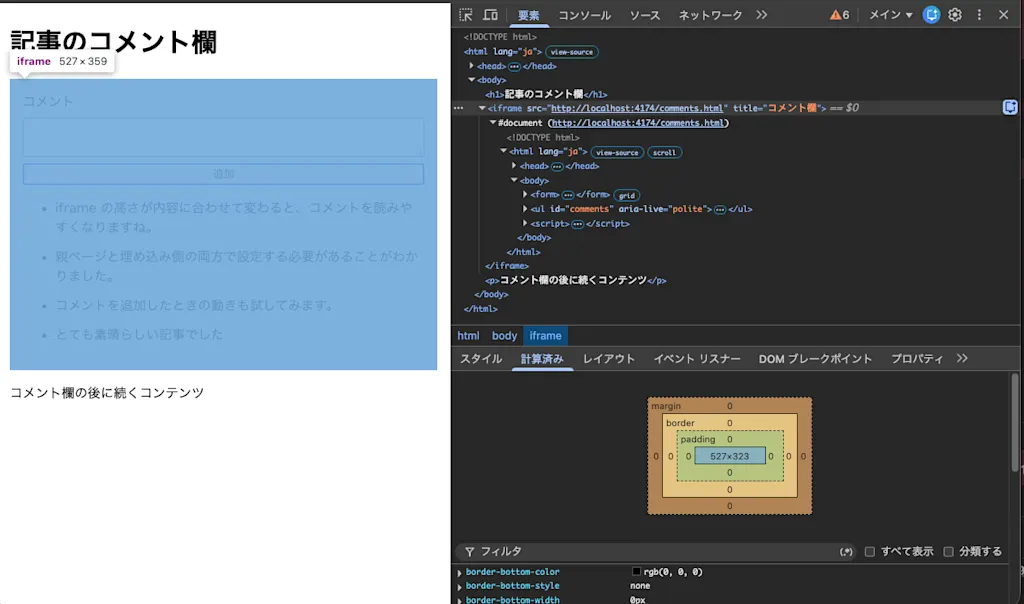
When you try it out, you can see that the iframe height is set to 359px based on the document's content.
frame-sizing Values
frame-sizing accepts the following values.
| Value | Dimension determined from content |
|---|---|
auto |
Does not use the content size |
content-height |
Height |
content-width |
Width |
content-block-size |
Size in the block direction |
content-inline-size |
Size in the inline direction |
In typical horizontal writing, the block direction is vertical and the inline direction is horizontal. Values that use logical directions follow the writing mode of the iframe element in the parent page, not that of the embedded document.
Why Both Sides Need to Opt In
Why do both the parent page and the embedded document need to be configured? The reason is that the size of an iframe's content can become a channel for leaking information. For example, on a page that shows a long list only when the user is signed in, the height could be a clue for inferring the user's sign-in state.
The 2021 design proposal points out that, in addition to the child document's size being a potential information leak, a child that unexpectedly changes the frame size can also affect the parent page. Requiring both sides to explicitly opt in addresses this problem as well as compatibility with existing pages.
Updating the Height After Adding a Comment
The content size used for the iframe height is calculated at two points:
- During the first layout after the
DOMContentLoadedevent fires in the embedded document - When the
loadevent fires on the embedded document'swindow
After that, changes to the embedded document's content do not automatically update the iframe height. The same applies when the height changes because of images lazy-loaded after the load event or web fonts applied later. When the content changes, such as when a comment is added or a panel is expanded, you need to call window.requestResize() from the embedded document.
In the following example, a comment is added when the form is submitted, and then requestResize() is called.
const form = document.querySelector("form");
const input = document.querySelector("textarea");
const comments = document.querySelector("#comments");

form.addEventListener("submit", (event) => {
  event.preventDefault();
  const text = input.value.trim();
  if (!text) return;

  const item = document.createElement("li");
  item.textContent = text;
  comments.append(item);
  form.reset();

  if ("requestResize" in window) {
    try {
      window.requestResize();
    } catch (error) {
      // Throws NotAllowedError when opened outside an iframe or when not opted in via the meta element
      if (error.name !== "NotAllowedError") throw error;
    }
  }
});
The key point is that window.requestResize() is called after the DOM has been modified by comments.append(item). You don't need to pass a size value as an argument. The browser calculates the content size and reflects it in the sizing of the iframe in the parent page.
requestResize() throws a NotAllowedError DOMException in any of the following cases:
- The document is not embedded in an iframe or similar, and is opened at the top level
- The embedding element is not an
<iframe> - The document has not allowed size sharing via
<meta name="responsive-embedded-sizing">
Add a comment and confirm that the iframe height changes automatically.
Why It Doesn't Always Update Automatically
Why doesn't CSS alone keep the iframe height updated automatically? The reason is that the embedded document's content may depend on the iframe's viewport. When the frame height changes, the embedded document's viewport changes too. If there is CSS that depends on that viewport, the content height changes as well, which changes the frame height again, potentially creating a cycle.
To prevent this cycle, the specification locks the size of the embedded document's initial containing block (ICB). The ICB is the area that serves as the basis for laying out the root element and for viewport units such as vh. A document that allows size sharing records its ICB size at the first layout and keeps using that value in subsequent layouts. As a result, even when the iframe height changes, declarations like 100vh in the embedded document keep their initial value. This mechanism makes a chain reaction less likely: "the content gets slightly larger than the ICB → the iframe grows → the ICB grows too, and the content gets even larger."
The specification and the
January 2026 discussion treat this kind of layout cycle as a problem. Requiring an explicit recalculation for post-load changes is intended to prevent updates from cascading.
Summary
- Embedding a third-party comment section or similar in an iframe could cause scrollbars or empty space, because a fixed frame height doesn't keep up with content that grows and shrinks
frame-sizing: content-heightuses the embedded content's height to size the iframe. It requires both CSS in the parent page and<meta name="responsive-embedded-sizing">in the child document- When content changes after load, call
window.requestResize()from the child document to update the size information