
Why Enter-to-Submit Forms Check Both isComposing and keyCode === 229
The Enter key that confirms an IME conversion can send a half-written message by mistake. This article explains why isComposing is combined with the deprecated keyCode === 229 to keep conversion-confirming Enter keys out of your submit logic.
When you implement "press Enter to send a message" in a chat UI, you need to account for users who type through an IME. In languages such as Japanese and Chinese, text is assembled by picking a conversion candidate and then confirming it with the Enter key. If you submit on event.key === "Enter" alone, the user presses Enter intending to confirm the text, and a half-written message gets sent instead.
The Enter key pressed to confirm the conversion has sent the still-unfinished message as-is.
You may have come across code like the following as a workaround for this problem.
input.addEventListener("keydown", (event) => {
  if (event.isComposing || event.keyCode === 229) return;
  if (event.key === "Enter") {
    // Submit the message...
  }
});
isComposing is a property that tells you whether an event fired while the IME was assembling text. keyCode === 229 is the value that has long been used for key input processed by an IME. Both serve to keep an Enter key pressed mid-conversion out of the submit logic.
If isComposing already expresses whether the IME is mid-conversion, why check keyCode as well? On top of that, keyCode is a deprecated API. Using Enter-to-submit in forms and chat UIs as the example, this article explains why the two checks are combined and what to watch out for when implementing them.
The Enter Key Confirms IME Conversions, Not Just Submissions
An IME (Input Method Editor) is a mechanism for entering characters such as Japanese by combining key presses. For instance, you type nihongo phonetically in kana, pick the kanji candidate for it from the list the IME offers, and confirm that candidate with the Enter key.
Browsers treat this kind of text assembly as a composition session. The UI Events specification defines the following events.
compositionstart: text assembly beginscompositionupdate: the string being assembled is updatedcompositionend: assembly completes, or is canceled
The keyboard event property KeyboardEvent.isComposing indicates whether the event fired between compositionstart and its corresponding compositionend.
So in custom Enter-to-submit logic, you first check isComposing and avoid proceeding to the submit path while text is still being assembled.
input.addEventListener("keydown", (event) => {
  if (event.isComposing) return; // Don't submit while composing
  if (event.key === "Enter") {
    // Submit the message...
  }
});
Some browser implementations, however, have a reported problem where the Enter key used to confirm an IME conversion is delivered with isComposing: false.
Some Environments Can't Identify the Confirming Enter with isComposing Alone
According to the event order laid out in the specification, the
keydown that ends a composition session is delivered with isComposing: true, and compositionend fires after it. In other words, the Enter key with which the IME confirms a conversion should reach you as a keydown with isComposing: true.
WebKit bug report #165004, on the other hand, records that Safari was dispatching
compositionend before the confirming keydown. In that case the session has already ended by the time the confirming Enter arrives, so isComposing ends up being false.
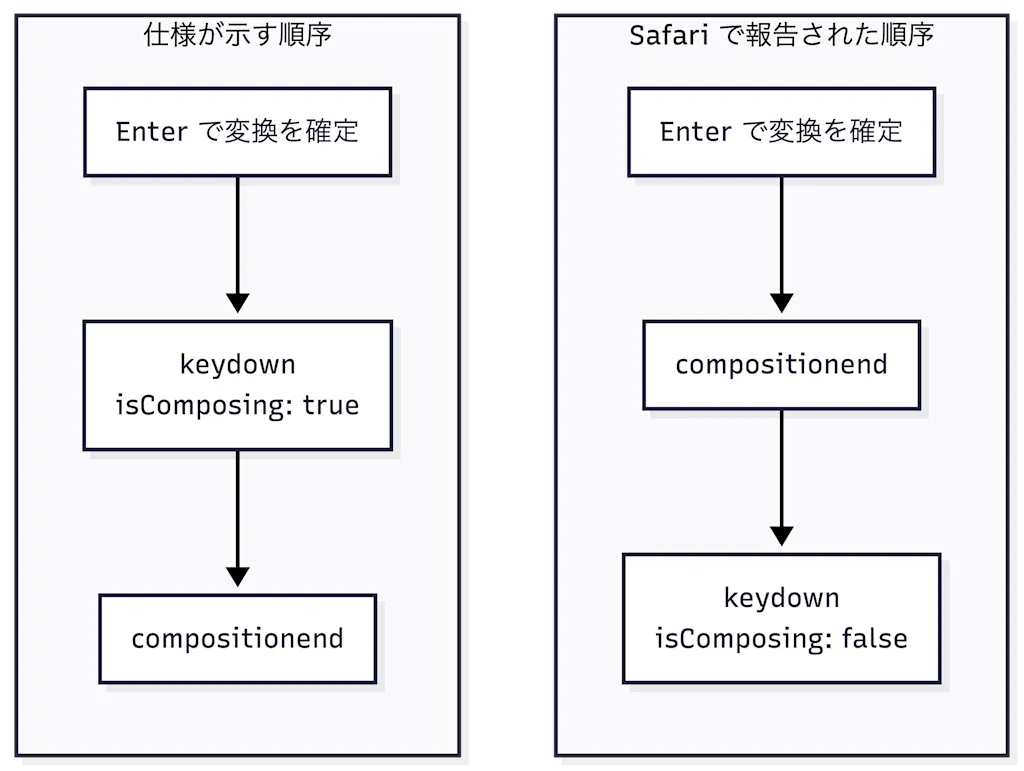
That is why, on Safari, isComposing alone could not distinguish the confirming Enter, and half-written messages would sometimes be sent.
At this point you might think that instead of relying on isComposing, you could update a flag yourself in the compositionstart and compositionend events and track whether a conversion is in progress.
let composing = false;

input.addEventListener("compositionstart", () => {
  composing = true;
});

input.addEventListener("compositionend", () => {
  composing = false;
});

input.addEventListener("keydown", (event) => {
  if (composing) return; // Don't submit while composing
  if (event.key === "Enter") {
    // Submit the message...
  }
});
The same problem occurs with this approach, though. The compositionend event that resets the flag to false fires before the confirming keydown, so the flag has already been changed by the time you receive the keydown. The root cause is the event order itself, so managing the composition events yourself doesn't get around it either.
Combining It with keyCode === 229
keyCode === 229 is the value that has long been used for key input processed by an IME. A W3C proposal document from 2010 describes an algorithm that returns
229 for a keydown whose key input the IME is handling. On Windows, the virtual key code VK_PROCESSKEY is defined as 0xE5 (229 in decimal).
In the legacy keyboard events section of the current UI Events specification, however,
keyCode is treated as a value that depends on the system and the implementation. It was never formally specified, each browser implemented it its own way, and so the specification limits itself to describing that reality non-normatively.
What makes this value useful for the Safari problem is that even when isComposing is false, you can still stop your custom submit logic if the confirming keydown has a keyCode of 229. This workaround is explained in the same WebKit bug report referenced earlier.
That is why code combining isComposing and keyCode === 229, like the following, is the recommended approach.
if (event.isComposing || event.keyCode === 229) {
  return;
}
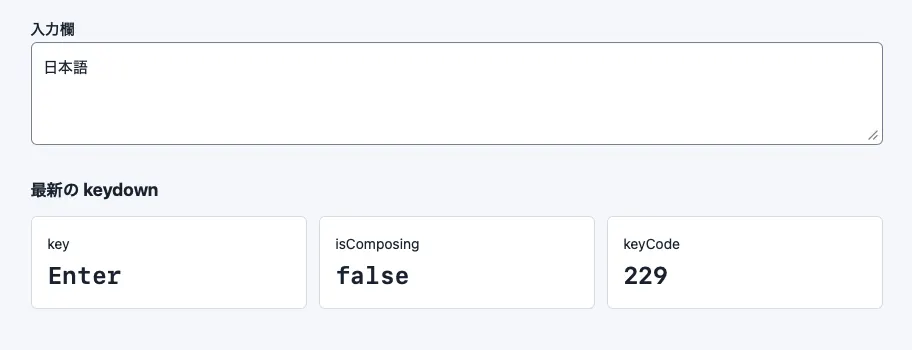
Running the demo below in Safari lets you see how the values of isComposing and event.keyCode each change.
The Safari event ordering problem already has a fix on the WebKit side: WebKit Bug #311717. Depending on your Safari version, that fix may already be included.
Implicit Form Submission Leaves the IME Check to the Browser
So far I've covered workarounds for the case where you detect the Enter key in keydown and submit yourself. For an ordinary form, though, there's no need to detect the Enter key in JavaScript at all. You can rely on the implicit submission that browsers already provide.
Implicit submission is the mechanism that submits a form through an action such as pressing Enter in a text field, without clicking the submit button directly. The HTML specification calls the first submit button that appears in the form the default button, and states that a browser supporting implicit submission fires a
click event on that button as long as it isn't disabled. You receive the submission through the usual submit event.
For example, a form with a single-line input and a submit button can be implemented as follows. The key points are wrapping the input element in a <form> element and placing a type="submit" button so that it's treated as a form.
<form id="message-form">
  <label for="message">メッセージ</label>
  <input id="message" name="message" type="text" required />
  <button type="submit">送信</button>
</form>
<p id="result" role="status"></p>

<script>
  const form = document.querySelector("#message-form");
  const result = document.querySelector("#result");

  form.addEventListener("submit", (event) => {
    event.preventDefault();
    const data = new FormData(form);
    result.textContent = `送信内容: ${data.get("message")}`;
  });
</script>
This code has no keydown listener and no isComposing or keyCode checks. Whether the confirming Enter is treated as an IME operation or as a form submission is left to the browser, and the application only does work when the submit event fires. That removes the very thing that causes custom key event handling to mistake a conversion confirmation for a submission.
Enter in a textarea, however, is normally treated as a newline. When you need custom behavior such as a chat UI's "Enter to send, Shift+Enter for a newline," implicit submission alone can't express it, so the IME checks described above become necessary. Start by considering whether standard form behavior meets your requirements, and reach for key events only when you genuinely need custom Enter-to-submit.
Summary
- The Enter key is also used to confirm IME conversions, so custom Enter-to-submit logic has to check whether text is still being assembled
isComposingindicates whether a keyboard event fired during a composition session, which makes it usable for detecting an in-progress IME conversion- Safari has a reported problem where
compositionendfires before the confirmingkeydown, which can leaveisComposingasfalse - To work around that problem,
keyCode === 229is checked as well to determine whether the key input is being processed by an IME - For ordinary forms, using implicit submission and the
submitevent hands both the Enter detection and the IME state management back to the browser
References
UI Events — Composition Events
WebKit Bug 165004 — The event order of keydown/keyup events and composition events are wrong on macOS
modern-web-guidance/skills/modern-web-guidance/guides/forms/ime-safe-enter-submit.md at v0.0.186 · GoogleChrome/modern-web-guidance
HTML Standard — Implicit submission