
Letting an AI Agent Modernize an Existing App with legacy-scan in Modern Web Guidance 1.0
legacy-scan, new in Modern Web Guidance 1.0, finds outdated web patterns with local static analysis and leaves the fixes to AI agents. This article runs it on a legacy sample app and follows an agent as it resolves 12 findings across 9 guides.
In real-world development, you are far more likely to work on an existing codebase than to build a new app from scratch. Projects that have been running for years tend to accumulate old workarounds for problems that modern browsers now solve natively. For example, <textarea> elements used to be auto-resized by watching scrollHeight in JavaScript, but today CSS field-sizing: content does the same job.
Because these old workarounds still appear to work, they rarely get prioritized and tend to be left alone. Underneath, though, they carry hidden costs: the maintenance burden of outdated code keeps growing, and not using native browser features inflates JavaScript bundle sizes. On top of that, AI coding agents are pulled along by their outdated training data and the surrounding code, so they end up spreading the same old patterns into new features.
Modern Web Guidance 1.0, released as a stable version in November 2026 by the Google Chrome team together with the Microsoft Edge, Mozilla Firefox, and MDN teams, adds a modernization workflow and a
legacy-scan command for safely modernizing existing codebases.
In this article, I prepare a small web app that intentionally contains outdated code and check what issues legacy-scan finds. I then have an AI agent (Antigravity) carry out the actual modernization and walk through the decision process visible in its session log, along with the before and after diffs.
How Modern Web Guidance 1.0 and legacy-scan work
Modern Web Guidance is an open source skill set that gives AI coding agents up-to-date web standards, best practices, and Baseline browser compatibility data. As of 1.0, it contains more than 200 expert-reviewed guides, and you can add it to a project with the following command.
npx modern-web-guidance@latest installBesides the interactive wizard, you can also install it with npx skills add GoogleChrome/modern-web-guidance or through the plugin features of Claude Code, Codex, Cursor, Antigravity CLI, and others. Agents use the search and retrieve commands to fetch only the guides they need for the task at hand.
For improving existing code, 1.0 adds legacy-scan, a CLI command for detection, and a four-step modernization workflow built into the skill (detect → verify → report → fix). When you ask the agent to modernize a project, it follows the steps in this skill and works through them autonomously.
legacy-scan has a few notable design characteristics.
- It statically analyzes HTML, CSS, JavaScript / TypeScript, framework components, and
package.jsonlocally using AST, DOM, and CSS parsers. It never calls an LLM during the scan, so it consumes no tokens - It is limited to high-confidence rules. Only rules with at least 80% static matcher precision and at least 90% precision after agent verification are adopted, which covers only about 20% of the roughly 200 guides
- Each finding comes with verification criteria (
keepWhen/dropWhen).keepWhendescribes when to keep the finding as something to fix, anddropWhendescribes when to discard it as a false positive
Static analysis can quickly find syntactic patterns, but it cannot tell what the code is meant to do. For example, an <input type="password"> on a login form should have autocomplete="current-password", but a settings field for entering a webhook secret or an API key is out of scope. These criteria let the AI agent use context to drop findings that would be false positives if judged by syntax alone.
The official Modernization workflow explains why legacy-scan deliberately has no --fix flag. Even modernizations that look simple often turn into cross-layer refactors, such as deleting a JavaScript event listener or an external package and moving the behavior into HTML attributes or CSS, and they involve subtle behavior differences and browser support decisions. The work is split so that fast static analysis handles detection, while the AI agent handles contextual judgment and the fixes.
Preparing a sample app with outdated code
To see what issues legacy-scan finds and how an AI agent rewrites them, I built "Team Memo Board", a small memo app made with HTML, CSS, and JavaScript.
The app intentionally includes the following outdated patterns, which are common in existing projects.
- Form validation uses
:invaliddirectly, so empty fields show a red border as soon as the page loads - The how-to panel accordion opens and closes with a transition between
max-height: 0andmax-height: 9999px - The memo list scrollbar is styled only with
::-webkit-scrollbar <textarea>auto-resizing recalculates the height with theinputevent andscrollHeightevery time- The
keydownhandler that submits on Enter does not check whether IME composition is in progress, so confirming a Japanese conversion accidentally submits the form - The
<dialog>is opened and closed withaddEventListener('click', ...), and closing on a backdrop click is detected withevent.target === loginDialog - The password field in the login form has no
autocompleteattribute - Data is deep-copied with
JSON.parse(JSON.stringify(...)), and all child elements are removed withwhile (memoList.firstChild) memoList.removeChild(...)
The sample app consists of three files: index.html, styles.css, and app.js. The full code is available below.
`index.html`
<!doctype html>
<html lang="ja">
  <head>
    <meta charset="UTF-8" />
    <meta name="viewport" content="width=device-width, initial-scale=1.0" />
    <title>Team Memo Board</title>
    <link rel="stylesheet" href="./styles.css" />
  </head>
  <body>
    <header class="app-header">
      <h1>Team Memo Board</h1>
      <div class="header-actions">
        <button id="open-login-btn" type="button">ログイン</button>
      </div>
    </header>

    <main class="container">
      <section class="composer-card">
        <h2>新しいメモを追加</h2>
        <form id="memo-form" novalidate>
          <div class="field">
            <label for="memo-title">タイトル(必須)</label>
            <input
              id="memo-title"
              name="title"
              type="text"
              required
              minlength="2"
              placeholder="例: 来週のリリース準備"
            />
          </div>

          <div class="field">
            <label for="memo-body">本文(Enter で送信 / Shift+Enter で改行)</label>
            <textarea
              id="memo-body"
              name="body"
              rows="2"
              required
              placeholder="メモを入力してください..."
            ></textarea>
          </div>

          <div class="form-footer">
            <button type="submit">メモを投稿</button>
          </div>
        </form>
      </section>

      <section class="memo-section">
        <div class="section-header">
          <h2>メモ一覧</h2>
          <button id="toggle-tips-btn" type="button" aria-expanded="false">
            使い方を表示
          </button>
        </div>

        <div id="tips-panel" class="accordion-panel">
          <p>
            タイトルと本文を入力して Enter キーを押すとメモを追加できます。右上のログインボタンからアカウント認証モーダルを開けます。
          </p>
        </div>

        <ul id="memo-list" class="memo-list"></ul>
      </section>
    </main>

    <dialog id="login-dialog" class="login-dialog">
      <form id="login-form" method="dialog">
        <h2>チームアカウントにログイン</h2>
        <div class="field">
          <label for="login-email">メールアドレス</label>
          <input id="login-email" name="email" type="email" required />
        </div>
        <div class="field">
          <label for="login-password">パスワード</label>
          <input id="login-password" name="password" type="password" required />
        </div>
        <div class="dialog-actions">
          <button id="cancel-login-btn" type="button">キャンセル</button>
          <button type="submit">ログイン</button>
        </div>
      </form>
    </dialog>

    <script type="module" src="./app.js"></script>
  </body>
</html>
`styles.css`
:root {
  color-scheme: light;
  --bg: #f6f7f9;
  --surface: #ffffff;
  --text: #1f2937;
  --muted: #6b7280;
  --border: #d1d5db;
  --accent: #2563eb;
  --danger: #dc2626;
}

* {
  box-sizing: border-box;
}

body {
  margin: 0;
  font-family: system-ui, -apple-system, sans-serif;
  background: var(--bg);
  color: var(--text);
  line-height: 1.5;
}

.app-header {
  display: flex;
  justify-content: space-between;
  align-items: center;
  padding: 1rem 1.5rem;
  background: var(--surface);
  border-bottom: 1px solid var(--border);
}

.app-header h1 {
  margin: 0;
  font-size: 1.25rem;
}

.container {
  max-width: 720px;
  margin: 1.5rem auto;
  padding: 0 1rem;
  display: grid;
  gap: 1.5rem;
}

.composer-card,
.memo-section {
  background: var(--surface);
  border: 1px solid var(--border);
  border-radius: 8px;
  padding: 1.25rem;
}

.field {
  display: grid;
  gap: 0.35rem;
  margin-bottom: 1rem;
}

input,
textarea {
  width: 100%;
  padding: 0.6rem 0.75rem;
  border: 1px solid var(--border);
  border-radius: 6px;
  font: inherit;
}

textarea {
  resize: none;
  overflow-y: hidden;
  min-height: 4rem;
}

input:invalid,
textarea:invalid {
  border-color: var(--danger);
  background-color: #fef2f2;
}

button {
  padding: 0.5rem 1rem;
  border: 1px solid var(--accent);
  border-radius: 6px;
  background: var(--accent);
  color: #ffffff;
  font: inherit;
  cursor: pointer;
}

button[type="button"] {
  background: var(--surface);
  color: var(--text);
  border-color: var(--border);
}

.section-header {
  display: flex;
  justify-content: space-between;
  align-items: center;
  margin-bottom: 0.75rem;
}

.accordion-panel {
  max-height: 0;
  overflow: hidden;
  transition: max-height 0.3s ease;
  color: var(--muted);
}

.accordion-panel.is-open {
  max-height: 9999px;
}

.memo-list {
  list-style: none;
  margin: 0;
  padding: 0;
  max-height: 260px;
  overflow-y: auto;
  display: grid;
  gap: 0.75rem;
}

.memo-list::-webkit-scrollbar {
  width: 8px;
}

.memo-list::-webkit-scrollbar-track {
  background: #f3f4f6;
}

.memo-list::-webkit-scrollbar-thumb {
  background-color: #9ca3af;
  border-radius: 4px;
}

.memo-item {
  border: 1px solid var(--border);
  border-radius: 6px;
  padding: 0.75rem;
}

.memo-item h3 {
  margin: 0 0 0.25rem;
  font-size: 1rem;
}

.memo-item p {
  margin: 0;
  white-space: pre-wrap;
  color: var(--muted);
}

.login-dialog {
  width: min(420px, 90vw);
  border: 1px solid var(--border);
  border-radius: 10px;
  padding: 1.5rem;
}

.login-dialog::backdrop {
  background: rgba(15, 23, 42, 0.45);
}

.dialog-actions {
  display: flex;
  justify-content: flex-end;
  gap: 0.5rem;
}
`app.js`
const memoForm = document.getElementById('memo-form');
const memoTitle = document.getElementById('memo-title');
const memoBody = document.getElementById('memo-body');
const memoList = document.getElementById('memo-list');
const toggleTipsBtn = document.getElementById('toggle-tips-btn');
const tipsPanel = document.getElementById('tips-panel');
const openLoginBtn = document.getElementById('open-login-btn');
const cancelLoginBtn = document.getElementById('cancel-login-btn');
const loginDialog = document.getElementById('login-dialog');

const initialMemos = [
  {
    id: 1,
    title: 'スプリント振り返り',
    body: '金曜日の 15:00 から会議室 A で実施します。',
  },
  {
    id: 2,
    title: 'デザインレビュー',
    body: 'フォームのバリデーション表示タイミングを見直す。',
  },
  {
    id: 3,
    title: 'モーダル改善タスク',
    body: '背景クリックで閉じるときの挙動を確認する。',
  },
  {
    id: 4,
    title: '日本語入力の不具合調査',
    body: '変換確定時の Enter キーで意図せず送信されないようにする。',
  },
];

let memos = JSON.parse(JSON.stringify(initialMemos));

function renderMemos() {
  while (memoList.firstChild) {
    memoList.removeChild(memoList.firstChild);
  }

  for (const memo of memos) {
    const li = document.createElement('li');
    li.className = 'memo-item';

    const title = document.createElement('h3');
    title.textContent = memo.title;

    const body = document.createElement('p');
    body.textContent = memo.body;

    li.append(title, body);
    memoList.appendChild(li);
  }
}

function addMemo() {
  const title = memoTitle.value.trim();
  const body = memoBody.value.trim();
  if (!title || !body) {
    memoForm.reportValidity();
    return;
  }

  const nextMemo = JSON.parse(
    JSON.stringify({
      id: Date.now(),
      title,
      body,
    }),
  );

  memos = [nextMemo, ...memos];
  memoTitle.value = '';
  memoBody.value = '';
  memoBody.style.height = 'auto';
  renderMemos();
}

memoBody.addEventListener('input', () => {
  memoBody.style.height = 'auto';
  memoBody.style.height = `${memoBody.scrollHeight}px`;
});

memoBody.addEventListener('keydown', (event) => {
  if (event.key === 'Enter' && !event.shiftKey) {
    event.preventDefault();
    addMemo();
  }
});

memoForm.addEventListener('submit', (event) => {
  event.preventDefault();
  addMemo();
});

toggleTipsBtn.addEventListener('click', () => {
  const isOpen = tipsPanel.classList.toggle('is-open');
  toggleTipsBtn.setAttribute('aria-expanded', String(isOpen));
  toggleTipsBtn.textContent = isOpen ? '使い方を隠す' : '使い方を表示';
});

openLoginBtn.addEventListener('click', () => {
  loginDialog.showModal();
});

cancelLoginBtn.addEventListener('click', () => {
  loginDialog.close();
});

loginDialog.addEventListener('click', (event) => {
  if (event.target === loginDialog) {
    loginDialog.close();
  }
});

renderMemos();
Let's look at the initial screen of this pre-modernization app in the browser.
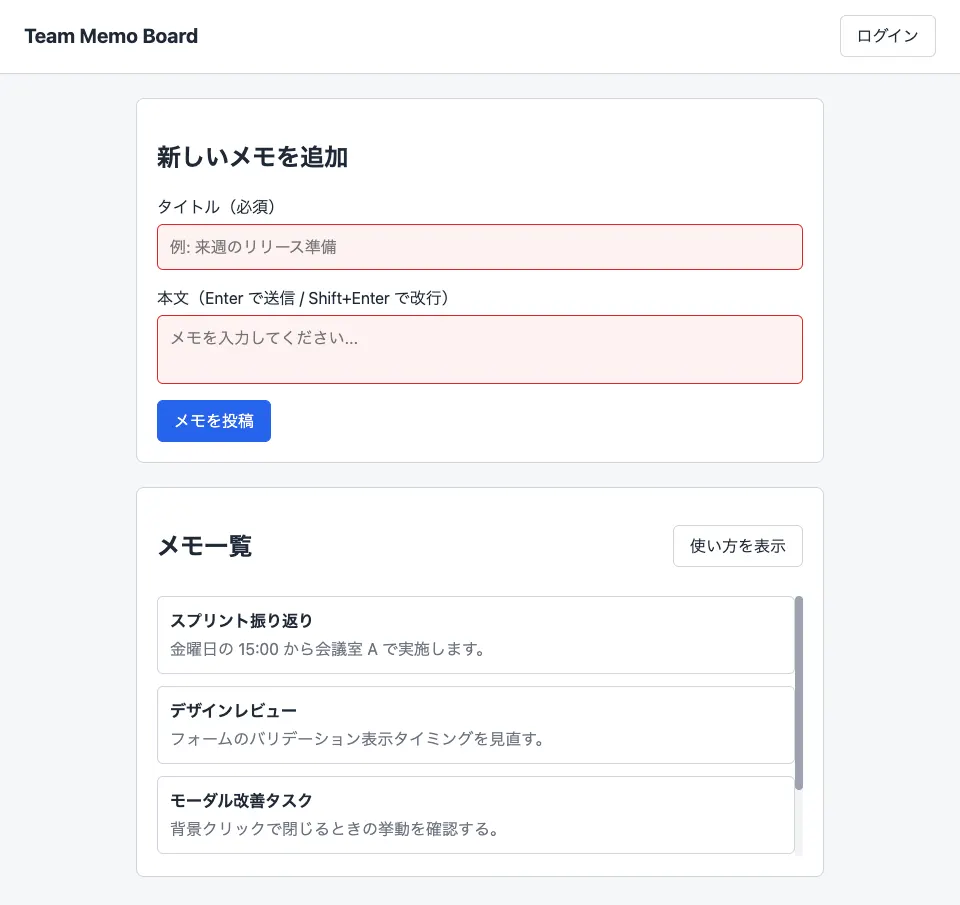
Even though the user has not typed anything yet, the :invalid selector gives the title and body fields a red border and a light red background. The scrollbar on the right edge of the memo list is also styled only with the non-standard ::-webkit-scrollbar, so the styles do not apply in Firefox. The app works, but there is plenty of room for improvement in form experience, accessibility, and performance.
Finding issues with legacy-scan
Run legacy-scan in the project directory and see what issues it detects.
npx -y [email protected] legacy-scan .Running it detected 12 modernization opportunities across 9 guides in the three HTML, CSS, and JavaScript files.
Modern Web Guidance Analyzer — .
Found 12 modernization opportunities across 9 guides (scanned 38 guides with deterministic rules; ~20% of the guidance corpus):
Note: Static analysis results are provisional — verify against the Keep/Drop criteria below.

* animate-to-intrinsic-sizes (1 finding)
  CSS transition on max-height simulates intrinsic size animation; modernize with interpolate-size: allow-keywords or calc-size().
  Keep when: The CSS rule animates or transitions max-height (or transitions all alongside a max-height declaration) to si…
  Drop when: The container is a scrollable panel with overflow: scroll or overflow: auto where max-height defines a legiti…
  - styles.css:104
    .accordion-panel {

* autofill-sign-in-form (1 finding)
  Password input in sign-in or credential form should specify autocomplete="current-password" or autocomplete="new-password".
  Keep when: The password input is part of a user-facing authentication, current-password verification, or sign-in form; T…
  Drop when: The password input is disabled, readonly, hidden, or a non-interactive display widget; The password input alr…
  - index.html:77
    <input id="login-password" name="password" type="password" required />

* customize-scrollbar-color-and-thickness (2 findings)
  Vendor ::-webkit-scrollbar pseudo-elements customize or hide scrollbars; use standard scrollbar-color and scrollbar-width (including scrollbar-width: none) instead.
  Keep when: The CSS rule uses vendor pseudo-elements (::-webkit-scrollbar or ::-webkit-scrollbar-thumb) to customize scro…
  Drop when: The stylesheet already defines standard scrollbar-width or scrollbar-color properties; The rule only resets s…
  - styles.css:125
    .memo-list::-webkit-scrollbar {
  - styles.css:133
    .memo-list::-webkit-scrollbar-thumb {

* declarative-dialog-popover-control (1 finding)
  Detect pure JS click event listeners that only call showModal(), close(), showPopover(), hidePopover(), or togglePopover().
  Keep when: A click event listener is attached to a button solely to call 0-argument `.showModal()`, `.close()`, `.showPo…
  Drop when: The click listener performs additional logic (validation, network requests, analytics, classList or state upd…
  - app.js:103
    loginDialog.showModal();

* dialog (1 finding)
  Manual backdrop click listeners dismissing <dialog> should be modernized with declarative <dialog closedby="any">.
  Keep when: A click event listener attached to a <dialog> or modal checks event.target === dialog, event.target === event…
  Drop when: The listener is guarded by "closedBy" in HTMLDialogElement.prototype for progressive enhancement; The click h…
  - app.js:110
    loginDialog.addEventListener('click', (event) => {

* form-fields-automatically-fit-contents (1 finding)
  Imperative JavaScript auto-resizing of textareas and inputs using scrollHeight or autosize() should be replaced with CSS field-sizing: content.
  Keep when: A keyup, input, change, or keydown event listener dynamically recalculates a textarea or text input height/wi…
  Drop when: The code is guarded by a feature query checking CSS.supports("field-sizing", "content") or field-sizing suppo…
  - app.js:81
    memoBody.style.height = `${memoBody.scrollHeight}px`;

* ime-safe-enter-submit (1 finding)
  Flag keydown event listeners on inputs or textareas intercepting Enter (event.key or event.code "Enter") to submit forms, send messages, or trigger actions without checking event.isComposing or event.keyCode === 229, breaking IME input in CJK languages.
  Keep when: Keydown event listeners on inputs or textareas checking event.key === "Enter" or event.code === "Enter" to tr…
  Drop when: Keyup or keypress event listeners (composition has already ended by keyup); Handlers that check event.isCompo…
  - app.js:85
    if (event.key === 'Enter' && !event.shiftKey) {

* js (3 findings across 2 rules)

  js/replace-children (1 finding)
    Replace loops that remove all child nodes one by one (including forward live-collection loops that skip every other child) with el.replaceChildren().
    Keep when: The loop unconditionally removes all direct children of a DOM ParentNode (Element, Document, or DocumentFragm…
    Drop when: The receiver is a non-DOM object, custom tree or scene-graph wrapper, mock, or plain JavaScript object implem…
    - app.js:37
      while (memoList.firstChild) {

  js/structured-clone (2 findings)
    Replace JSON.parse(JSON.stringify(x)) deep-copy workarounds with structuredClone(x).
    Keep when: JSON.parse(JSON.stringify(x)) is used to create an independent deep copy of plain objects, arrays, or plain d…
    Drop when: The snippet shows direct evidence that the cloned value is a Proxy wrapper or framework reactive state (such…
    - app.js:34
      let memos = JSON.parse(JSON.stringify(initialMemos));
    - app.js:64
      const nextMemo = JSON.parse(

* validate-input-after-interaction (1 finding)
  CSS input:invalid and textarea:invalid error-styling rules (including :not(:focus):invalid and :not(:placeholder-shown):invalid workarounds) without :user-invalid should be modernized with :user-invalid so error feedback appears only after user interaction.
  Keep when: A CSS rule uses input:invalid or textarea:invalid (or :not(:focus):invalid / :not(:placeholder-shown):invalid…
  Drop when: The stylesheet already uses :user-invalid or guards :invalid inside @supports not selector(:user-invalid); Th…
  - styles.css:75
    input:invalid,

Retrieve a guide: npx modern-web-guidance retrieve <guide-id>
The main rules that were detected are as follows.
form-fields-automatically-fit-contents: Detects JavaScript that auto-adjusts the height of a<textarea>usingscrollHeightand suggests migrating to CSSfield-sizing: contentdeclarative-dialog-popover-control: Detects event listeners that only callshowModal()or similar methods on click and suggests replacing them with declarative control through thecommandfor/commandattributes (Invoker Commands API)dialog: Detects manual backdrop click checks such asevent.target === dialogand suggests migrating to<dialog closedby="any">validate-input-after-interaction: Detects the:invalidselector, which shows errors before the user has typed anything, and suggests replacing it with:user-invalid, which applies only after user interactionime-safe-enter-submit: Detects Enter-to-submitkeydownhandlers that do not check for IME composition and suggests preventing accidental submission withevent.isComposingandevent.keyCode === 229autofill-sign-in-form: Detects password fields in a login form that lack theautocompleteattribute and suggests adding a value such asautocomplete="current-password"
For AI agents, run it with the --json option.
npx -y [email protected] legacy-scan . --jsonThe JSON output includes the full verification criteria for each rule and a retrieveCommand for fetching the guide. Here is an excerpt for autofill-sign-in-form.
{
  "guideId": "autofill-sign-in-form",
  "retrieveCommand": "npx modern-web-guidance retrieve autofill-sign-in-form",
  "count": 1,
  "rules": [
    {
      "ruleId": "autofill-sign-in-form",
      "summary": "Password input in sign-in or credential form should specify autocomplete=\"current-password\" or autocomplete=\"new-password\".",
      "verifierRubric": {
        "keepWhen": [
          "The password input is part of a user-facing authentication, current-password verification, or sign-in form.",
          "The password input lacks an autocomplete attribute or specifies autocomplete=\"off\" on credentials, preventing browser password manager autofill."
        ],
        "dropWhen": [
          "The password input is disabled, readonly, hidden, or a non-interactive display widget.",
          "The password input already provides a valid credential autocomplete token (such as \"current-password\", \"new-password\", or \"one-time-code\").",
          "The password input is for creating or confirming a new password (owned by autofill-sign-up-form).",
          "The password input is for external service, infrastructure, or device configuration (such as database connections, proxy credentials, SMTP settings, webhooks, or API keys/tokens).",
          "The input is not contained within a form or form-like authentication context.",
          "The component receives its autocomplete attribute dynamically via props, context, or JSX spread."
        ]
      },
      "count": 1,
      "findings": [
        {
          "file": "index.html",
          "line": 77,
          "message": "Password input inside sign-in or credential form lacks autocomplete=\"current-password\".",
          "lineContent": "<input id=\"login-password\" name=\"password\" type=\"password\" required />"
        }
      ]
    }
  ]
}
For example, dropWhen explicitly states that password fields for external configuration, such as webhook secrets or API key inputs, are out of scope. The JSON structure itself shows the design: static analysis casts a wide net for candidates, and the contextual judgment is left to the agent.
How the AI agent carries out the modernization
Next, with the Modern Web Guidance 1.0 SKILL.md in place, I asked the Antigravity agent to modernize the app. Following the session log in chronological order, the agent worked through the following steps exactly as defined in SKILL.md.
- Understanding the skill and the target project: The agent first read
SKILL.mdalong withindex.html,styles.css,app.js, andpackage.jsonto understand the overall structure of the app - Running
legacy-scan --jsonand verifying in context: The agent rannpx -y modern-web-guidance@latest legacy-scan <target path> --jsonand checked thekeepWhen/dropWhencriteria for each of the 12 findings across 9 guides against the actual code. This time, every finding was judged valid (KEEP) - Retrieving all 9 guides at once and reading them in full: The agent passed the 9 detected guide IDs as a comma-separated list to fetch them in a single call
npx -y modern-web-guidance@latest retrieve animate-to-intrinsic-sizes,autofill-sign-in-form,customize-scrollbar-color-and-thickness,declarative-dialog-popover-control,dialog,form-fields-automatically-fit-contents,ime-safe-enter-submit,js,validate-input-after-interactionThe session log recorded an interesting behavior here. Because the output for 9 guides was too large, the CLI automatically wrote it to a temporary file to avoid truncating standard output, and gave the agent the following instructions.
Output (99.2 KB, 1779 lines) saved to /var/folders/.../mwg-guide-52082-1795225531086.md to prevent CLI stdout truncation.
Read /var/folders/.../mwg-guide-52082-1795225531086.md in full using your file-reading tool (1779 lines total)—do not use cat or head.
Following these instructions and the directions in SKILL.md, the agent called read_file three times to read the full guides. This shows that the CLI has a built-in safeguard against losing context when handling large guides.
- Editing after checking Baseline compatibility and fallback requirements: After reading the guides, the agent checked whether each feature is Baseline Widely available, sorted out which features need fallbacks and which do not, and then edited
index.html,styles.css, andapp.js - Rescanning, confirming compliance, and disclosing the rationale: The agent reloaded the edited files, reran
legacy-scan --json, and confirmedtotalFindings: 0. Finally, it reported the reason for each change across the 9 applied guides, with direct quotes from the guide text, and finished
Key changes and before / after diffs
Let's look at the diffs to see how the code was actually changed. Note that the agent did not just swap syntax for newer APIs; it also automatically applied the "common pitfalls", "accessibility requirements", and "browser compatibility fallbacks" described in the retrieved guides.
1. Migrating from scrollHeight auto-resizing to CSS field-sizing: content
The code that measured scrollHeight on every input event in JavaScript was removed entirely and replaced with CSS field-sizing: content.
 textarea {
+  field-sizing: content;
+  width: 100%;
+  height: auto;
+  min-block-size: 4rem;
+  max-block-size: 14rem;
   resize: none;
-  overflow-y: hidden;
-  min-height: 4rem;
 }
+
+@supports not (field-sizing: content) {
+  textarea {
+    resize: vertical;
+  }
+}-memoBody.addEventListener('input', () => {
- memoBody.style.height = 'auto';
- memoBody.style.height = `${memoBody.scrollHeight}px`;
-});The form-fields-automatically-fit-contents guide notes that an explicit width or height overrides field-sizing: content. That is why the width is fixed to fill the parent with width: 100%, while the height is set to height: auto so that it does not block automatic growth.
field-sizing only became Baseline Newly available in June 2026. For that reason, a fallback that allows manual resizing in unsupported browsers was also added with @supports not.
2. Declarative dialog control, closedby="any", and sign-in form optimization
Three guides were applied to the login modal: declarative-dialog-popover-control, dialog, and autofill-sign-in-form.
-        <button id="open-login-btn" type="button">ログイン</button>
+        <button
+          id="open-login-btn"
+          type="button"
+          commandfor="login-dialog"
+          command="show-modal"
+        >
+          ログイン
+ </button>- <dialog id="login-dialog" class="login-dialog">
+ <dialog
+ id="login-dialog"
+ class="login-dialog"
+ closedby="any"
+ aria-labelledby="login-dialog-title"
+ >
<form id="login-form" method="dialog">
- <h2>チームアカウントにログイン</h2>
+ <h2 id="login-dialog-title">チームアカウントにログイン</h2>
...
- <input id="login-email" name="email" type="email" required />
+ <input
+ id="login-email"
+ name="email"
+ type="email"
+ autocomplete="username"
+ spellcheck="false"
+ enterkeyhint="next"
+ data-error="login-email-error"
+ autofocus
+ required
+ />
...
- <input id="login-password" name="password" type="password" required />
+ <input
+ id="login-password"
+ name="password"
+ type="password"
+ autocomplete="current-password"
+ enterkeyhint="done"
+ data-error="login-password-error"
+ required
+ />
...
- <button id="cancel-login-btn" type="button">キャンセル</button>
- <button type="submit">ログイン</button>
+ <button
+ id="cancel-login-btn"
+ class="btn-secondary"
+ type="submit"
+ value="cancel"
+ formnovalidate
+ >
+ キャンセル
+ </button>
+ <button type="submit" value="login">ログイン</button>There are four fine-grained decisions the agent drew from the guides here.
- It did not use
command="close"for the cancel button inside<form method="dialog">: Following the guidance indeclarative-dialog-popover-controlto avoid mixingcommand="close"into a<form method="dialog">and to stick to one strategy, the agent changed the button totype="submit" value="cancel" formnovalidateand removed the JavaScript click listener - It refined the sign-in form input attributes: Following the
autofill-sign-in-formguide, it not only addedautocomplete="current-password"andenterkeyhint="done"to the password field but also addedautocomplete="username",spellcheck="false", andenterkeyhint="next"to the email field so that password managers can recognize it more easily - It rewrote the fallback for closing on a backdrop click: Because
closedby="any"was Limited availability at the time of testing, a fallback using feature detection with'closedBy' in HTMLDialogElement.prototypewas kept. However, the originalevent.target === loginDialogcheck unintentionally closes the dialog when the user clicks its padding or a gap between child elements, or when selecting text by dragging, so it was rewritten to usegetBoundingClientRect()andpointerdown/pointerupas the guide recommends - It even added small UX improvements around the modal: an accessible name via
aria-labelledby,autofocuswhen the modal opens,overscroll-behavior: containondialog:modaland::backdropto prevent scroll chaining to the background, and resettingloginDialog.returnValue = ''on thecloseevent
// Dynamically load the polyfill only in browsers without Invoker Commands support
if (!('commandForElement' in HTMLButtonElement.prototype)) {
  import('https://esm.run/invokers-polyfill');
}

// Fallback for browsers that do not support <dialog closedby="any">
if (!('closedBy' in HTMLDialogElement.prototype)) {
  const outside = (e, dialog) => {
    const r = dialog.getBoundingClientRect();
    return (
      e.clientX < r.left ||
      e.clientX > r.right ||
      e.clientY < r.top ||
      e.clientY > r.bottom
    );
  };
  for (const dialog of document.querySelectorAll('dialog[closedby="any"]')) {
    let pressedOutside = false;
    dialog.addEventListener('pointerdown', (e) => {
      pressedOutside = outside(e, dialog);
    });
    dialog.addEventListener('pointerup', (e) => {
      if (pressedOutside && outside(e, dialog)) {
        dialog.close();
      }
    });
  }
}
The Invoker Commands API is Baseline Newly available, and the closedby attribute of <dialog> is Limited availability. Since neither is Widely available, a polyfill and a fallback are provided as shown above.
3. Migrating to :user-invalid and syncing ARIA attributes
The form validation change went beyond simply replacing CSS :invalid with :user-invalid.
-input:invalid,
-textarea:invalid {
+input:user-invalid,
+textarea:user-invalid {
   border-color: var(--danger);
   background-color: #fef2f2;
 }
+
+input:user-invalid + .error-msg,
+textarea:user-invalid + .error-msg {
+  display: block;
+}
The validate-input-after-interaction guide warns that native :user-invalid does not automatically sync with ARIA attributes. Following that instruction, the agent added .error-msg elements and hint text to the HTML so that errors are not conveyed by color alone, and implemented JavaScript that keeps aria-invalid, aria-describedby, and an aria-live="polite" region in sync.
4. Standardized scrollbars, IME guard, accordion, and modern JS
The guide-specific caveats were also reflected in the remaining four guides.
- Scrollbar (
customize-scrollbar-color-and-thickness): Added the standardscrollbar-width: thinandscrollbar-color, and changed the thumb color from#9ca3afto#6b7280to meet WCAG 1.4.11 (a contrast ratio of at least 3:1) - Accordion (
animate-to-intrinsic-sizes): Addedinterpolate-size: allow-keywordsto:rootand moved to a transition betweenblock-size: 0andauto, with animation disabled under@media (prefers-reduced-motion: reduce). It also addedaria-controls="tips-panel"and thehiddenattribute, and when closing, it waits for theCSSTransitionto finish viagetAnimations()before settinghidden = trueto keep the accessibility tree in sync - IME-safe Enter submission (
ime-safe-enter-submit): Addedif (event.isComposing || event.keyCode === 229) return;to thekeydownhandler and changed submission tomemoForm.requestSubmit() - Modern JS (
js):JSON.parse(JSON.stringify(initialMemos))was replaced withstructuredClone(initialMemos), andwhile (memoList.firstChild) memoList.removeChild(...)was replaced withmemoList.replaceChildren(...items)
scrollbar-color is Baseline Newly available, and interpolate-size is Limited availability. In browsers that do not support interpolate-size, the accordion simply opens and closes without animation, so it can be treated as progressive enhancement.
Rescanning after the fixes and testing in the browser
After the fixes were complete, the agent reran legacy-scan --json, and the number of findings dropped from 12 to 0.
{
  "targetDir": ".",
  "totalFindings": 0,
  "guides": [],
  "activeRuleCount": 52,
  "activeGuideCount": 38,
  "note": "No legacy patterns found across 38 guides (52 rules; ~20% of the guidance corpus). Use 'search <topic>' for feature-specific guidance."
}
I also opened the modernized app in Chrome 152 to check that it works.
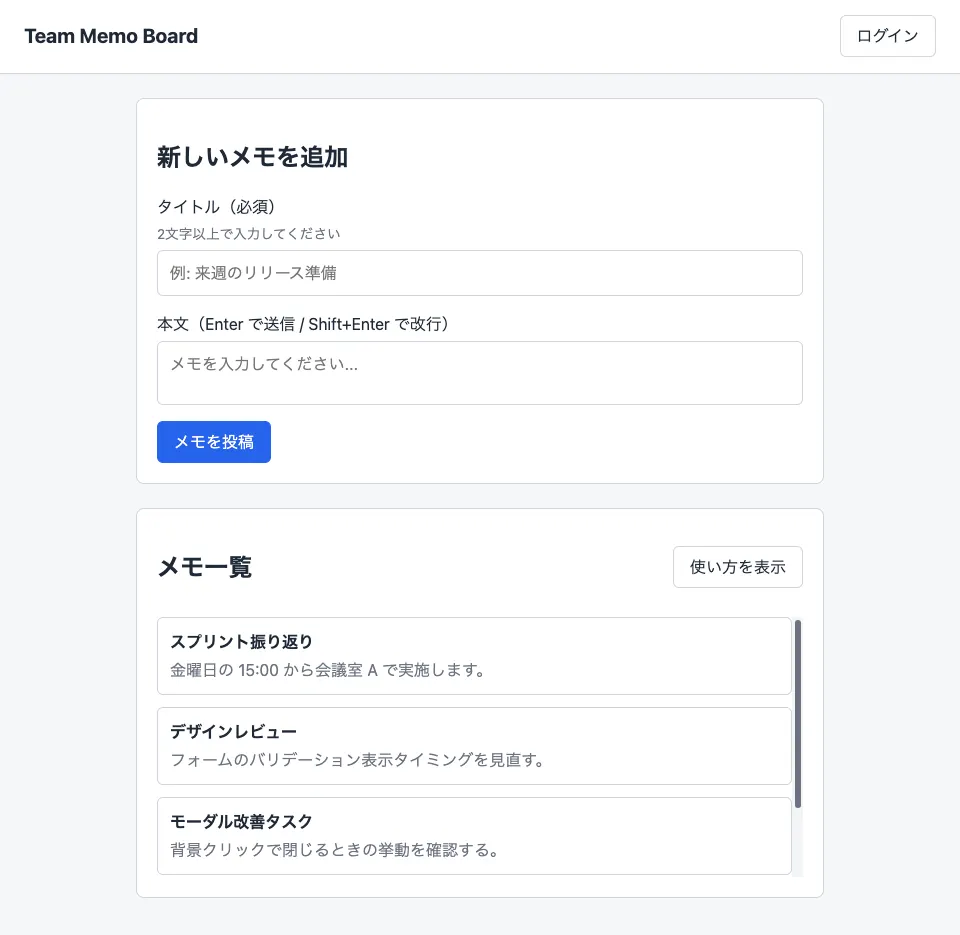
I confirmed that all existing features still work. On the other hand, the changes went beyond pure refactoring and altered the UI and behavior that users see, which is not always desirable. For example, the following changes were made even though I did not ask for them.
- A hint text asking for at least 2 characters was added to the title field
- The scrollbar thumb color changed from
#9ca3afto#6b7280 max-block-size: 14remwas set on the<textarea>, introducing a height limit that the original implementation did not have- The cancel button changed from
type="button"totype="submit"
The dynamic import() from a CDN added to load the polyfill is also a concern from a security standpoint. The official workflow includes a final step that runs the project's tests to confirm that behavior has not changed, but this sample has no tests, so that check did not happen. To preserve existing behavior, it is best for the project to have a solid test suite already in place. In addition, because the agent prioritized following the guidelines, there were several places where the implementation was excessive for an app of this size, such as the added aria-live region and resetting returnValue on the close event.
It seems that, as needed, you will have to adjust your prompts or add constraints to AGENTS.md. If you want to review the plan before any fixes are made, you probably need to say so explicitly in your prompt, for example, "Present a modernization plan before editing any code."
Summary
legacy-scan, added in Modern Web Guidance 1.0, scans HTML, CSS, JavaScript / TypeScript, framework components, andpackage.jsonwith local static analysis, so it can find outdated web patterns without consuming LLM tokenslegacy-scandeliberately has no--fixflag. It adopts a four-step workflow in which static analysis produces candidates and verification criteria (keepWhen/dropWhen), while contextual judgment, guide retrieval (retrieve), and cross-layer refactoring are left to the AI agent- Testing it on a sample app with outdated code produced 12 findings across 9 guides. Antigravity read the full 99.2 KB of guides through a temporary file, then applied fixes that even included fallbacks based on Baseline compatibility, a contrast adjustment for WCAG 1.4.11, and syncing
:user-invalidwith ARIA attributes