
Trying MCP Tasks and Elicitation with Claude Code
Claude now supports MCP Tasks and Elicitation. Tasks turn slow tool calls into a task ID plus polling, and Elicitation asks the user for input mid-operation. This article builds an MCP server with the TypeScript SDK and calls it from Claude Code.
MCP (Model Context Protocol) tool calls are fundamentally synchronous: the client sends a request and waits until the server returns a result. That's fine for work that finishes in a few seconds, but for something like a multi-minute research job or a CI run, the client ends up holding a connection open the whole time. There are also cases where you want to ask the user for a decision partway through a tool's execution, such as "Are you sure you want to issue this refund?" or "Which repository should this target?"
MCP has two mechanisms that address these problems: Tasks, for handling long-running work, and Elicitation, for asking the user for input in the middle of an operation. On October 23, 2026, Anthropic announced support for MCP Tasks and Elicitations in Claude. It's currently available in the Claude Code CLI and will roll out to other Claude products over time.
This article starts with the basics of Tasks and Elicitation, then implements an MCP server that uses both features with the TypeScript SDK and looks at how it behaves when called from the Claude Code CLI.
As of October 25, 2026, MCP Tasks in Claude Code is in public beta. It requires the Claude Code CLI v2.1.304 or later and is not available in the VS Code extension or the desktop app.
What are MCP Tasks?
MCP Tasks is an extension that lets a server respond to a tool call with a "task handle" instead of the final result, so the client can poll for the result later. The extension identifier is
io.modelcontextprotocol/tasks, and the specification is maintained in the ext-tasks repository.
You can handle long-running work by simply keeping the connection open while waiting for the tool call result, but the official documentation gives the following reasons to use Tasks instead:
- Many clients and transport intermediaries impose request timeouts, which makes holding a connection open for more than a few seconds impractical
- A task ID is a durable handle, so even if the client disconnects or restarts, it can resume polling with the same ID
- Tasks carry a status such as
workingorinput_requiredalong with astatusMessage, so clients can display progress - If user input is needed partway through a task, the exchange can happen without an additional connection
How Tasks work
A tool call that uses Tasks proceeds as follows:
- The client declares support for the Tasks extension in the request's
_meta - If the server decides the work will take a while, it returns a result with
resultType: "task"(aCreateTaskResult) - The client queries the task's status with
tasks/get - When the task becomes
input_required, the client sends the user's input withtasks/update - When the task becomes
completed, the client receives theresultincluded in thetasks/getresponse
The 2026-07-28 specification removes the initialize handshake, and clients instead declare their capabilities in the _meta of every request. Support for the Tasks extension is declared in the extensions field.
{
  "_meta": {
    "io.modelcontextprotocol/clientCapabilities": {
      "extensions": {
        "io.modelcontextprotocol/tasks": {}
      }
    }
  }
}
For requests that carry this declaration, the server decides on a per-request basis whether to return a regular CallToolResult or a CreateTaskResult. A CreateTaskResult looks like this:
{
  "resultType": "task",
  "taskId": "build-7f3a9c2e",
  "status": "working",
  "statusMessage": "Compiling, 40 of 212 files done",
  "createdAt": "2026-10-22T14:03:07Z",
  "lastUpdatedAt": "2026-10-22T14:03:07Z",
  "ttlMs": null,
  "pollIntervalMs": 5000
}
pollIntervalMs is the polling interval the server recommends, and ttlMs is how long the task is retained, in milliseconds, counted from its creation; null means no limit. The specification requires the server to return the CreateTaskResult only after the task has been fully created, that is, once the task can be retrieved with tasks/get.
A task has one of the following five statuses:
| Status | Meaning |
|---|---|
working |
In progress |
input_required |
Input from the client is needed. The requests are in inputRequests |
completed |
Finished. result contains the result of the original tool call |
failed |
A JSON-RPC error occurred during execution. error contains the details |
cancelled |
Cancelled |
failed represents JSON-RPC errors only. If a tool returns a result with isError: true, the request still completed successfully at the protocol level, so the task becomes completed and result contains that error result.
completed, failed, and cancelled are terminal states; once a task reaches one of them, it never changes again. Clients can request cancellation with tasks/cancel, but cancellation is cooperative. The server only acknowledges the request, and it's up to the server whether to actually stop the work.
What is Elicitation?
Elicitation is a mechanism that lets a server ask the user for additional information through the client while it is processing a request. It was added in the 2025-06-18 specification.
Elicitation has two modes:
- Form mode: The server specifies the input fields with JSON Schema, and the client displays a form to collect structured data. The data passes through the client on its way to the server
- URL mode: The server specifies a URL, and the user opens it in a browser to interact with it. No data other than the URL passes through the client
In form mode, requestedSchema is restricted to a flat object whose properties are all primitive types. The allowed types are strings (with an optional format of email, uri, date, or date-time), numbers, booleans, and enums (single-select and multi-select). Nested objects are intentionally unsupported to make it easier for clients to build forms.
The user's response is distinguished by one of three action values:
action |
Meaning |
|---|---|
accept |
The user explicitly approved and submitted. In form mode, content contains the input values |
decline |
The user explicitly declined |
cancel |
The user closed the dialog without making a choice (for example, with the Esc key) |
The specification states that servers MUST NOT request sensitive information such as passwords, API keys, access tokens, or payment information in form mode. These are handled with URL mode instead. SEP-1036, which introduced URL mode, cites an MCP server obtaining OAuth authorization for a third-party API as its main motivation. If the MCP client obtained the token and passed it to the server, that would be token passthrough, which security best practices prohibit. With URL mode, the user grants authorization directly to the third party in the browser, and the token reaches the server without passing through the client.
Elicitation in the 2026-07-28 specification
Up to the 2025-11-25 specification, a server sent an elicitation/create request to the client while a tool was running. Sending a request from server to client requires an established session and a bidirectional channel.
Because the 2026-07-28 specification removes sessions, elicitation/create is now delivered to the client in one of two ways:
- Multi round-trip requests (MRTR): The server returns a result with
resultType: "input_required"totools/calland ends processing for now. The client puts the user's response intoinputResponsesand resends the sametools/callwith a new ID - Tasks'
input_required: The server sets the task's status toinput_requiredand putselicitation/createintoinputRequestsin thetasks/getresponse. The client sends the user's response withtasks/update
In both cases, inputRequests is a map from keys to { method, params } pairs. A tasks/get response for a task looks like this:
{
  "resultType": "complete",
  "taskId": "6c2ffda1-fa4a-4620-96d8-d3ddf603770d",
  "status": "input_required",
  "statusMessage": "Waiting for the user to choose the report audience",
  "inputRequests": {
    "audience": {
      "method": "elicitation/create",
      "params": {
        "mode": "form",
        "message": "「MCP Tasks」の調査が終わりました。レポートの公開範囲を選んでください。",
        "requestedSchema": {
          "type": "object",
          "properties": {
            "audience": {
              "type": "string",
              "title": "公開範囲",
              "oneOf": [
                { "const": "team", "title": "チーム内" },
                { "const": "company", "title": "社内全体" }
              ]
            }
          },
          "required": ["audience"]
        }
      }
    }
  }
}
The client returns its response under the same key:
{
  "method": "tasks/update",
  "params": {
    "taskId": "6c2ffda1-fa4a-4620-96d8-d3ddf603770d",
    "inputResponses": {
      "audience": { "action": "accept", "content": { "audience": "team" } }
    }
  }
}
MRTR is well suited to asking for input within an exchange that finishes in a few seconds, while Tasks' input_required is well suited to asking for input in the middle of a long-running operation.
Implementing an MCP server that uses Tasks and Elicitation
From here, we'll implement an MCP server with two tools:
deep_research: A research tool that returns a task. Partway through, it uses Elicitation to ask the user who the report should be shared with, then finishes the report once the user confirmsshare_report: A tool that doesn't use tasks and instead asks for confirmation to share via MRTR
The implementation uses @modelcontextprotocol/server from MCP TypeScript SDK v2. However, as of October 25, 2026, the server side of the SDK does not implement the Tasks extension (typescript-sdk#2189). So we implement methods like
tasks/get ourselves as custom methods on the SDK. Elicitation requests are built with the SDK's inputRequired.
Create a project and install the required packages:
npm init -y
npm pkg set type=module
npm install @modelcontextprotocol/[email protected] @modelcontextprotocol/[email protected] zod
Storing task state
createMcpHandler creates a new McpServer instance for each HTTP request. Since tasks are referenced across multiple requests, we store them in a module-scoped Map. In a real service, you'd need to store them somewhere every server instance can reach, such as a database. Also, this sample never deletes finished tasks, but a real service would set ttlMs and delete tasks once they expire.
Each of the following code blocks shows only the import statements that block uses. When you combine them into server.ts, merge the imports at the top of the file.
import { ProtocolError, ProtocolErrorCode } from "@modelcontextprotocol/server";

const TASKS_EXTENSION = "io.modelcontextprotocol/tasks";
const PORT = Number(process.env.PORT ?? 3000);
// How long each phase (research and report writing) takes
const PHASE_MS = Number(process.env.PHASE_MS ?? 20_000);

type TaskStatus =
  | "working"
  | "input_required"
  | "completed"
  | "failed"
  | "cancelled";

type TaskRecord = {
  taskId: string;
  status: TaskStatus;
  statusMessage?: string;
  createdAt: string;
  lastUpdatedAt: string;
  topic: string;
  inputRequests?: Record<string, unknown>;
  result?: unknown;
};

// Server instances are recreated per request, so tasks live in module scope
const tasks = new Map<string, TaskRecord>();

// Return -32602 (Invalid params) for unknown task IDs
function findTask(taskId: string) {
  const task = tasks.get(taskId);
  if (!task) {
    throw new ProtocolError(
      ProtocolErrorCode.InvalidParams,
      `Unknown task: ${taskId}`,
    );
  }
  return task;
}

function update(task: TaskRecord, patch: Partial<TaskRecord>) {
  Object.assign(task, patch, { lastUpdatedAt: new Date().toISOString() });
}

function toWire(task: TaskRecord) {
  return {
    taskId: task.taskId,
    status: task.status,
    statusMessage: task.statusMessage,
    createdAt: task.createdAt,
    lastUpdatedAt: task.lastUpdatedAt,
    ttlMs: null,
    pollIntervalMs: 2000,
    ...(task.status === "input_required" && {
      inputRequests: task.inputRequests,
    }),
    ...(task.status === "completed" && { result: task.result }),
  };
}
toWire converts a task into the shape used by CreateTaskResult and the tasks/get response. It includes inputRequests when the status is input_required and result when it is completed. Unknown task IDs get a -32602 error.
Task IDs are generated with randomUUID(). The new Tasks extension has no tasks/list, so knowing a task ID is one of the conditions for accessing a task. The specification requires generating task IDs with enough entropy that a third party can't guess them, and checking authentication and authorization on every request for a task.
Simulating the research
The research itself is simulated with setTimeout. After PHASE_MS elapses, runResearch sets the task to input_required and puts an Elicitation into inputRequests asking who the report should be shared with.
import { inputRequired } from "@modelcontextprotocol/server";

// Run the research, ask the user once for the report audience, then finish the report
function runResearch(task: TaskRecord) {
  setTimeout(() => {
    if (task.status !== "working") return;
    update(task, {
      status: "input_required",
      statusMessage: "Waiting for the user to choose the report audience",
      inputRequests: {
        audience: inputRequired.elicit({
          message: `「${task.topic}」の調査が終わりました。レポートの公開範囲を選んでください。`,
          requestedSchema: {
            type: "object",
            properties: {
              audience: {
                type: "string",
                title: "公開範囲",
                oneOf: [
                  { const: "team", title: "チーム内" },
                  { const: "company", title: "社内全体" },
                ],
              },
            },
            required: ["audience"],
          },
        }),
      },
    });
  }, PHASE_MS);
}

function finishResearch(task: TaskRecord, audience: string) {
  update(task, {
    status: "working",
    statusMessage: `Writing the report for ${audience}`,
    inputRequests: undefined,
  });
  setTimeout(() => {
    if (task.status !== "working") return;
    update(task, {
      status: "completed",
      statusMessage: "Report is ready",
      result: {
        content: [
          {
            type: "text",
            text: `「${task.topic}」のレポート(公開範囲: ${audience}): 3 件の資料を要約しました。`,
          },
        ],
      },
    });
  }, PHASE_MS);
}
inputRequired.elicit() is an SDK helper that builds an input request of the form { method: "elicitation/create", params: { mode: "form", ... } }. The display names for the choices are specified by listing const and title pairs in the JSON Schema oneOf. The enum and enumNames pair used in the 2025-06-18 specification still exists in the 2026-07-28 schema as LegacyTitledEnumSchema, but it is slated for removal in a future version.
Registering a tool that returns a task
The deep_research tool checks that the client supports the required capabilities, then creates a task and returns a CreateTaskResult. The server also declares its own support for the extension with registerCapabilities, which includes it in the server/discover response.
import { randomUUID } from "node:crypto";
import { McpServer } from "@modelcontextprotocol/server";
import type {
  CallToolResult,
  ClientCapabilities,
} from "@modelcontextprotocol/server";
import * as z from "zod/v4";

// An elicitation: {} with neither form nor url counts as form-mode support
function supportsFormElicitation(capabilities?: ClientCapabilities) {
  const elicitation = capabilities?.elicitation;
  if (!elicitation) return false;
  return elicitation.form !== undefined || elicitation.url === undefined;
}

function buildServer() {
  const server = new McpServer({ name: "research-server", version: "1.0.0" });

  server.server.registerCapabilities({
    extensions: { [TASKS_EXTENSION]: {} },
  });

  server.registerTool(
    "deep_research",
    {
      description:
        "Research a topic and write a report. Takes several minutes.",
      inputSchema: z.object({ topic: z.string() }),
    },
    async ({ topic }) => {
      // A task may be returned only when the client declared the Tasks extension on this request.
      // The task asks for the report audience partway through, so form-mode Elicitation is also required
      const clientCapabilities = server.server.getClientCapabilities();
      const missing: string[] = [];
      if (!clientCapabilities?.extensions?.[TASKS_EXTENSION]) {
        missing.push(TASKS_EXTENSION);
      }
      if (!supportsFormElicitation(clientCapabilities)) {
        missing.push("elicitation.form");
      }
      if (missing.length > 0) {
        // The spec calls for -32021 (Missing Required Client Capability), but
        // SDK v2.3's registerTool converts errors thrown by the handler into an isError tool result
        return {
          content: [
            {
              type: "text",
              text: `Missing required client capabilities: ${missing.join(", ")}`,
            },
          ],
          isError: true,
        };
      }

      const now = new Date().toISOString();
      const task: TaskRecord = {
        taskId: randomUUID(),
        status: "working",
        statusMessage: "Collecting sources",
        createdAt: now,
        lastUpdatedAt: now,
        topic,
      };
      tasks.set(task.taskId, task);
      runResearch(task);

      // SDK v2.3 doesn't implement the Tasks extension, so it has no CreateTaskResult type
      return {
        resultType: "task",
        ...toWire(task),
      } as unknown as CallToolResult;
    },
  );

  // The share_report tool and the tasks/* methods in the following code blocks are registered here too

  return server;
}
You must not return a task to a client that hasn't declared the Tasks extension. The Claude Code documentation also explains that returning a task to a request without the declaration results in the error Unsupported result type 'task' for tools/call.
The tool also checks for form-mode Elicitation support because the specification says a server MUST NOT put request types the client hasn't declared into inputRequests. With MRTR's inputRequired(), covered later, the SDK performs this check automatically, but since we build the task's inputRequests ourselves, the server has to check it.
Implementing tasks/get, tasks/update, and tasks/cancel
Next, register the three methods inside buildServer with setRequestHandler. Passing a method name and a zod schema to setRequestHandler lets you handle custom methods that aren't defined in the specification.
import { acceptedContent } from "@modelcontextprotocol/server";
import * as z from "zod/v4";

  const taskParams = z.object({ taskId: z.string() }).loose();

  server.server.setRequestHandler(
    "tasks/get",
    { params: taskParams },
    async ({ taskId }) => toWire(findTask(taskId)),
  );

  server.server.setRequestHandler(
    "tasks/update",
    { params: taskParams },
    async ({ taskId }, ctx) => {
      const task = findTask(taskId);
      if (task.status !== "input_required") return {};
      // Ignore responses for unknown keys. Stay input_required until a response for audience arrives
      if (!ctx.mcpReq.inputResponses?.["audience"]) return {};

      // The SDK extracts params.inputResponses and passes it to ctx.mcpReq.inputResponses
      const answer = acceptedContent<{ audience: string }>(
        ctx.mcpReq.inputResponses,
        "audience",
      );
      if (answer) {
        finishResearch(task, answer.audience);
      } else {
        // Treat both decline and cancel as the user not approving, and end the task
        update(task, {
          status: "cancelled",
          statusMessage: "The user did not choose an audience",
          inputRequests: undefined,
        });
      }
      return {};
    },
  );

  server.server.setRequestHandler(
    "tasks/cancel",
    { params: taskParams },
    async ({ taskId }) => {
      const task = findTask(taskId);
      if (task.status === "working" || task.status === "input_required") {
        update(task, {
          status: "cancelled",
          statusMessage: "Cancelled by the client",
          inputRequests: undefined,
        });
      }
      return {};
    },
  );
acceptedContent is an SDK helper that returns content only when the action of the response for the given key is accept. It returns undefined for decline and cancel, in which case this sample sets the task to cancelled.
Using Elicitation without tasks
The share_report tool is an example of MRTR Elicitation without tasks. On the first call, inputResponses is empty, so it returns inputRequired(). On the second call, which the client resends with the response attached, it returns the result.
import { acceptedContent, inputRequired } from "@modelcontextprotocol/server";
import * as z from "zod/v4";

  // Elicitation without tasks. Return inputRequired as the tool result and wait for the client to resend
  server.registerTool(
    "share_report",
    {
      description: "Share a finished report with the given channel.",
      inputSchema: z.object({ channel: z.string() }),
    },
    async ({ channel }, ctx) => {
      const confirm = ctx.mcpReq.inputResponses?.["confirm"];
      if (!confirm) {
        return inputRequired({
          inputRequests: {
            confirm: inputRequired.elicit({
              message: `レポートを ${channel} に共有しますか?`,
              requestedSchema: {
                type: "object",
                properties: {
                  notify: {
                    type: "boolean",
                    title: "メンバーに通知する",
                    default: false,
                  },
                },
              },
            }),
          },
        });
      }
      const answer = acceptedContent<{ notify?: boolean }>(
        ctx.mcpReq.inputResponses,
        "confirm",
      );
      if (!answer) {
        return { content: [{ type: "text", text: "共有を取りやめました。" }] };
      }
      return {
        content: [
          {
            type: "text",
            text: `${channel} に共有しました(通知: ${answer.notify ? "あり" : "なし"})。`,
          },
        ],
      };
    },
  );
The first and second calls are independent requests, so the server keeps no state between them. If you need to carry values across multiple rounds of input, use requestState. Because requestState comes back by way of the client, if you put values in it that affect authorization or business logic, you need to detect tampering with something like an HMAC.
Starting the HTTP server
Finally, pass buildServer to createMcpHandler and expose it with a Node.js HTTP server. legacy: "reject" rejects requests based on the pre-2026 specifications.
import { createServer } from "node:http";
import { toNodeHandler } from "@modelcontextprotocol/node";
import { createMcpHandler } from "@modelcontextprotocol/server";

const handler = toNodeHandler(
  createMcpHandler(buildServer, { legacy: "reject" }),
);

createServer((req, res) => {
  if (req.url !== "/mcp") {
    res.writeHead(404).end();
    return;
  }
  // In 2026-07-28 Streamable HTTP the method name is also in a header, so we can log without reading the body
  console.error(
    new Date().toISOString(),
    req.headers["mcp-method"],
    req.headers["mcp-name"] ?? "",
  );
  void handler(req, res);
}).listen(PORT, "127.0.0.1", () => {
  console.error(`listening on http://127.0.0.1:${PORT}/mcp`);
});
In 2026-07-28 Streamable HTTP, the request's Mcp-Method header contains the method name. The Mcp-Name header contains the tool name for tools/call and the task ID for task methods such as tasks/get. This lets load balancers route requests without reading the request body.
Start the server with the following command:
node server.tsCalling it from Claude Code
Create a .mcp.json at the project root to register the MCP server:
{
  "mcpServers": {
    "research": {
      "type": "http",
      "url": "http://127.0.0.1:3000/mcp"
    }
  }
}
Launch the Claude Code CLI and ask it to call the deep_research tool. --mcp-config loads .mcp.json, and --strict-mcp-config keeps MCP servers from other configurations from being loaded.
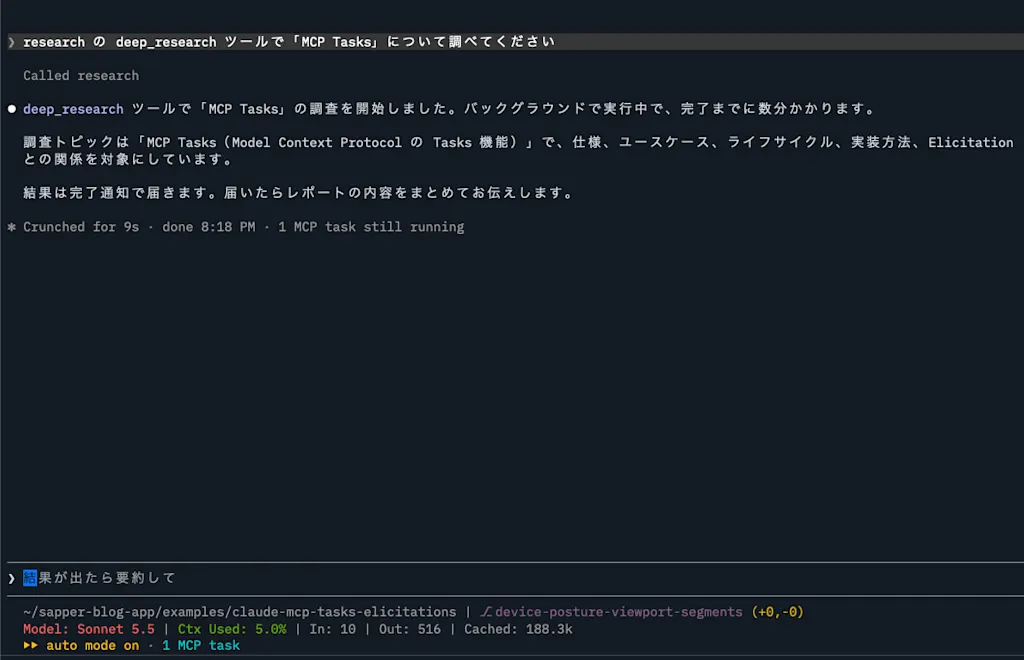
claude --strict-mcp-config --mcp-config .mcp.jsonWhen you enter a prompt like the following, the server returns a task and starts working:
research の deep_research ツールで「MCP Tasks」について調べてくださいAfter calling the tool, Claude replied "I've started the research." without waiting for the task to finish, and ended its turn. 1 MCP task appears below the input field.
The server log showed tasks/get recorded every 2 seconds right after tools/call. This shows Claude Code polling to check whether the task has finished.
2026-10-25T03:02:35.930Z tools/call deep_research
2026-10-25T03:02:35.974Z tasks/get 736bc765-bd68-4d43-bf8a-31accb8486e9
2026-10-25T03:02:37.998Z tasks/get 736bc765-bd68-4d43-bf8a-31accb8486e9
2026-10-25T03:02:40.016Z tasks/get 736bc765-bd68-4d43-bf8a-31accb8486e9
Running the /tasks command shows the statusMessage returned by the server and the polling interval.
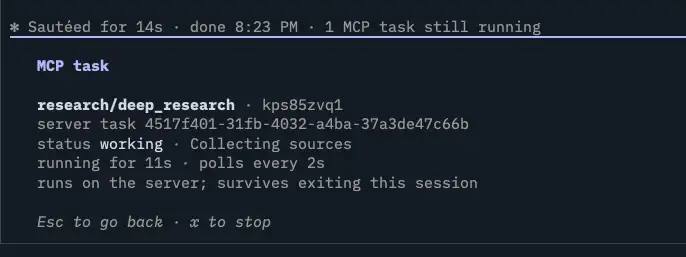
If you select the task in /tasks and press the x key, Claude Code sends tasks/cancel to the server. Pressing Esc does not stop the task.
An Elicitation dialog appears partway through the task
When the task became input_required, Claude Code displayed the elicitation/create from inputRequests as a dialog. The title values specified in oneOf, "チーム内" (team only) and "社内全体" (entire company), are used as the display names of the choices.
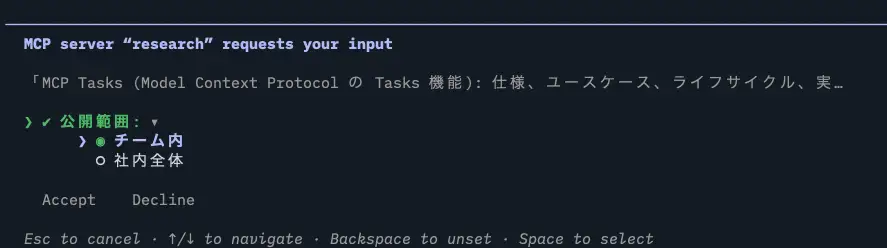
While the dialog was open, tasks/get polling stopped. After choosing "チーム内" and clicking Accept, a tasks/update reached the server and polling resumed.
2026-10-25T03:03:20.883Z tasks/update 736bc765-bd68-4d43-bf8a-31accb8486e9
2026-10-25T03:03:37.335Z tasks/get 736bc765-bd68-4d43-bf8a-31accb8486e9
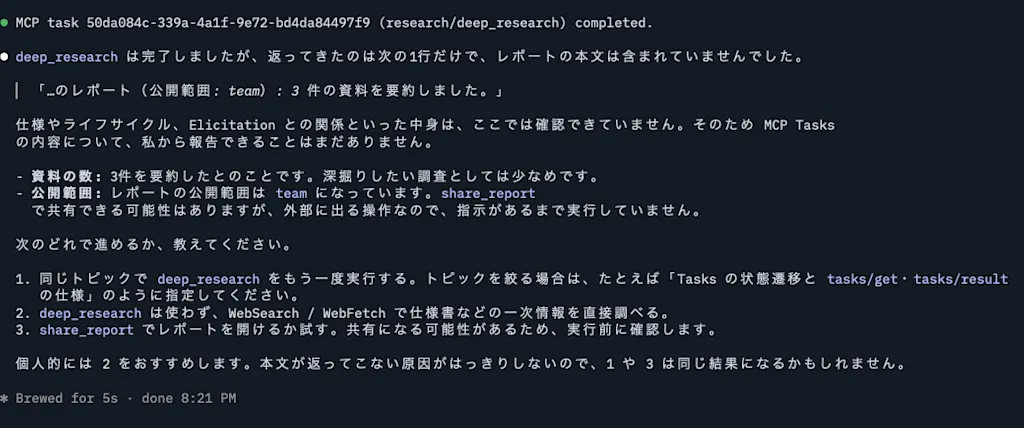
When the task became completed, Claude Code displayed MCP task 736bc765-bd68-4d43-bf8a-31accb8486e9 (research/deep_research) completed. Claude then responded to the user based on the contents of the report.
MRTR Elicitation
When I asked Claude to call the share_report tool, the tool call display showed Fulfilling input required by 'tools/call' (round 1) and a confirmation dialog for sharing opened. After clicking Accept, a second tools/call was recorded in the server log, and Claude replied with the result of the share.
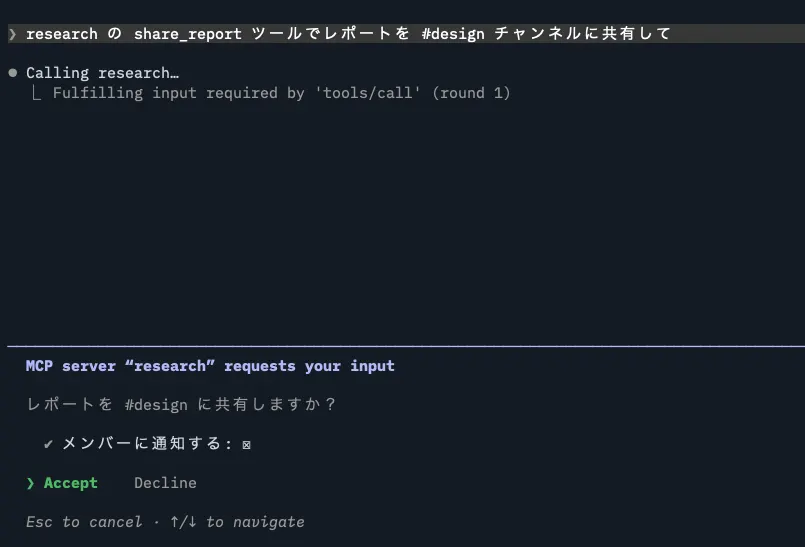
Unlike with tasks, Claude keeps waiting for the tool result until you respond to the dialog. Note that in Claude Code, even a tool call that doesn't use tasks moves to the background once it has been running for more than two minutes. However, it does not move to the background while an Elicitation dialog is open.
Summary
- MCP Tasks is an extension in which the server returns a task handle for a tool call and the client polls its status with
tasks/get. Its identifier isio.modelcontextprotocol/tasks - Elicitation is a mechanism for asking the user for input partway through an operation. It has form mode for collecting structured data and URL mode for keeping sensitive information away from the client
- In the 2026-07-28 specification, Elicitation requests reach the client either through MRTR's
InputRequiredResultor throughinputRequestsin a task'sinput_requiredstate - Testing with the Claude Code CLI confirmed that task status is polled with
tasks/get, a dialog appears when the task becomesinput_required, and the user's response is sent to the server withtasks/update - MRTR Elicitation can be implemented without tasks by returning
inputRequired()as the result of a tool call
References
Connect Claude Code to tools via MCP - Claude Code Docs
Tasks - Model Context Protocol
modelcontextprotocol/ext-tasks