
Distributing Agent Skills from MCP Servers with the Skills Extension
The Skills Extension lets clients discover and retrieve Agent Skills over MCP. Learn why it was designed, how skills are loaded progressively, and how to implement and inspect a skill server with Node.js.
Connecting to an MCP (Model Context Protocol) server lets an AI agent call tools provided by external services. However, tool descriptions alone do not necessarily explain an entire business process. A refund workflow, for example, requires searching for an order, checking refund eligibility, and issuing the refund, as well as deciding when to stop the process.
Agent Skills provide a way to organize these procedures and decision criteria. Instructions go in
SKILL.md, which is managed in a directory alongside any supporting documents and scripts. Plugins are also increasingly used to bundle skills with related tools. If users can retrieve skills from the same MCP server that provides the tools, they have less to find and install separately.
The Skills Extension enables clients to discover and retrieve Agent Skills over MCP. It uses the existing Agent Skills file format, while MCP handles metadata retrieval and file reads. As of September 21, 2026,
SEP-2640 has Final status, and the specification is published as an official extension.
This article explains the design background and communication model of the Skills Extension. In the second half, we implement an example that serves a code review skill and retrieves its instructions and checklist from a client.
Why distribute skills over MCP?
With Agent Skills, an agent loads information in stages. This mechanism is called progressive disclosure.
- Use the skill's name and description to decide whether it applies to the current task.
- Read
SKILL.mdwhen using the skill. - Read supporting documents and scripts referenced in the instructions as needed.
Putting every step of a long procedure in an MCP server's instructions passes along explanations that may be irrelevant to the task from the start. Separating them into skills lets the agent load procedures only when needed. It also lets you manage knowledge such as the order in which to use multiple tools separately from individual tool descriptions. The Working Group's problem statement identified long workflows, skill discovery, and procedures spanning multiple servers as challenges.
Using MCP as the distribution channel lets a server provide both its capabilities and files explaining how to use them.
Treating skills as MCP resources
The Skills Extension exposes each file in a skill as an MCP resource. A resource is data whose contents can be read by specifying a URI. Files are retrieved using the existing resources/read method.
For example, consider a skill with the following structure.
code-review/
├── SKILL.md
└── references/
    └── checklist.md
The skill's files map to the following URIs.
| File | Resource URI |
|---|---|
| Skill instructions | skill://code-review/SKILL.md |
| Checklist | skill://code-review/references/checklist.md |
SKILL.md begins with frontmatter: metadata written in YAML. The parent directory's name must match the name in this frontmatter.
---
name: code-review
description: Review code changes using the team's checklist.
metadata:
  version: "1.0"
---
To organize skills by team or purpose, you can add path segments at the beginning, as in skill://acme/backend/code-review/SKILL.md. A relative reference such as references/checklist.md in SKILL.md is resolved against the skill's root directory.
The skill:// URI scheme is recommended but not required. Also, a resource must not be treated as a skill solely because its URI starts with skill://.
A skill is identified by the combination of its originating server and URI. Two servers that both provide skill://code-review/SKILL.md are providing distinct skills.
Why use existing Resources?
The design rationale explains that skills are simply files, so using Resources, which already exist to expose files, is a natural fit. Resources let implementations reuse URI addressing and
resources/read. Supporting files can be retrieved in the same way, so SKILL.md does not need special treatment.
During specification development, the group also considered returning a catalog through a skill://index.json resource and distributing skills as archives. At the June 24, 2026 meeting, the vote was postponed over concerns including a custom catalog format, the complexity of archive extraction, and script execution.
Catalog retrieval later changed to skills/list, and archive distribution was removed from the current specification. With skills/list, implementations can use pagination and caching mechanisms in the same way as other list APIs. Retrieving files as individual resources also lets clients load only the files they need.
Discovering skills and reading their contents
The Skills Extension adds the following three methods. These work alongside the existing resources/read method to retrieve file contents.
skills/list: Retrieve a list of skill metadata.skills/get: Retrieve metadata for a skill identified by URI.resources/directory/read: Retrieve the files and subdirectories directly inside a directory.
Declaring server support for the extension
First, the client checks the server's capabilities, which declare the features it supports. In revision 2026-07-28, server/discover returns supported protocols and capabilities.
A server supporting the Skills Extension declares resources and io.modelcontextprotocol/skills under extensions. The following is the capabilities portion of a response.
{
  "resources": {},
  "extensions": {
    "io.modelcontextprotocol/skills": {}
  }
}
An empty object for io.modelcontextprotocol/skills indicates support for the extension without optional features. A server that implements resources/directory/read declares directoryRead: true here.
Listing metadata with skills/list
After confirming extension support, the client calls skills/list. Each entry in the response's skills array contains the following information.
| Field | Description |
|---|---|
uri |
URI of SKILL.md |
frontmatter |
The YAML frontmatter from SKILL.md represented as a JSON object |
resources |
A list of URIs, SHA-256 hashes, and byte counts for all files in the skill, or "dynamic" |
frontmatter preserves fields beyond name and description. This lets the host build a skill catalog from metadata without retrieving each file.
The resources array is the file manifest. Here, a manifest means a list used to check distributed files against their expected contents. It lists every file, including SKILL.md itself, with no missing or extra entries. SHA-256 computes a hash used to detect differences in content. Each file's digest consists of sha256: followed by 64 lowercase hexadecimal digits, and size is the number of bytes in the raw file contents.
The manifest lets the host verify the contents it receives. After retrieving a file listed in resources, the host checks its digest and size. If they do not match, the host must not use that content: it may be corrupted, modified, or part of a skill updated since the entry was retrieved. For SKILL.md, the host also compares the retrieved frontmatter with the entry's frontmatter field by field and stops loading if they differ.
List responses also require resultType: "complete" to indicate completion, along with ttlMs and cacheScope to specify the cache lifetime and sharing scope. If a response contains nextCursor, pass it as cursor in the next request to fetch the next page. A single skill's manifest is never split across pages.
Retrieving one skill's metadata with skills/get
skills/get returns metadata for the skill at the specified URI. The returned skill has the same shape as an entry in skills/list.
For example, skills/get is useful when a user or the server's instructions provides a skill URI directly. A server may return an empty or partial catalog, so metadata must be retrievable by URI even for skills absent from the list. It is also useful for refreshing just one skill's manifest after its files change.
Retrieving instructions and supporting files
Use resources/read to retrieve instructions and supporting files. The basic flow is as follows.
- Send
server/discoverto check whether the server supports the Skills Extension. - Send
skills/listto retrieve frontmatter and file manifests. - Select a skill and check whether it may be loaded under user approval requirements and the host's policies.
- Retrieve
SKILL.mdwithresources/read. - Retrieve supporting files with
resources/readas needed.
Retrieving SKILL.md with resources/read alone does not activate the skill. Activation requires going through the host's skill-loading process, verifying the contents, and obtaining any required user approval.
Serving and retrieving a skill with Node.js
Let's implement a server that provides a code review skill and a client that reads it. The server processes JSON-RPC over Node.js standard input and output, and the client uses the official TypeScript SDK.
Create a working directory and install the dependencies.
mkdir mcp-skills-demo
cd mcp-skills-demo
npm init -y
npm install --save-exact @modelcontextprotocol/[email protected] @modelcontextprotocol/[email protected] [email protected]
mkdir -p skills/code-review/references
Create skills/code-review/SKILL.md. Its instructions reference references/checklist.md.
---
name: code-review
description: Review code changes using the team's checklist.
metadata:
  version: "1.0"
---

# Code review

Read [the checklist](references/checklist.md), then review the provided diff.
Report findings with the affected lines, the reason, and a suggested fix.
Next, create the checklist used during a review.
# Review checklist

- Does the change handle empty input?
- Does the change preserve existing behavior?
- Do the tests cover the intended behavior?
These two files use the same format as ordinary Agent Skills. There is no need to add MCP-specific fields to SKILL.md.
Creating the server that serves the skill
Next, create server.mjs. It reads the files at startup and uses the same bytes to build both the manifest and the read responses.
import { readFile } from "node:fs/promises";
import { createHash } from "node:crypto";
import { createInterface } from "node:readline";
import { parse } from "yaml";

// Extract metadata from the YAML frontmatter in SKILL.md.
function frontmatter(markdown) {
  const match = /^---\r?\n([\s\S]*?)\r?\n---(?:\r?\n|$)/.exec(markdown);
  if (!match) throw new Error("YAML frontmatter is required");
  return parse(match[1]);
}

const extension = "io.modelcontextprotocol/skills";
const root = "skill://code-review";
const uri = `${root}/SKILL.md`;
const paths = ["SKILL.md", "references/checklist.md"];
const files = new Map();
// Read local files and map them to URIs.
for (const path of paths) {
  const bytes = await readFile(
    new URL(`./skills/code-review/${path}`, import.meta.url),
  );
  files.set(`${root}/${path}`, bytes);
}
// Build the skill metadata returned by skills/list and skills/get.
const skill = {
  uri,
  frontmatter: frontmatter(files.get(uri).toString("utf8")),
  resources: [...files].map(([uri, bytes]) => ({
    uri,
    digest: `sha256:${createHash("sha256").update(bytes).digest("hex")}`,
    size: bytes.length,
  })),
};

// Return a response with a cache lifetime and sharing scope.
// ttlMs: 0 allows fetching a fresh response each time instead of reusing it.
const cached = (value) => ({
  resultType: "complete",
  ...value,
  ttlMs: 0,
  cacheScope: "public",
});
const invalid = (message) => {
  throw { code: -32602, message };
};

function dispatch(method, params = {}) {
  switch (method) {
    // Declare support for the Skills Extension.
    case "server/discover":
      return cached({
        supportedVersions: ["2026-07-28"],
        capabilities: {
          resources: {},
          extensions: { [extension]: {} },
        },
        _meta: {
          "io.modelcontextprotocol/serverInfo": {
            name: "skills-example",
            version: "1.0.0",
          },
        },
      });
    case "ping":
      return { resultType: "complete" };
    // Return a list of skill metadata.
    case "skills/list":
      return cached({ skills: [skill] });
    // Return metadata for the skill identified by the URI.
    case "skills/get":
      if (params.uri !== uri) invalid("Unknown skill");
      return cached({ skill });
    case "resources/list":
      return cached({
        resources: [...files.keys()].map((uri) => ({
          uri,
          name:
            uri === skill.uri ? skill.frontmatter.name : uri.split("/").at(-1),
          mimeType: "text/markdown",
          ...(uri === skill.uri
            ? { description: skill.frontmatter.description }
            : {}),
        })),
      });
    case "resources/templates/list":
      return cached({ resourceTemplates: [] });
    // Return the resource identified by the URI, including SKILL.md and supporting files.
    case "resources/read": {
      const bytes = files.get(params.uri);
      if (!bytes) invalid("Unknown resource");
      return cached({
        contents: [
          {
            uri: params.uri,
            mimeType: "text/markdown",
            text: bytes.toString("utf8"),
          },
        ],
      });
    }
    default:
      throw { code: -32601, message: "Method not found" };
  }
}

// Over stdio, send and receive one JSON-RPC message per line.
const lines = createInterface({ input: process.stdin });
for await (const line of lines) {
  let request;
  let response;
  try {
    request = JSON.parse(line);
    if (!("id" in request)) continue;
    const result = dispatch(request.method, request.params);
    response = { jsonrpc: "2.0", id: request.id, result };
  } catch (error) {
    response = {
      jsonrpc: "2.0",
      ...(request?.id != null ? { id: request.id } : {}),
      error: {
        code: error.code ?? (error instanceof SyntaxError ? -32700 : -32603),
        message: error.message ?? "Internal error",
      },
    };
  }
  process.stdout.write(`${JSON.stringify(response)}\n`);
}
The core of this implementation is the skill object and the switch statement in dispatch(). Processing branches according to the method name in the client's request.
server/discover: Declare support for the Skills Extension.skills/list: Return a list of skill metadata.skills/get: Return metadata for the skill identified by URI.resources/read: Return the contents of the resource identified by URI. BothSKILL.mdand supporting files are served here.
Standard output is reserved for JSON-RPC messages. Send server-side debug logs to standard error using console.error() or a similar method.
Reading from the client
Finally, create client.mjs. This client checks basic operation by finding a skill with skills/list, then retrieving and displaying SKILL.md with resources/read. The SDK's StdioClientTransport launches the server as a child process.
import { fileURLToPath } from "node:url";
import { Client } from "@modelcontextprotocol/client";
import { StdioClientTransport } from "@modelcontextprotocol/client/stdio";
import { ResultSchema } from "@modelcontextprotocol/core";

const extension = "io.modelcontextprotocol/skills";
const client = new Client(
  { name: "skills-reader", version: "1.0.0" },
  {
    // Declare that the client supports the Skills Extension.
    capabilities: { extensions: { [extension]: {} } },
    // Specify the MCP protocol version used in this example.
    versionNegotiation: { mode: { pin: "2026-07-28" } },
  },
);
// Configure Node.js to launch server.mjs from the same directory.
const transport = new StdioClientTransport({
  command: process.execPath,
  args: [fileURLToPath(new URL("./server.mjs", import.meta.url))],
});

try {
  // Start the server and connect over standard input and output.
  await client.connect(transport);
  // Fetch the list of skill metadata without retrieving the contents yet.
  const { skills } = await client.request(
    { method: "skills/list", params: {} },
    ResultSchema,
  );
  // Select the skill to read by its frontmatter name.
  const skill = skills.find(
    (entry) => entry.frontmatter.name === "code-review",
  );
  if (!skill) throw new Error("code-review skill was not found");
  console.log(`Discovered: ${skill.uri}`);

  // Fetch the contents of SKILL.md using the URI from the list.
  const { contents } = await client.readResource({ uri: skill.uri });
  // Display the text in the response.
  for (const content of contents) {
    if ("text" in content) console.log(content.text);
  }
} finally {
  // Close the connection and stop the child process even if an error occurs.
  await client.close();
}
Setting versionNegotiation to 2026-07-28 checks support for that version when connecting. The SDK attaches the required protocol version and client information to params._meta on each request.
Call skills/list through the generic client.request() method and resources/read through the SDK's client.readResource(). The URI from the list lets you retrieve the skill's contents.
Checking the output
Run the following command.
node client.mjsIt displays the skill's URI and the contents of SKILL.md.
Discovered: skill://code-review/SKILL.md
---
name: code-review
description: Review code changes using the team's checklist.
metadata:
  version: "1.0"
---

# Code review

Read [the checklist](references/checklist.md), then review the provided diff.
Report findings with the affected lines, the reason, and a suggested fix.
This confirms that we can find a skill exposed by the server in the catalog and retrieve its contents.
Inspecting the skill in MCP Inspector
MCP Inspector is a developer tool for checking MCP server behavior. It supports the Skills Extension starting with v2.6.0. In addition to retrieving the catalog and displaying instructions, Inspector lets you check the integrity of the distributed files through its UI.
Connecting to the server
Run the following command in the directory where you created server.mjs.
npx --yes @modelcontextprotocol/[email protected] --web --protocol-era modern node server.mjs--web starts the browser UI. --protocol-era modern selects the server/discover connection model used in this example. Since the default in 2.7.0 is legacy, include this option.
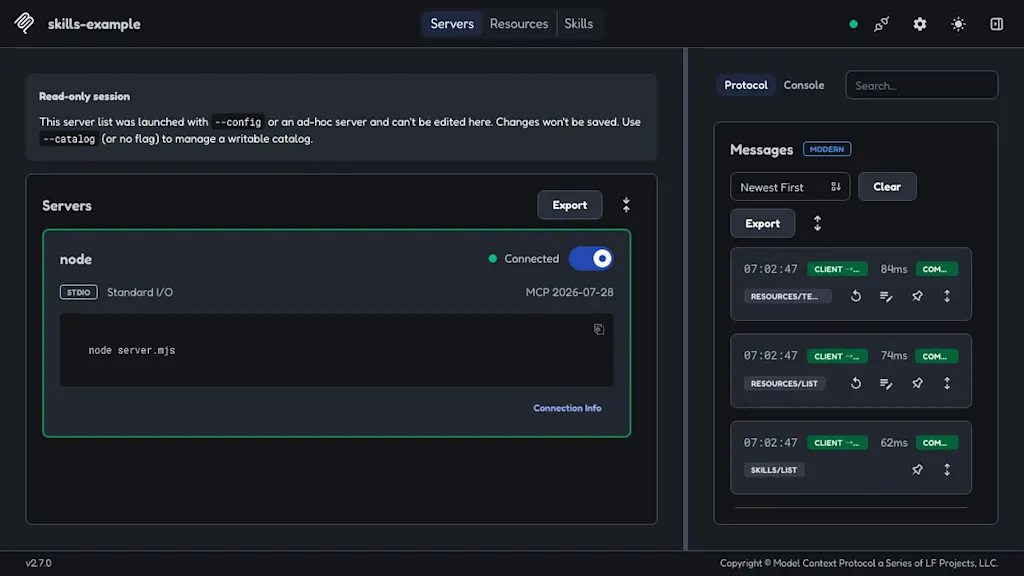
Once the browser opens, turn on the switch for node on the Servers screen. If the browser does not open automatically, open the URL shown in the terminal. Inspector starts the server, so there is no need to run node server.mjs in another terminal.
After connecting, the screen shows Connected and the protocol version MCP 2026-07-28, and a Skills tab appears at the top.
Viewing the skill catalog and instructions
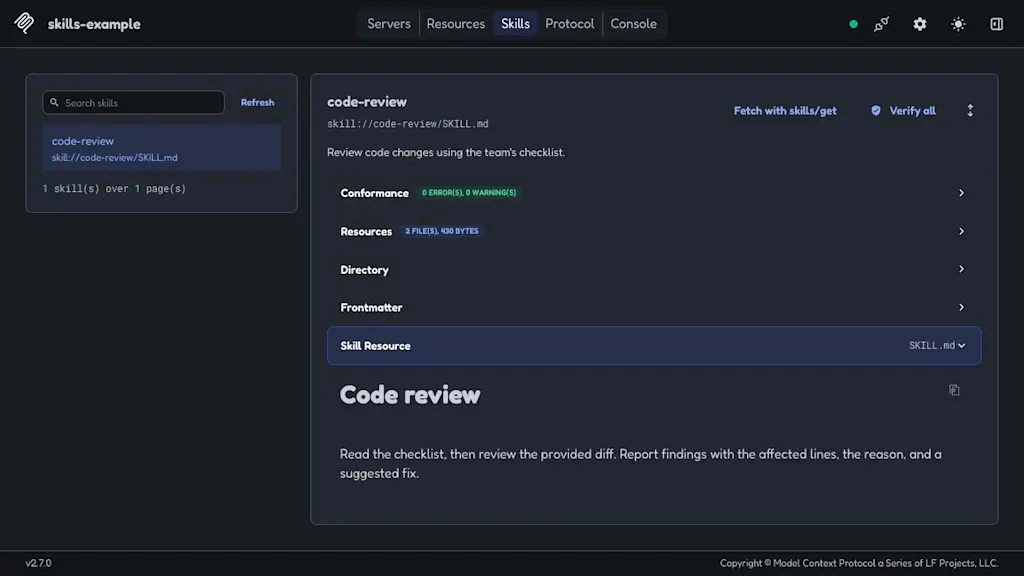
Open the Skills tab and select code-review from the list on the left. The skill's description, frontmatter, and list of distributed files are displayed. The Skill Resource section displays the retrieved contents of SKILL.md as Markdown.
Verifying file contents
Click Fetch with skills/get to retrieve metadata again using the selected URI. With this server, the Conformance section displayed skills/get matches skills/list, confirming that it returned the same skill information as the catalog.
Next, click Verify all and open the Resources section. This retrieves and verifies every file in the manifest. In this example, both SKILL.md and references/checklist.md showed VERIFIED.
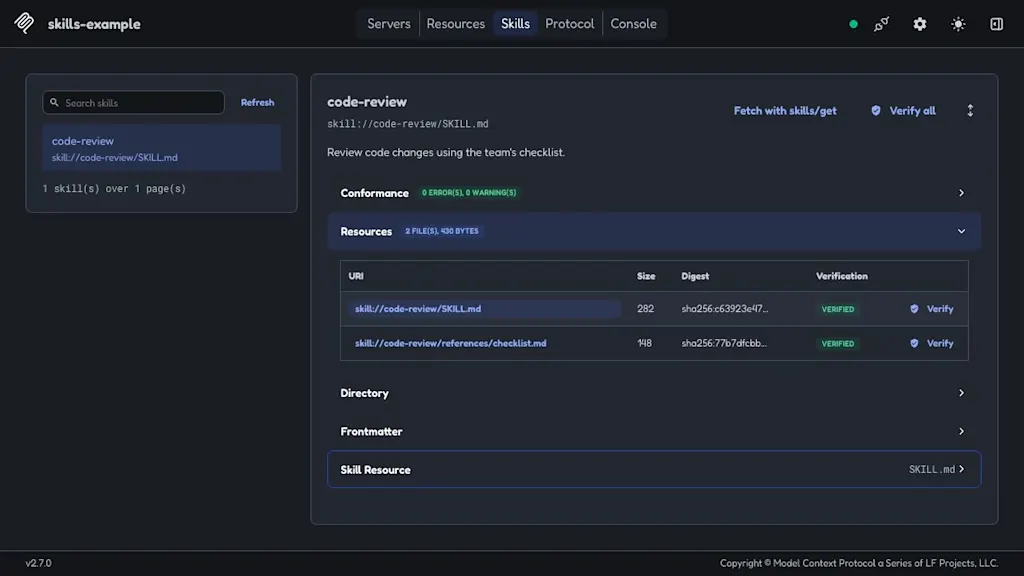
Inspector thus lets you check the integrity of distributed files through the UI, as well as retrieve the catalog and display the instructions.
Summary
- The Skills Extension uses the Agent Skills file format to provide skill metadata and contents from MCP servers.
skills/listandskills/getretrieve metadata, whileresources/readretrieves instructions and supporting files.- Skills are identified by their originating server and URI, and instructions and supporting files are retrieved when needed.
References
Skills - Model Context Protocol
modelcontextprotocol/ext-skills
Agent Skills specification