Virtualizing Large Lists with TanStack Virtual
Adding thousands of elements to the DOM at once drives up rendering and update costs. TanStack Virtual is a headless library that renders only the items needed for the current scroll position. This article covers virtualizing a list in React.
When a web application lists a large number of logs or messages, rendering every element at once can leave the page unresponsive or even crash the browser tab. Even if only a handful of items are visible on screen, the browser still builds DOM nodes for the off-screen elements, runs style calculations and layout for them, and rendering costs climb. The number of items is not the only factor either — DOM size starts to affect performance when conditions like these overlap.
- Each item is built from a deep tree with many child elements, making the page's overall DOM large
- Class or attribute changes force style recalculation across a large number of elements
- CSS selectors match broadly, or complex selectors make matching expensive
- Hover states or animations change properties that trigger layout or repaint
- Code repeatedly queries and updates large numbers of DOM elements
web.dev's article on DOM size explains that a large DOM affects not just initial rendering but also the style calculation and layout that follow user interaction. And as
the article on style calculations describes, the cost of changing an element's class or attribute depends on how many elements are affected and how complex the selectors are.
MDN's rendering waterfall explains that changing properties tied to an element's geometry, such as
width or border-width, requires layout and paint on top of style recalculation. Changes to transform and opacity, on the other hand, can skip layout and repaint under the right conditions, updating the position or opacity of an already-painted layer through compositing alone. That is why they tend to keep the load lower during animation than properties that change an element's size or position.
If the data can reasonably be split across pages, pagination is worth considering first. It keeps both the number of records fetched per page and the DOM element count down, and it is comparatively simple to implement. It also makes the current page easy to share via URL and helps users understand where they are within the list.
That said, some UIs — logs, timelines, chat — are meant to be read continuously, without page boundaries getting in the way. When a requirement is hard to satisfy with pagination, such as when switching pages to compare adjacent items breaks the reader's context, list virtualization becomes worth considering.
Virtualization renders only the items needed for the current scroll position and leaves off-screen items out of the render, keeping the DOM element count low. Because it is more complex than pagination in both implementation and accessibility, the deciding factor should be whether a continuous scrolling experience is genuinely required — not simply that there are a lot of items.
TanStack Virtual is a headless library for implementing exactly this. Adapters are available for React, Vue, Svelte, and others. It ships no components or styles and handles only the calculations virtualization requires, so you can keep using your existing UI components and styles as they are.
This article shows how to virtualize and render a list using React and @tanstack/react-virtual.
The problem with rendering every element as-is
Rendering an array as a list in React is just a matter of turning every item into JSX with map(). For the comparison demo, I built a MessageCard that includes an avatar, buttons, and similar elements for each item. PlainList does not use TanStack Virtual — it renders all 10,000 records as <li> elements.
function PlainList() {
  return (
    <div className="scroll-container">
      <ul role="list" aria-label="メッセージ一覧" className="plain-list">
        {messages.map((message, index) => (
          <li key={message.id} data-index={index} className="plain-message">
            <MessageCard index={index} />
          </li>
        ))}
      </ul>
    </div>
  );
}
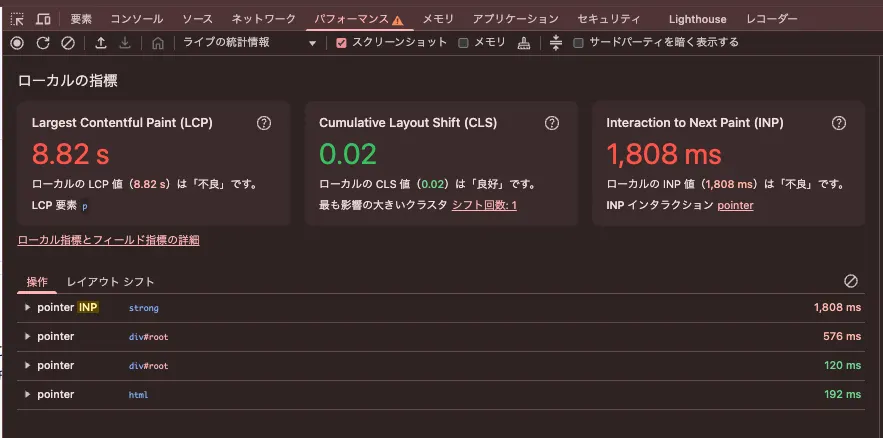
With this implementation, 10,000 <li> elements live in the DOM even though only a few are visible in the scroll area at any moment. Since a single MessageCard contains roughly 20 elements, the page ends up with around 210,000 DOM elements in total. In a real UI, the more images, buttons, icons, and metadata you add, the more elements have to be created and updated. In the running demo, initial rendering can take more than a second, and the browser can briefly stop responding at the moment a hover style is applied.
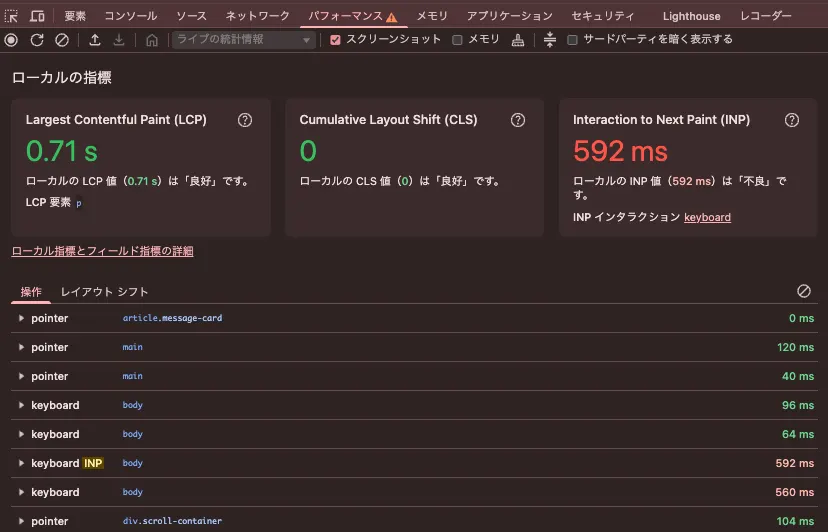
Looking at metrics like LCP (Largest Contentful Paint) and INP (Interaction to Next Paint), the scores are clearly terrible.
Virtualization addresses this by placing only the items near the scroll area into the DOM. Items that move off-screen are removed, and items entering the screen are added. The upside is a much smaller DOM element count, but it also requires calculating scroll positions and adding and removing DOM nodes, so the implementation is more involved than simply rendering everything. A virtualization library like TanStack Virtual abstracts that complexity away and provides the machinery for rendering only the items the current scroll position calls for.
Implementing a fixed-height virtual list
Create a Vite React + TypeScript project and install the @tanstack/react-virtual package. It provides the useVirtualizer hook for React.
npm install @tanstack/react-virtualTo start, here is a minimal virtual list that assumes each item is 50px tall.
import { useRef } from "react";
import { useVirtualizer } from "@tanstack/react-virtual";

const messages = Array.from({ length: 10_000 }, (_, index) => ({
  id: index + 1,
  body: `メッセージ ${index + 1}`,
}));

export function App() {
  const scrollElementRef = useRef<HTMLDivElement>(null);

  const virtualizer = useVirtualizer({
    count: messages.length, // number of items to virtualize
    getScrollElement: () => scrollElementRef.current, // returns the scroll container's DOM element
    estimateSize: () => 50, // assume each item is 50px tall
  });

  return (
    <div
      ref={scrollElementRef}
      style={{ height: 480, overflow: "auto" }}
    >
      <ul
        style={{
          // 50px × 10,000 items = 500,000px is applied,
          // reserving the scroll distance
          height: virtualizer.getTotalSize(),
          position: "relative",
          margin: 0,
          padding: 0,
          listStyle: "none",
        }}
      >
        {virtualizer.getVirtualItems().map((virtualItem) => (
          <li
            key={virtualItem.key}
            style={{
              height: virtualItem.size,
              position: "absolute",
              top: 0,
              left: 0,
              width: "100%",
              // For index 500, for example, start is 25,000px, so
              // translateY(25,000px) places it exactly at the scrolled position
              transform: `translateY(${virtualItem.start}px)`,
            }}
          >
            {messages[virtualItem.index].body}
          </li>
        ))}
      </ul>
    </div>
  );
}
useVirtualizer has three required options: count, getScrollElement, and estimateSize.
countis the total number of items to virtualizegetScrollElementis a function that returns the scroll container's DOM elementestimateSizeis a function that receives an index and returns that item's width or height
Since this example estimates all 10,000 items at 50px, getTotalSize() returns the following value.
10,000 items × 50px = 500,000pxSetting that 500,000px as the height of the <ul> reserves scroll distance that covers items which are not actually rendered.
When you scroll far enough for the item at index 500 to enter the visible range, its VirtualItem holds values like these — the 500 items ahead of it add up to 500 × 50px = 25,000px.
{
  index: 500,
  start: 25_000,
  size: 50,
  end: 25_050,
}
getVirtualItems() returns only the VirtualItems near the visible range, around index 500. If you laid those out in normal document flow, the space for the roughly 500 missing items would collapse and the item at index 500 would end up near the top of the <ul>. So each element is positioned absolutely and VirtualItem.start is passed to translateY(), moving it to its proper distance from the top of the <ul>.
You could also position items by setting VirtualItem.start on top, but changing transform can, under the right conditions, skip layout and repaint and update through compositing alone — which tends to keep the cost of repositioning during scroll lower.
Measuring variable-height elements with measureElement
Real messages vary in height depending on how long the body text is. If every item stays estimated at 50px, long bodies overlap and the calculated scroll positions drift away from the actual ones.
For variable-height items, estimateSize serves as the initial value and measureElement measures the elements after they render. The code below creates 10,000 messages of varying length.
type Message = {
  id: number;
  author: string;
  body: string;
};

const phrases = [
  "新しい変更内容を確認しました。",
  "次のリリースに向けてテストケースを追加しています。",
  "再現手順と期待する結果をドキュメントにまとめました。",
  "レビューで指摘された境界条件もあわせて検証する予定です。",
];

const messages: Message[] = Array.from({ length: 10_000 }, (_, index) => ({
  id: index + 1,
  author: `ユーザー ${(index % 12) + 1}`,
  body: Array.from(
    { length: (index % phrases.length) + 1 },
    (_, phraseIndex) => phrases[(index + phraseIndex) % phrases.length],
  ).join(" "),
}));
Change the Virtualizer's estimateSize to a value that accommodates even the message with the longest body.
const scrollElementRef = useRef<HTMLDivElement>(null);

const virtualizer = useVirtualizer({
  count: messages.length,
  getScrollElement: () => scrollElementRef.current,
  estimateSize: () => 220,
});
The official description of
estimateSize recommends estimating the largest possible size, within comfort, when you measure elements dynamically. The smaller the gap between the estimate and the actual height, the less the total size and scroll position need to be corrected after measurement.
Measuring the item heights in this sample shows a range from 160px to 213px depending on body length. So 220px is specified as a value that accommodates even the tallest item.
Next, add data-index and ref={virtualizer.measureElement} to the <li> elements you render.
<ul
  className="message-list"
  style={{ height: virtualizer.getTotalSize() }}
>
  {virtualizer.getVirtualItems().map((virtualItem) => {
    return (
      <li
        key={virtualItem.key}
        data-index={virtualItem.index}
        ref={virtualizer.measureElement}
        className="message"
        style={{ transform: `translateY(${virtualItem.start}px)` }}
      >
        <MessageCard index={virtualItem.index} />
      </li>
    );
  })}
</ul>
measureElement is called as a React ref callback and reports the rendered element's size back to the Virtualizer. The element also needs data-index so the item can be identified. data-index is the attribute that ties a variable-height element to its measurement, which then feeds into getTotalSize() and the start values of subsequent items.
You cannot use margin for the spacing between items. The getBoundingClientRect() value that measureElement reads does not include margin, so the height the Virtualizer knows about is smaller than the space the item actually occupies, and items end up overlapping. Create spacing with padding, or use the gap option instead.
Identifying the same item across data changes with getItemKey
getItemKey is a function that returns an item's key, such as its id. By default getItemKey returns the array index. For a static list with no additions, removals, or reordering, the default may never cause a problem.
Now consider a case where messages can be deleted. Delete the message at index 0, and the message that used to be at index 1 becomes index 0. When an item's key shifts like that, the Virtualizer's stored measurements and the DOM elements React reuses risk being associated with a different message than before the deletion. Supplying a getItemKey that returns a stable key lets the same message stay identifiable across deletions and reordering.
The example below returns message.id, which identifies the same message no matter how the order changes.
const [messages, setMessages] = useState(initialMessages);

// return the id as a stable key
const getItemKey = useCallback(
  (index: number) => messages[index].id,
  [messages],
);

const virtualizer = useVirtualizer({
  count: messages.length,
  getScrollElement: () => scrollElementRef.current,
  estimateSize: () => 220,
  getItemKey,
});
Tuning what appears during scroll with overscan
overscan is the number of extra items rendered before and after the visible range. According to the API documentation, the default value is
1. Raising it reduces the chance of seeing blank space while the next items render during fast scrolling.
const virtualizer = useVirtualizer({
  // ...
+  overscan: 5,
});
The trade-off is that a higher overscan also means more DOM elements created off-screen. The right value depends on how expensive each item is to render, how large the scroll area is, and what devices your users are on. A large value does not automatically make scrolling smooth. Start small and verify with your actual content on your target devices.
Accessibility and other caveats
In a virtual list, only part of the set exists in the DOM. As a result, users of assistive technology may not get an accurate sense of roughly how many items exist, or where the current item sits within the set. The totals and positions assistive technology announces are based on the number and order of items present in the DOM.
To make a virtualized list accessible, add ARIA attributes that convey the size of the set and the current position to assistive technology.
aria-setsizeindicates the number of elements in the entire set. Set the actual count when the total is known, or-1when it is notaria-posinsetindicates an element's position within the set. Use an integer of 1 or greater, no larger thanaria-setsizewhen the total is known
 <ul
   className="message-list"
   style={{ height: virtualizer.getTotalSize() }}
 >
   {virtualizer.getVirtualItems().map((virtualItem) => (
     <li
       key={virtualItem.key}
       data-index={virtualItem.index}
       ref={virtualizer.measureElement}
+      aria-posinset={virtualItem.index + 1}
+      aria-setsize={messages.length}
       className="message"
       style={{ transform: `translateY(${virtualItem.start}px)` }}
     >
       {/* message content */}
     </li>
   ))}
 </ul>
Because aria-posinset takes a 1-based position within the set, add 1 to the 0-based virtualItem.index. For aria-setsize, pass messages.length — the size of the entire set, including items that are not in the DOM.
These attributes are unnecessary in an ordinary list where every item exists in the DOM, because the browser can derive position and total from the DOM itself. You add them to each <li> only when, as in a virtual list, just part of the set is rendered.
Browsers do not validate whether aria-posinset and aria-setsize are logically correct. Stale totals or out-of-range positions will pass along wrong information to assistive technology. The WAI-ARIA Authoring Practices Guide states the principle "No ARIA is better than Bad ARIA". If you cannot keep the values correct, omitting the attributes and preserving the native list structure is safer than leaving incorrect values frozen in place.
Rendering only part of the items also affects browser features and focus management. Virtualized scrolling can introduce problems like these.
- Items not in the DOM cannot be found with the browser's find-in-page
- Printing may only cover the items near the visible range that happen to be in the DOM at that moment
- Select-all and copy in the browser will not include text from items that are not in the DOM
- If an item containing the focused element — a button or link, say — is unmounted by scrolling, that element's focus is lost. You need either to keep the focused item rendered or to restore focus after rendering the destination
Summary
- TanStack Virtual is a headless virtualization library that provides no markup or styles and calculates which items to render, and where to place them, from the scroll position
- For large datasets, consider straightforward pagination first, and reach for virtualization when a continuous reading experience without page boundaries is required
getTotalSize()reserves the scroll distance for all items, and absolutely positioning only the itemsgetVirtualItems()returns keeps the DOM element count low- For variable-height items,
estimateSizeserves as the initial value whiledata-indexandmeasureElementreport the rendered dimensions back to the Virtualizer - For lists where items are added, removed, or reordered, returning a stable ID from
getItemKeykeeps measurements associated with the right data - Raising
overscanrenders items just outside the visible range ahead of time, but it also increases the DOM element count and rendering cost, so tune it against your actual content - Because only part of the items exist in the DOM in a virtual list, position within the set, focus, find-in-page, printing, select-all and copy, and assistive technology announcements all need separate consideration