The sibling-index() CSS Function That Returns a Sibling Element's Index
`sibling-index()` returns an element's index among its siblings. It enables styling based on sibling position, such as staggered animations and gradual hue changes, using only CSS.
sibling-index() is a function defined in CSS Values and Units Module Level 5. It returns an element's index among its sibling elements. The index starts at 1 and indicates where the current element is positioned among elements that share the same parent. For example, if an element is the third child of its parent, sibling-index() returns 3.
li {
  /* If this is the third element, set the width to 3 * 50px = 150px */
  width: calc(sibling-index() * 50px);
  background-color: lawngreen;
}By using the index obtained from sibling-index(), you can style elements based on their position among siblings, such as creating staggered animations or changing hue step by step. Effects that previously required JavaScript can now be achieved with pure CSS.
Even before sibling-index() was proposed, it was possible to style elements based on their sibling position with pseudo-classes such as :nth-child() and :nth-of-type(). However, these pseudo-classes are for selecting elements that match a specific pattern; they do not let an element know its own index. To obtain the index, you needed verbose code like the following:
li {
  width: calc((var(--index) + 1) * 50px);
  background-color: lawngreen;
}

/* Similar code continues for each element... */
li:nth-child(1) {
  --index: 0;
}
li:nth-child(2) {
  --index: 1;
}
li:nth-child(3) {
  --index: 2;
}
There has long been a need to use an element's index or the total number of elements in calculations, but this could not be completed with CSS alone. With the addition of sibling-index(), these needs can now be handled entirely in CSS. This article introduces several styling examples that use sibling-index().
Staggered animations
A staggered animation is a technique that creates wave-like motion by offsetting the start time of animations across multiple elements. By using sibling-index() in the calculation for animation-delay, you can delay the animation start time based on each sibling's position. The following example implements a staggered animation where list items fade in one after another.
li {
  opacity: 0;
  transform: translateX(-12px);
  animation: slide-in 0.5s ease-out forwards;
  /* 1st = 120ms, 2nd = 240ms, ... */
  animation-delay: calc(sibling-index() * 120ms);
}

@keyframes slide-in {
  to {
    opacity: 1;
    transform: translateX(0);
  }
}Changing hue gradually
By combining sibling-index() and sibling-count(), you can also create styles that change hue step by step. sibling-count() is a function that returns the total number of elements with the same parent. This is achieved by converting the index obtained with sibling-index() into an angle (hue) and passing it to the hue component of the oklch() function. When combined with sibling-count(), the hue can change evenly from the start hue to the end hue no matter how many elements there are.
li {
  --start: 200;
  --end: 320;
  background: oklch(
    65% 0.15
      calc(
        var(--start) + (var(--end) - var(--start)) / (sibling-count() - 1) *
          (sibling-index() - 1)
      )
  );
}
Fan-shaped layout
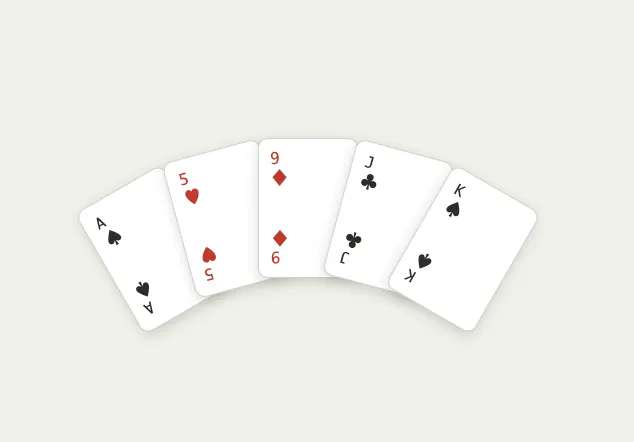
You can also place elements in a fan shape by using sibling-index() to calculate an angle based on each element's position and applying that angle with transform: rotate(). The key to this layout is rotating each element by a different angle around a center point. Define the total spread of the fan (up to 360 degrees) as --spread, then calculate the step angle based on the number of elements. The final angle for each element is calculated from the step angle and the index.
.card {
  --spread: 60deg; /* The total spread of the fan */
  --radius: 240px; /* The fan radius */

  /* Step angle per card */
  --step: calc(var(--spread) / (sibling-count() - 1));

  /* Final angle for each card (center = 0deg) */
  --angle: calc(var(--step) * (sibling-index() - 1) - var(--spread) / 2);

  /* Rotate the card */
  transform: rotate(var(--angle)) translateY(calc(var(--radius) * -1));
  transform-origin: bottom center;
}
Menu items that appear in a circle
A common effect in floating action buttons is to show multiple menu items in a circle when hovering over the button. This can also be implemented by using sibling-index() to calculate an angle based on each element's position and applying that angle with transform: rotate(). As with the fan-shaped layout, the key is rotating each element by a different angle around a center point.
/* Menu items arranged around the circumference */
.menu .item {
  /* Convert the 1-based index to a 0-based index */
  --i: calc(sibling-index() - 1);

  /* Subtract 1 because the center trigger should not be counted */
  --total: calc(sibling-count() - 1);

  /* Angle from evenly dividing the circumference */
  --angle: calc(360deg / var(--total) * var(--i));

  /* Radius and animation speed */
  --radius: 110px;
  --delay-step: 70ms;

  /* Initial state: all items overlap and are transparent */
  transform: rotate(var(--angle)) translateY(0) rotate(calc(var(--angle) * -1));
  opacity: 0;

  /* Delay the animation start time based on the index */
  transition:
    transform 0.4s cubic-bezier(0.34, 1.56, 0.64, 1)
      calc(var(--i) * var(--delay-step)),
    opacity 0.3s ease-out calc(var(--i) * var(--delay-step));
}

/* When hovering over the trigger, expand the menu items in a circle */
.menu:hover .item {
  /* Rotate by the index-based angle and move outward by the radius */
  transform: rotate(var(--angle)) translateY(calc(var(--radius) * -1))
    rotate(calc(var(--angle) * -1));
  opacity: 1;
}Summary
sibling-index()is a CSS function that returns an element's index among its siblingssibling-count()is a CSS function that returns the total number of elements that share the same parent- By using these functions, you can style elements based on sibling position, such as staggered animations, gradual hue changes, and fan-shaped layouts