
You Can Now Distribute Agent Skills with the `gh` Command
GitHub CLI now includes the `gh skill` command, making it easier to install, search, and manage agent skills hosted on GitHub. This article walks through how to use `gh skill` in practice.
In the era of coding agents, the importance of sharing agent skills across a team has become widely recognized. Reusing practices that emerged from individual experimentation across the whole team can significantly improve development speed and stabilize quality. Agent skills also help turn tacit knowledge into explicit, documented knowledge, which is valuable from a team knowledge management perspective.
For sharing and distributing skills, npx skills provided by Vercel had been widely used. It lets you install skills published on GitHub with a single command,
npx skills add owner/repo, and it was a very convenient tool because it abstracted away differences between coding agents.
Against that backdrop, GitHub CLI added the
gh skill command in v2.90.0, making it easy to install, search, and manage agent skills hosted on GitHub. The significance is that skill management can now be handled entirely with the native GitHub CLI without relying on a third-party tool. One particularly notable feature is that gh skill can use GitHub primitives such as tags and releases to reduce supply chain risk.
Because both Vercel's npx skills and GitHub CLI's gh skill follow the Agent Skills specification, skills are compatible between the two. Even if you are already distributing skills with
npx skills, moving to gh skill should be relatively straightforward.
This article introduces how to use the gh skill command.
How to use the gh skill command
To use gh skill, you first need to update GitHub CLI to v2.90.0 or later. Let's check the version of the gh command.
$ brew upgrade gh
$ gh --version

gh version 2.90.0 (2026-04-16)
https://github.com/cli/cli/releases/tag/v2.90.0
The gh skill command provides the following subcommands.
| Subcommand | Description |
|---|---|
gh skill install |
Install a skill from a GitHub repository |
gh skill preview |
Preview the contents of a skill hosted in a GitHub repository |
gh skill publish |
Publish a skill to a GitHub repository after validating it against the spec |
gh skill search |
Search for skills on GitHub |
gh skill update |
Update installed skills to the latest version |
Installing a skill
Searching for a skill
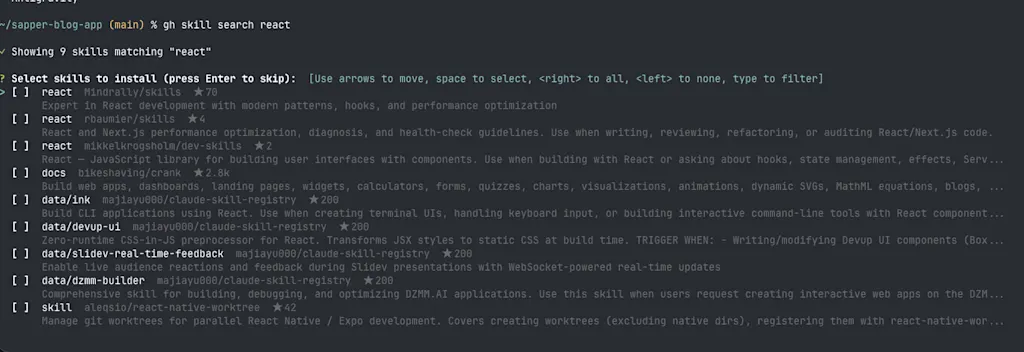
Let's try installing a skill with gh skill. To look for public skills on GitHub, you can use the gh skill search command. Alternatively, you can browse a skill catalog site such as skills.sh. Here, let's search for skills related to React as an example.
gh skill search reactWhen you run the command above, GitHub Code Search API searches public repositories for SKILL.md files whose skill names or descriptions include the keyword "react." You can then select results directly from the list and install them.
Reviewing the contents of a skill
Here, let's install the next-best-practices skill published at https://github.com/vercel-labs/next-skills. Before installing a skill published by a third party, it is important to review its contents in advance from a security perspective. Otherwise, you could be exposed to prompt injection risk if the skill contains instructions that steer the AI in unintended ways, or malware risk if bundled scripts are malicious.
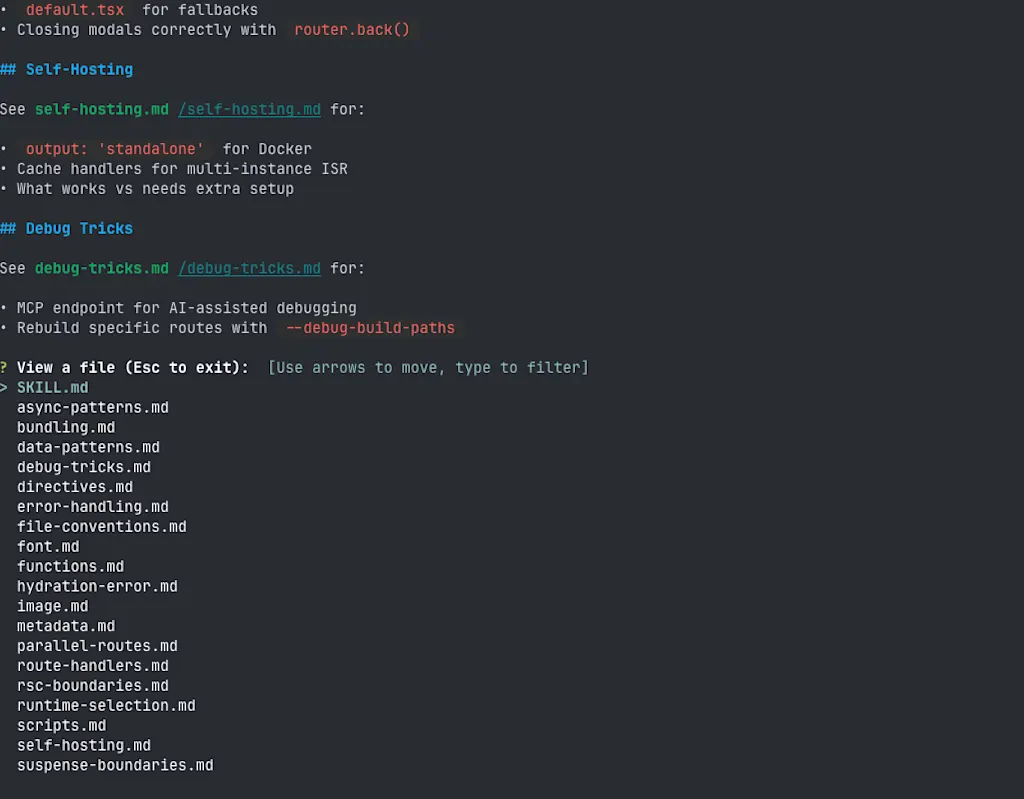
This is where gh skill preview helps: it lets you safely inspect a skill before installation.
# Review the contents of the next-best-practices skill
gh skill preview vercel-labs/next-skills next-best-practices
# You can also start from the full list of skills without selecting a specific skill name
gh skill preview vercel-labs/next-skills
It shows a list of files provided by the skill, and you can press Enter on any file to inspect its contents.
Installing a skill
Once you have confirmed that the skill contents are acceptable, install it with gh skill install.
gh skill install vercel-labs/next-skills next-best-practicesRunning the command above installs the next-best-practices skill published in the vercel-labs/next-skills repository on GitHub. If you want to specify a version, you can append a tag or commit hash after @. To reduce supply chain risk, it is recommended to install a specific version rather than following whatever is latest.
However, because tags on GitHub can still be changed later unless Immutable Release is enabled, specifying a commit hash is safer. This security guidance is very similar to best practices for defending against supply chain attacks in GitHub Actions. Here,
@<ref> is the syntax for specifying which tag or commit hash to fetch at install time, while --pin is an option that prevents future updates through gh skill update.
# Install by specifying a commit hash
gh skill install vercel-labs/next-skills next-best-practices@038954e07bfc313e97fa5f6ff7caf87226e4a782
# Use the pin option to prevent future updates
gh skill install vercel-labs/next-skills next-best-practices --pin 038954e07bfc313e97fa5f6ff7caf87226e4a782
When you run the command, installation proceeds interactively.
- Which AI agent to install the skill for
- GitHub Copilot
- Claude Code
- Cursor
- Codex
- Gemini CLI
- Antigravity
- Skill scope (
projectoruser)
If you want to share the skill with your team, choosing project scope is usually a good idea. If you want to use it as a personal tool, user scope makes more sense. Project scope is especially useful in team development because it lets you manage skills in association with the repository.
After installation completes, the skill is stored in the directory corresponding to the AI agent you selected. In this example, Claude Code was selected, so the skill was installed into .claude/skills/next-best-practices.
$ tree .claude/skills/next-best-practices
.claude/skills/next-best-practices
├── SKILL.md
├── async-patterns.md
├── bundling.md
├── data-patterns.md
├── debug-tricks.md
├── directives.md
├── error-handling.md
├── file-conventions.md
├── font.md
├── functions.md
├── hydration-error.md
├── image.md
├── metadata.md
├── parallel-routes.md
├── route-handlers.md
├── rsc-boundaries.md
├── runtime-selection.md
├── scripts.md
├── self-hosting.md
└── suspense-boundaries.md

1 directory, 20 files
For skills installed with gh skill, metadata is appended to the SKILL.md file, including which GitHub repository the skill was installed from and which version was installed. gh skill update uses this metadata to manage updates.
| Field | Purpose |
|---|---|
github-repo |
The URL of the GitHub repository the skill was installed from |
github-path |
The path to the skill directory inside the repository |
github-ref |
The tag or commit hash referenced at installation time |
github-pinned |
The pinned revision set by --pin. If this is present, gh skill update will not update it |
github-tree-sha |
A hash representing the contents of the skill directory, used to detect updates from file diffs |
github-tree-sha is particularly useful because it can detect whether the actual contents of the skill changed even when the tag or commit hash did not. That makes it possible to catch cases where "the version number stayed the same, but the contents were swapped out."
---
description: Next.js best practices - file conventions, RSC boundaries, data patterns, async APIs, metadata, error handling, route handlers, image/font optimization, bundling
metadata:
  github-path: skills/next-best-practices
  github-pinned: 038954e07bfc313e97fa5f6ff7caf87226e4a782
  github-ref: 038954e07bfc313e97fa5f6ff7caf87226e4a782
  github-repo: https://github.com/vercel-labs/next-skills
  github-tree-sha: ad17eb27952b39a6ab0061bd50e8a2213b63a3ec
name: next-best-practices
user-invocable: false
---

# Next.js Best Practices

Apply these rules when writing or reviewing Next.js code.

<!-- omitted -->
Updating skills
Having a mechanism to keep skills up to date is also an important part of skill management. For example, if a library undergoes a breaking change but the skill related to that library is not updated, the agent may continue acting based on outdated practices.
Skills installed with gh skill can be updated to the latest version with gh skill update.
When you run the command, it checks the list of skills installed locally to see whether any updates are available. Even for skills that are not managed by a GitHub repository, meaning metadata.github-repo is missing, the command is designed to ask which GitHub repository they came from.
$ gh skill update

! .system/skill-creator has no GitHub metadata
? Repository for .system/skill-creator (owner/repo):
If updates are available, it shows the old and new commit hashes and asks whether to apply them. As noted earlier, skills installed with --pin are skipped.
? Repository for .system/skill-creator (owner/repo):
  Skipping .system/skill-creator
⊘ next-best-practices is pinned to 038954e07bfc313e97fa5f6ff7caf87226e4a782 (skipped)

2 update(s) available:
  • integrate-context-matic (github/awesome-copilot) 7095ef41 > 86cfeb1c [main]
  • next-best-practices (vercel-labs/next-skills) 0b069c12 > ad17eb27 [main]

? Update 2 skill(s)? (Y/n)
If you want to update only a specific skill, you can specify the skill name.
gh skill update next-best-practicesYou can also use --dry-run to see which skills are updatable without actually updating them.
gh skill update --dry-runPublishing a skill
You do not have to use gh skill publish in order to publish a skill on GitHub. As long as you place content that follows the skill specification in a GitHub repository, it can be installed with gh skill install. However, gh skill publish is still recommended from a supply chain security perspective because it automatically does the following:
- Run validation against the skill specification
- Check repository settings such as tag protection and secret scanning
Let's walk through publishing a skill by creating a repository from scratch. Create a public repository in advance.
gh repo create my-skill-repo --publicNext, add a skill to the repository. gh skill recognizes files placed in the following locations as skills.
skills/*/SKILL.mdskills/{scope}/*/SKILL.md*/SKILL.md(root-level)plugins/{scope}/skills/*/SKILL.md
Let's create a tech-review skill for reviewing technical articles. Because the skill name and directory name must match, place the SKILL.md file at skills/tech-review/SKILL.md.
---
name: tech-review
description: A skill for reviewing technical books and manuscripts for software engineers, offering suggestions from the perspectives of structure, technical accuracy, and reader experience. It should be used when a user asks for a review of a manuscript, draft chapter, tutorial article, or technical documentation, such as "review this manuscript," "take a look at this chapter," "I'm writing a technical book," "check the code samples," or "give me advice on the structure." It can support all aspects of technical book production, including writing assistance, editorial feedback, structural improvements, code review within the manuscript, and adjusting the target reader level.
---

# Technical Manuscript Review Skill

...
Before running gh skill publish, use the --dry-run option to check whether the skill has any issues. If it does not conform to the Agent Skills specification, errors will be shown. For example, the command validates things like the following:
- Whether the
namefield follows the specification: lowercase alphanumeric characters and hyphens only, starts and ends with an alphanumeric character, and has at least 3 characters - Whether the skill name matches the directory name
- Whether the
nameanddescriptionfields exist - If the
allowed-toolsfield exists, whether it is a string rather than an array - Whether
metadata.github-*fields are absent, since these are installation metadata added bygh skill installand should not be included when publishing
As an example, try running gh skill publish --dry-run after removing the description field. You should see an error like this.
$  gh skill publish --dry-run
X tech-review: missing required field: description
! tech-review: recommended field missing: license
! no active tag protection rulesets found. Consider protecting tags to ensure immutable releases (Settings > Rules > Rulesets)

1 error(s), 2 warning(s)
validation failed with 1 error(s)
The error tells you that the description field is missing. As long as errors remain, the skill cannot be published, even if you remove the --dry-run option. The output also shows two warnings. To improve the repository's safety and trustworthiness, it is recommended to address those warnings as well.
- The
licensefield is missing - Tag protection rules are not configured
Add the description field back and run gh skill publish --dry-run again. This time there should be no errors, and you should see a "Ready to publish!" message.
$ gh skill publish --dry-run
! tech-review: recommended field missing: license
! no active tag protection rulesets found. Consider protecting tags to ensure immutable releases (Settings > Rules > Rulesets)

2 warning(s)

Ready to publish! Repository: azukiazusa1/my-skill-repo

Dry run complete. Use without --dry-run to publish.
Now that the errors are resolved, let's publish the skill. First, push your changes to the remote repository.
git add skills/tech-review/SKILL.md
git commit -m "Add tech-review skill"
git push origin main
At the moment you push the changes to the remote repository, the skill is already installable with gh skill install. Running gh skill publish simply automates the rest of the publishing workflow, including tagging and release creation. Now remove the --dry-run option and run gh skill publish. Publishing proceeds interactively.
- If the repository does not already have the
agent-skillstopic, whether to add it - Tagging strategy (
Semveror custom) - Tag version (
v1.0.0) - Whether to enable Immutable Release, which prevents retagging
- Whether to auto-generate release notes
$ gh skill publish

Publishing to azukiazusa1/my-skill-repo...

? Add "agent-skills" topic to azukiazusa1/my-skill-repo? (required for discoverability) Yes
✓ Added "agent-skills" topic
? Tagging strategy: Semver (recommended): v1.0.0
? Version tag [v1.0.0]: v1.0.0
? Enable immutable releases? (prevents tampering with published releases) Yes
? Create release v1.0.0 with auto-generated notes? Yes
✓ Published v1.0.0
✓ Install with: gh skill install azukiazusa1/my-skill-repo
✓ Pin with:     gh skill install azukiazusa1/my-skill-repo <skill> --pin v1.0.0
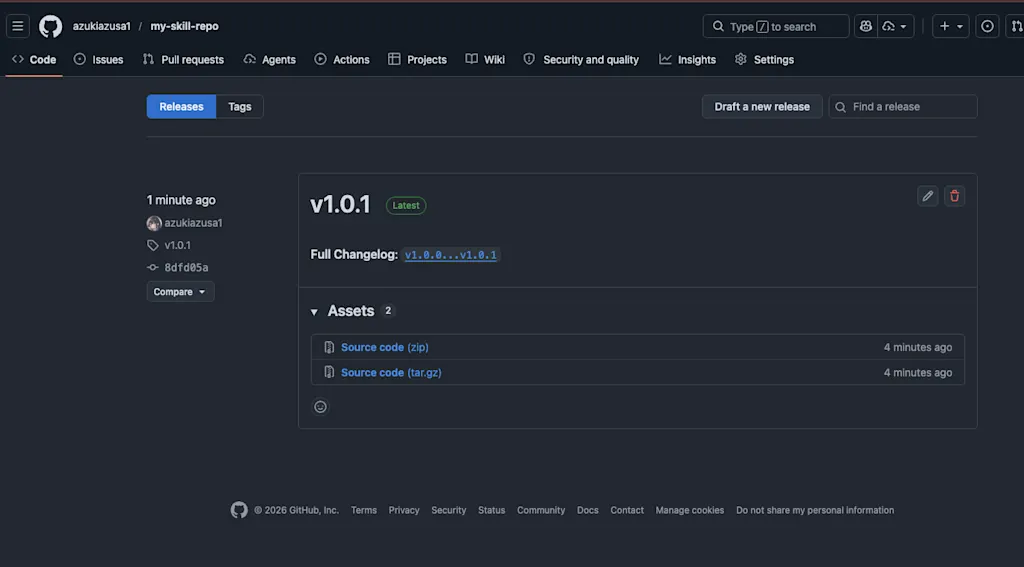
You can confirm that a tag and release named v1.0.0 were indeed created in the azukiazusa1/my-skill-repo repository on GitHub.
Finally, let's verify that the published skill can actually be installed.
gh skill install azukiazusa1/my-skill-repo tech-reviewSummary
- The
gh skillcommand makes it easy to install, search, and manage agent skills on GitHub - You can pin skills using commit hashes or tags, which helps reduce supply chain risk
gh skill search <keyword>lets you search for skills on GitHubgh skill install <owner/repo> <skill>installs a skill from GitHubgh skill preview <owner/repo> <skill>lets you inspect a skill before installing itgh skill updatechecks whether installed skills have updates and updates them to the latest versiongh skill publishautomates the sequence of tasks required to publish a skill