
Creating and Improving Skills with the Skill Create Skill
Agent Skills that give Claude Code domain expertise are gaining attention, but creating them still involves hurdles. This article explores skill-creator, Anthropic's tool for skill creation, improvement, and performance measurement.
Skills that provide Claude Code with domain expertise and organizational knowledge based on the open Agent Skills standard have been drawing a lot of attention recently. One reason is that the release of Opus 4.6 significantly improved model capability, bringing it to a level where it can take on workflows across an entire project. Another is that Claude Code is increasingly being used outside engineering as well. When people with specialized knowledge create skills and use them to bring out the model's capabilities, it becomes possible to automate more advanced tasks. Traditional organizations have long struggled with work becoming dependent on specific individuals, but by sharing knowledge through skills, it becomes possible to improve productivity across the organization.
That said, there are still several hurdles to creating skills. The people who create skills are often domain experts, but they do not necessarily have engineering knowledge. Even when engineers create skills, there is still the question of how to evaluate them. Unlike tests in traditional software development, skill evaluation is difficult to quantify, so it often relies on subjective judgment. Skills also need ongoing improvement, but the lack of clear guidance on how to improve them is another challenge. In practice, I often hear discussions at meetups about how to evaluate skills and AI agents.
To address these issues, Anthropic provides a plugin called skill-creator.
skill-creator is a tool that supports skill creation, improvement, and performance measurement. It can be used to create a skill from scratch, edit and optimize an existing skill, and evaluate and measure skill performance.
In this article, I will walk through creating and improving a skill with skill-creator, and explain how it can be used to measure skill performance.
Dissecting skill-creator
Because skill-creator itself is built according to Agent Skill best practices, analyzing it is also useful for learning how to create skills. Its directory structure looks like this:
.
├── agents
│   ├── analyzer.md
│   ├── comparator.md
│   └── grader.md
├── assets
│   └── eval_review.html
├── eval-viewer
│   ├── generate_review.py
│   └── viewer.html
├── LICENSE.txt
├── references
│   └── schemas.md
├── scripts
│   ├── __init__.py
│   ├── aggregate_benchmark.py
│   ├── generate_report.py
│   ├── improve_description.py
│   ├── package_skill.py
│   ├── quick_validate.py
│   ├── run_eval.py
│   ├── run_loop.py
│   └── utils.py
└── SKILL.md
The core of a skill is SKILL.md. When Claude executes a task, it loads content into the system prompt in the following three stages:
- The
nameanddescriptionfields inSKILL.md: this is the part that describes the skill and is used to decide whether to invoke it. Because it is always included in the system prompt, it is limited to 64 characters fornameand 1024 characters fordescriptionto avoid bloating context. - The body of
SKILL.md: this is included in the system prompt when the skill is invoked, and contains execution steps and cautions. To achieve good performance, it is recommended to keep it under 500 lines. - Additional resources such as
references/,assets/, andscripts/: extra information required to execute the skill, loaded only when needed.
The description field of the skill-creator skill is written as follows, so if you instruct Claude to create or evaluate a skill, it will likely invoke this skill. The Use when users ... part is especially important in deciding whether the skill should be triggered.
Create new skills, modify and improve existing skills, and measure skill performance. Use when users want to create a skill from scratch, edit, or optimize an existing skill, run evals to test a skill, benchmark skill performance with variance analysis, or optimize a skill's description for better triggering accuracy.SKILL.md also describes the workflow for executing the skill. In skill best practices, complex operations are recommended to be broken down into clear, ordered steps.
At a high level, the flow looks like this. You can see that it is designed so that the user can intervene throughout skill creation and improvement. It also uses a feedback loop pattern, which helps improve quality.
- Conduct interviews or research to understand the user's intent.
- Write
SKILL.md. - Create test cases to evaluate the skill.
- Launch agents in parallel to run the test cases. While waiting for evaluation to finish, explain the evaluation criteria to the user.
- After all agent evaluations are complete, aggregate the quantitative results and generate a report.
- Launch a viewer so the user can review the evaluation results in the browser.
- Improve the skill based on user feedback. Repeat this process until the issues are resolved.
- Optimize the description to improve whether the skill is triggered appropriately.
Additional resources are defined in SKILL.md along with how they should be used. For example, it instructs Claude to use the generate_review.py script to create quantitative evaluations. The advantage of using a script is that it can perform deterministic processing, meaning the same input always produces the same output.
- Help the user evaluate the results both qualitatively and quantitatively
  - While the runs happen in the background, draft some quantitative evals if there aren't any (if there are some, you can either use as is or modify if you feel something needs to change about them). Then explain them to the user (or if they already existed, explain the ones that already exist)
  - Use the `eval-viewer/generate_review.py` script to show the user the results for them to look at, and also let them look at the quantitative metrics
Specialized tasks are also delegated to sub-agents as needed. There is analyzer.md for analyzing how a skill can be improved, comparator.md for comparing performance before and after improvements, and grader.md for scoring skill performance. By delegating specialized analysis and grading to sub-agents, the main session can avoid overloading its context.
Domain-specific knowledge is collected in the /references directory. schemas.md defines the JSON schema used for evaluating skills, which helps structure and stabilize the output of AI agents, whose responses can otherwise vary significantly.
The concrete workflow of skill-creator will be explained in the next section using the improvement of an existing skill as an example.
Install the skill-creator Plugin
The skill-creator plugin is distributed through the claude-plugins-official marketplace. Launch Claude Code, enter the /plugin command, and type skill-creator in the search bar.
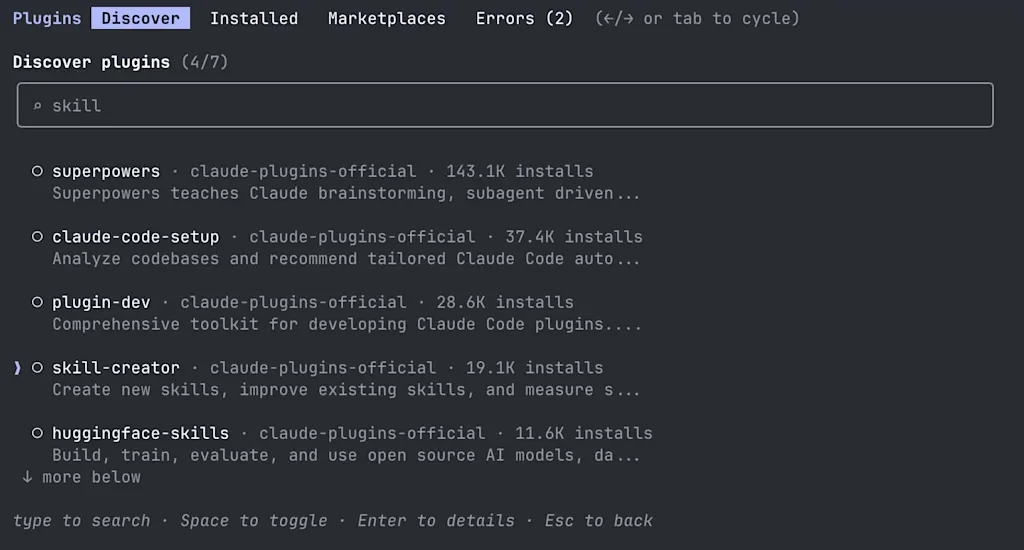
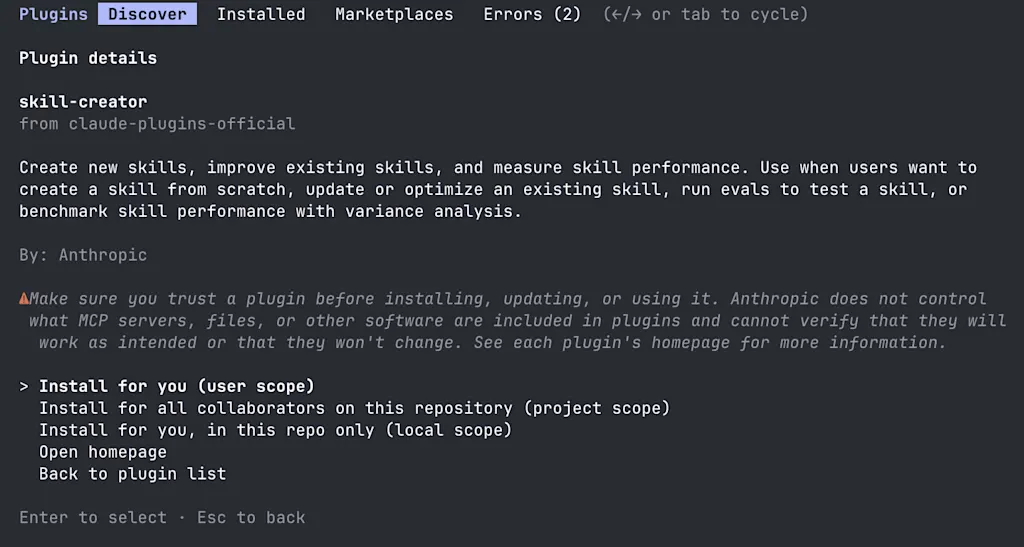
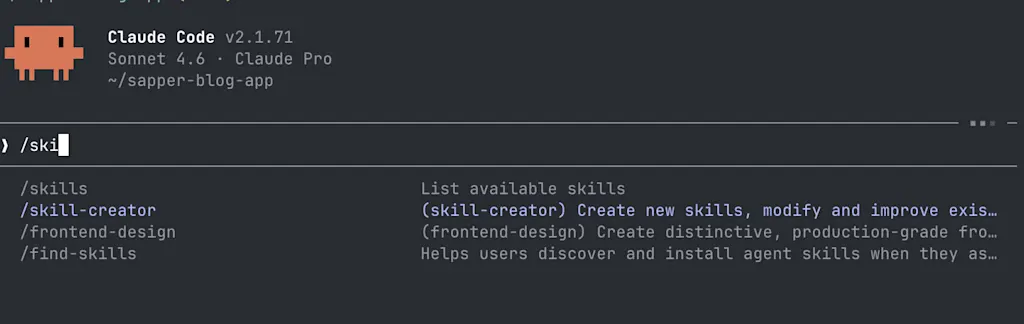
Once you find the skill-creator plugin, press Enter to install it. After installation, the /skill-creator command becomes available. To reflect the installed skill, you need to run /reload-plugins or restart Claude Code.
Improve an Existing Skill
Let's try improving a skill with skill-creator. I happen to have a skill called article-review for checking blog posts for typos and other writing issues, so I used that as the example.
Contents of `SKILL.md` for the `article-review` skill
---
description: "Reviews the article specified by the argument."
argument-hint: "[article-slug]"
allowed-tools: Bash(git *), Bash(npm *), Read, Glob, Grep, WebFetch
---

You are a professional editor. Read the technical article and point out typos, grammatical errors, and unnatural expressions.

## Output format

```
【Typos / Notation Issues】
- Relevant text: "..."
  Suggested fix: "..."
  Reason: [specific reason]

【Grammatical Errors】
- Relevant text: "..."
  Suggested fix: "..."
  Reason: [specific reason]

【Suggestions】
- Add any suggestions that would make the article easier to read
```

### Notes

- Point out only clear errors, not matters of writing style or preference
- Always provide a suggested fix
- There is no need to mention what the article does well. Output only issues.

## Context

- Refer to @writing-style.md for the author's writing style
Since the decision of whether to invoke a skill is left to Claude, even if you instruct it to create or improve a skill, the skill will not be invoked 100% of the time. If you want to make sure skill-creator is used, you can invoke it directly with the slash command. For example, try a prompt like /skill-creator Please improve the article-review skill.
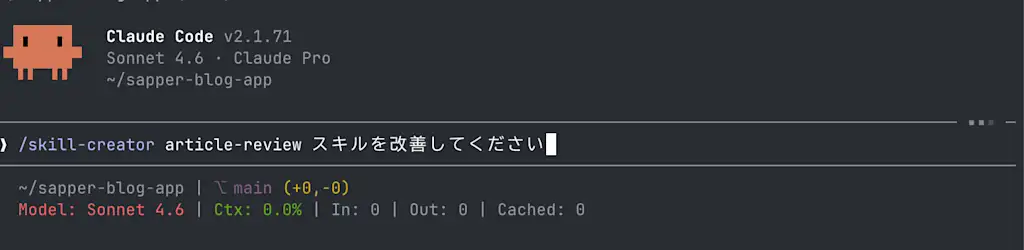
It first inspects the current contents of SKILL.md and identifies areas for improvement. In this example, it pointed out the following four issues:
- The article file location is unclear. Unlike the
qskill, it does not sayblogPost/$ARGUMENTS.md. - The textlint MCP is not used, even though
mcp__textlint__lintFileis available. allowed-toolsdoes not include textlint.- The description is insufficient, so the trigger conditions are ambiguous.
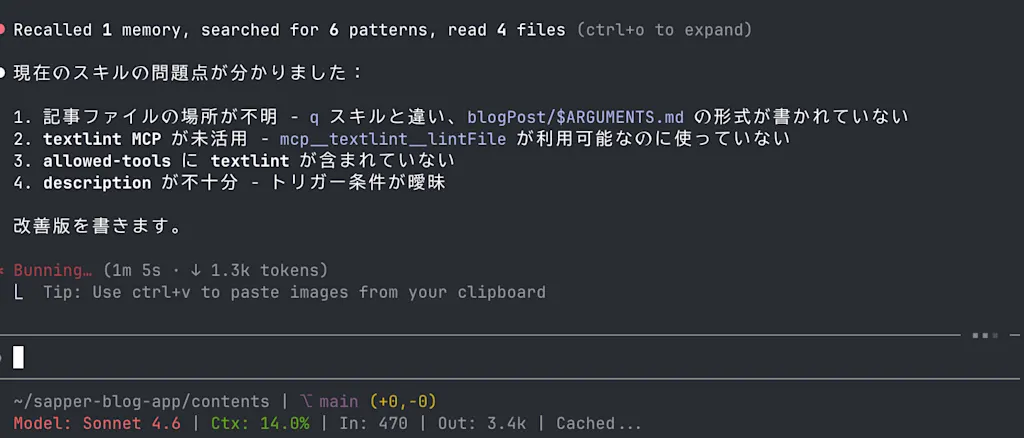
Based on those findings, it proposes an improved version of SKILL.md. The updated version looked like this:
   ---
  -description: "Reviews the article specified by the argument."
  +description: "Reviews the article specified by the argument. Pass an article slug to run automatic proofreading with textlint and point out typos and grammatical errors. Invoke it as /article-review [slug]. You can also use it after writing an article, for pre-publication proofreading, or for checking writing quality."
   argument-hint: "[article-slug]"
  -allowed-tools: Bash(git *), Bash(npm *), Read, Glob, Grep, WebFetch
  +allowed-tools: Bash(git *), Bash(npm *), Read, Glob, Grep, mcp__textlint__lintFile
   ---

  -You are a professional editor. Read the technical article and point out typos, grammatical errors, and unnatural expressions.
  +You are a professional editor. Review the technical article at `blogPost/$ARGUMENTS.md` and point out what should be improved.

  +## Steps
  +
  +1. Read `blogPost/$ARGUMENTS.md`
  +2. Run automatic proofreading with `mcp__textlint__lintFile` (specify the file path as an absolute path)
  +3. Refer to `writing-style.md` to understand the author's writing style
  +4. Summarize the review results in the format below
  +
   ## Output format

  -```
  +### textlint findings
  +
  +List the issues detected by textlint. If there are none, write "No issues found."
  +Include line numbers and suggested fixes for each issue.
  +
  +### Manual review
  +
   【Typos / Notation Issues】
   - Relevant text: "..."
     Suggested fix: "..."

     Reason: [specific reason]

   【Suggestions】
  -- Add any suggestions that would make the article easier to read
  +- Add any suggestions that would make the article easier to read (optional)

  -### Notes
  +## Notes

   - Point out only clear errors, not matters of writing style or preference
   - Always provide a suggested fix
   - There is no need to mention what the article does well. Output only issues.
  +- Do not point out author-specific style described in `writing-style.md` (for example, use of polite style or first-person "I") as errors

   ## Context

  -- Refer to @writing-style.md for the author's writing style
  +- Article path: `blogPost/$ARGUMENTS.md`
  +- For details of the author's writing style, refer to `writing-style.md`
Evaluate the Skill
Once SKILL.md has been updated, let's also ask skill-creator to evaluate the skill. Try entering a prompt like /skill-creator Compare the old and new skills and evaluate which one more accurately points out typos and grammatical errors in articles. The evaluation runs according to the following procedure described in skill-creator's SKILL.md.
## Running and evaluating test cases

This section is one continuous sequence — don't stop partway through. Do NOT use `/skill-test` or any other testing skill.

Put results in `<skill-name>-workspace/` as a sibling to the skill directory. Within the workspace, organize results by iteration (`iteration-1/`, `iteration-2/`, etc.) and within that, each test case gets a directory (`eval-0/`, `eval-1/`, etc.). Don't create all of this upfront — just create directories as you go.

...
First, it creates the directories /sapper-blog-app/contents/.claude/skills/article-review-workspace/evals and /tmp/article-review-old-skill/article-review, and defines the test cases. The file .claude/skills/article-review-workspace/evals/evals.json stores the test case definitions in JSON format.
Contents of the test case definition file `evals.json`
{
  "skill_name": "article-review",
  "evals": [
    {
      "id": 1,
      "prompt": "/article-review VTiIv3S58XSIoE7yzFhNo",
      "expected_output": "Typos and grammatical errors are listed with line numbers, and suggested fixes are provided. The automatic proofreading results from textlint are also included (expected only for the new skill).",
      "files": [
        "/Users/asai/sapper-blog-app/contents/blogPost/VTiIv3S58XSIoE7yzFhNo.md"
      ],
      "assertions": [
        {
          "id": "has-correction-with-line-or-quote",
          "text": "Includes a quotation of the relevant text (in the form \"...\")"
        },
        {
          "id": "has-fix-suggestion",
          "text": "Provides a suggested fix (the label \"Suggested fix:\" is present)"
        },
        {
          "id": "has-reason",
          "text": "Explains the reason (the label \"Reason:\" is present)"
        },
        {
          "id": "has-textlint-section",
          "text": "Includes a textlint findings section (expected only for the new skill)"
        },
        {
          "id": "catches-joshi-error",
          "text": "Points out the particle error on line 21"
        },
        {
          "id": "catches-typo-shitei",
          "text": "Points out the typo where a phrase meaning 'specified items' should be 'pointed-out items'"
        }
      ]
    },
    {
      "id": 2,
      "prompt": "/article-review claude-code-hooks-run-formatter",
      "expected_output": "Typos and grammatical errors in the article are listed, and suggested fixes are provided",
      "files": [
        "/Users/asai/sapper-blog-app/contents/blogPost/claude-code-hooks-run-formatter.md"
      ],
      "assertions": [
        {
          "id": "has-correction-with-line-or-quote",
          "text": "Includes a quotation of the relevant text (in the form \"...\")"
        },
        {
          "id": "has-fix-suggestion",
          "text": "Provides a suggested fix"
        },
        {
          "id": "no-style-complaints",
          "text": "Does not treat the author's writing style as an error"
        },
        {
          "id": "has-textlint-section",
          "text": "Includes a textlint findings section (expected only for the new skill)"
        }
      ]
    },
    {
      "id": 3,
      "prompt": "/article-review css-anchor-positioning",
      "expected_output": "Typos and grammatical errors in the article are listed, and suggested fixes are provided",
      "files": [
        "/Users/asai/sapper-blog-app/contents/blogPost/css-anchor-positioning.md"
      ],
      "assertions": [
        {
          "id": "has-correction-with-line-or-quote",
          "text": "Includes a quotation of the relevant text (in the form \"...\")"
        },
        {
          "id": "has-fix-suggestion",
          "text": "Provides a suggested fix"
        },
        {
          "id": "no-style-complaints",
          "text": "Does not treat the author's style as an error"
        },
        {
          "id": "has-textlint-section",
          "text": "Includes a textlint findings section (expected only for the new skill)"
        }
      ]
    }
  ]
}
After that, agents are launched and the test cases are run against both the new and old skills. When creating a brand-new skill, the comparison is between having the skill and not having it. Since there were 3 test cases and both old and new skills were evaluated, a total of 6 agents were launched in parallel. While they were running, it explained the grading criteria.
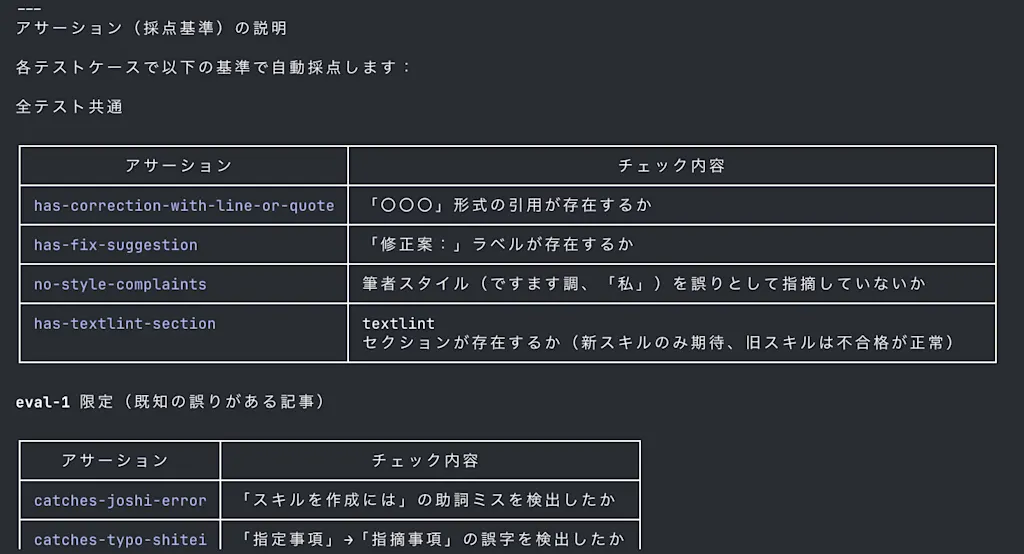
The explanation of the evaluation criteria also follows the instruction written in skill-creator's SKILL.md:
Don't just wait for the runs to finish — you can use this time productively. Draft quantitative assertions for each test case and explain them to the user. If assertions already exist in evals/evals.json, review them and explain what they check.As each agent finishes, the evaluation result is saved to a path like .claude/skills/article-review-workspace/iteration-1/eval-1-skill-creator-article/old_skill/outputs/review.md.
# Article Review Result (Old Skill)
Target file: `blogPost/VTiIv3S58XSIoE7yzFhNo.md`

**【Typos / Notation Issues】**
- Relevant text: "..."
  Suggested fix: "..."
  Reason: ...

  ...
Metadata such as consumed tokens and execution time is also reported by the sub-agents. This result is saved as timing.json and later used in evaluation.
{
  "total_tokens": 18734,
  "duration_ms": 43589,
  "total_duration_seconds": 43.6
}
Once all agent evaluations are complete, the next step is grading the results. Grading is handled by agents/grader.md, a sub-agent defined in skill-creator. It scores each criterion as a binary pass or fail. Every score must be backed by clear evidence.
## Role

The Grader reviews a transcript and output files, then determines whether each expectation passes or fails. Provide clear evidence for each judgment.

You have two jobs: grade the outputs, and critique the evals themselves. A passing grade on a weak assertion is worse than useless — it creates false confidence. When you notice an assertion that's trivially satisfied, or an important outcome that no assertion checks, say so.
The grading results are saved as grading.json. Each field includes text, passed, and evidence. text contains the evaluation criterion, passed indicates whether the criterion was satisfied, and evidence explains the basis for that judgment.
{
  "eval_id": 1,
  "config": "new_skill",
  "expectations": [
    {
      "text": "Includes a quotation of the relevant text (in the form \"...\")",
      "passed": true,
      "evidence": "Contains multiple quotations"
    },
    {
      "text": "Provides a suggested fix",
      "passed": true,
      "evidence": "Each finding includes a suggested fix"
    },
    {
      "text": "Explains the reason",
      "passed": true,
      "evidence": "Each finding includes a reason"
    },
    {
      "text": "Includes a textlint findings section",
      "passed": true,
      "evidence": "The section '## textlint findings' contains four automatically detected issues"
    },
    {
      "text": "Points out the particle error on line 21",
      "passed": true,
      "evidence": "The particle error on line 21 is explicitly pointed out"
    },
    {
      "text": "Points out the typo where a phrase meaning 'specified items' should be 'pointed-out items'",
      "passed": true,
      "evidence": "The typo is explicitly identified and corrected"
    }
  ]
}
Once grading by all sub-agents is complete, the benchmark is aggregated. Aggregation is done using the script defined in skill-creator/scripts/aggregate_benchmark.py. The results are saved as benchmark.json and benchmark.md. These outputs include metrics such as pass rate against each evaluation criterion, execution time, and consumed tokens for the old and new skills.
{
  "metadata": {
    "skill_name": "article-review",
    "skill_path": "<path/to/skill>",
    "executor_model": "<model-name>",
    "analyzer_model": "<model-name>",
    "timestamp": "2026-03-07T04:39:02Z",
    "evals_run": [
      1,
      2,
      3
    ],
    "runs_per_configuration": 3
  },
  "runs": [
    {
      "eval_id": 1,
      "configuration": "new_skill",
      "run_number": 1,
      "result": {
        "pass_rate": 1.0,
        "passed": 6,
        "failed": 0,
        "total": 6,
        "time_seconds": 49.5,
        "tokens": 20401,
        "tool_calls": 0,
        "errors": 0
      },
      "expectations": [
        {
          "text": "Includes a quotation of the relevant text",
          "passed": true,
          "evidence": "Contains multiple quotation formats"
        },
        ...
      ]
    }
  ],
  "run_summary": {
    "new_skill": {
      "pass_rate": {
        "mean": 1.0,
        "stddev": 0.0,
        "min": 1.0,
        "max": 1.0
      },
      "time_seconds": {
        "mean": 45.5333,
        "stddev": 3.5162,
        "min": 42.8,
        "max": 49.5
      },
      "tokens": {
        "mean": 17875.3333,
        "stddev": 2246.7591,
        "min": 16099,
        "max": 20401
      }
    },
    "old_skill": {
      ...
    }
  }
}# Skill Benchmark: article-review
**Model**: <model-name>
**Date**: 2026-03-07T04:39:02Z
**Evals**: 1, 2, 3 (3 runs each per configuration)
## Summary
| Metric | New Skill | Old Skill | Delta |
|--------|------------|---------------|-------|
| Pass Rate | 100% ± 0% | 78% ± 5% | +0.22 |
| Time | 45.5s ± 3.5s | 47.7s ± 5.0s | -2.1s |
| Tokens | 17875 ± 2247 | 17003 ± 1653 | +872 |The benchmark results are also output as an HTML report so they are easier for humans to review, and can be viewed in the browser by launching the viewer. This makes it clear that the skill-creator skill is designed to support skill improvement and evaluation through human-in-the-loop interaction. The viewer has Output and Benchmark tabs: the Output tab shows each test case result, and the Benchmark tab shows the aggregated benchmark results.
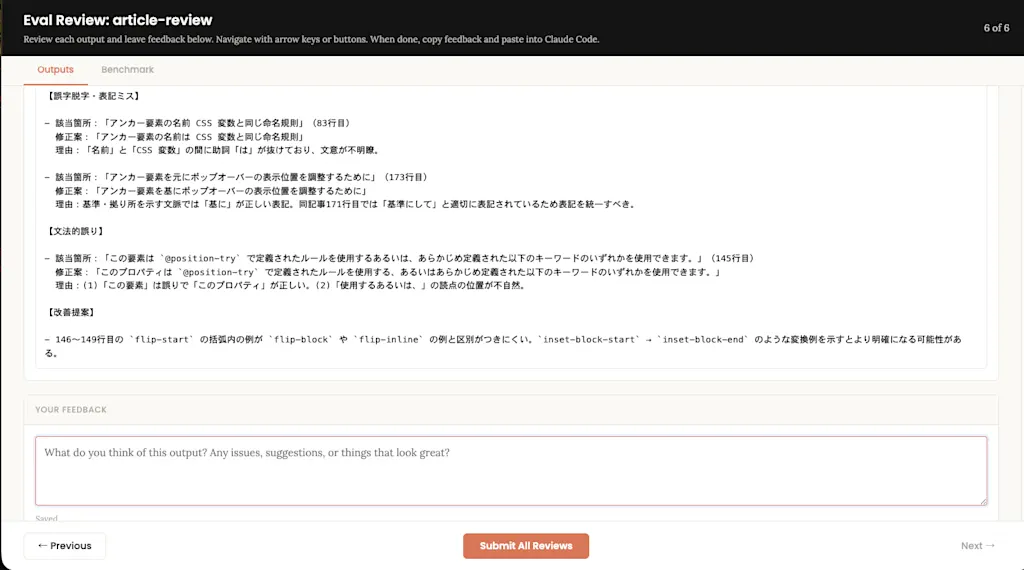
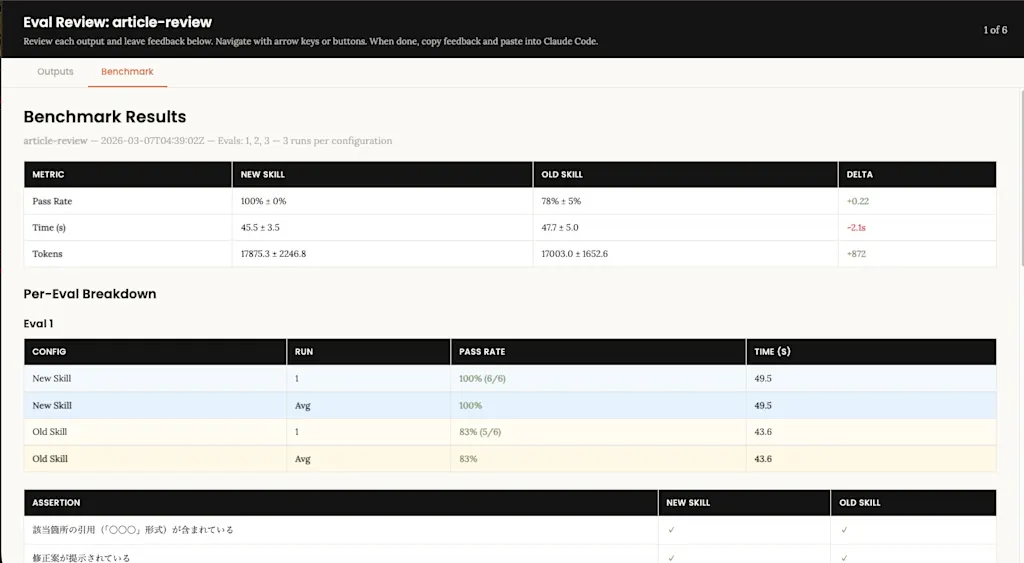
Claude Code then waits for the user to send feedback. After reviewing the evaluation results, if you find room for improvement, you can send feedback and instruct it to make further changes. If everything looks fine, just submit empty feedback. Clicking the Submit All Reviews button saves the feedback content as feedback.json.
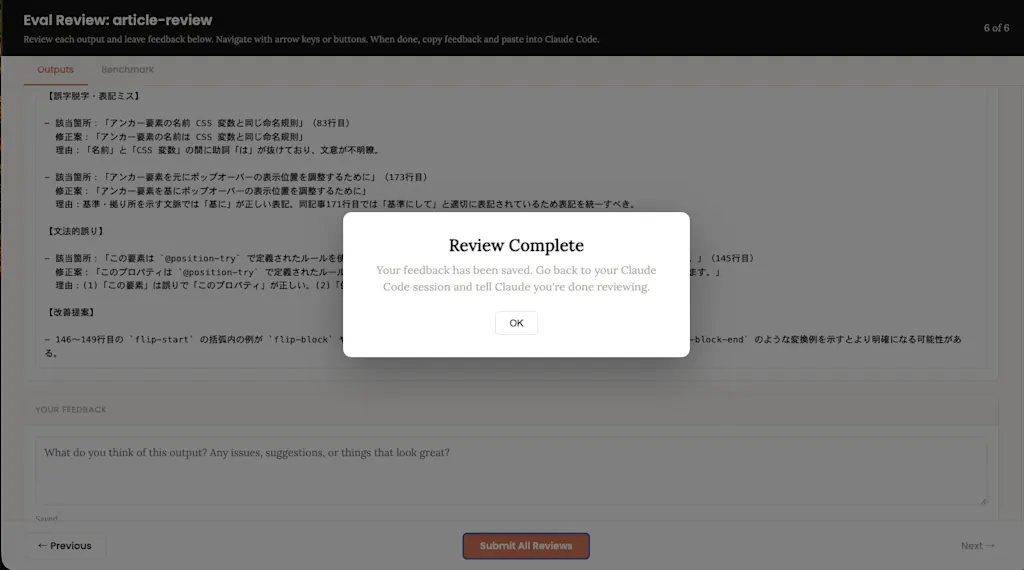
{
  "reviews": [],
  "status": "in_progress"
}
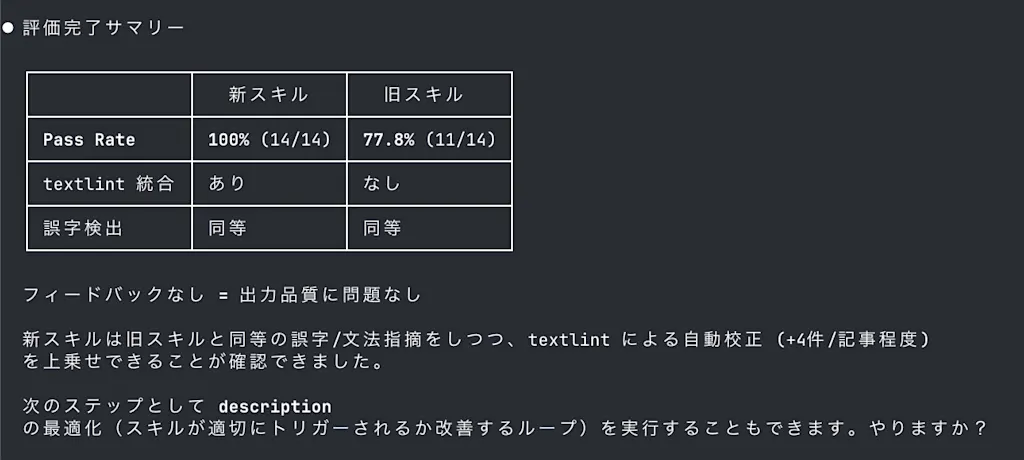
Once the form has been submitted, return to the Claude Code session and enter a prompt such as "The feedback is complete." If the user provided feedback, iterations continue until the problems are resolved. If there is no feedback, the evaluation process is considered complete and a final report is generated. Since textlint was integrated, the results show that the new skill points out typos more accurately than the old one.
Optimizing the Description
Finally, let's continue by optimizing the description field in SKILL.md. At the end of the session, Claude Code suggests: "As a next step, we can also run description optimization (a loop to improve whether the skill is triggered appropriately). Would you like to do that?" Here, I entered a prompt like "Please optimize the description as well."
Claude creates a number of queries that should trigger the skill and others that should not. Queries with should_trigger: true are those that should invoke the skill, while those with false should not.
[
  {
    "query": "/article-review css-anchor-positioning Please review the article I just wrote",
    "should_trigger": true
  },
  {
    "query": "Please check a new blog post I wrote, build-your-own-coding-ai-agent, for typos",
    "should_trigger": true
  },
  {
    "query": "I want to make the article title more SEO-friendly",
    "should_trigger": false
  }
]
The user is then asked to review whether this evaluation data is appropriate. The queries and whether the skill is triggered are displayed using the assets/eval_review.html template so the user can review them easily.
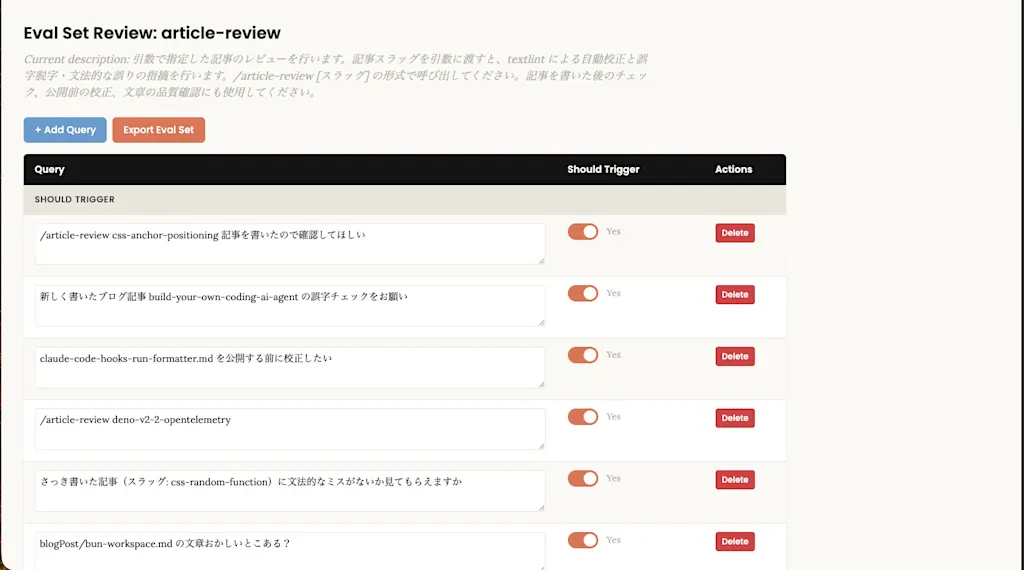
The user can toggle the Should Trigger switch or edit the query text to revise the evaluation data. If there are changes, click the Export Eval Set button and pass the updated data back to Claude. If there are no issues, simply return to the Claude Code session and let it continue.
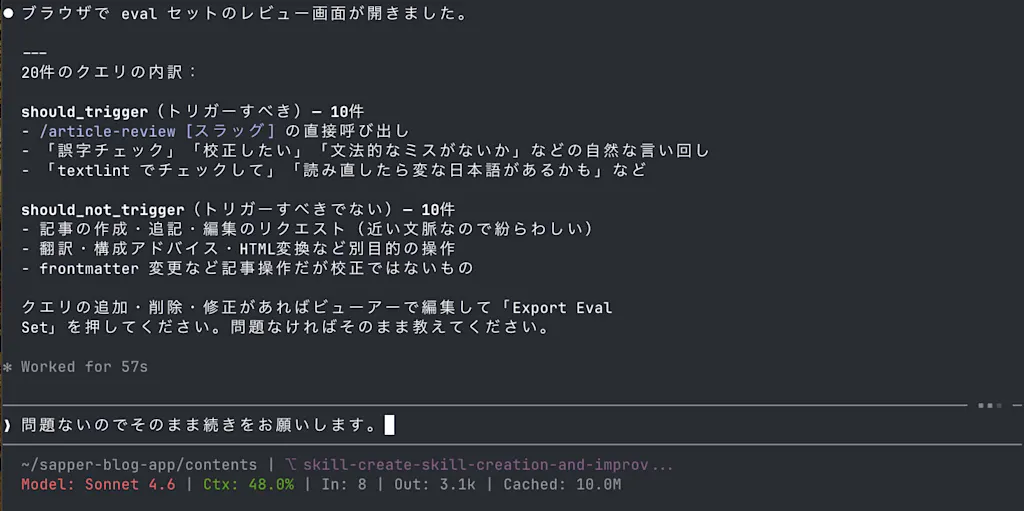
The optimization loop is then executed using the scripts/run_loop.py script. It is interesting that the steps in SKILL.md explicitly say, "This will take some time, so I will run it in the background."
### Step 3: Run the optimization loop
Tell the user: "This will take some time — I'll run the optimization loop in the background and check on it periodically."
The run_loop.py script repeatedly calls run_eval.py for evaluation and improve_description.py for improvement suggestions, searching for the description that maximizes triggering accuracy. During evaluation, it actually launches Claude Code with claude -p to test whether the skill is invoked. It also requires the ANTHROPIC_API_KEY environment variable at runtime, and the cost was roughly $5.
Once the optimization loop is complete, it opens an HTML report in the browser showing the result of each iteration.
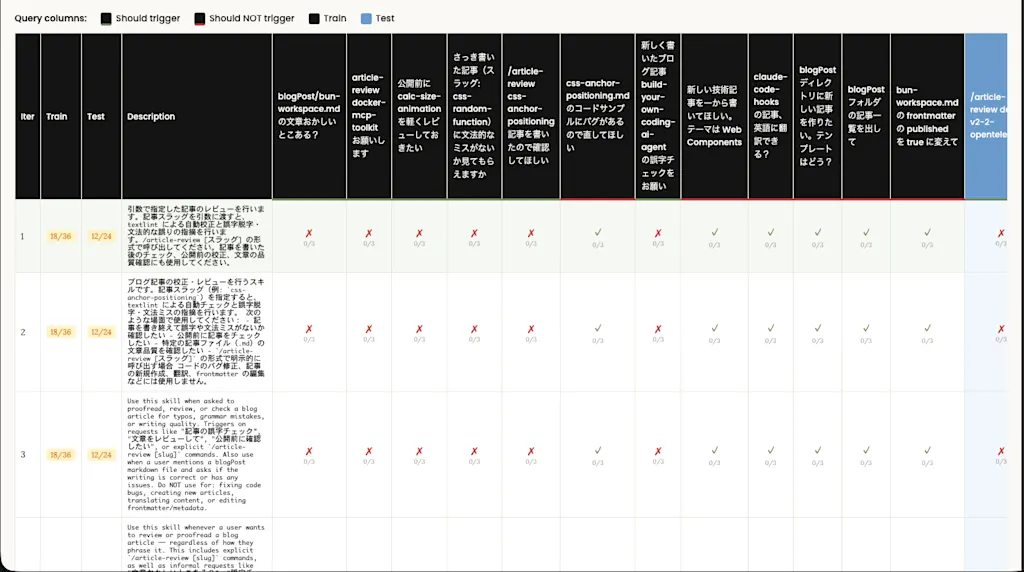
Finally, the best_description result is written back into the description field in SKILL.md, completing the process. In this case, the optimization concluded that the original description was already the best one.
Summary
- The
skill-creatorskill is used to create, improve, and evaluate skills, and it is designed so that users can improve and evaluate skills through a human-in-the-loop process. - The
descriptionfield inSKILL.mdis used to decide whether the skill should be invoked, so it is important to describe the skill concisely and clearly state the situations in which it should be used. - The skill improvement process follows this workflow:
- Interview or research to understand the user's intent
- Write
SKILL.md - Create test cases to evaluate the skill
- Launch agents in parallel to run the test cases and explain the evaluation criteria while waiting
- Aggregate quantitative evaluation results and generate a report after all evaluations complete
- Launch the viewer so the user can review the evaluation results in the browser
- Improve the skill based on user feedback, repeating until issues are resolved
- Optimize the description to improve whether the skill is triggered appropriately
- Skill evaluation follows this workflow:
- Define test cases in
evals.json - Launch agents to run the test cases
- Explain the grading criteria
- Run grading in
grading.jsononce each evaluation is complete - Aggregate the benchmark in
benchmark.jsonandbenchmark.md - Launch the viewer to review the evaluation results
- Send improvement instructions based on user feedback
- Define test cases in
- The skill improvement and evaluation process is a human-in-the-loop process in which the user actively participates. By reviewing evaluation results, finding room for improvement, and sending feedback, the user contributes directly to improving skill quality.
- It is also possible to optimize the description to improve trigger accuracy. By evaluating which queries should and should not trigger the skill and refining the description, you can make the skill activate more appropriately.
References
skills/skills/skill-creator/SKILL.md at main · anthropics/skills
Improving skill-creator: Test, measure, and refine Agent Skills | Claude
Extend Claude with Skills - Claude Code Docs
Overview - Agent Skills
Learning Skill Design from skill-creator and How to Build an Orchestration Skill
Skill authoring best practices - Claude API Docs