Running View Transitions per Element with Element-scoped View Transitions
A document can run only one `document.startViewTransition()` at a time, drawn over the whole page. `element.startViewTransition()` scopes a transition to an element so several can run at once. This article shows the basics by animating two lists.
The View Transition API makes it easy to animate transitions between page states. The browser automatically captures snapshots and compares the states before and after a DOM update to generate the animation. When you update the DOM inside the callback of
document.startViewTransition(), the animation for that update runs automatically. However, only one transition can run per document, which comes with several limitations.
For example, you can't interact with the page during a transition, you can't run multiple transitions at the same time, and elements you want to show in front, such as popovers, can end up hidden.
Element-scoped View Transitions is a feature that limits a View Transition to the subtree of a specific element via
element.startViewTransition(). This article walks through the basics using an example that animates two lists at the same time.
As of October 10, 2026, Element-scoped View Transitions is available in Chrome 147.
Problems with document-wide View Transitions
First, let's see what happens with the traditional document.startViewTransition(). In the following example there are two lists, and clicking each button animates moving the first item to the end of the list.
<section>
  <button type="button" data-list="list1">Move first to last</button>
  <ul id="list1">
    <li>Apple</li>
    <li>Banana</li>
    <li>Cherry</li>
    <li>Durian</li>
  </ul>
</section>
<section>
  <button type="button" data-list="list2">Move first to last</button>
  <ul id="list2">
    <li>Red</li>
    <li>Green</li>
    <li>Blue</li>
    <li>Yellow</li>
  </ul>
</section>
<button type="button" popovertarget="popover">Toggle popover</button>
<div id="popover" popover="manual">A popover shown above the lists</div>
Each li element gets view-transition-name: match-element so that every element is treated as a separate snapshot. match-element is a value that lets the browser assign a name automatically based on the element's identity. Adding a class with view-transition-class lets you target all of them at once with a selector like *.item.
li {
  view-transition-name: match-element;
  view-transition-class: item;
}

::view-transition-group(*.item) {
  animation-duration: 1s;
}
When a button is clicked, the DOM is updated inside the callback of document.startViewTransition(). This starts a transition for the entire page.
function rotate(list) {
  list.append(list.firstElementChild);
}

for (const button of document.querySelectorAll("[data-list]")) {
  button.addEventListener("click", () => {
    const list = document.getElementById(button.dataset.list);
    document.startViewTransition(() => rotate(list));
  });
}
If you click the button for the left list while the popover is open, you get the behavior shown in the following video.
The video shows two problems:
- Clicking the right button while the left list is animating does not change the right list
- The items of the left list are drawn on top of the popover, hiding it
The first problem occurs because the pseudo-element tree for the transition is created on the root of the document (the html element). The ::view-transition pseudo-element covers the entire page, so every click during the transition targets the html element. In other words, the whole page can't be clicked while the transition is running.
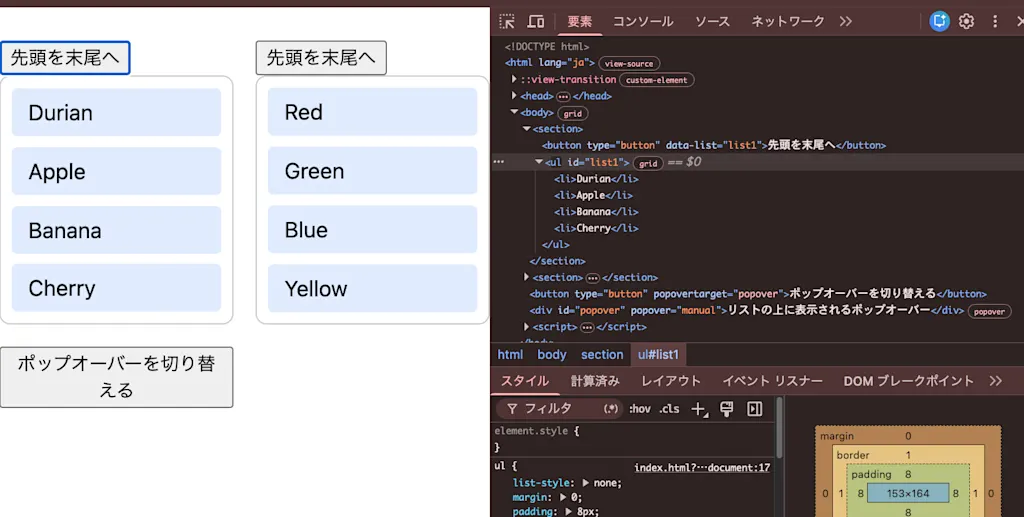
The second problem has the same cause. The ::view-transition pseudo-element is drawn above the entire page, including the top layer. The popover, which has no view-transition-name, is treated as part of the snapshot of the whole page, and the groups of named items are drawn on top of it. As a result, the popover ends up hidden beneath the items.
There is another problem: as shown in the next video, the animation of the left list gets cut off midway.
This happens because a document can run only one View Transition at a time. When the second transition starts, the first one is skipped, so its animation is cut off and only the DOM update is applied.
The Explainer lists the following four problems with document-wide transitions:
- Independent elements can't transition at the same time without knowing about each other
- Transitions can't be rendered inside ancestors that clip or transform, such as scroll containers
- Rendering of the entire page is paused during the update
- Elements that don't participate in the transition can't be drawn in front of it
Limiting a transition to a specific element with element.startViewTransition()
With Element-scoped View Transitions, you call startViewTransition() on any element instead of document. Change the earlier code as follows:
 for (const button of document.querySelectorAll("[data-list]")) {
   button.addEventListener("click", () => {
     const list = document.getElementById(button.dataset.list);
-    document.startViewTransition(() => rotate(list));
+    list.startViewTransition(() => rotate(list));
   });
 }
The element on which startViewTransition() is called is called the scope (or transition root). When a scope is specified, the browser behaves as follows:
- It looks for elements to snapshot (elements with a
view-transition-name) within the scope's subtree - Only the scope's subtree has its rendering paused while the update runs
- The
::view-transitionpseudo-element tree is created on the scope element instead of thehtmlelement
In addition, the scope element itself automatically gets view-transition-name: root, so the scope also participates in the transition. If you don't want the scope element to be snapshotted, you can opt out by specifying view-transition-name: none.
Layout containment, which creates an independent layout boundary inside an element, is applied automatically to an active scope. You can't start a transition on elements where layout containment doesn't apply, such as a regular
span with display: inline.
The arguments and return value are the same as document.startViewTransition(). The difference is that the transitionRoot property of the ViewTransition object returns the scope element instead of the html element.
const transition = list.startViewTransition(() => rotate(list));
console.log(transition.transitionRoot); // <ul id="list1">
With the version that uses list.startViewTransition, both lists can animate at the same time, as shown in the following video. The popover also stays on top of the lists.
Only transitions with different scopes can run at the same time. If you call startViewTransition() again on the same element while a transition is running, the running transition is skipped and replaced by the new one. For example, if you click the left list's button twice in quick succession, the first animation is cut off midway.
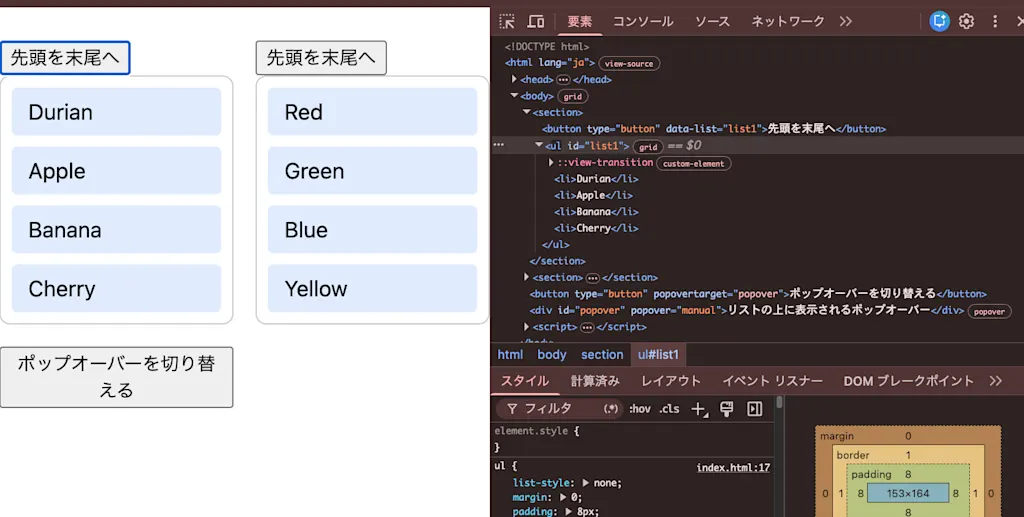
Looking at Chrome DevTools, you can confirm that the ::view-transition pseudo-element tree is indeed created inside the ul element used as the scope.
Preventing name collisions with the view-transition-scope property
A view-transition-name must be unique within the document. If the same component appears multiple times on a page, the names collide and the transition is skipped. In most cases you can avoid collisions by using values like match-element that let the browser assign names automatically, but sometimes you can't control the names, for example in components from a library.
The view-transition-scope property limits where view-transition-name values can be found to the element's subtree. It takes two values: none (the initial value) and all.
.card-list {
  view-transition-scope: all;
}
Transitions started outside an element with all can no longer find the view-transition-name of that element or its descendants. The idea is similar to the anchor-scope property in CSS anchor positioning.
While a scoped transition is running, view-transition-scope: all is applied to the scope element automatically.
Summary
- During a transition started with
document.startViewTransition(),::view-transitioncovers the entire page and every click targets thehtmlelement, so you can't interact with other elements on the page - Only one transition started with
document.startViewTransition()can run per document; starting a second one cuts off the first midway - Calling
element.startViewTransition()makes that element the scope, limiting snapshot capture, rendering pauses, and the pseudo-element tree to the scope view-transition-scope: alllimits the search forview-transition-nameto the element's subtree and is applied automatically to an active scope
References
CSS View Transitions Module Level 2 — Scoped View Transitions
Element-Scoped View Transitions Explainer
Run concurrent and nested view transitions with element-scoped view transitions | Chrome for Developers
Intent to Prototype: Scoped view transitions
Element: startViewTransition() method - Web APIs | MDN