
e2e: A Testing Framework That Drives Your App with Natural Language and Verifies the Results
e2e is a testing framework that combines natural-language actions with element-based actions and assertions. This article builds tests for a Todo app that let AI perform the actions and verify the results in code.
E2E (end-to-end) tests verify the flows a user goes through when using an application. Tools like Playwright let you automate those interactions, but you have to write each step by pointing at specific input fields and buttons. That means that when the screen layout changes, you often need to update those steps as well. As a result, E2E tests have generally been seen as highly effective but costly to write and maintain.
e2e is a testing framework that lets you describe the goal of an action in natural language. Give it a goal such as "add a Todo," and an AI agent inspects the screen and chooses the necessary actions. This means you can write tests from the perspective of whether a feature works correctly, without depending on concrete steps like clicking a particular button. Within the same test, you can also use element-based actions and regular assertions.
In this article, we'll use a simple Todo app to write tests that perform actions in natural language and verify the results in code. We'll also look at how e2e caches verified actions and replays them.
As of October 2, 2026, e2e is still under development toward 1.0. APIs and configuration may change even in minor versions.
Writing Tests with e2e
e2e tests are written in TypeScript. e2e provides both natural-language actions and actions that target specific elements (official documentation). Let's start by looking at a finished test.
import { test, expect } from "e2e";

test("自然言語で Todo を追加する", async ({ app, agent, screen }) => {
  await app.open("/");

  await agent.act("Todo に「牛乳を買う」を追加してください");

  await expect(screen.getByRole("listitem")).toHaveText("牛乳を買う");
  await expect(screen.getByRole("status")).toHaveText("1 件の Todo");
});
app.open() opens the page under test, and agent.act() receives the goal of the action. The instruction is just a regular string; here it asks the agent to add 牛乳を買う ("Buy milk") as a Todo. In this example, typing into the input field and pressing the add button are left to the agent.
The result is verified with expect() assertions. screen.getByRole() returns a locator that identifies an element by its role, such as a button or a list item. A locator is an object that specifies the element to act on or verify. toHaveText() checks that the element's text matches the expected value. The way you verify elements is the same as in Playwright.
Verification can also be written in natural language. When you pass the expected state in natural language to agent.assert(), the model inspects the screen and judges whether the goal has been achieved.
await agent.assert("Todo に「牛乳を買う」が追加されていることを確認してください");What Does the Agent Look at When It Acts?
According to the explanation of how agent steps work, the model reads information about the screen and decides "what to interact with next" and "whether the goal has been achieved." The actual test execution is handled by e2e's test execution program (the runner), which you start with
npx e2e run.
For example, when you tell agent.act() to add a Todo, the model receives a snapshot of the screen that includes each element's role, name, text, and state. From that information, the model decides to "type '牛乳を買う' into this input field" and requests the action. The runner validates the request and types into the browser through the web engine. The web engine, @e2e-dev/web, uses Playwright internally to control the browser. There is also @e2e-dev/mobile for mobile, which uses agent-device to control iOS simulators and Android emulators.
Information about the screen after the action is passed back to the model. When the model decides "press the add button next," the runner presses the button through the web engine. By repeating this cycle of decisions by the model and execution by the runner, the agent works toward the goal. The expect() assertions written in the test are also executed by the runner.
When the text information is not enough, the agent can request a screenshot.
Setting Up the Test Environment
Let's set up a test with e2e. Node.js 22.12 or later is required. Install the dependencies and Chromium.
npm init -y
npm install --save-dev --save-exact [email protected] @e2e-dev/[email protected] [email protected] [email protected] @ai-sdk/[email protected]
npx playwright install chromium
e2e is the test runner, and @e2e-dev/web is the web engine. ai and @ai-sdk/openai are used by the agent to call the model. There is also an official interactive npx e2e init command, but here we'll configure things manually to learn how they work.
As the app under test, create an HTML page that adds the entered text to a list.
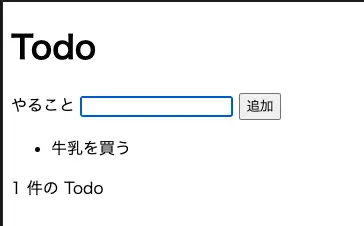
index.html
<!doctype html>
<html lang="ja">
  <meta charset="utf-8" />
  <meta name="viewport" content="width=device-width, initial-scale=1" />
  <title>Todo</title>
  <main>
    <h1>Todo</h1>
    <form>
      <label for="title">やること</label>
      <input id="title" name="title" required />
      <button type="submit">追加</button>
    </form>
    <ul aria-label="Todo 一覧"></ul>
    <p role="status">0 件の Todo</p>
  </main>
  <script type="module">
    const form = document.querySelector("form");
    const input = document.querySelector("input");
    const list = document.querySelector("ul");
    const status = document.querySelector('[role="status"]');

    form.addEventListener("submit", (event) => {
      event.preventDefault();
      const title = input.value.trim();
      if (!title) return;

      const item = document.createElement("li");
      item.textContent = title;
      list.append(item);
      status.textContent = `${list.children.length} 件の Todo`;
      form.reset();
    });
  </script>
</html>
Next, create a server that serves the HTML. This server is started with node server.mjs.
server.mjs
import { createServer } from "node:http";
import { readFile } from "node:fs/promises";

const html = await readFile(new URL("./index.html", import.meta.url));
const server = createServer((request, response) => {
  if (request.url !== "/") {
    response.writeHead(404).end("Not found");
    return;
  }
  response.writeHead(200, { "Content-Type": "text/html; charset=utf-8" });
  response.end(html);
});

server.listen(4317, "127.0.0.1", () => {
  console.log("Todo app: http://127.0.0.1:4317");
});
The Todo app is served at http://127.0.0.1:4317. Starting and stopping the server is left to the e2e runner, which we'll configure next.
Configuring e2e and Connecting a Model
In e2e.config.ts, configure the engine to run, the app under test, and the model.
import type { E2EConfig } from "e2e";
import { web } from "@e2e-dev/web";
import { openai } from "@ai-sdk/openai";

export default {
  workers: 1,
  retries: 0,
  agents: {
    default: {
      model: openai(process.env.E2E_MODEL ?? "gpt-6-luna"),
    },
  },
  targets: [
    {
      name: "chromium",
      engine: web({ browser: "chromium" }),
      app: {
        url: "http://127.0.0.1:4317",
        command: { executable: "node", args: ["server.mjs"] },
      },
    },
  ],
} satisfies E2EConfig;
targets defines where the tests run. Here we configure a single web engine named chromium. When you specify app.command, the runner starts the server and begins the tests once app.url responds. It stops the server after the run.
agents.default.model is the model the agent uses. Here we use the OpenAI provider from the AI SDK. Besides using an OpenAI API key, the model configuration docs describe other options: Vercel AI Gateway, OpenRouter, or using a model provider's subscription without an API key.
This time, we'll set OPENAI_API_KEY in the terminal where the tests run. Replace your-api-key below with your own API key.
export OPENAI_API_KEY="your-api-key"e2e does not load .env files automatically. Either set the environment variable in your terminal or call process.loadEnvFile(".env") in the config file. Do not hard-code your API key in test code. Note that model calls incur usage fees.
Running Natural-Language Actions
Save the test from the beginning of the article as tests/todo.e2e.ts and run it. By default, e2e discovers *.e2e.ts files under tests/ as tests. Here we specify the file to run just one test.
npx e2e run tests/todo.e2e.tsAdd --headed if you want to watch the actions on screen. By default, results are saved to .e2e/report.json.
This JSON records each test's pass/fail status, the duration of each step, the number of model calls, cache usage, and more. If you recorded videos or traces, it also includes references to those files. Find the target test in run.results; its attempts contain the result of each attempt, and their steps show the results of app.open(), agent.act(), and the assertions.
{
  "api": "agent.act",
  "status": "passed",
  "durationMs": 6901,
  "cache": {
    "mode": "missed",
    "reason": "no-entry",
    "replayedActions": 0,
    "totalActions": 0
  },
  "turns": [
    {
      "index": 1,
      "calls": [
        "type({\"target\":\"n5\",\"value\":\"牛乳を買う\",\"replace\":false})"
      ]
    },
    {
      "index": 2,
      "calls": [
        "tap({\"target\":\"n6\"})"
      ]
    },
    {
      "index": 3,
      "calls": [
        "complete_step({\"status\":\"passed\",\"summary\":\"「牛乳を買う」を Todo に追加しました。リストに表示され、Todo 件数が「1 件の Todo」になっています。\"})"
      ]
    }
  ]
}
Reading the turns in the agent.act() step shows that it actually proceeded in the following order:
- The model chose the input field labeled "やること" ("To do") and requested typing "牛乳を買う" with
type. The runner typed it and returned screen information to the model showing that the field's value had changed - The model chose the "追加" ("Add") button and requested a
tap. When the runner pressed the button, "牛乳を買う" was added to the list and the count changed from "0 件の Todo" to "1 件の Todo" - The model checked the updated screen and reported success with
complete_step. This ended theagent.act()step
You can see the actions in the following video.
牛乳を買う appears in the list, and the count reads 1 件の Todo. In addition to the change on screen, the test's assertions passed as well.
Combining with Element-Based Tests
Actions that don't need AI can be written with the screen API. Here is the same Todo addition, performed by targeting the input field and the button directly.
import { test, expect } from "e2e";

test("要素を指定して Todo を追加する", async ({ app, screen }) => {
  await app.open("/");

  await screen.getByRole("textbox", { name: "やること" }).fill("牛乳を買う");
  await screen.getByRole("button", { name: "追加" }).tap();

  await expect(screen.getByRole("listitem")).toHaveText("牛乳を買う");
  await expect(screen.getByRole("status")).toHaveText("1 件の Todo");
});
This test doesn't call the model, so you can run it without an API key.
npx e2e run tests/todo-deterministic.e2e.tsIn e2e, you can mix actions like these with agent.act() in a single test. You can target elements where the steps are fixed and use natural language where you want to express several actions as a goal.
Caching and Replaying Verified Actions
Calling the model for every natural-language action costs both time waiting for responses and usage fees. e2e addresses this with a mechanism called the replay cache. The replay cache records the actions performed by
agent.act() and reuses them on the next run, skipping the model calls. If the expected result can no longer be confirmed, e2e falls back to calling the model to fill in the actions.
For actions to be recorded, a verification after agent.act() must pass. A locator assertion such as expect(screen.getByRole("listitem")).toHaveText(...) in this example qualifies. The actions are not recorded just because the agent judged them successful.
Let's run the same test again.
npx e2e run tests/todo.e2e.tsOn this run, the two actions (typing and adding) were replayed, and the number of model calls dropped to zero. Both assertions passed again.
| Run | agent.act() duration |
Model calls | Cache result |
|---|---|---|---|
| First run | 6.90 s | 3 | 1 missed |
| Second run | 169 ms | 0 | 1 replayed |
When the Cache Is Used, and Caveats
The test name, target name, instruction, and other properties are used to identify cache entries. If any of these change, the cache no longer matches. Our Todo app starts with an empty list every time the page is opened and uses the same input value on every run, which makes replay easy to observe.
Specifically, changes like the following cause a cache miss:
- Renaming the
test()from "自然言語で Todo を追加する" to "Todo を登録する". - Changing the Todo name in the
agent.act()instruction from "牛乳を買う" to "パンを買う" ("Buy bread"). - Passing an email address or timestamp that differs on every run in
params. - Changing the target name in the config, or upgrading the web engine to a new minor or major version.
Even when a matching recording exists, it may no longer be replayable on the current screen. For example:
- The "追加" button pressed during recording is gone and doesn't appear even after waiting
- More buttons with the same characteristics have been added, so the recorded target can't be distinguished
- Typing and clicking completed, but the list item that appeared during recording does not show up
You can find out why the cache couldn't be reused in cache.reason on the corresponding step in the report. For example, it is no-entry when no recording matches, and target-not-found when the screen has changed and the recorded target can't be found. When the cache can't be used, e2e calls the model to fill in the actions.
Locally, e2e replays saved actions and also saves newly verified actions to the cache. In CI, by default, it only reuses the saved cache and doesn't save new recordings.
To check the model's behavior without the cache, pass --no-cache.
npx e2e run tests/todo.e2e.ts --no-cacheYou can also pass --strict-cache to detect when an existing recording can no longer be replayed because the screen changed. Because the agent fills in the gaps and keeps tests passing after UI changes, it's easy to miss an increase in model calls; this option addresses that problem.
Reusing Actions with Different Test Data Every Run
The Todo app so far loses its data every time the page is opened, so we can test it with a fixed 牛乳を買う. In real E2E tests, however, the results of actions are often saved to a server-side database. If data created by a previous test remains, registering a user with the same email address may fail with a duplicate error, or you may mistake a previously created item with the same name for this run's result. When multiple tests run in parallel, data with the same name can also interfere with each other.
To avoid these situations, a common practice is to use a different, randomly generated value for each test.
In e2e, the params option of agent.act() lets you write the instruction separately from the data passed into it. For example, you can pass a different Todo name every time like this:
const title = `牛乳を買う ${randomUUID()}`;

await agent.act("Todo に「{title}」を追加してください", {
  params: { title },
});
Swapping Values on Replay with unique()
However, params values are also part of the cache identity. If you pass a different value every time, every test run results in a cache miss and calls the model. This is where unique() comes in: it lets you mark a value that changes on every run. When the cache is replayed, a value wrapped in unique() is replaced with the value passed in the current run rather than the previous one.
Let's try an example that changes the name on every run using the same Todo app. Create tests/todo-unique.e2e.ts.
import { randomUUID } from "node:crypto";
import { test, expect, unique } from "e2e";

test("実行ごとに異なる名前の Todo を追加する", async ({ app, agent, screen }) => {
  const title = `牛乳を買う ${randomUUID()}`;
  await app.open("/");

  await agent.act("Todo に「{title}」を追加してください", {
    params: { title: unique(title) },
  });

  await expect(screen.getByRole("listitem")).toHaveText(title);
  await expect(screen.getByRole("status")).toHaveText("1 件の Todo");
});
unique(title) makes the value replaceable in e2e's cache. unique() itself does not generate a random value.
Run the following command twice to check whether the same recorded actions can be reused while entering a different name.
npx e2e run tests/todo-unique.e2e.ts
npx e2e run tests/todo-unique.e2e.ts
Here is the record from the first run. cache.reason is no-entry, and since there is no recording yet, the model was called three times. The entered name contains a UUID starting with de83e6af-.
{
  "api": "agent.act",
  "status": "passed",
  "events": [
    {
      "kind": "engine",
      "name": "type",
      "detail": "type \"牛乳を買う de83e6af-e1a9-4229-9ab5-730649afe…\" into textbox \"やること\""
    }
  ],
  "metrics": {
    "modelCalls": 3,
    "actionSteps": 2
  },
  "cache": {
    "mode": "missed",
    "reason": "no-entry",
    "replayedActions": 0,
    "totalActions": 0
  }
}
Next, let's look at the record from the second run.
{
  "api": "agent.act",
  "status": "passed",
  "events": [
    {
      "kind": "engine",
      "name": "type",
      "detail": "type \"牛乳を買う 82974bbd-514b-43fa-9d1f-e284fa4e2…\" into textbox \"やること\""
    }
  ],
  "metrics": {
    "modelCalls": 0,
    "actionSteps": 2
  },
  "cache": {
    "mode": "self-finalized",
    "replayedActions": 2,
    "totalActions": 2
  }
}
The UUID in the entered name has changed to a different value starting with 82974bbd-. Even so, cache.mode is self-finalized and replayedActions is 2, meaning both actions (typing and adding) were replayed. Since metrics.modelCalls is 0, we can see that the value was swapped for the current one without calling the model.
Use unique() for data such as names or email addresses, where the flow of actions stays the same even when the value changes. For values that change the flow depending on the choice, such as "Free plan" versus "Paid plan," use regular params. This prevents cases that require different actions from being treated as the same recording.
Summary
- e2e is a framework that lets you combine natural-language actions with element-based actions and assertions in the same test
- When you pass a goal to
agent.act(), the model inspects the screen and chooses the actions. You can verify the results in code withexpect(), and in natural language withagent.assert() - Actions from
agent.act()followed by a passing verification can be reused through the replay cache. When the cache can't be used, e2e calls the model to fill in the actions - With
unique(), you can swap in test data that changes on every run while still reusing the cached actions