
Driving a WebMCP TODO App from Codex in ChatGPT Desktop
ChatGPT desktop's built-in browser now supports WebMCP, which lets a website expose its features as tools for AI agents. We build a WebMCP-enabled TODO app and inspect the arguments and results of the Site tools Codex calls from its execution history.
When an AI agent operates a web page by locating on-screen buttons and input fields and clicking them, the approach is fragile and consumes a large number of tokens. If a website can instead expose "what can be done" and "what arguments are required" as structured tools, the agent no longer has to guess at the screen in order to act.
WebMCP is a JavaScript API for exposing a web application's features as tools that an AI agent can call. By calling the tools exposed through WebMCP, an AI agent can run the web application's logic directly.
On August 25, 2026, the built-in browser in ChatGPT desktop gained support for Site tools (WebMCP). ChatGPT Work and Codex can discover and call the tools provided by a website open in the built-in browser.
In this article, we ask Codex in ChatGPT desktop to add, complete, and delete TODOs, and observe how the WebMCP tools are called.
WebMCP is a proposal being developed by the W3C Web Machine Learning Community Group. As of August 27, 2026, it is neither a W3C standard nor a specification on the W3C Standards Track, and the API may change in the future.
How WebMCP works
A tool exposed through WebMCP has a name, a title, a natural-language description, an input schema in JSON Schema format, and a callback function that performs the work. Supplementary information, such as whether the tool is read-only, can be attached via annotations.
The TODO app used here registers its tools with document.modelContext.registerTool(), as shown below. This is the example for add_todo, which adds a new TODO.
// Shared application logic, also called on form submit.
// Adds a TODO, reflects it in localStorage and the UI, and returns the added TODO object.
function addTodo(title) {
  // ...validation and state update...
}

await document.modelContext.registerTool({
  name: "add_todo",
  title: "Add a TODO",
  description: "Adds a single new, incomplete TODO.",
  inputSchema: {
    type: "object",
    properties: {
      title: {
        type: "string",
        description: "Title of the TODO to add",
        minLength: 1,
        maxLength: 200,
      },
    },
    required: ["title"],
    additionalProperties: false,
  },
  execute: async ({ title }) => {
    const todo = addTodo(title);
    return { message: `Added "${todo.title}".`, todo };
  },
});
name and description are the cues the agent uses to choose a tool, and inputSchema defines the arguments it accepts using JSON Schema. execute runs when the tool is called; here it invokes the shared addTodo() used by the UI and then builds the result object returned to the agent.
Tools that do not change state can carry annotations.readOnlyHint. The list_todos tool, which returns the list of TODOs, is registered like this:
await document.modelContext.registerTool({
  name: "list_todos",
  title: "Get the list of TODOs",
  description: "Returns the current list of TODOs with their ID, title, and completion state.",
  inputSchema: { type: "object", properties: {}, additionalProperties: false },
  annotations: { readOnlyHint: true },
  execute: async () => ({ count: todos.length, todos }),
});
That said, readOnlyHint is only a hint and does not guarantee the behavior. A malicious web page could declare a tool read-only yet still run code that changes state.
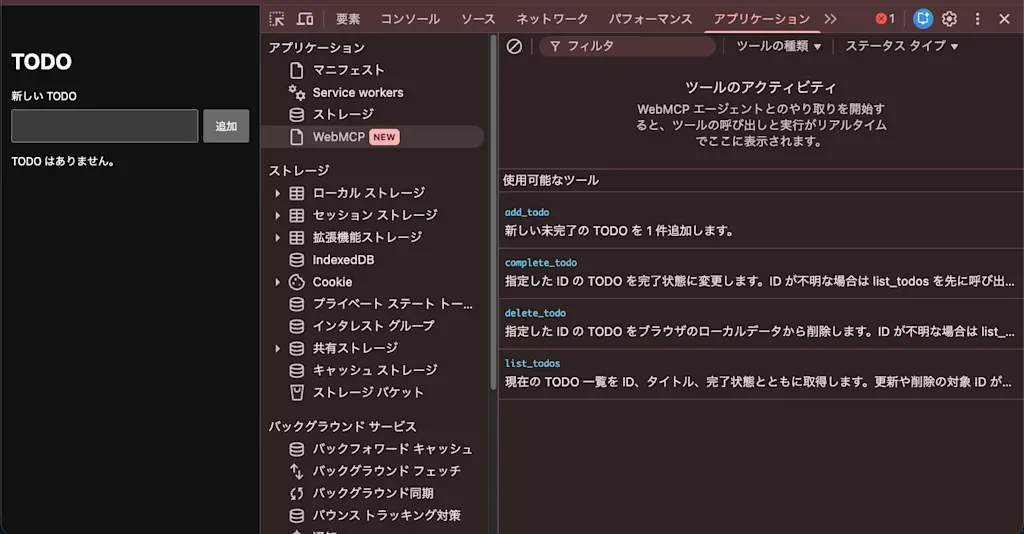
You can inspect the tools actually registered on a web page from the WebMCP section of the Application panel in Chrome DevTools.
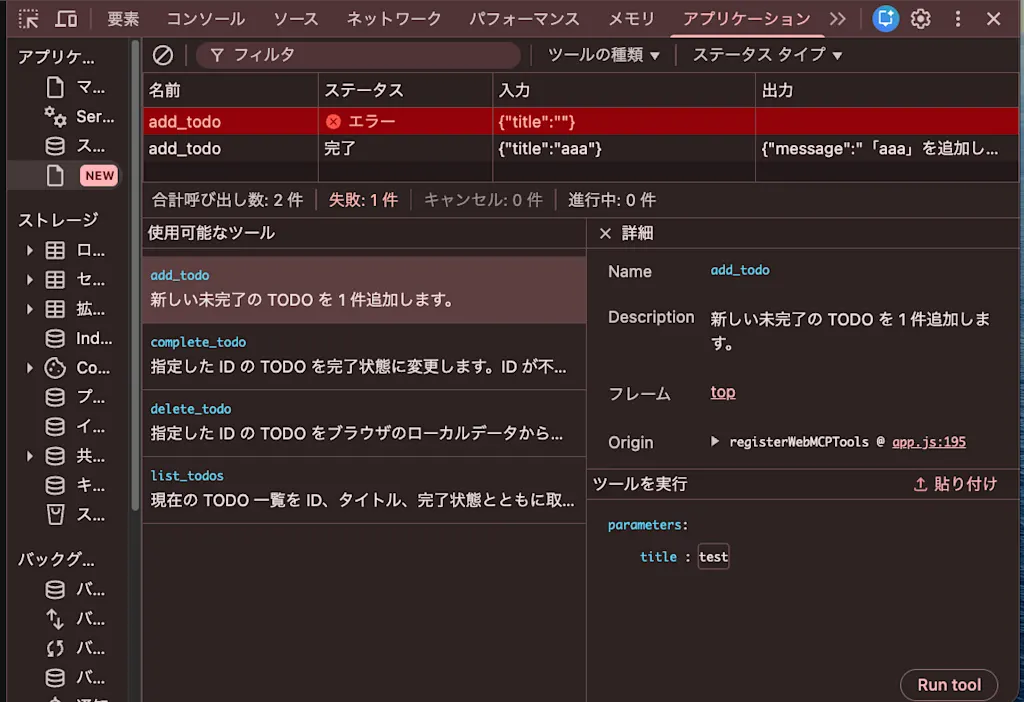
You can also debug a tool by selecting it, entering arguments, and clicking "Run tool".
Because WebMCP tools are bound to the page that is currently open, the agent operates using the same screen, page state, and login session as the user. This makes it possible for a human and an AI to work together while looking at the same screen. And because it reuses the existing login session, there is no need to introduce a new authentication mechanism just so the AI can act, which is another benefit.
Here is the full code of the TODO app used in this article. TODOs are stored in localStorage, and four tools are registered: list_todos, add_todo, complete_todo, and delete_todo.
Full code of the TODO app (index.html / app.js)
<!doctype html>
<html lang="ja">
  <head>
    <meta charset="UTF-8" />
    <meta name="viewport" content="width=device-width, initial-scale=1.0" />
    <title>WebMCP TODO</title>
    <link rel="stylesheet" href="./styles.css" />
    <script type="module" src="./app.js"></script>
  </head>
  <body>
    <main>
      <h1>TODO</h1>

      <form id="todo-form">
        <label for="todo-title">新しい TODO</label>
        <div class="todo-input">
          <input id="todo-title" name="title" maxlength="200" required />
          <button type="submit">追加</button>
        </div>
      </form>

      <p id="empty-message">TODO はありません。</p>
      <ul id="todo-list" aria-label="TODO リスト"></ul>
    </main>
  </body>
</html>const STORAGE_KEY = "webmcp-todos";
const form = document.querySelector("#todo-form");
const titleInput = document.querySelector("#todo-title");
const todoList = document.querySelector("#todo-list");
const emptyMessage = document.querySelector("#empty-message");
let todos = loadTodos();
function loadTodos() {
try {
const value = JSON.parse(localStorage.getItem(STORAGE_KEY) ?? "[]");
return Array.isArray(value) ? value : [];
} catch {
return [];
}
}
function saveTodos() {
localStorage.setItem(STORAGE_KEY, JSON.stringify(todos));
renderTodos();
}
function addTodo(title) {
if (typeof title !== "string") {
throw new TypeError("The TODO title must be a string.");
}
const normalizedTitle = title.trim();
if (!normalizedTitle) {
throw new Error("Please enter a TODO title.");
}
if (normalizedTitle.length > 200) {
throw new Error("The TODO title must be 200 characters or fewer.");
}
const todo = {
id: crypto.randomUUID(),
title: normalizedTitle,
completed: false,
};
todos.push(todo);
saveTodos();
return todo;
}
function updateTodo(id, completed) {
const todo = todos.find((item) => item.id === id);
if (!todo) {
throw new Error(`No TODO found with ID ${id}.`);
}
todo.completed = completed;
saveTodos();
return todo;
}
function deleteTodo(id) {
const index = todos.findIndex((item) => item.id === id);
if (index === -1) {
throw new Error(`No TODO found with ID ${id}.`);
}
const [deletedTodo] = todos.splice(index, 1);
saveTodos();
return deletedTodo;
}
function renderTodos() {
todoList.replaceChildren();
emptyMessage.hidden = todos.length > 0;
for (const todo of todos) {
const item = document.createElement("li");
item.dataset.completed = String(todo.completed);
const checkbox = document.createElement("input");
checkbox.type = "checkbox";
checkbox.checked = todo.completed;
checkbox.setAttribute("aria-label", `${todo.title}を完了にする`);
checkbox.addEventListener("change", () => {
updateTodo(todo.id, checkbox.checked);
});
const title = document.createElement("span");
title.textContent = todo.title;
const deleteButton = document.createElement("button");
deleteButton.type = "button";
deleteButton.textContent = "削除";
deleteButton.setAttribute("aria-label", `${todo.title}を削除する`);
deleteButton.addEventListener("click", () => {
deleteTodo(todo.id);
});
item.append(checkbox, title, deleteButton);
todoList.append(item);
}
}
form.addEventListener("submit", (event) => {
event.preventDefault();
addTodo(titleInput.value);
form.reset();
titleInput.focus();
});
async function registerWebMCPTools() {
if (typeof document.modelContext?.registerTool !== "function") {
console.info("WebMCP is not available in this browser.");
return;
}
const tools = [
{
name: "list_todos",
title: "Get the list of TODOs",
description:
"Returns the current list of TODOs with their ID, title, and completion state. If you do not know the target ID for an update or delete, call this tool first.",
inputSchema: {
type: "object",
properties: {},
additionalProperties: false,
},
annotations: { readOnlyHint: true },
execute: async () => ({ count: todos.length, todos }),
},
{
name: "add_todo",
title: "Add a TODO",
description: "Adds a single new, incomplete TODO.",
inputSchema: {
type: "object",
properties: {
title: {
type: "string",
description: "Title of the TODO to add",
minLength: 1,
maxLength: 200,
},
},
required: ["title"],
additionalProperties: false,
},
execute: async ({ title }) => {
const todo = addTodo(title);
return { message: `Added "${todo.title}".`, todo };
},
},
{
name: "complete_todo",
title: "Complete a TODO",
description:
"Marks the TODO with the given ID as completed. If you do not know the ID, call list_todos first.",
inputSchema: {
type: "object",
properties: {
id: {
type: "string",
description: "ID of the TODO to complete",
},
},
required: ["id"],
additionalProperties: false,
},
execute: async ({ id }) => {
const todo = updateTodo(id, true);
return { message: `Marked "${todo.title}" as completed.`, todo };
},
},
{
name: "delete_todo",
title: "Delete a TODO",
description:
"Deletes the TODO with the given ID from the browser's local data. If you do not know the ID, call list_todos first.",
inputSchema: {
type: "object",
properties: {
id: {
type: "string",
description: "ID of the TODO to delete",
},
},
required: ["id"],
additionalProperties: false,
},
execute: async ({ id }) => {
const todo = deleteTodo(id);
return { message: `Deleted "${todo.title}".`, todo };
},
},
];
for (const tool of tools) {
await document.modelContext.registerTool(tool);
}
}
renderTodos();
registerWebMCPTools().catch((error) => {
console.error("Failed to register WebMCP tools.", error);
});Site tools in ChatGPT desktop
ChatGPT calls its implementation of the WebMCP spec Site tools. When you open a WebMCP-enabled page in the built-in browser of ChatGPT desktop, the agent can detect and call the available operations.
At present, using WebMCP requires GPT-5.6 Sol or GPT-5.6 Terra. WebMCP is disabled for GPT-5.6 Luna.
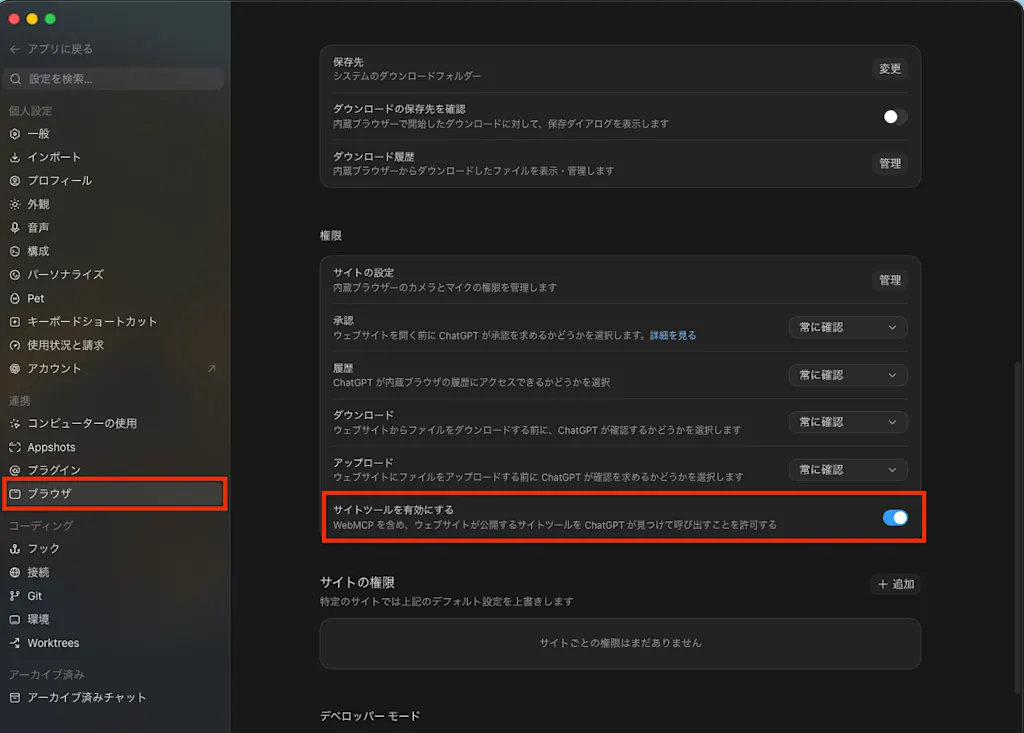
Update ChatGPT desktop to the latest version, open Settings, and confirm that "Browser" → "Enable site tools" is turned on.
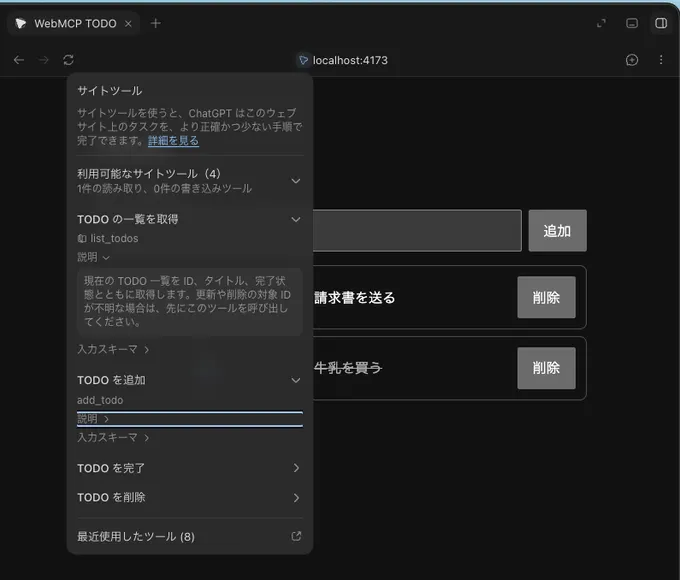
Clicking the site tools icon in the built-in browser's address bar shows the tools the page exposes. After a tool has been called, you can also review recent invocations under "Recently used tools".
Operating the TODO app from Codex
Now let's actually operate the TODO app from Codex.
Adding TODOs
First, I opened the TODO app page in the built-in browser and made the following request:
Open http://localhost:4173/ and add "buy milk" and "send the invoice" to the TODOsIt appears that Codex first calls the ChatGPT desktop built-in tool webmcp_list_tools to retrieve the list of tools the page exposes.
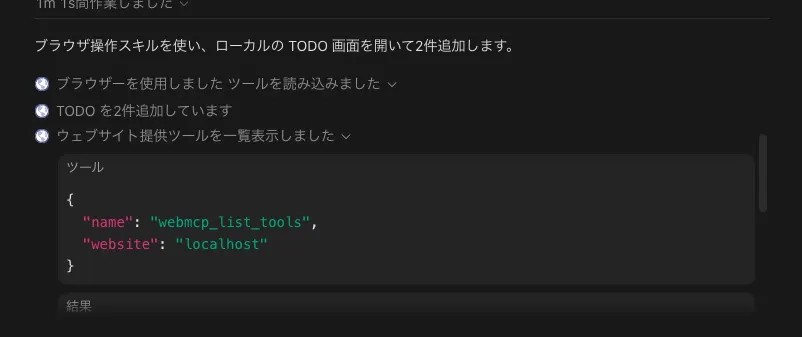
{
  "tools": [
    {
      "name": "list_todos",
      "registration_id": "3364449875-2897562999-3575514943-438539620",
      "title": "TODO の一覧を取得",
      "description": "現在の TODO 一覧を ID、タイトル、完了状態とともに取得します。更新や削除の対象 ID が不明な場合は、先にこのツールを呼び出してください。",
      "input_schema": {
        "type": "object",
        "properties": {},
        "additionalProperties": false
      },
      "annotations": {
        "readOnlyHint": true
      },
      "origin": "http://localhost:4173",
      "pageUrl": "http://localhost:4173/"
    },
    {
      "name": "add_todo",
      "registration_id": "1414652002-805789020-2859544873-1366956443",
      "title": "TODO を追加",
      "description": "新しい未完了の TODO を 1 件追加します。",
      "input_schema": {
        "type": "object",
        "properties": {
          "title": {
            "type": "string",
            "description": "追加する TODO のタイトル",
            "minLength": 1,
            "maxLength": 200
          }
        },
        "required": [
          "title"
        ],
        "additionalProperties": false
      },
      "origin": "http://localhost:4173",
      "pageUrl": "http://localhost:4173/"
    },
    {
      "name": "complete_todo",
      "registration_id": "2157087165-3452018612-3738018915-3103997134",
      "title": "TODO を完了",
      "description": "指定した ID の TODO を完了状態に変更します。ID が不明な場合は list_todos を先に呼び出してください。",
      "input_schema": {
        "type": "object",
        "properties": {
          "id": {
            "type": "string",
            "description": "完了にする TODO の ID"
          }
        },
        "required": [
          "id"
        ],
        "additionalProperties": false
      },
      "origin": "http://localhost:4173",
      "pageUrl": "http://localhost:4173/"
    },
    {
      "name": "delete_todo",
      "registration_id": "2282909197-3701202854-3300925970-3712548734",
      "title": "TODO を削除",
      "description": "指定した ID の TODO をブラウザのローカルデータから削除します。ID が不明な場合は list_todos を先に呼び出してください。",
      "input_schema": {
        "type": "object",
        "properties": {
          "id": {
            "type": "string",
            "description": "削除する TODO の ID"
          }
        },
        "required": [
          "id"
        ],
        "additionalProperties": false
      },
      "origin": "http://localhost:4173",
      "pageUrl": "http://localhost:4173/"
    }
  ]
}
You can also see it pick add_todo from the tool list and run it.
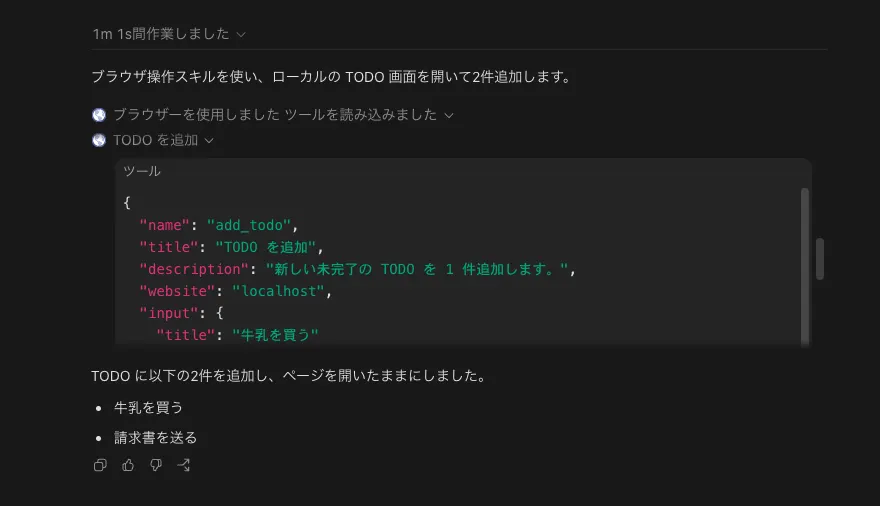
[
  {
    "tool": "add_todo",
    "input": { "title": "牛乳を買う" },
    "output": {
      "message": "「牛乳を買う」を追加しました。",
      "todo": {
        "id": "f8e7ed69-a298-4c77-96a9-d4254e1158a4",
        "title": "牛乳を買う",
        "completed": false
      }
    }
  },
  {
    "tool": "add_todo",
    "input": { "title": "請求書を送る" },
    "output": {
      "message": "「請求書を送る」を追加しました。",
      "todo": {
        "id": "4882d4fa-2847-4807-8bb0-d350c377b69f",
        "title": "請求書を送る",
        "completed": false
      }
    }
  }
]
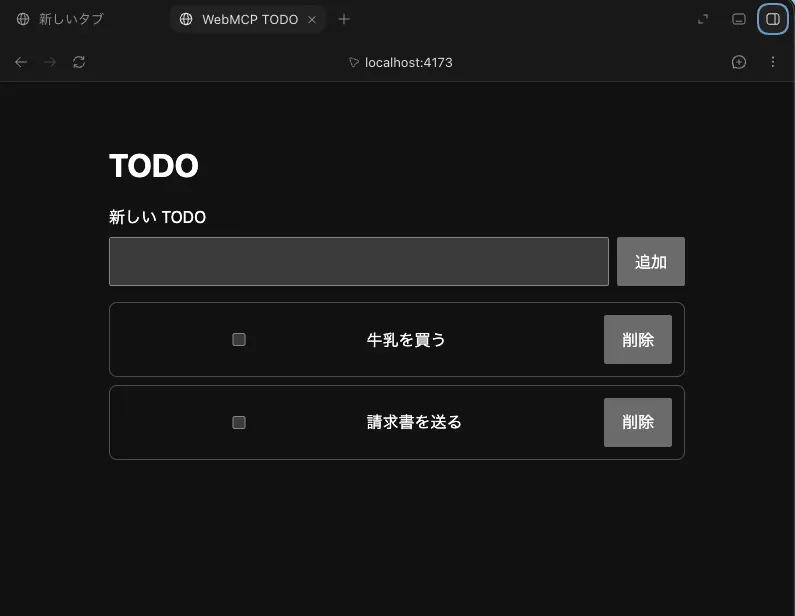
You can confirm that the two items were also added to the TODO list open in the built-in browser.
Picking a target from the list and completing it
Next, I asked it to mark a TODO as completed.
Mark the shopping TODO as completedCodex first called the read-only list_todos. From the titles in the return value, it decided that "buy milk" was the shopping TODO and passed its UUID to complete_todo.
[
  {
    "tool": "list_todos",
    "input": {},
    "output": {
      "count": 2,
      "todos": [
        {
          "id": "f8e7ed69-a298-4c77-96a9-d4254e1158a4",
          "title": "牛乳を買う",
          "completed": false
        },
        {
          "id": "4882d4fa-2847-4807-8bb0-d350c377b69f",
          "title": "請求書を送る",
          "completed": false
        }
      ]
    }
  },
  {
    "tool": "complete_todo",
    "input": { "id": "f8e7ed69-a298-4c77-96a9-d4254e1158a4" },
    "output": {
      "message": "「牛乳を買う」を完了にしました。",
      "todo": {
        "id": "f8e7ed69-a298-4c77-96a9-d4254e1158a4",
        "title": "牛乳を買う",
        "completed": true
      }
    }
  }
]
A confirmation was required right before the delete
Finally, I asked it to delete a TODO, as follows.
Delete the completed TODOsAfter deciding what to delete, and before calling delete_todo, Codex asked in the conversation whether it was OK to delete the local data for "buy milk".
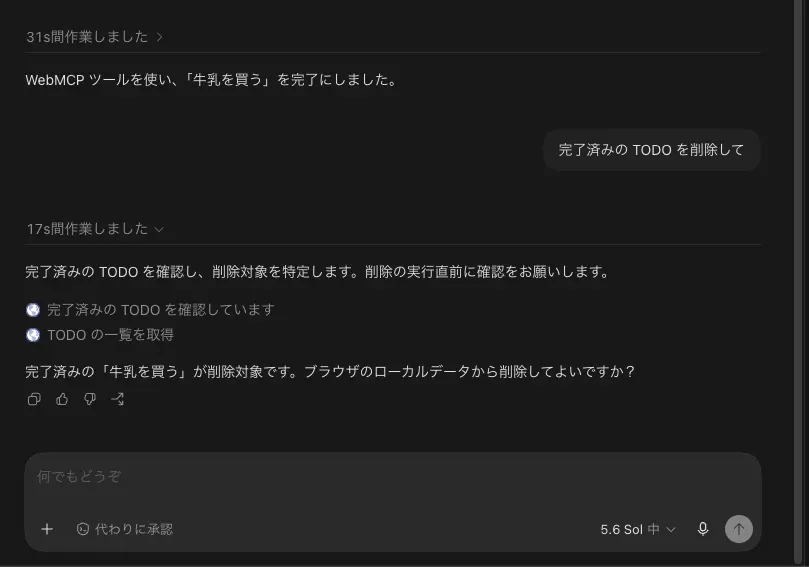
This is due to ChatGPT's safety review and confirmation policy. ChatGPT's official documentation explains that the built-in browser runs a safety review before invoking each tool, and that the normal confirmation policy applies to actions such as deleting, purchasing, sending messages, and changing permissions.
These checks reduce risk; they do not guarantee the trustworthiness of a website or its output. Keep in mind that a tool's description and its readonly annotation are not necessarily accurate.
After approval, Codex re-fetched the latest state with list_todos and then called delete_todo.
[
  {
    "tool": "list_todos",
    "input": {},
    "output": {
      "count": 2,
      "todos": [
        {
          "id": "f8e7ed69-a298-4c77-96a9-d4254e1158a4",
          "title": "牛乳を買う",
          "completed": true
        },
        {
          "id": "4882d4fa-2847-4807-8bb0-d350c377b69f",
          "title": "請求書を送る",
          "completed": false
        }
      ]
    }
  },
  {
    "tool": "delete_todo",
    "input": { "id": "f8e7ed69-a298-4c77-96a9-d4254e1158a4" },
    "output": {
      "message": "「牛乳を買う」を削除しました。",
      "todo": {
        "id": "f8e7ed69-a298-4c77-96a9-d4254e1158a4",
        "title": "牛乳を買う",
        "completed": true
      }
    }
  }
]
Conclusion
- Codex in ChatGPT desktop can discover and run the WebMCP tools of a page opened in the built-in browser as Site tools.
- In the current WebMCP, you use
document.modelContext.registerTool()and call the same application logic from the tool as the existing UI does. - Codex picked the tool that fit the goal from the tool list, filled in the arguments, and called it.
- For deletion, a confirmation was required right before execution, once the target had been determined.