Extending Claude Code Itself with Claude Code Mods
Claude Code Mods are TypeScript/JavaScript functions that run inside the Claude Code process to observe, rewrite, or answer events. This article builds a mod that blocks dangerous Bash commands and explains how Mods work, their design, and security.
Claude Code has long offered several ways to customize it, including hooks, Skills, MCP servers, and the status line. All of these, however, run outside of Claude Code. Hooks, for example, run a shell command for each event and can stop a tool call based on its exit code or JSON output, but they can't redraw Claude Code's screen or replace its built-in behavior.
On October 1, 2026, Mods officially arrived in Claude Code. A mod is a TypeScript/JavaScript function that runs inside the Claude Code process and can observe, rewrite, or answer in place of events such as tool calls, prompt submissions, and screen rendering. Claude Code's own
/diff is already implemented as a mod.
In this article, we'll build a mod that blocks dangerous Bash commands and shows how many it has blocked above the prompt. Along the way, we'll look at how Mods work, the design background behind the current API, and the security considerations to keep in mind.
What are Mods?
The official documentation describes a mod as a plugin that changes how Claude Code looks and behaves. When a plugin contains JavaScript/TypeScript code, it becomes a mod. This means you install and distribute mods with the same
/plugin install command and marketplace system you already use.
A mod's code registers functions that are called for each event. The official documentation calls these functions hooks, and refers to the traditional hooks written in settings files as "settings hooks" to distinguish them. This article uses the same terminology.
The official documentation lists the following examples of what a mod can do:
- Draw your own UI, including buttons and text inputs, in a pane next to the transcript or in a band above the prompt
- Rewrite UI that Claude Code itself draws, such as tool call rows and the spinner
- Hold a tool call to ask the user a question, or return a result instead of running the tool
- Add
/commands that run a function immediately, without going through Claude's turn
Structure of a mod
At minimum, a mod consists of three files.
danger-guard/
├── .claude-plugin/
│   └── plugin.json
└── hooks/
    ├── hooks.json
└── register.tsxplugin.json: The plugin manifesthooks.json: Specifies the path to the hooks module with themoduleskey. The presence of this key is what makes the plugin a modregister.tsx: The hooks module itself
Claude Code loads .ts, .tsx, .js, and similar files directly, so you don't need Node.js, a bundler, or a build step.
hooks.json specifies just one hooks module path, like this:
{
  "modules": ["./register.tsx"]
}
The hooks module exports a register function. When Claude Code loads the mod, it calls register exactly once and passes an on function as its argument. Calling on(eventName, matcher, hook) registers a hook for an event.
import type { Register } from "claude-code";

export const register: Register = (on) => {
  on("tool.call", { tool: "Bash" }, async ($, e, next) => {
    // ...
    return next(e);
  });
};
Handling events with $, e, and next
Every hook receives three arguments: ($, e, next).
$: The mods API. Every operation that affects anything outside the mod, including rendering, registering commands, calling models, and accessing files and processes, goes through$, as in$.ui.toast()or$.process.run()e: The event input. Fortool.call,e.toolholds the tool name ande.commandholds the Bash commandnext: A function that calls the next handler. At the end of the chain, Claude Code's own processing runs and its result is returned
Depending on how a hook handles next, its behavior falls into one of three patterns.
// Just log and pass it through to the next handler unchanged
on("tool.call", async ($, e, next) => {
  $.ui.log("Claude is about to use " + e.tool);
  return next(e);
});

// Pass a modified copy of the event to the next handler
on("prompt.submit", async ($, e, next) => {
  return next({ ...e, text: e.text.trim() });
});

// Return a result without calling next (later mods and Claude Code's own processing don't run)
on("tool.call", { tool: "Bash" }, async () => {
  return { deny: "Bash is turned off in this project. Use the file tools." };
});
If you write code after await next(e), you can inspect the result after the tool has run and add your own processing. If you've used Express or Koa middleware, this shape should feel familiar.
Multiple mods stack in an onion model
When multiple mods register hooks for the same event, they form a single middleware chain. The hooks are layered like the skins of an onion: the event travels from the outside in, and the result travels back from the inside out. This structure is known as the onion model, made famous by the middleware of Koa, a web framework for Node.js.
Let's look at a concrete example. Suppose mod A, which logs every Bash command, and mod B, which denies rm -rf, both register hooks for tool.call. If A is loaded first, A is on the outside and B is on the inside.
// mod A (outer): logs every command
on("tool.call", { tool: "Bash" }, async ($, e, next) => {
  $.ui.log("A: 前");
  const result = await next(e); // proceed inward to B
  $.ui.log(`A: 後 (deny=${result.deny !== undefined})`);
  return result;
});
// mod B (inner): denies rm -rf
on("tool.call", { tool: "Bash" }, async ($, e, next) => {
$.ui.log("B: 前");
if (/\brm\s+-rf\b/.test(e.command)) {
$.ui.log("B: 拒否");
return { deny: "rm -rf は実行できません" };
}
const result = await next(e); // Claude Code runs the tool
$.ui.log("B: 後");
return result;
});await next(e) means "move one layer inward and wait until everything inside has finished and returned a result." (In the logs, 前 means "before," 後 means "after," and 拒否 means "denied.") When Claude runs ls, the logs appear in this order:
A: 前 → B: 前 → (ls を実行) → B: 後 → A: 後 (deny=false)On the other hand, when Claude tries to run rm -rf build, B returns { deny } without calling next, so the tool never runs. Even so, B's result comes back to A's await next(e), so A can tell that the command was denied.
A: 前 → B: 前 → B: 拒否 → A: 後 (deny=true)This example reveals the following properties of the onion model:
- The outer hook receives the event first and the result last. It can observe everything, including operations denied further in
- If the outer hook doesn't call
next, the inner hooks don't run. Conversely, an inner hook can't stop an outer hook
The order of the chain is determined by where each mod comes from. Built-in guard mods and mods that an organization's administrator specifies with prependPlugins in managed settings are placed before mods the user installed.
Design background
Before the official release, the design of Mods was published in the GitHub issue Mods - make Claude 10x more extensible (#91870), and it took shape based on community feedback. In the first post on September 3, 2026, the feature was called "function hooks," and an update on September 9 settled on the product name "Claude Mods."
The first post describes the mechanism as a "registration-order next continuation model" modeled after Express and Koa. Explaining why they chose a Koa-inspired onion model, an Anthropic engineer noted in a comment that a plugin registered earlier "owns" the hooks that follow it, and that later plugins can't interfere with the ones above them. The goal is that an organization's administrator can place their own mod at the front and audit every event, including denied operations.
There's also a reason for routing everything through $. According to comments on the issue, the goal is not to restrict what plugins can do, but to eliminate implicit access to things like file operations and process spawning. Routing everything through $ lets administrators audit, allow, deny, and log it. In practice, the hooks module runs in an isolated environment with neither the DOM nor Node.js APIs, so you can't write something like import fs from "node:fs". Thanks to this design, claude plugin validate, which we'll cover later, can list what a mod calls purely through static analysis of its source code, without running it.
Building a mod that blocks dangerous commands
From here, we'll build a mod called danger-guard that blocks dangerous Bash commands such as rm -rf and git push --force, and shows how many it has blocked above the prompt.
First, create the manifest. Note that claude plugin validate rejects names that look like official Anthropic plugins, such as a name starting with claude-.
{
  "name": "danger-guard",
  "version": "0.1.0",
  "description": "Blocks dangerous Bash commands and shows how many were blocked above the prompt",
  "author": {
    "name": "azukiazusa"
  }
}
As shown earlier, hooks/hooks.json points to ./register.tsx. Here is the hooks module itself:
import type { Register } from "claude-code";

// Treat rm -rf and git push --force / -f as dangerous commands
const DANGEROUS =
  /\brm\s+-[a-z]*r[a-z]*f|\brm\s+-[a-z]*f[a-z]*r|\bgit\s+push\b.*(--force\b|\s-f\b)/;

let blocked = 0;

export const register: Register = (on) => {
  on("tool.call", { tool: "Bash" }, async ($, e, next) => {
    if (!DANGEROUS.test(e.command)) {
      return next(e);
    }
    blocked += 1;
    $.ui.invalidate("ui.render");
    return {
      deny: `${e.command} は danger-guard によりブロックされました。破壊的でない別の方法を提案してください。`,
    };
  }).catch(async ($, e, next) => {
    // If the guard itself fails, don't run the command
    if (next.called) return next(e);
    return { deny: "danger-guard の判定に失敗したため、コマンドを実行しませんでした。" };
  });

  on("ui.render", { component: "AbovePrompt" }, async ($, e, next) => {
    if (blocked === 0 || e.props.hasSurvey) {
      return next(e);
    }
    const { Box, Text } = $.ui.resolve(e);
    return (
      <Box>
        <Text color="yellow">
          danger-guard: {blocked} 件の危険なコマンドをブロックしました
        </Text>
      </Box>
    );
  });
};This mod only checks the command string with a regular expression, so it is not secure. It's merely an example to demonstrate how mods work.
The first hook is registered for the tool.call event. The second argument, { tool: "Bash" }, is a matcher, so the hook runs only for calls to the Bash tool. Besides plain values, matchers also accept arrays and regular expressions.
If the command isn't dangerous, the hook simply returns next(e), so the command goes through the usual permission check and runs. If the command is dangerous, the hook returns { deny: ... } without calling next. The command doesn't run, and no permission dialog appears either. Claude receives the deny string as the tool result, so the key is to write it as an instruction that helps Claude decide what to do next.
If a hook throws before calling next, Claude Code skips that hook to avoid breaking the session and continues with the inner handlers and its own processing. In other words, if a guarding hook fails because of a bug, the dangerous command runs anyway. To prevent this, we register a failure handler with .catch on the registration object that on returns, so the command is stopped even when the hook fails.
next.called indicates whether the failed hook had already called next. If it had, the tool has already run or is running, so the handler returns that result as is with next(e).
The second hook is registered for the ui.render event. ui.render fires every time Claude Code draws a part of the screen, and specifying { component: "AbovePrompt" } makes the hook run only when the band above the prompt is drawn. You get the Box and Text components used for rendering from $.ui.resolve(e), and you can draw with JSX.
$.ui.invalidate("ui.render"), called inside the tool.call hook, asks Claude Code to redraw. Because blocked is a module-level variable, the screen won't update unless you tell Claude Code that the value has changed.
Checking with validate and test
Before loading a mod, you can use claude plugin validate to see how Claude Code interprets it.
claude plugin validate ./danger-guardRunning it produced the following output:
Validating hooks: .../danger-guard/hooks/hooks.json

  ❯ ./register.tsx hooks: tool.call{tool=Bash}, ui.render{component=AbovePrompt}
  ❯ ./register.tsx gating hook with .catch: tool.call{tool=Bash}
  ❯ ./register.tsx calls: $.ui.invalidate, $.ui.resolve

✔ Validation passed
The hooks: line lists the events and matchers the mod registers, and the calls: line lists the mods APIs it calls. gating hook with .catch indicates that the hook capable of denying tool calls has a .catch attached. If you remove the .catch, this line changes to gating hook without .catch.
As mentioned earlier, calls: can be listed because every operation goes through $. To make this static analysis possible, there are a few constraints on how you write a hooks module:
- Don't assign
$or its namespaces to variables, as inconst ui = $.ui, and don't destructure them - Use string literals for the event names passed to
on - Don't use dynamic
import()orrequire; onlyimportfiles inside the plugin using relative paths
Before installing a mod someone else wrote, you can also run claude plugin validate to check, without executing any code, whether the mod reads or writes files, spawns processes, or accesses the network.
Next, let's write automated tests. With claude plugin test, you can fire events and check how your hooks behave without a session, a login, or network access.
import { expect, test } from "claude-code/testing";

test("危険なコマンドだけをブロックする", async ($, on) => {
  // Answer tool calls in place of Claude Code so no real command runs
  on("tool.call", () => ({ result: "ok" }));

  const safe = await $.tool.call({ tool: "Bash", command: "ls -la" });
  expect(safe.deny).toBeUndefined();

  const rm = await $.tool.call({ tool: "Bash", command: "rm -rf build" });
  expect(rm.deny).toContain("danger-guard");

  const push = await $.tool.call({
    tool: "Bash",
    command: "git push -f origin main",
  });
  expect(push.deny).toContain("danger-guard");

  for (const surface of ["terminal", "desktop"] as const) {
    const ui = await $.ui.mount({
      plugin: "danger-guard",
      surface,
      component: "AbovePrompt",
      props: { hasSurvey: false, isWorking: false, maxRows: 10 },
    });
    expect(await ui.find({ type: "Text", text: /2 件/ })).toBeDefined();
    await ui.unmount();
  }
});
Using on("tool.call", ...) inside a test lets you answer tool calls in place of Claude Code. With that in place, the test fires tool calls with $.tool.call() and verifies the returned results. $.ui.mount draws a render site on the specified surface and lets you search the elements in the rendered output. Here, we check that the count is displayed in both the terminal and the Desktop app.
Run the following command in the mod's directory:
claude plugin testtests/danger-guard.test.tsx:
(pass) 危険なコマンドだけをブロックする [24.14ms]
1 pass
0 fail
Ran 1 test across 1 file. [0.19s]The test passed. I also confirmed that changing the expected count to /3 件/ makes the test fail, which shows the test really is verifying the rendered output.
Running the mod in a real session
You can load a mod by passing its directory with the --plugin-dir flag.
claude --plugin-dir ./danger-guardDirectories loaded with --plugin-dir are watched, and the mod hot-reloads whenever you save a file.
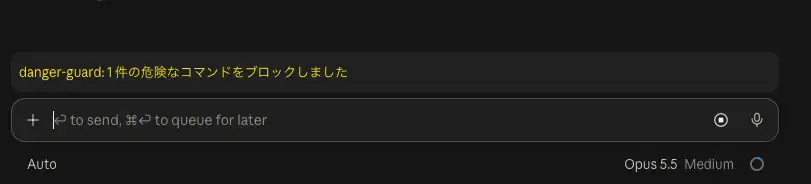
I launched Claude Code v2.1.302 in a location with a build directory and asked it to "try running rm -rf build." Claude called rm -rf build with the Bash tool, but the mod denied the command, so the build directory wasn't deleted, and the following appeared above the prompt:
Having Claude write a mod
So far we've written the mod by hand, but you can also ask Claude to write one in a Claude Code session, with a request like "Create a mod that shows the current Git branch above the prompt." Claude Code has a built-in Skill for writing mods called plugin-authoring, and Claude follows it to create the mod while referring to the type definitions of the APIs available in that session.
Mods that Claude writes are saved under ~/.claude/dev-mods/<session ID>/. When the first file is saved, a prompt asks "Enable hot reloading for this session?" If you choose "Enable for this session," the mod is loaded at the end of the turn. From then on, changes take effect at the end of each turn, so you can refine the mod while chatting with Claude.
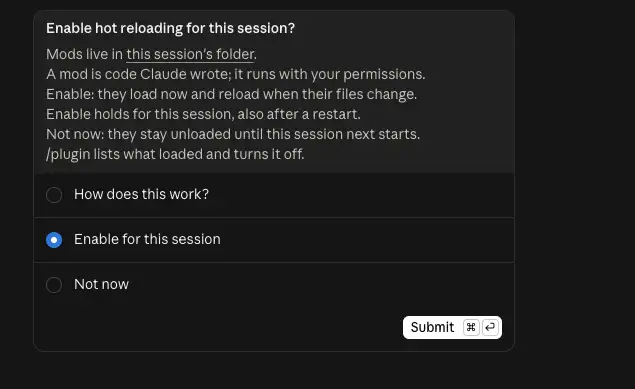
Mods that Claude writes are loaded only in that session and are deleted after a certain period. If you want to keep using one, copy the directory somewhere else and either load it with --plugin-dir or distribute it through a marketplace.
Security and disabling mods
Mods are not sandboxed and run with the user's permissions. According to the official documentation, a loaded mod can:
- Read and write files, launch programs, and access the network as the user
- Read secrets such as API keys stored in environment variables and configuration files
- See every prompt you submit and every tool call Claude makes
- Rewrite prompts and tool calls, and approve tool calls without asking the user
- Call models using the user's plan or API key
Even if you enable the sandbox, it only isolates the Bash commands Claude runs; processes launched by a mod are not covered. That said, even a mod can't change what the permission dialog displays.
Install only mods from authors and marketplaces you trust, and check what they call with claude plugin validate before installing.
Summary
- Mods are TypeScript/JavaScript functions that run inside the Claude Code process and can observe, rewrite, or answer in place of events such as tool calls, prompts, and rendering
- A mod is a plugin that specifies a hooks module in
modulesofhooks/hooks.json, and it is installed and distributed the same way as existing plugins - A hook receives
($, e, next), and its behavior depends on whether and how it callsnext. Multiple mods stack in a Koa-like onion model, so mods placed earlier can audit and control the ones that follow - Because every external effect is restricted to going through
$,claude plugin validatecan list the events a mod registers and the APIs it calls without running it - With
ui.renderhooks, you can draw your own UI in the band above the prompt or in a pane, and rewrite Claude Code's own UI claude plugin testlets you test a mod by triggering tool calls and rendering without a session- If a hook fails before calling
next, Claude Code skips it, so a guarding hook should use.catchto stop the command even on failure - Mods are not sandboxed and run with the user's permissions, so only install ones you trust
References
Mods overview - Claude Code Docs
Customize Claude Code with mods in TypeScript | Claude
Mods - make Claude 10x more extensible · Issue #91870 · anthropics/claude-code