
TUI を構築するための Typescript ライブラリ OpenTUI
AI コーディングエージェントの普及により、ターミナルベースの TUI アプリケーションの需要が高まっています。OpenTUI は Typescript で TUI アプリケーションを簡単に構築できるライブラリです。この記事では OpenTUI の特徴と基本的な使い方を紹介します。
AI コーディングエージェントの普及により、ターミナルにふれる時間が増えた開発者が多いでしょう。そんな中、ターミナルベースの TUI (Text-based User Interface) アプリケーションの需要が高まっています。OpenTUI は Typescript で TUI アプリケーションを簡単に構築できるライブラリです。OpenTUI は
opencode の基盤として利用されていることもあり、今後も開発が活発に続けられることが期待されます。この記事では OpenTUI の特徴と基本的な使い方を紹介します。
OpenTUI プロジェクトを作成する
以下のコマンドで OpenTUI プロジェクトの雛形を作成できます。
npm create tui@latest
# or
bun create tui@latest
プロジェクト名の入力とテンプレートの選択を求められます。まずは core テンプレートを選択しましょう。組み込みのテンプレートとして react と solid も用意されています。
✔ What is your project named? … my-opentui-project
? Which template do you want to use? ›
❯ Core
  React
  Solid
  Custom (GitHub URL or shorthand)
OpenTUI の基本的な使い方
はじめに OpenTUI の基本的な使い方を見ていきましょう。src/index.ts には以下のコードが含まれています。
import {
  ASCIIFont,
  Box,
  createCliRenderer,
  Text,
  TextAttributes,
} from "@opentui/core";

const renderer = await createCliRenderer({ exitOnCtrlC: true });

renderer.root.add(
  Box(
    { alignItems: "center", justifyContent: "center", flexGrow: 1 },
    Box(
      { justifyContent: "center", alignItems: "flex-end" },
      ASCIIFont({ font: "tiny", text: "OpenTUI" }),
      Text({ content: "What will you build?", attributes: TextAttributes.DIM }),
    ),
  ),
);
createCliRenderer 関数は OpenTUI のコアであり、ターミナル出力を管理し、入力イベントを処理し、レンダリングループを制御します。renderer.root.add メソッドを使用して、UI コンポーネントをルートコンテナに追加します。ウェブ開発における canvas に似た役割を果たします。ここでは renderer.root.add() メソッドを使用して、Box コンポーネントをルートに追加することにより、TUI のレイアウトを定義しています。この状態で npm run dev を実行すると、以下のような TUI が表示されます。これはレイアウトが変更された場合のみ再レンダリングされます。

renderer.start() メソッドを呼び出すことで、レンダリングループが開始され、TUI アプリケーションが動作します。
レンダリングは Box、Text、ASCIIFont などのコンポーネントを組み合わせて行います。すべてのレンダリング要素は Renderables クラスを継承して作成されています。Renderables クラスは Yoga レイアウトエンジン を使用しており、フレックスなレイアウトを簡単に実現できます。
Renderables クラスは宣言的な方法と命令的な方法の両方で使用できます。例えば Text コンポーネントを使用する代わりに TextRenderable クラスを直接使用できます。
import { TextRenderable, Text } from "@opentui/core";

const renderer = await createCliRenderer();

// Renderable クラスでの命令的な使用方法
const myText1 = new TextRenderable(renderer, { content: "Hello, OpenTUI!" });
// コンポーネントでの宣言的な使用方法
const myText2 = Text({ content: "Hello, OpenTUI!" });
命令的な使用方法では Renderable インスタンスを作成し、.add() メソッドを使用して子要素を追加します。状態はインスタンスのプロパティとして管理され、setter メソッドを使用して更新できます。ラベル付きの Input フィールドを命令的な方法で作成すると以下のようになります。
import {
  BoxRenderable,
  createCliRenderer,
  InputRenderable,
  TextRenderable,
} from "@opentui/core";

const renderer = await createCliRenderer();

function createLabelledInput() {
  const label = new TextRenderable(renderer, { content: "Name:" });
  const input = new InputRenderable(renderer, {
    placeholder: "Enter your name",
    id: "input",
    cursorColor: "blue",
    backgroundColor: "white",
    textColor: "black",
    width: 20,
  });
  const container = new BoxRenderable(renderer, {
    flexDirection: "row",
    gap: 1,
  });
  container.add(label);
  container.add(input);

  return container;
}

const container = createLabelledInput();
// input にフォーカスを設定
container.getRenderable("input")?.focus();

renderer.root.add(container);
宣言的な方法では、VNode を返す関数を使用して VNode ツリーを構築します。instantiate 関数が呼ばれるまで実際の Renderable インスタンスは作成されません。ラベル付きの Input フィールドを宣言的な方法で作成すると以下のようになります。特定の子孫要素に .focus() メソッドを呼び出すには、delegate 関数を使用します。
import { Box, createCliRenderer, delegate, Input, Text } from "@opentui/core";

const renderer = await createCliRenderer();

function LabelledInput() {
  return delegate(
    {
      focus: "input",
    },
    Box(
      { flexDirection: "row", gap: 1 },
      Text({ content: "Name:" }),
      Input({
        placeholder: "Enter your name",
        id: "input",
        cursorColor: "blue",
        backgroundColor: "white",
        textColor: "black",
        width: 20,
      }),
    ),
  );
}

const MyLabelledInput = LabelledInput();
// input にフォーカスを設定
MyLabelledInput.focus();

renderer.root.add(MyLabelledInput);
コンソールログ
ターミナルでは標準出力が TUI のレンダリングに使用されるため、console.log を使用してデバッグしようとすると、TUI の表示が乱れてしまうという問題がありました。OpenTUI では console.xxx メソッドをオーバーライドして、オーバーレイとしてログを表示する仕組みが組み込まれています。これにより普段の TypeScript の開発と同じように console.log を使用してデバッグできます。
コンソールのオプションは createCliRenderer 関数の引数で設定できます。renderer.console.toggle() メソッドでコンソールの表示・非表示を切り替えられます。
import { createCliRenderer, ConsolePosition, Box, Text } from "@opentui/core";
const renderer = await createCliRenderer({
  console: {
    position: ConsolePosition.BOTTOM,
    sizePercent: 30,
    colorInfo: "cyan",
    colorWarn: "yellow",
    colorError: "red",
  },
});

const Button = Box(
  {
    padding: 1,
    backgroundColor: "green",
    borderRadius: 1,
    onClick: () => {
      renderer.console.toggle();
    },
  },
  Text({ content: "Toggle Console (Ctrl+C)" }),
);

renderer.root.add(Button);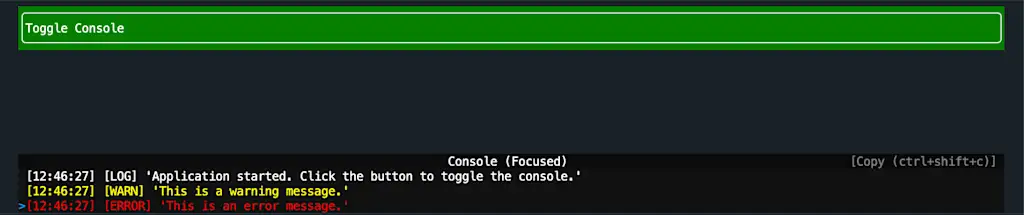
キーボードイベント
コンポーネントの onKeyPress プロパティや renderer.KeyInput イベントリスナーを使用して、キーボードイベントを処理できます。
import { createCliRenderer, KeyEvent } from "@opentui/core";

const renderer = await createCliRenderer();

renderer.keyInput.on("keypress", (keyEvent: KeyEvent) => {
  console.log("Key name:", keyEvent.name);
  console.log("Key sequence:", keyEvent.sequence);
  console.log("Is Ctrl pressed:", keyEvent.ctrl);
  console.log("Is Shift pressed:", keyEvent.shift);
  console.log("Is Alt pressed:", keyEvent.meta);
  console.log("Is Option pressed:", keyEvent.option);
  console.log("-----");
});
Renderable の一覧
OpenTUI はいくつかの組み込みのレンダリング要素を提供しています。以下は主な Renderable の一覧です。
| Renderable | 説明 |
|---|---|
| Box | コンテナ要素として機能する |
| Text | テキスト要素を表示 |
| ASCIIFont | ASCII アートフォントでテキストを表示 |
| Input | ユーザーからのテキスト入力を受け付ける |
| Select | 選択可能なリストを表示 |
| TabSelect | タブ切り替え用の UI を提供 |
| FrameBuffer | 低レベルの描画操作をサポート |
React 統合
OpenTUI は React や Solid といった UI フレームワークと統合するためのパッケージも提供しています。React 統合を使用すると、React コンポーネントとして TUI を構築できます。React 統合を使用するには以下のパッケージをインストールします。
npm install @opentui/react reactまた tsconfig.json の jsxImportSource オプションを @opentui/react に設定します。
{
  "compilerOptions": {
    "jsx": "react-jsx",
    "jsxImportSource": "@opentui/react"
  }
}Box、Text、Input などの基本的なコンポーネントは <box>, <text>, <input> といった JSX タグとして使用できます。使用可能な JSX タグの一覧は以下の通りです。
<box>: コンテナ要素として機能する<text>: テキスト要素を表示<ascii-font>: ASCII アートフォントでテキストを表示<scroll-box>: スクロール可能なコンテナ要素<input>: ユーザーからのテキスト入力を受け付ける<textarea>: 複数行のテキスト入力を受け付ける<select>: 選択可能なリストを表示<tab-select>: タブ切り替え用の UI を提供<code>: シンタックスハイライト付きのコード表示<line-number>: 行番号、差分、マーカー付きのコード表示<diff>: diff 表示<span>,<strong>,<em>,<u>,<b>,<i>,<br>: テキスト装飾要素
以下は React 統合を使用したサンプルコードです。
import { createCliRenderer, TextAttributes } from "@opentui/core";
import { createRoot } from "@opentui/react";

const renderer = await createCliRenderer({ exitOnCtrlC: true });
const App = () => (
  <box alignItems="center" justifyContent="center" flexGrow={1}>
    <box justifyContent="center" alignItems="flex-end">
      <asciifont font="tiny" text="OpenTUI" />
      <text attributes={TextAttributes.DIM}>What will you build?</text>
    </box>
  </box>
);
const root = createRoot(renderer);
root.render(<App />);
通常の React 開発と同様に、状態管理には useState フックを使用できます。
import { createCliRenderer } from "@opentui/core";
import { createRoot } from "@opentui/react";
import { useState } from "react";

const renderer = await createCliRenderer({ exitOnCtrlC: true });

const App = () => {
  const [count, setCount] = useState(0);

  return (
    <box alignItems="center" justifyContent="center" flexGrow={1}>
      <text>Count: {count}</text>
      <box
        padding={1}
        backgroundColor="green"
        onMouseDown={() => setCount(count + 1)}
      >
        <text>Increment</text>
      </box>
    </box>
  );
};

const root = createRoot(renderer);
root.render(<App />);
useKeyboard フックを使用してキーボードイベントを処理できます。
import { createCliRenderer } from "@opentui/core";
import { createRoot, useKeyboard } from "@opentui/react";
import { useEffect, useState } from "react";

const renderer = await createCliRenderer({ exitOnCtrlC: true });

const App = () => {
  const [lastKey, setLastKey] = useState<string | null>(null);

  useKeyboard((keyEvent) => {
    setLastKey(keyEvent.name);
  });

  return (
    <box alignItems="center" justifyContent="center" flexGrow={1}>
      <text>
        {lastKey ? `Last key pressed: ${lastKey}` : "Press any key..."}
      </text>
    </box>
  );
};

const root = createRoot(renderer);
root.render(<App />);
React DevTools を使ってデバッグ
OpenTUI の React 統合は React DevTools と互換性があります。初めに react-devtools パッケージをインストールします。
npm install react-devtools@7React DevTools を起動するには、以下のコマンドを実行します。
npx react-devtools環境変数 DEV を true に設定してアプリケーションを起動すると、React DevTools が自動的に接続されます。
DEV=true npm run dev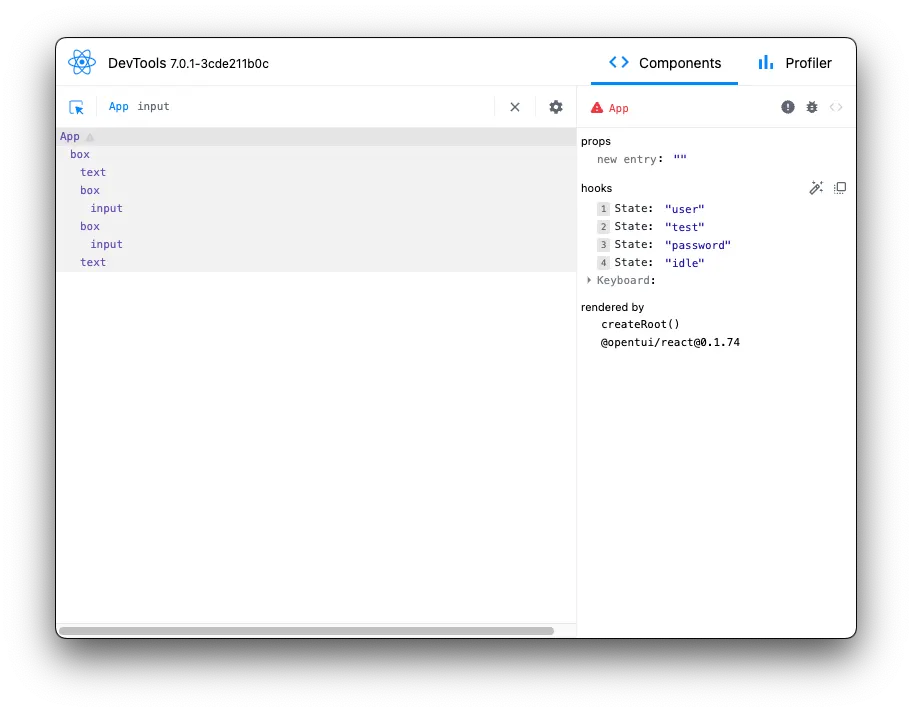
まとめ
- OpenTUI は Typescript で TUI アプリケーションを簡単に構築できるライブラリ
- OpenTUI は Yoga レイアウトエンジンを使用しており、フレックスベースのレイアウトを簡単に実現できる
- レイアウトは
Renderablesクラスを継承したコンポーネントを組み合わせて定義し、宣言的・命令的な方法で使用できる - 宣言的な方法では VNode を返す関数を使用して VNode ツリーを構築する
- 命令的な方法では Renderable インスタンスを作成し、
.add()メソッドで子要素を追加する - コンソールログはオーバーレイとして表示され、
console.logを使用してデバッグできる - キーボードイベントはコンポーネントの
onKeyPressプロパティやrenderer.KeyInputイベントリスナーで処理できる - OpenTUI は React や Solid といった UI フレームワークと統合可能