
Building a Full-Stack Vite App with Void and Deploying to Cloudflare
Void is VoidZero's toolkit for building full-stack Vite apps and deploying them to Cloudflare. It infers resources from imports like void/db. This article builds a React memo app on D1 and deploys it with a single void deploy command.
Void is a toolkit for building full-stack apps with Vite and deploying them to Cloudflare. It was built by VoidZero, the company behind Vite, Vitest, Oxc, and Rolldown, and was released as open source (MIT License) on October 15, 2026, after VoidZero joined Cloudflare. Simply importing
void/db in your code gives you a local database, and running void deploy automatically creates a D1 database on Cloudflare.
In this article, we'll use Void to build a React memo app that stores its data in D1, and walk through deploying it to Cloudflare.
What Is Void?
According to Cloudflare's official blog, Void consists of three parts:
- Void SDK: A JavaScript SDK for building full-stack apps with Vite. It provides file-based routing, prerendering, and type safety from the database all the way to the UI
- Void CLI: A CLI for provisioning resources and deploying. It is built on top of Cloudflare's new
cfCLI - Void Platform: A deployment platform for hosting Void apps as a team. You can self-host it on Workers for Platforms in your own Cloudflare account
All of these ship as a single npm package, void, together with a Vite plugin. This article covers the SDK and the CLI.
The official blog gives two motivations for building Void:
- VoidZero's tools have covered the frontend toolchain, but full-stack apps also need server routes, databases, a local development environment, and deployment. The goal is to handle all of that within a single Vite workflow
- Companies want to build internal apps easily, but handing cloud access to every employee raises security concerns. A shared, admin-controlled deployment platform (Void Platform) addresses this
At the heart of Void is the idea of "inferring resources from your code." At startup, Void scans directories such as routes/ and pages/ and checks which modules they import. For example, if it finds import { db } from "void/db", it determines that a DB binding for a D1 database is needed; if it finds import { kv } from "void/kv", it determines that a KV binding for KV is needed.
A binding is the connection setting that lets Cloudflare Workers code access resources such as D1 or KV. During development, these imports resolve to local resources, and at deploy time real Cloudflare resources are created. As a result, you don't need to hand-write configuration files like wrangler.jsonc.
Creating a Project
Following the Quickstart, install Void in an empty directory and create a project with the
void init command.
mkdir void-memo && cd void-memo
npm install -D void
npx void init
Running void init asks a few interactive questions. Here is how I answered them:
| Question | Options | My answer |
|---|---|---|
| Choose a Pages scaffold toolchain | Vite+ (default) / Vite | Vite+ |
| Choose a Pages framework to scaffold | React / Vue / Svelte / Solid | React |
| Choose a Pages starter | D1 (SQLite) / PostgreSQL / MySQL / Static Pages | D1 (SQLite) |
| Where should this project deploy? | Cloudflare / Void / Skip deployment setup | Cloudflare |
Vite+, mentioned in the first question, is a unified toolchain developed by VoidZero. In addition to Vite, it lets you use Vitest, Oxlint, Oxfmt, and more from a single command,
vp. You don't need to install Vite+ globally; void init adds it as a project dependency.
Once void init finishes, the following files are created:
.
├── AGENTS.md
├── db
│   ├── migrations
│   ├── schema.ts
│   └── seed.ts
├── pages
│   ├── index.server.ts
│   └── index.tsx
├── routes
│   └── api
│       └── hello.ts
├── package.json
├── tsconfig.json
├── vite.config.ts
└── void.config.ts
vite.config.ts includes Void's Vite plugin and the React adapter.
import { defineConfig } from "vite";
import { voidPlugin } from "void";
import { voidReact } from "@void/react/plugin";

export default defineConfig({
  plugins: [
    voidPlugin(),
    voidReact({ react: { compiler: true } }),
  ],
});
voidPlugin() handles routing and resource inference, and voidReact() is the adapter for using Pages mode with React. AGENTS.md explains how to use Void for coding agents. Void's documentation is bundled in node_modules/void/docs/, so agents can refer to it.
The starter already includes a page that lists and adds messages. Let's rewrite it into an app where you can add and delete memos.
Schema and Migrations
Void bundles Drizzle ORM as its ORM. Define the memos table in
db/schema.ts. The functions used to define columns are imported from void/schema-d1, void/schema-pg, or void/schema-mysql, depending on the database type.
import { sql } from "void/db";
import { integer, sqliteTable, text } from "void/schema-d1";

export const memos = sqliteTable("memos", {
  id: integer("id").primaryKey({ autoIncrement: true }),
  body: text("body").notNull(),
  createdAt: text("created_at").notNull().default(sql`(datetime('now'))`),
});
Also update db/seed.ts, which inserts initial data for development, to match the new table name.
import { defineSeed } from "void/seed";

export default defineSeed<typeof import("./schema")>(async ({ db, schema }) => {
  await db.insert(schema.memos).values([{ body: "Void を試す" }]);
});
void init has already generated a migration for the starter's messages table in db/migrations/. Since this migration hasn't been applied anywhere yet, delete the whole directory and regenerate the migration files from the schema with the void db generate command.
rm -rf db/migrations
npx void db generate
An SQL file like the following is generated in the db/migrations/ directory:
CREATE TABLE `memos` (
	`id` integer PRIMARY KEY AUTOINCREMENT NOT NULL,
	`body` text NOT NULL,
	`created_at` text DEFAULT (datetime('now')) NOT NULL
);
Next, the void db seed command resets the local database, applies the migrations, and then runs db/seed.ts.
npx void db seed◇ Reset database. Applied 1 migration.
✓ Seeded from db/seed.ts.The local database is stored in the .void directory. The development server also uses the database created here.
Pages, Loaders, and Actions
In Void's Pages mode, components placed in the pages/ directory become routes as-is. pages/index.tsx maps to /. This design is inspired by Inertia.js, and you write server-side logic in a
.server.ts file that accompanies each page (Pages Routing).
A .server.ts file mainly exports two kinds of functions:
loader: Runs on GET requests, and its return value becomes the page component's propsaction/actions: Handles mutations such as form submissions. If a page has multiple mutations, define them as named actions in anactionsobject
Rewrite pages/index.server.ts as follows:
import { defineHandler, type InferProps } from "void";
import { db, desc, eq } from "void/db";
import { createInsertSchema, createSelectSchema } from "void/drizzle-zod";
import { memos } from "@schema";

export type Props = InferProps<typeof loader>;

export const loader = defineHandler(async () => {
  const rows = await db.select().from(memos).orderBy(desc(memos.id));
  return { memos: rows };
});

export const actions = {
  create: defineHandler.withValidator({
    body: createInsertSchema(memos, {
      body: (schema) => schema.trim().min(1).max(280),
    }).pick({ body: true }),
  })(async (_c, { body }) => {
    await db.insert(memos).values(body);
  }),

  delete: defineHandler.withValidator({
    body: createSelectSchema(memos).pick({ id: true }),
  })(async (_c, { body }) => {
    await db.delete(memos).where(eq(memos.id, body.id));
  }),
};
The key points are:
dbis imported fromvoid/db. This import is what lets Void infer that a D1DBbinding is neededInferProps<typeof loader>extracts the type of the loader's return value and exports it as the page component's props typedefineHandler.withValidator()validates the request body.void/drizzle-zodre-exportsdrizzle-zod, and
createInsertSchema()andcreateSelectSchema()let you generate Zod schemas from your Drizzle schema
Next, implement the page component in pages/index.tsx.
import { useEffect } from "react";
import { action, Form, useForm } from "@void/react";
import type { Props } from "./index.server";

export default function HomePage({ memos }: Props) {
  const form = useForm("/?create", { body: "" });

  // On success, the submitted values become the new defaults, so clear the field explicitly instead of calling reset()
  useEffect(() => {
    if (form.wasSuccessful) form.setData("body", "");
  }, [form.wasSuccessful]);

  return (
    <main>
      <h1>メモ</h1>
      <Form form={form}>
        <label>
          メモ
          <input
            value={form.data.body}
            onChange={(event) => form.setData("body", event.target.value)}
          />
        </label>
        <button disabled={form.pending}>追加</button>
      </Form>
      <ul>
        {memos.map((memo) => (
          <li key={memo.id}>
            {memo.body} <small>{memo.createdAt}</small>{" "}
            <button onClick={() => action("/?delete", { data: { id: memo.id } })}>
              削除
            </button>
          </li>
        ))}
      </ul>
    </main>
  );
}
The page component receives the loader's return value as props. Because the Props type is imported from index.server.ts, the component's types follow along whenever the loader's return value changes.
Named actions are called by appending ?actionName to the URL. useForm("/?create", { body: "" }) is a hook that manages the state of a form submitting to the create action. The types of form.data and form.errors are inferred from the initial values in the second argument and from the create action's validation schema. Passing form to the Form component calls the create action on submit. While submitting, form.pending is true, so the add button is disabled.
For operations that don't need form state, such as the delete button, use the action() helper. action("/?delete", { data: { id: memo.id } }) sends a POST request to the delete action and refreshes the page on success.
Start the development server with npm run dev (which runs vp dev under the hood) and open http://localhost:5173.
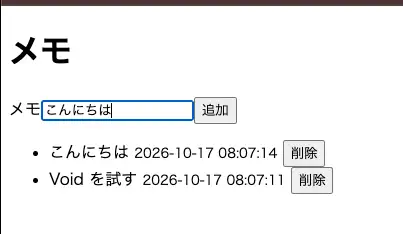
npm run devYou'll see the memo Void を試す inserted by db/seed.ts. Type a memo into the input and press the 追加 (Add) button, and the memo is added to the top of the list. Press the 削除 (Delete) button, and that memo disappears from the list.
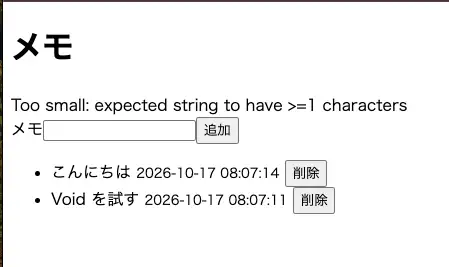
If you submit only whitespace, the trim().min(1) validation fails. The Form component automatically displays the error message in an element with role="alert".
Building a Detail Page with Link and Dynamic Routes
Next, let's make it possible to click a memo and move to its detail page. In Pages mode, wrapping part of a file name in square brackets, as in [id], turns that part into a URL parameter (a dynamic segment). pages/memos/[id].tsx maps to URLs such as /memos/1 and /memos/2.
First, create the detail page's loader in pages/memos/[id].server.ts.
import { defineHandler, type InferProps } from "void";
import { db, eq } from "void/db";
import { HTTPException } from "hono/http-exception";
import { memos } from "@schema";

export type Props = InferProps<typeof loader>;

export const loader = defineHandler(async (c) => {
  const [memo] = await db
    .select()
    .from(memos)
    .where(eq(memos.id, Number(c.req.param("id"))));

  if (!memo) {
    throw new HTTPException(404, { message: "メモが見つかりません" });
  }
  return { memo };
});
The loader's argument c is a Hono context. You can get the URL parameter with c.req.param("id"). Since parameters are strings, the code converts it to a number with Number() before querying. If no matching memo exists, it throws Hono's HTTPException to return a 404. After the throw, memo is known not to be undefined, so memo in Props is also inferred as the memo type.
Next, create the page component in pages/memos/[id].tsx.
import { Link, useParams } from "@void/react";
import type { Props } from "./[id].server";

export default function MemoPage({ memo }: Props) {
  const { id } = useParams<{ id: string }>();

  return (
    <main>
      <h1>メモ #{id}</h1>
      <p>{memo.body}</p>
      <p>
        <small>{memo.createdAt}</small>
      </p>
      <Link href="/">一覧に戻る</Link>
    </main>
  );
}
To reference URL parameters inside a component, use useParams() from @void/react. Here it is used for the number in the heading.
Link is a component for navigating between pages. It renders as a regular <a> element, but it intercepts clicks and navigates without reloading the whole page.
Also turn each memo's body on the list page into a Link to its detail page.
 import { useEffect } from "react";
-import { action, Form, useForm } from "@void/react";
+import { action, Form, Link, useForm } from "@void/react";
 import type { Props } from "./index.server";

 // ...

           <li key={memo.id}>
-            {memo.body} <small>{memo.createdAt}</small>{" "}
+            <Link href={`/memos/${memo.id}`}>{memo.body}</Link> <small>{memo.createdAt}</small>{" "}
             <button onClick={() => action("/?delete", { data: { id: memo.id } })}>
Click a memo in the list, and you move to /memos/1, where the detail page is shown. Click 一覧に戻る (Back to list) to return to the list page.
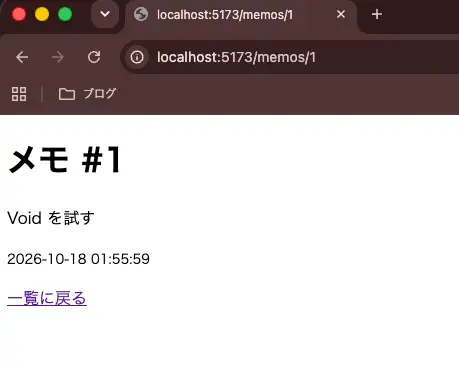
Looking at the Network panel in DevTools during navigation, the request to /memos/1 returned JSON like the following:
{
  "component": "memos/[id]",
  "props": {
    "memo": { "id": 1, "body": "Void を試す", "pinned": false, "createdAt": "2026-10-18 01:55:59" }
  },
  "params": { "id": "1" },
  "shared": {},
  "url": "/memos/1",
  "errors": null
}
The response bundles the name of the page component to render (component), the props returned by the loader, and the URL parameters (params). The client receives this JSON and swaps in the page component. Requests made by Link navigation carry an X-VoidPages: true header; for the same URL without this header, the server returns server-rendered HTML instead. Inertia.js uses a protocol that returns JSON containing the component name and props for requests with an
X-Inertia header, and Void's Pages mode works in a very similar way.
Accessing the URL of a nonexistent ID directly (for example, /memos/999) returned status code 404 along with the message passed to HTTPException, メモが見つかりません (Memo not found), as plain text.
Showing Related Memos Later with defer and Suspense
Some pages contain data that takes a while to load. A loader can't return a value until all of its data is ready, so a single slow piece of data delays the entire page.
In Void, wrapping part of a loader's return value in defer() lets you send just that data later. The page is displayed as soon as the other props are ready, and the data wrapped in defer() arrives once it's ready.
Let's try it by adding "related memos" to the detail page. Assume related memos come from an external recommendation service; here, we stand in for it with a function that waits 1.5 seconds and then returns mock data.
-import { defineHandler, type InferProps } from "void";
+import { defineHandler, defer, type InferProps } from "void";
 import { db, eq } from "void/db";
 import { HTTPException } from "hono/http-exception";
 import { memos } from "@schema";

 export type Props = InferProps<typeof loader>;

+// Stand-in for an external service that recommends related memos: waits 1.5 seconds, then returns mock data
+async function fetchRelatedMemos(memoId: number) {
+  await new Promise((resolve) => setTimeout(resolve, 1500));
+  return [
+    { id: `${memoId}-1`, body: "Pages モードの loader を調べる" },
+    { id: `${memoId}-2`, body: "D1 のマイグレーションを試す" },
+  ];
+}
+
 export const loader = defineHandler(async (c) => {
   // ...
-  return { memo };
+  return {
+    memo,
+    relatedMemos: defer(() => fetchRelatedMemos(memo.id)),
+  };
 });
defer() takes an async function that returns the data. Note that fetchRelatedMemos() is not awaited. The loader returns without waiting for the related memos, so memo is sent to the client right away.
In a React page component, props wrapped in defer() are passed as Promises. Read the value with React 19's use(), and wrap that component in <Suspense>.
+import { Suspense, use } from "react";
 import { Link, useParams } from "@void/react";
 import type { Props } from "./[id].server";

-export default function MemoPage({ memo }: Props) {
+function RelatedMemos({ relatedMemos }: Pick<Props, "relatedMemos">) {
+  const related = use(relatedMemos);
+
+  return (
+    <ul>
+      {related.map((memo) => (
+        <li key={memo.id}>{memo.body}</li>
+      ))}
+    </ul>
+  );
+}
+
+export default function MemoPage({ memo, relatedMemos }: Props) {
   const { id } = useParams<{ id: string }>();

   return (
     <main>
       <h1>メモ #{id}</h1>
       <p>{memo.body}</p>
       <p>
         <small>{memo.createdAt}</small>
       </p>
+      <h2>関連メモ</h2>
+      <Suspense fallback={<p>関連メモを読み込み中...</p>}>
+        <RelatedMemos relatedMemos={relatedMemos} />
+      </Suspense>
       <Link href="/">一覧に戻る</Link>
     </main>
   );
 }
use(relatedMemos) suspends the component's rendering until the data arrives. In the meantime, the fallback of the nearest <Suspense> is shown, and once the data arrives, RelatedMemos resumes rendering. Because you can reuse the type inferred from the loader, as in Pick<Props, "relatedMemos">, related is inferred as the mock's return type as well.
Click a memo link on the list page to open its detail page. The memo body appears immediately, and the related memos area shows 関連メモを読み込み中... (Loading related memos...). About 1.5 seconds later, it's replaced by the list of related memos.
In this case, the response to the Link navigation came back in application/x-ndjson (newline-delimited JSON) format. The first line contains memo, relatedMemos marked as still loading (loading: true), and deferred, which lists the names of props that will arrive later. About 1.5 seconds later, a second line containing the related memos' data arrives.
{"component":"memos/[id]","props":{"memo":{"id":1,"body":"Void を試す","pinned":false,"createdAt":"2026-10-18 01:55:59"},"relatedMemos":{"value":null,"loading":true,"error":null}},"params":{"id":"1"},"shared":{},"url":"/memos/1","errors":null,"deferred":["relatedMemos"],"deferredKeys":{"relatedMemos":"relatedMemos"}}
{"__deferred":"relatedMemos","data":[{"id":"1-1","body":"Pages モードの loader を調べる"},{"id":"1-2","body":"D1 のマイグレーションを試す"}]}
API Routes and Typed fetch
Separately from Pages mode, you can define API routes in the routes/ directory. The file path maps to the URL path, and functions exported under HTTP method names such as GET and POST become handlers.
Delete the starter's routes/api/hello.ts and create routes/api/memos.ts, which returns the number of memos.
import { defineHandler } from "void";
import { count, db } from "void/db";
import { memos } from "@schema";

export const GET = defineHandler(async () => {
  const [{ total }] = await db.select({ total: count() }).from(memos);
  return { total };
});
defineHandler defines a handler that receives a Hono context. Returning an object automatically converts it to a JSON response, so accessing
/api/memos returns JSON like {"total":1}.
You can call this route from the client with fetch from void/client. Because fetch from void/client generates types from the definitions in routes/, specifying a nonexistent path or an HTTP method the route doesn't export results in a compile error.
import { fetch } from "void/client";

// The return value is inferred as { total: number }
const { total } = await fetch("/api/memos");

// Error: Argument of type '"/api/memo"' is not assignable to parameter of type '"/api/memos"'.
await fetch("/api/memo");

// Error: Type '"POST"' is not assignable to type '"GET"'.
await fetch("/api/memos", { method: "POST" });
Despite the shared name, fetch from void/client returns something different from the standard fetch. It returns the parsed response body directly, so you can destructure the return value as in the example above. It also throws a FetchError when the status code is not 2xx. You can read the status code from FetchError's status and the parsed body from data.
import { fetch, FetchError } from "void/client";

try {
  const { total } = await fetch("/api/memos");
} catch (error) {
  if (error instanceof FetchError) {
    console.error(error.status, error.data);
  }
}
Adding or changing route files updates the types as well, so any mismatch in the API shape between server and client is caught at compile time.
Deploying to Cloudflare
Now that the application is complete, let's deploy it to Cloudflare. If you chose Cloudflare as the deploy target in void init, all you need to do is run the void deploy command.
npx void deployIf you didn't choose a deploy target in void init, pass the --platform cloudflare option. If you aren't logged in to Cloudflare yet, a browser opens and asks you to log in. Make sure the code shown in your terminal matches the code shown in the browser before granting access.
npx void deploy --platform cloudflarevoid deploy performs the following steps in order:
- Builds the application with Vite
- Creates the resources inferred from your code (a D1 database in this case)
- Applies any pending migrations in
db/migrations/to D1 - Publishes the Worker and prints its URL
According to the official documentation, apps built with Void run within the limits of the Workers Free plan.
If you see output like the following, the deployment succeeded.
void-memo → Cloudflare
✓ 294 modules transformed.
✓ built in 128ms
✓ 26 modules transformed.
✓ built in 73ms
◇ Preparing deployment...
◇ Applying D1 migrations...
◇ Uploading the Worker and assets...
◇ Activating the Worker...
◇ Updating routes and triggers...
╭─ https://void-memo.<subdomain>.workers.dev ─╮
│                                            │
│  Worker: void-memo                         │
│  D1 migrations up to date                  │
│                                            │
╰────────────────────────────────────────────╯

✓ Successfully deployed!
After deploying, the project contains a file called void.lock.json. It records information about the resources created during deployment.
{
  "version": 1,
  "source": {},
  "resolved": {
    "account_id": "<account ID>",
    "d1_databases": [
      {
        "binding": "DB",
        "database_name": "void-memo-db",
        "database_id": "<database ID>",
        "migrations_dir": "./db/migrations"
      }
    ],
    "name": "void-memo"
  }
}
You can see that a D1 database named void-memo-db was created for the DB binding inferred from the void/db import. Subsequent deployments refer to this file and reuse the same resources. The official documentation recommends committing void.config.ts and void.lock.json to Git.
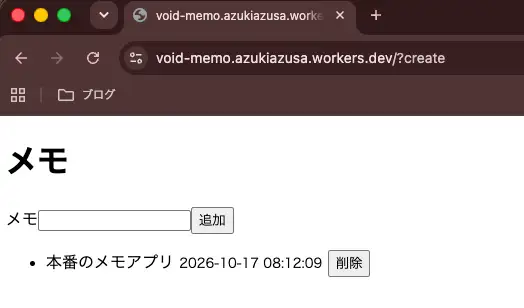
Open the printed URL, and the memo app is displayed.
Checking the deployment status with the void project status command shows the number of applied migrations and when each deployment happened.
npx void project status│ id status migrations deployed
│ 42b607af-554e-4828-b064-638f23369a1f live 1 5m ago
void-memo — 1 versionThe void db status command shows whether each migration has been applied locally and in production (remote).
npx void db status● 20261017063732_same_dreaming_celestial.sql local: applied remote: applied
1 migrationDeploying After a Schema Change
Let's also walk through what happens when the schema changes. Add a pinned column to the memos table for pinning memos.
 export const memos = sqliteTable("memos", {
   id: integer("id").primaryKey({ autoIncrement: true }),
   body: text("body").notNull(),
+  pinned: integer("pinned", { mode: "boolean" }).notNull().default(false),
   createdAt: text("created_at").notNull().default(sql`(datetime('now'))`),
 });
If you run void deploy without generating a migration, the following error appears after the build and the deployment is aborted. No migrations are applied and the Worker isn't published, so the production Worker and database stay as they were.
◇ Preparing deployment...
■ Schema drift detected between your Drizzle schema and db/migrations/.
  Run `void db generate`, review the generated migration, commit it yourself,
  then rerun `void deploy`.
As the error message says, generate a migration with void db generate. Apply it to the local database with void db migrate as well.
npx void db generate
npx void db migrate
An ALTER TABLE statement that adds the column is generated.
ALTER TABLE `memos` ADD `pinned` integer DEFAULT false NOT NULL;Running void db status at this point shows that the new migration has been applied locally but not yet in production (pending).
●   20261017063732_same_dreaming_celestial.sql  local: applied  remote: applied
    20261017081352_bright_gateway.sql  local: applied  remote: pending
2 migrations, 1 pending remotely
Run void deploy again, and the pending migration is applied to the production D1 database before the deployment completes.
◇ Preparing deployment...
◇ Applying D1 migrations...
? About to apply 1 migration(s)
Your database may not be available to serve requests during the migration, continue?
◇ Uploading the Worker and assets...
◇ Activating the Worker...
◇ Updating routes and triggers...
╭─ https://void-memo.<subdomain>.workers.dev ─╮
│                                            │
│  Worker: void-memo                         │
│  D1 migrations up to date                  │
│                                            │
╰────────────────────────────────────────────╯

✓ Successfully deployed!
Checking the production data with void db execute --remote showed that the memo saved before the deployment was still there, and the new pinned column held the default value 0 (false).
npx void db execute --remote "SELECT * FROM memos"id body created_at pinned
─────────────────────────────────────────
2 本番のメモアプリ 2026-10-17 08:12:09 0Logs and Rollbacks
You can view the deployed app's logs with the void project logs command. When deployed to Cloudflare, this is a live tail, showing requests that reach the app while the command is running.
npx void project logsGET https://void-memo.<subdomain>.workers.dev/api/memos - ok @ 10/17/2026, 3:47:37 PMIf a deployed version has a problem, you can roll back to a previous version with the void project rollback command. Note, however, that rolling back does not revert database migrations. Before rolling back, make sure the previous code works with the current database schema.
npx void project rollbackAlso, running void init --github generates a GitHub Actions workflow that deploys on pushes to the main branch. In that case, set CLOUDFLARE_API_TOKEN in your repository secrets.
Summary
- Void is a toolkit from VoidZero for building full-stack apps with Vite and deploying them to Cloudflare, and its SDK, CLI, and Platform all ship in a single npm package called
void - Choosing a UI framework, database, and deploy target in
void initcreates a project with Vite config, pages, API routes, and a schema - Because Void infers bindings from imports such as
void/db, a local database is used during development and a D1 database is created automatically at deploy time - In Pages mode, the return value of the
loaderin.server.tsbecomes the page's props, andInferPropscarries the types all the way to the component - Wrapping part of a file name in square brackets, as in
pages/memos/[id].tsx, creates a dynamic route; you read the parameter withc.req.param()in the loader and withuseParams()in the component - Navigation with
Linkdoesn't reload the document; it receives JSON containing the page component name and props and swaps the page - Wrapping part of a loader's return value in
defer()lets the page render without waiting for that data, and in React you read the later-arriving value withuse()inside<Suspense> - Named actions are called by appending a name to the URL, as in
?create, and are invoked fromuseFormoraction() - On a successful submission,
useFormmakes the submitted values the new defaults, so usesetData()rather thanreset()to clear the input - Validation errors from Pages-mode actions come back as
errorsin page data with status code 200, and theFormcomponent displays them automatically fetchfromvoid/clientgenerates types from the definitions inroutes/, turning nonexistent paths and unexported methods into compile errors- Running
void deploycreates D1, builds, applies migrations, and publishes the Worker in one go, and records the created resources invoid.lock.json - If you change the schema without generating a migration,
void deployaborts before publishing, so generate a migration withvoid db generateand deploy again - Rolling back does not revert migrations, so confirm that the previous code works with the current schema before rolling back