
コーディングエージェントの能力を拡張する Serena を試してみた
LSP を活用してセマンティックなコード検索・編集能力を提供する MCP サーバー Serena の導入・使用方法を紹介。Claude Code でのオンボーディングからリファクタリングまでの実践的な活用例を解説します。
Serena はセマンティックなコード検索・編集能力を追加するオープンソースのツールキットです。MCP(Model Context Protocol) サーバーとして動作しているため、Claude Code や Cursor, VS Code のように MCP に対応しているクライアントであれば利用できます。またエージェントフレームワークとして
Agno を使用しているため、特定の LLM モデルに依存せずに動作します。
Serena は LSP(Language Server Protocol)を使用してセマンティックなコードを解析するのが特徴です。LSP はコードの構文解析やシンボルの解決、コード補完などを提供するプロトコルで、Serena はこれを利用してコードベースの理解と操作を行います。これにより Serena は大規模で複雑なコードベースであっても適切なコンテキストを効率的に取得しタスクを実行できます。
これは人間が IDE を操作して関数の定義にジャンプしたり、シンボルを検索したりするのと同じような操作をコーディングエージェントに提供します。通常コーディングエージェントは関数の定義を探すだけでも関数名で検索や grep コマンドを使用してコードベース全体を検索し、多くのファイルを開いて確認をするため多くのトークンを消費してしまいます。Serena はキャッシュされたシンボルのリストから関数の候補を取得して検索するため、コンテキスト効率が良いわけです。
ファイルの書き込みにおいても違いがあります。現在のコーディングエージェントは基本的に単純なテキスト編集を使用してコードを編集します。Claude Code を使用している最中に「No changes to make: old_string and new_string are exactly the same.」というエラーが頻繁に表示されるという経験をしたことがある方も多いのではないでしょうか。Serena は replace_regex や insert_before_symbol, insert_after_symbol などのツールを使用して正規表現やシンボルを指定してコードを編集できます。これにより無駄なトークン消費を抑えつつ、より効率的なコード編集を試みます。
現在 Serena は以下のプログラミング言語をサポートしています。
- Python
- TypeScript/JavaScript
- PHP(Intelephense LSP を使用;プレミアム機能には
INTELEPHENSE_LICENSE_KEY環境変数の設定が必要) - Go(gopls のインストールが必要)
- R(
languageserverR パッケージのインストールが必要) - Rust(rustup が必要 - ツールチェーンの rust-analyzer を使用)
- C/C++(参照の検索で問題が発生する可能性があります。現在対応中)
- Zig(ZLS - Zig Language Server のインストールが必要)
- C#
- Ruby(デフォルトでは ruby-lsp を使用。以前の solargraph ベースの実装を使用するには、言語として ruby_solargraph を指定)
- Swift
- Kotlin(プレアルファ版の公式 kotlin LS を使用。問題が発生する可能性があります)
- Java(注意:起動が遅く、特に初回起動は時間がかかります。macOS と Linux で Java に関する問題が発生する可能性があります。現在対応中)
- Clojure
- Dart
- Bash
- Lua(インストールされていない場合、自動的に lua-language-server をダウンロード)
- Nix(nixd のインストールが必要)
- Elixir(NextLS と Elixir のインストールが必要;Windowsはサポート対象外)
- Erlang(beam と erlang_ls のインストールが必要。実験的機能のため、動作が遅いまたはハングする可能性があります)
- AL
この記事では実際に Serena を Claude Code にインストールして、コードの検索や編集を行う方法を紹介します。
Serena のインストール
Serena をインストールする手順として Python のパッケージマネージャーである uv を使用する方法が推奨されています。
macOS や Linux では以下のコマンドで uv をインストールできます。
curl -LsSf https://astral.sh/uv/install.sh | shuv をインストールしたら、uvx コマンドを使用して最新の Serena を直接実行できます。
uvx --from git+https://github.com/oraios/serena serena start-mcp-serverClaude Code に MCP サーバーとして追加する場合にはプロジェクトのルートディレクトリで以下のコマンドを実行します。
claude mcp add serena -s project -- uvx --from git+https://github.com/oraios/serena serena start-mcp-server --context ide-assistant --project $(pwd)コマンドの実行に成功するとプロジェクトのルートに .mcp.json ファイルが作成されます。この設定により Claude Code をプロジェクトのルートディレクトリで起動すると Serena MCP サーバーが自動的に起動されるようになります。
{
  "mcpServers": {
    "serena": {
      "type": "stdio",
      "command": "uvx",
      "args": [
        "--from",
        "git+https://github.com/oraios/serena",
        "serena",
        "start-mcp-server",
        "--context",
        "ide-assistant",
        "--project",
        "/Users/xxx/sapper-blog-app"
      ],
      "env": {}
    }
  }
}
Serena オンボーディング
Serena は初回起動時にオンボーディングプロセスを実行します。オンボーディングの目的は、Serena がプロジェクトのコードベースを理解し、将来のインタラクションで利用するメモリを構築することです。Claude Code を起動してみましょう。
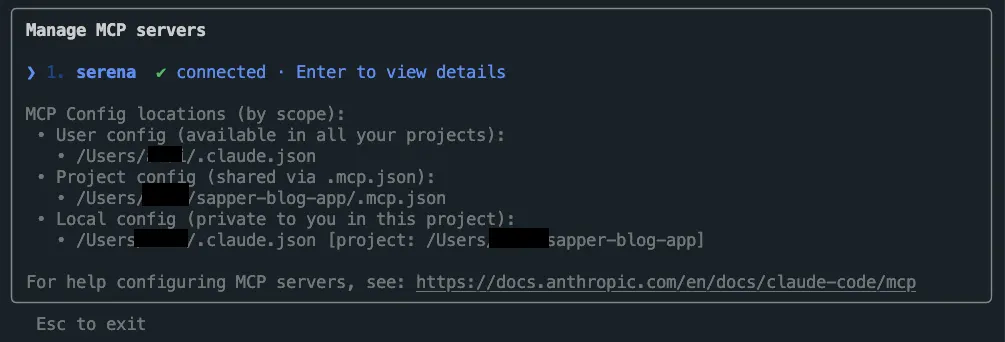
claude/mcp コマンドを実行して Serena MCP サーバーが起動していることを確認しましょう。Serena を選択して Enter キーを押すことで Serena MCP サーバーがどのようなツールを提供しているかを確認できます。
Serena のオンボーディングプロセスは onboarding ツールを使用して実行されます。以下のようなプロンプトを入力して、オンボーディングを開始するように指示します。
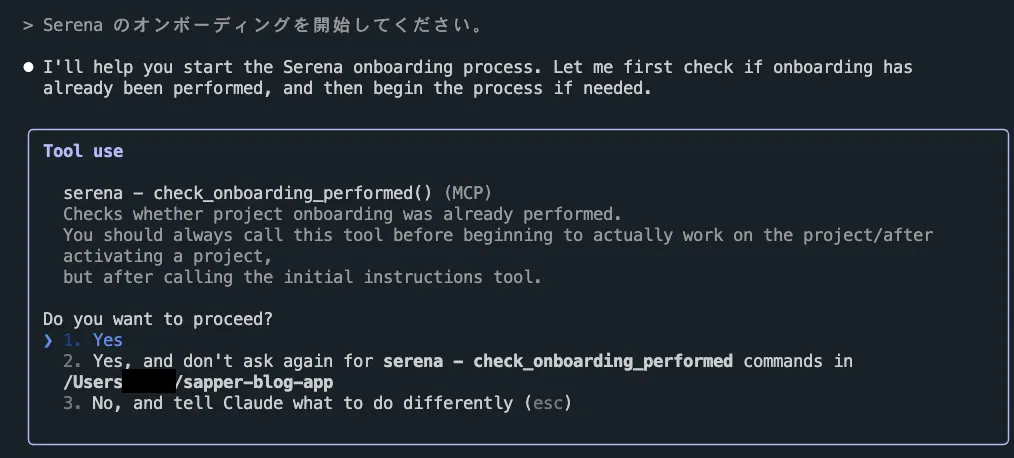
Serena のオンボーディングを開始してください。始めにオンボーディングが実施済みかどうかを確認する check_onboarding_performed ツールの呼び出しの許可を求められます。yes と入力して許可しましょう。
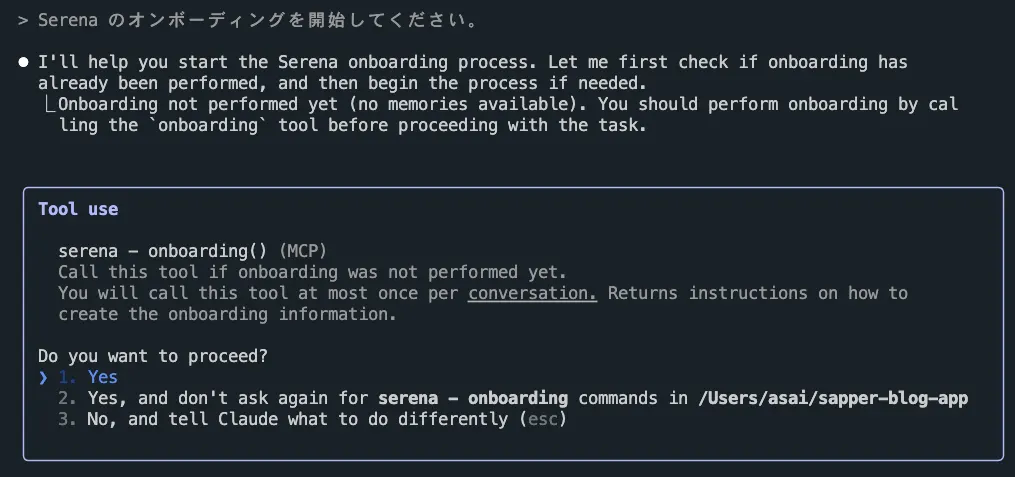
オンボーディングがまだ実施されていない場合には onboarding ツールの実行の許可を求められます。yes と入力してオンボーディングを開始しましょう。
オンボーディングプロセスでは Read や list_dir, get_symbols_overview などのツールを使用してプロジェクトのディレクトリ構造やシンボルの概要を取得します。最終的に以下のようなメモリファイルが /serena/memories ディレクトリに作成されました。
 Serenaオンボーディングが完了しました。

  プロジェクトの主要な情報をメモリファイルに保存しました:

  - project_overview.md - プロジェクトの目的、技術スタック、アーキテクチャ
  - suggested_commands.md - 開発で使用する主要なコマンド
  - code_style_conventions.md - コードスタイルと命名規則
  - task_completion_checklist.md - タスク完了時に実行すべきコマンド
  - content_processing_pipeline.md - マークダウン処理パイプラインの詳細
例として project_overview.md ファイルの内容を見てみましょう。
# Project Overview

## Purpose
This is azukiazusa's personal blog application (https://azukiazusa.dev) built as a Turborepo monorepo using npm workspaces. The blog is deployed to Cloudflare Pages and uses Contentful as a CMS for managing blog posts and content.

## Tech Stack
- **Framework**: SvelteKit 2.x with Svelte 5 runes
- **Deployment**: Cloudflare Pages with SPA fallback
- **Content Management**: Contentful CMS with GraphQL
- **Styling**: TailwindCSS 4.x
- **Build System**: Turborepo with npm workspaces
- **Testing**: Vitest (unit tests), Playwright (E2E tests)
- **Development Tools**: Storybook for component development
- **Content Processing**: Unified ecosystem with custom remark/rehype plugins

## Project Structure
- `app/` - Main SvelteKit application
- `contents/` - Blog post markdown files and content
- `packages/` - Shared packages including custom remark/rehype plugins and ESLint configs
  - `remark-link-card/` - Custom plugin for link cards
  - `remark-video/` - Custom plugin for video embeds
  - `remark-contentful-image/` - Custom plugin for Contentful images
  - `rehype-alert/` - Custom plugin for alerts
  - `eslint-config-custom/` - Shared ESLint configuration
  - `content-management/` - Content management utilities

## Architecture
- **Repository Pattern**: Uses dependency injection via `RepositoryFactory.ts`
- **Environment-aware**: Production uses real implementations (GitHub API, Google Analytics), Development/Preview uses mock implementations
- **Content Pipeline**: Unified markdown processing pipeline in `markdownToHtml.ts`
- **Static Generation**: Prerendering enabled with SvelteKit
シンボルツリーの概要として .serena/cache/typescript/document_symbols_cache_v23-06-25.pkl ファイルも作成されています。Serena はこのキャッシュを使用してシンボルの検索やコードの解析を効率化します。
またプロジェクト固有の設定ファイルとして .serena/project.yaml ファイルが作成されています。プロジェクトで使用されている言語であったり、利用可能なツールなどをカスタマイズできるようです。
# language of the project (csharp, python, rust, java, typescript, go, cpp, or ruby)
#  * For C, use cpp
#  * For JavaScript, use typescript
# Special requirements:
#  * csharp: Requires the presence of a .sln file in the project folder.
language: typescript

# whether to use the project's gitignore file to ignore files
# Added on 2025-04-07
ignore_all_files_in_gitignore: true
# list of additional paths to ignore
# same syntax as gitignore, so you can use * and **
# Was previously called `ignored_dirs`, please update your config if you are using that.
# Added (renamed)on 2025-04-07
ignored_paths: []

# whether the project is in read-only mode
# If set to true, all editing tools will be disabled and attempts to use them will result in an error
# Added on 2025-04-18
read_only: false

# list of tool names to exclude. We recommend not excluding any tools, see the readme for more details.
# Below is the complete list of tools for convenience.
# To make sure you have the latest list of tools, and to view their descriptions,
# execute `uv run scripts/print_tool_overview.py`.
#
#  * `activate_project`: Activates a project by name.
#  * `check_onboarding_performed`: Checks whether project onboarding was already performed.
#  * `create_text_file`: Creates/overwrites a file in the project directory.
#  * `delete_lines`: Deletes a range of lines within a file.
#  * `delete_memory`: Deletes a memory from Serena's project-specific memory store.
#  * `execute_shell_command`: Executes a shell command.
#  * `find_referencing_code_snippets`: Finds code snippets in which the symbol at the given location is referenced.
#  * `find_referencing_symbols`: Finds symbols that reference the symbol at the given location (optionally filtered by type).
#  * `find_symbol`: Performs a global (or local) search for symbols with/containing a given name/substring (optionally filtered by type).
#  * `get_current_config`: Prints the current configuration of the agent, including the active and available projects, tools, contexts, and modes.
#  * `get_symbols_overview`: Gets an overview of the top-level symbols defined in a given file or directory.
#  * `initial_instructions`: Gets the initial instructions for the current project.
#     Should only be used in settings where the system prompt cannot be set,
#     e.g. in clients you have no control over, like Claude Desktop.
#  * `insert_after_symbol`: Inserts content after the end of the definition of a given symbol.
#  * `insert_at_line`: Inserts content at a given line in a file.
#  * `insert_before_symbol`: Inserts content before the beginning of the definition of a given symbol.
#  * `list_dir`: Lists files and directories in the given directory (optionally with recursion).
#  * `list_memories`: Lists memories in Serena's project-specific memory store.
#  * `onboarding`: Performs onboarding (identifying the project structure and essential tasks, e.g. for testing or building).
#  * `prepare_for_new_conversation`: Provides instructions for preparing for a new conversation (in order to continue with the necessary context).
#  * `read_file`: Reads a file within the project directory.
#  * `read_memory`: Reads the memory with the given name from Serena's project-specific memory store.
#  * `remove_project`: Removes a project from the Serena configuration.
#  * `replace_lines`: Replaces a range of lines within a file with new content.
#  * `replace_symbol_body`: Replaces the full definition of a symbol.
#  * `restart_language_server`: Restarts the language server, may be necessary when edits not through Serena happen.
#  * `search_for_pattern`: Performs a search for a pattern in the project.
#  * `summarize_changes`: Provides instructions for summarizing the changes made to the codebase.
#  * `switch_modes`: Activates modes by providing a list of their names
#  * `think_about_collected_information`: Thinking tool for pondering the completeness of collected information.
#  * `think_about_task_adherence`: Thinking tool for determining whether the agent is still on track with the current task.
#  * `think_about_whether_you_are_done`: Thinking tool for determining whether the task is truly completed.
#  * `write_memory`: Writes a named memory (for future reference) to Serena's project-specific memory store.
excluded_tools: []

# initial prompt for the project. It will always be given to the LLM upon activating the project
# (contrary to the memories, which are loaded on demand).
initial_prompt: ""

project_name: "sapper-blog-app"
最後にオンボーディングプロセスが完了したら /clear コマンドを実行してコンテキストをリセットしておきましょう。
Serena を使用してコードの編集を指示する
それでは実際に Serena を使用してコードの編集を指示してみましょう。ここではコードのリファクタリングを依頼してみます。まずは「コードベースの中でリファクタリングすべき箇所はある?」と Serena に質問してみます。
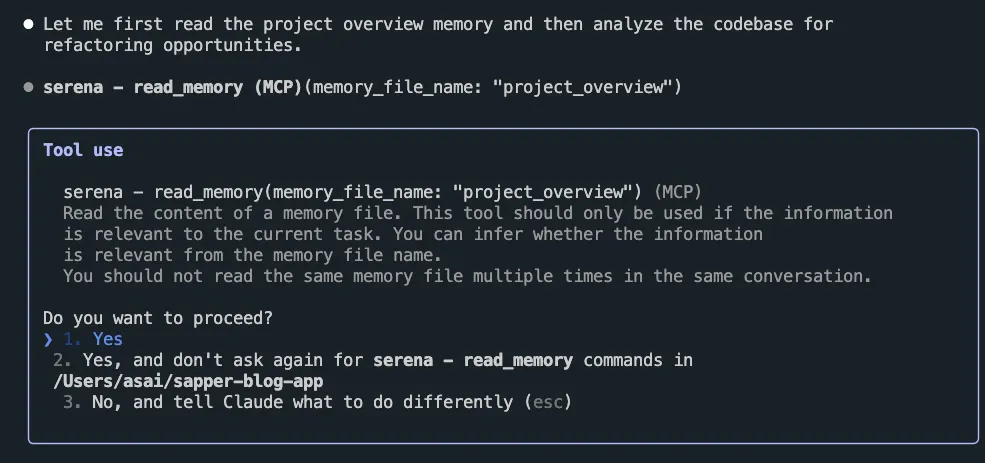
まずはメモリファイルを読み込んでプロジェクトの概要を把握するようです。read_memory ツールの呼び出しを求められます。
get_symbols_overview や find_symbol, search_for_pattern ツールを使用してコードの概要を把握し、リファクタリングの候補を見つけるようです。コードベースの情報の収集がある程度完了すると、think_about_collected_information ツールを使用して収集した情報を元に思考を行います。
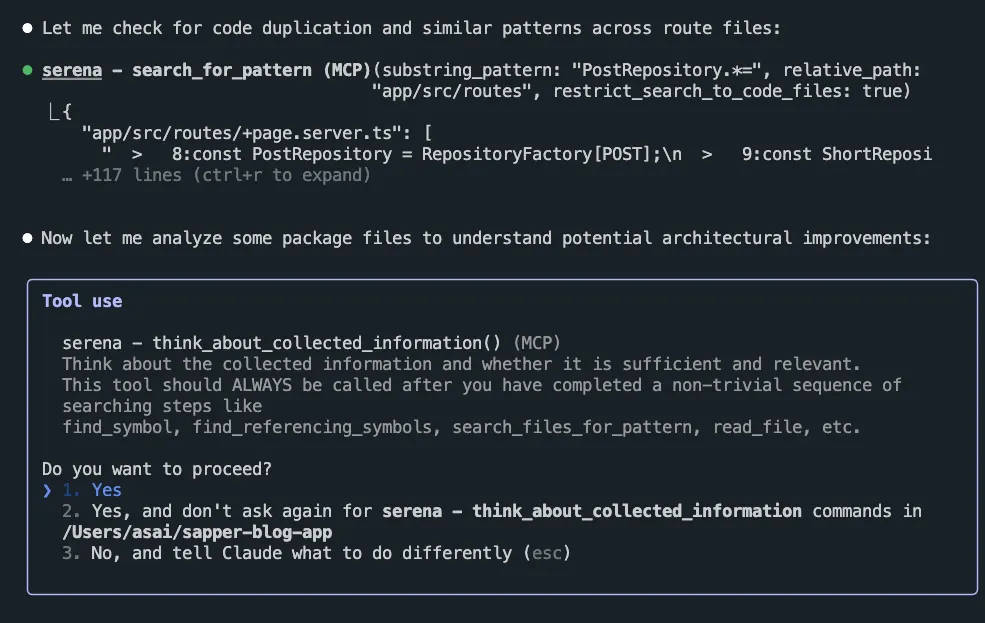
最終的に以下のようなリファクタリングの候補が提案されました。
⏺ コードベースを分析した結果、いくつかのリファクタリングの機会を特定できます。以下が主な改
  善点です:

  1. Repository インスタンス化の重複除去

  問題: 各ルートファイルで同じパターンのRepository取得コードが重複している
  const PostRepository = RepositoryFactory[POST];
  const ShortRepository = RepositoryFactory[SHORT];

  改善案: 共通のRepository取得関数またはフックを作成

  2. markdown処理での型安全性の問題

  問題: markdownToHtml.tsで多数のeslint-disableが使用されている
  // eslint-disable-next-line @typescript-eslint/no-explicit-any
  } as any;

  改善案: 適切な型定義を作成して型安全性を向上

  3. RSS/LLMs.txt生成の共通化

  問題: rss.xmlとllms.txtエンドポイントで似たようなデータ取得・変換ロジックが重複

  改善案: 共通のフィード生成ユーティリティを作成

  4. エラーハンドリングの一貫性

  問題: ルートハンドラーでのエラーハンドリングパターンが統一されていない

  改善案: 共通のエラーハンドリングミドルウェアを作成

  5. 環境変数によるRepository切り替えロジック

  問題: RepositoryFactory.tsでの環境変数チェックが直接埋め込まれている

  改善案: 設定ベースのRepository選択システムに変更

  これらの改善により、コードの保守性、型安全性、再利用性が向上します。特に優先度が高いのは1
  と2です。
提案されたリファクタリングの候補を元に、実際にコードの編集を指示してみましょう。ここでは「Repository インスタンス化の重複除去」を指示してみます。
1. Repository インスタンス化の重複除去を行ってください。いつもの Claude Code のように TODO リストを作成してから作業に取り掛かります。
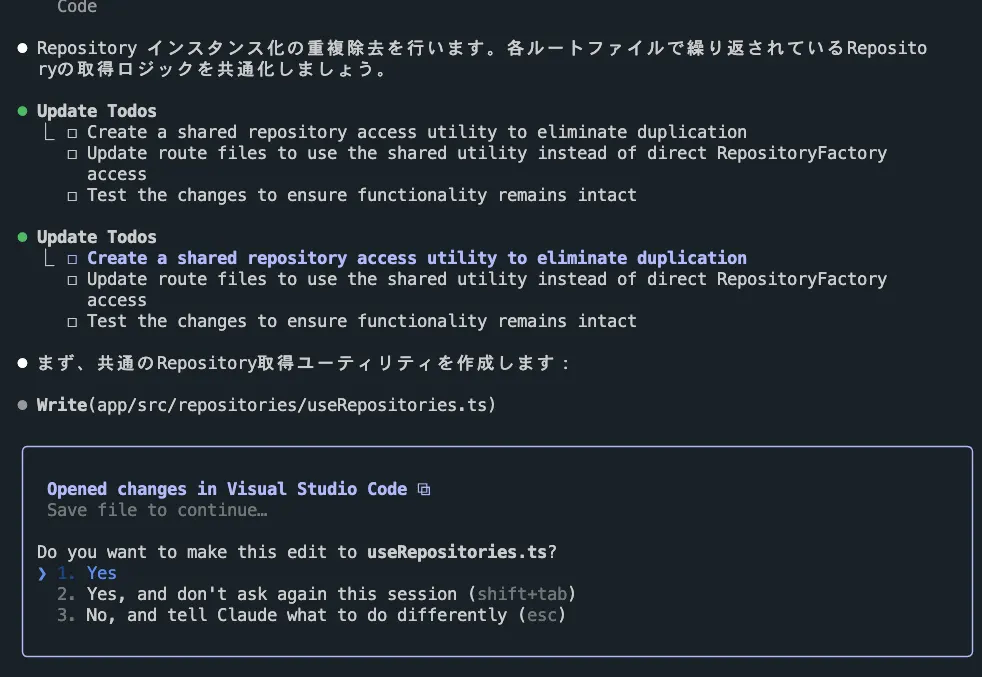
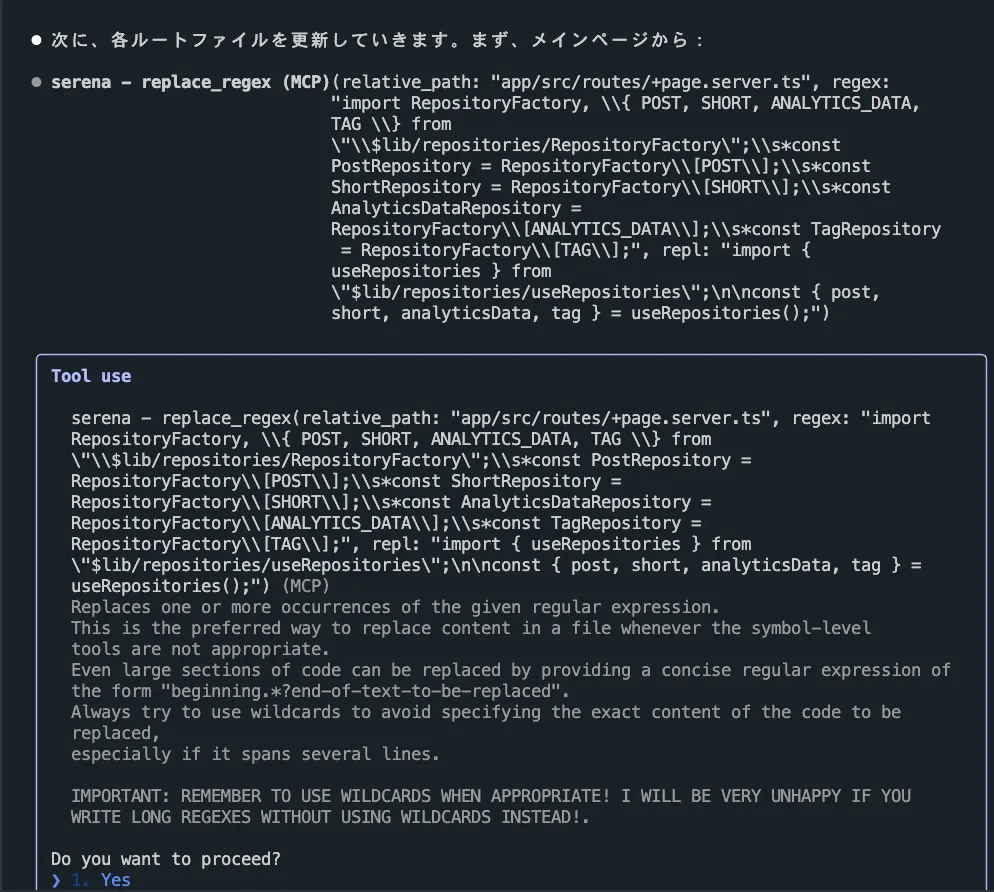
replace_regex のように効率的にコードを編集できるツールを使用してリファクタリングを行っています。これは正規表現を使用してコードを置換するツールです。他にも insert_before_symbol や insert_after_symbol などのツールを使用して特定のシンボルの前後にコードを挿入できます。
最終的に typecheck, list, build コマンドを実行してリファクタリングが成功したことを確認しました。
⏺ Repository インスタンス化の重複除去が完了しました!

  リファクタリング完了の概要:

  ✅ 共通ユーティリティ作成: useRepositories.tsを作成し、Repositoryの取得ロジックを一元化
  ✅ 全ルートファイル更新: 19個のルートファイルで重複していた以下のパターンを削除:
  // Before
  const PostRepository = RepositoryFactory[POST];
  const ShortRepository = RepositoryFactory[SHORT];

  // After
  const { post, short } = useRepositories();

  ✅ 型安全性: TypeScriptの型チェックが全て通過
  ✅ コード品質: ESLintによるリントも通過
  ✅ 変数名競合の解決: post、short、tagなどの変数名競合も適切に処理

  改善効果:

  1. コード重複の削除: 各ルートファイルでのRepository取得ロジックの重複を完全に除去
  2. 保守性の向上: Repository取得方法を変更する場合、useRepositories.tsのみ修正すれば良い
  3. 一貫性の確保: 全てのルートで統一されたRepository取得パターンを使用
  4. 可読性の向上: より簡潔で分かりやすいコードに

  リファクタリングは完了し、全てのテストも通過しています。
ccusage でセッションのトークン数を確認すると約 9,500 トークンでした。
npx ccusage session

┌───────────────┬──────────────┬──────────┬──────────┬────────────┬──────────────┐
│ Session       │ Models       │    Input │   Output │ Cost (USD) │ Last         │
│               │              │          │          │            │ Activity     │
├───────────────┼──────────────┼──────────┼──────────┼────────────┼──────────────┤
│ blog-app      │ - sonnet-4   │      273 │    9,582 │      $3.01 │ 2025-08-02   │
├───────────────┼──────────────┼──────────┼──────────┼────────────┼──────────────┤
比較のために MCP サーバーを使用せずに「コードベースの中でリファクタリングすべき箇所はある?」と指示してみると TODO コメントや any 型を使用している箇所の指摘が多く、コード全体の設計や構造に関する具体的なリファクタリングの提案は難しいのではないかという印象を受けました。
その後全く同じリファクタリングを依頼してみました。トークンの使用量は 27,453 トークンで、Serena を使用した場合の約 3 倍であることがわかりますね。
まとめ
- Serena はセマンティックなコード検索・編集能力を追加するオープンソースのツールキット。LSP を使用してコードの構文解析やシンボルの解決などを提供する
- Serena は MCP サーバーとして動作するため、Claude Code や Cursor, VS Code のように MCP に対応しているクライアントであれば利用できる
- Serena は
uvxコマンドを使用してローカルで MCP サーバーを起動できる - Serena はオンボーディングプロセスを通じてプロジェクトのコードベースを理解し、将来のインタラクションで利用するメモリを構築する
- Serena はコードベースを分析する際に
get_symbols_overview,find_symbol,search_for_patternなどのツールを使用して効率的に情報を収集する think_about_collected_informationツールを使用して収集した情報を元に思考を行う- コードの編集を指示する際には
replace_regexで正規表現を使用してコードを置換したり、insert_before_symbolで特定のシンボルの前にコードを挿入したりできる