How I Approach Design-Centered Development with Modern AI Coding Tools
As AI coding agents grow more autonomous and parallel workflows become routine, design is replacing implementation as the most time-consuming phase. This article covers design sessions, Git worktrees, autonomous verification, and AI code review.
In an earlier article, "A Candid Conversation with AI: What Will Happen to Engineers?," I wrote that using AI coding agents had reduced the time I spent writing code and increased the time I spent thinking about design. Since then, both the models themselves and the harnesses used to run agents have improved further, and running multiple agents in parallel has become routine for me. I feel this trend more strongly than ever.
These days, I rarely write code myself. That does not mean I spend less time on software development. Instead, I spend much more time discussing design with AI and breaking work into units that can be executed independently. The design session before implementation has become the most time-consuming part of development.
In this article, I will describe how I currently use AI to approach design and implementation. I will also discuss how this shift has changed the way I think about code review and the skills engineers need.
My Current AI Coding Workflow
The following diagram shows my current development workflow.
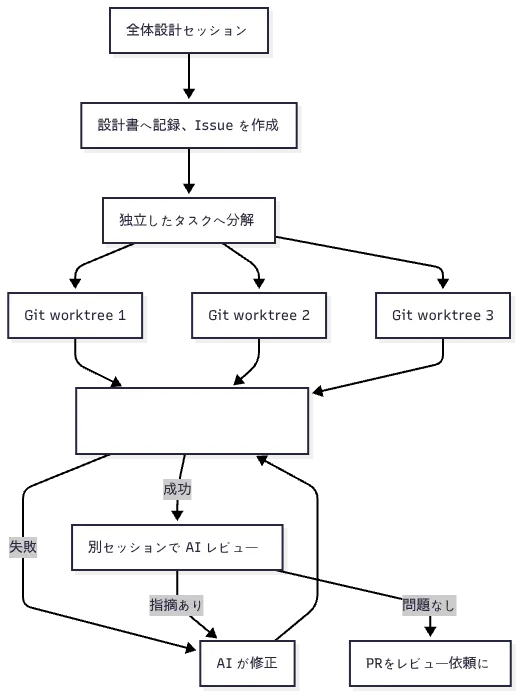
The key is to begin with a design that considers the system as a whole, then break the work into units that can be executed independently. By holding a design session first and establishing shared understanding with the AI, I can reasonably expect each parallel task to preserve the intent of the design during implementation.
For parallel execution to work, the AI must be able to run this feedback loop autonomously rather than asking a human to approve every operation. This allows humans to spend more time on consequential decisions made before implementation, such as data models and responsibility boundaries. As AI becomes more capable of completing tasks autonomously, I find that design becomes increasingly important.
Share the Goal, Not Detailed Procedures
When I assign a task to an AI, I avoid specifying file-by-file editing instructions or the implementation details inside individual functions in the initial prompt. If I provide too many detailed instructions, the AI tends to focus on executing them exactly, which eliminates opportunities for it to suggest a better approach I had not considered.
That does not mean I simply ask it to "implement this nicely" without any guidance. I use skills such as grill-me, discussed later, to conduct a thorough interview until the AI and I share an understanding of the design and product experience. In particular, we should discuss questions such as:
- Why is this change necessary?
- What conditions must be met for the work to be considered complete?
- Which domain constraints must not be violated?
- How should responsibilities be divided among components?
- Which behaviors can we verify to determine that the implementation is correct?
The important distinction here is between making the design detailed and prescribing a detailed work procedure. Before implementation begins, I discuss the goals, constraints, responsibility boundaries, interfaces, and behaviors that must be verified. However, I leave local implementation choices—such as which file to edit first or which syntax to use inside a function—to the AI.
For example, I care less than I once did about whether to use interface or type in TypeScript, or whether to avoid let by using a ternary expression. I care more about which layer owns the type and how well the impact of a change can be localized across the system.
Spend Time on a Design Session Before Implementation
As AI becomes more capable of completing tasks autonomously, establishing shared understanding between the human and the AI before implementation becomes increasingly important. When several tasks are running in parallel, a human cannot continuously monitor every agent. If implementation begins with unresolved misunderstandings, they may not become visible until all of the work has finished.
Before implementation, I therefore use tools such as "the
/grill-me skill for thoroughly interviewing a design and clarifying requirements" to hold a design session with the AI. The AI asks one design question at a time, and we resolve each branch of the decision tree in sequence.
It is important not to remain passive during a design session. If you simply answer "OK" to every recommendation the AI makes, you are effectively delegating the design itself to the AI. You need to articulate your domain constraints, explain why the existing architecture was chosen, and communicate any discomfort you feel about a proposal.
The skills developed through conventional software engineering remain directly applicable here. Humans still decide how responsibilities should be divided, which direction dependencies should point, and how much extensibility is justified for future changes, using the AI's proposals as input. AI cannot magically produce a sound design when the human brings no thinking of their own to the process.
Where to Store the Design Document
A design session contains many design decisions and becomes valuable context that multiple implementation sessions can reference. For that reason, I think it is better to organize the outcome in a separate document rather than leave it only in the chat history. I am still experimenting with where to store these design documents. At the moment, I often put them in comments on GitHub Issues. Issues are tied to the progress of a task and preserve a history of updates, making the reasoning behind design decisions easier to follow. On the other hand, storing a design document as a Markdown file in the repository is also attractive because it makes the document easier for AI to access.
However, if every procedure needed only during implementation is preserved permanently, the repository will accumulate design documents that are no longer maintained. For now, I find it useful to divide documentation into two categories: preserve decisions, but discard procedures once they have served their purpose.
- Preserve long-lived design decisions in ADRs or permanent design documents.
- Keep task breakdowns and execution procedures needed only for the current implementation in disposable locations such as Issue comments, then discard them when implementation is complete.
Run Multiple Tasks in Parallel from the Design Document
Once the design is complete, I break the work into units that can be executed independently. I prefer Claude Desktop to a CLI because it makes it easier to see the state of multiple threads, separate design sessions from implementation sessions, and check tasks running in the background. Many desktop applications can also render diagrams, which I find gives them an advantage over a CLI when visually reviewing design discussions.
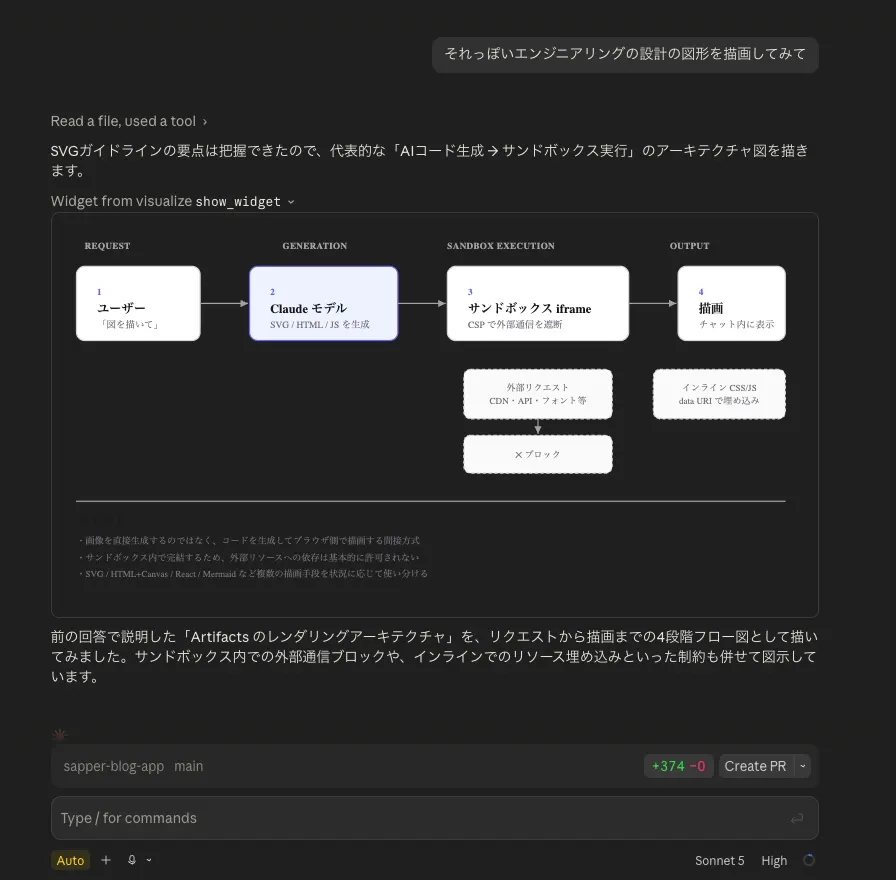
I isolate each task in its own working directory with Git worktree and run it in a separate Claude Desktop thread. Because the desktop application can split panes and display several threads at once, it is easy to see their progress. Finding boundaries along which tasks can be safely isolated is itself part of the design. A codebase with well-separated responsibilities and localized change impact makes it easier to distribute tasks among multiple agents.
Preparing an environment in which AI can use Git worktree effectively also improves the efficiency of parallel work. A common problem is that a newly checked-out worktree does not contain node_modules, leaving the AI unable to resolve dependencies. When dependency resolution fails, the AI may repeat several attempts while trying to identify the cause. It is therefore important to make dependencies available as soon as a worktree is created. In Claude Code, I use hooks to run processing when a worktree is created and create a symbolic link to node_modules.
If starting each session manually feels tedious, you can also ask the AI itself to divide and execute the work. For example, you can instruct it to "break down the design document into executable tasks and launch a subagent for each task in parallel." The AI can then supervise the subagents and autonomously handle the process from implementation through review. This kind of autonomous task division is possible because the goals and constraints were clarified during the design session.
Monorepos and AI Coding
Designing with AI often requires investigation across multiple areas, including the frontend, API, and infrastructure configuration. In this respect, I find monorepos advantageous because all the necessary code is kept in the same repository. The AI can explore dependencies and existing implementation patterns in one pass, while multiple implementation sessions can refer to the same design document and verification commands. It is also easier to investigate the impact of a cross-cutting change before deciding where to divide the work.
My day-to-day work uses a polyrepo setup, with the system split across multiple repositories. One useful technique is to start a session while including a relative path to another repository in the prompt. For example, a session implementing the frontend can be given the relative path to the API repository and the location of its design document. I now work across repositories so often that even when I accidentally start a session in the wrong one, the AI frequently infers that I must be referring to another repository and handles it appropriately—a recurring source of amusement.
Build an Environment Where AI Can Verify Its Work Autonomously
For AI to implement changes autonomously, it needs an environment in which it can obtain feedback on its own work. It must be able to confirm whether its changes satisfy the expected behavior and use the result as feedback.
In my usual development workflow, the AI performs not only static checks such as tests, type checking, and linting, but also verifies the application while the development server is running. For frontend changes, it operates a browser; for API changes, it sends requests with curl and checks the responses. I define the expected behavior during the design phase and encode the basic procedures for starting the development server and verifying the browser or API as project-specific skills. The AI determines what must be checked from the design document, then performs the verification by following those skills.
A language model cannot operate a browser on its own, so it must be connected to a browser-control tool. I usually use the browser-control functionality in Claude Desktop. It comes with the tools needed for browser interaction, and because the browser runs inside the desktop application, it is easy to see what the AI is doing.
It is important to minimize the time between making a change and determining whether it succeeded. If starting the development server or running tests takes a long time, the feedback loop slows down accordingly. Improving the speed of local verification and CI deserves more serious attention than ever. In recent TypeScript projects, the toolchain sometimes referred to as the Vite+ stack has helped speed up this workflow, and I have been adopting it actively.
- Vite
- Vitest
- Oxlint
- Oxfmt
- tsgo (TypeScript 7)
Feedback loops built around development servers, tests, and browser interaction deserve as much attention as the models and prompts used by the AI.
Run an AI Review in a Separate Session After Creating a PR
After implementation is complete and I have created a PR, I always ask an AI to review it with a command such as review or code-review. I do not ask the implementation session to review its own work. The implementation session may be biased toward justifying its changes, so I find that a fresh context with no knowledge of the implementation process is more likely to identify problems. Many projects now seem to have some form of review AI triggered by a PR.
AI review can be useful as a first pass for finding logical errors, missing test coverage, and local readability problems. This does not mean humans stop reviewing code altogether. The scope delegated to AI also depends on the impact of the change. Changes involving authentication, payments, personal information, data migrations, or other areas where mistakes could have significant consequences require focused human review. That said, I no longer read every line with the same level of attention. I discuss how humans and AI can divide review concerns in more detail later, in "Code Review Becomes the Next Bottleneck."
Maintaining CLAUDE.md and Skills
It is also important to maintain CLAUDE.md and Agent Skills so that AI can access project-specific knowledge. I roughly divide their responsibilities as follows:
CLAUDE.mdcontains the repository structure, standard commands, implicit project knowledge, and short principles that apply to every task.- Project-specific skills contain reusable work patterns such as verification procedures and routine operations.
- Personal skills contain work patterns that can be reused across projects, such as
grill-meand code review.
If you find yourself repeating the same instructions in prompts, moving them into CLAUDE.md or a skill can make the workflow more consistent. I closely observe an agent's behavior until the harness is mature. The conversation, tool calls, files referenced, and execution results are recorded in logs, allowing me to identify where the agent hesitated during implementation. Those points of hesitation indicate what should be added to CLAUDE.md or a skill.
When creating a skill, it is useful to tell the agent during the same session, "Turn the work you just performed and the feedback I gave you into a reusable skill for next time." AI has some ability to create skills on its own, and immediately after completing a task, the session still contains the primary context needed to create one.
Once CLAUDE.md and the skills are sufficiently mature, I begin delegating tasks more autonomously. This feels surprisingly similar to managing people. A new employee initially receives detailed instructions, but once they understand how the work is done, they can be trusted to operate more independently.
However, continually improving instructions cannot solve every problem in a codebase.
For example, instead of repeatedly writing "preserve this dependency direction" in CLAUDE.md, it is more reliable to make package boundaries explicit in the code or enforce them with lint rules. Skills alone cannot make a codebase easy for AI to work with when responsibilities are entangled and one change spreads across many files. AI is generally good at exploring existing code and making changes that follow established patterns. When the architecture is unclear or responsibilities are entangled, the AI may struggle to determine where to begin. As a result, it may misunderstand the impact of a change and introduce inconsistencies. This is not quite "garbage in, garbage out," but poor architecture makes poor code more likely to be reproduced.
I do not think architecture designed for AI requires entirely new principles.
- Responsibility boundaries are clear.
- Dependency directions are consistent.
- The impact of a change can be localized.
- Behavior can be understood from interfaces.
- Tests verify behavior at boundaries.
- Naming and directory structure make the relevant code discoverable.
These have long been considered important properties of maintainable software. The same properties also help AI explore a codebase, divide work into independent tasks, and verify its changes autonomously. Improving CLAUDE.md and skills is valuable, but the architecture expressed by the code itself remains the most important factor, just as it always has.
The Ability to Write Code and the Ability to See the Whole System
From the early days of using AI coding tools, I felt that I needed to hand the role of writing code over to AI, even when I believed I could write better code myself. Humans cannot match an AI's typing speed. If I wrote the code myself every time because it seemed faster, I would never get the opportunity to improve the design and verification environment required to delegate implementation effectively.
Today, I rarely write code by hand. As a result, I feel that some aspects of my coding ability have declined. I have fewer opportunities to recall specific syntax and detailed implementation patterns, and I pay less attention to the elegance of local code.
At the same time, I spend more time looking across the system as a whole and thinking about responsibility boundaries, dependencies, and consistency when multiple changes are integrated. Rather than saying that my abilities have simply improved, I see it as a change in where I allocate my attention.
However, the design ability I rely on today is supported by years of writing code myself and learning through failure. I do not know whether someone who delegates every implementation detail to AI from the beginning can develop the same design judgment. Training and learning for junior engineers will need to be considered as a separate and substantial problem.
Code Review Becomes the Next Bottleneck
It has already been said many times, but once AI can implement changes autonomously, code review becomes the bottleneck.
Even if AI creates several PRs simultaneously, a queue forms if humans still review them one at a time at the same level of detail as before. The following passage from Addy Osmani's "Agentic Code Review" captures the current situation well (the excerpt below is paraphrased).
Code review kept up largely because senior engineers could read code faster than junior engineers could produce it. Teams also learned how their systems fit together by reading one another's diffs. This arrangement emerged because writing code was slow and expensive, while reading it was relatively cheap and fast.
When an industrial revolution occurs, the way people work inevitably changes. Many people are beginning to wonder whether conventional code review has reached its limits. At the same time, we cannot trust AI enough to stop humans from examining code altogether. Humans remain accountable. One possible path is to divide code review into layers: humans review high-risk changes and the overall design, while individual implementations primarily pass through AI review and automated verification.
As noted earlier, AI review can be useful as a first pass for finding logical errors, missing test coverage, and local readability problems. Instead of spending time on every local detail, humans can focus on whether the requirements are met, whether responsibility boundaries match the design, and whether high-risk changes involving APIs, data models, permissions, and similar concerns are sound. We can go a step further and have humans review the overall design together before implementation. AI can then implement individual changes from an agreed design, with each implementation primarily going through AI review and automated verification. This allows humans to concentrate on design consistency and high-risk changes, while AI assists with checking local implementation quality. A shared design makes deviations easier to detect, but unstated requirements and flaws in the design itself still need separate review.
Keeping PRs small is another effective way to reduce the review bottleneck. Even before AI, it was widely recognized that larger diffs increase the burden on reviewers and dilute their attention. Because AI agents can make large changes at once, PRs tend to grow unless this is actively managed. I recommend asking the AI itself to split the work into smaller PRs. You can discuss the criteria for splitting them, and the AI can also handle moderately complex Git operations.
Finally, make sure you can explain the changes in the PR yourself. Do not push the cost of explaining them onto the reviewer. Even when AI created the PR, you must be able to explain the design intent and the reasons behind the change.
Design for Minimal Approvals
An agent cannot run an autonomous feedback loop if it must ask a human for approval every time it executes a command or edits code. It is also important to recognize that requiring approval for more operations does not automatically make AI operations safer. As the number of approvals increases, people experience "approval fatigue," and the quality of those approvals declines. They gradually begin approving requests automatically and become more likely to miss the operations that genuinely require scrutiny.
To minimize approvals, it is important to prepare a sandboxed environment. Isolating the AI's environment in a sandbox limits the damage if the AI performs an incorrect operation and deletes an important file. Features such as Claude Code's Auto mode and
Codex's delegated approval also allow AI to determine whether an operation requires approval. Rather than skipping every approval, these systems attempt to block operations when a classifier detects risks such as leaking sensitive data, deleting important files, or executing malicious code. If the agent continues to attempt the operation, human approval is required. Expanding the range in which AI can make autonomous decisions is also important for preventing approval fatigue.
We, Programmers: A Chronicle of Coders from Ada to AI describes how, in the early days of programming, people had to intervene and restart programs even for processes we would now express with loops and conditional branches. The transition from humans monitoring every instance of AI code generation to allowing autonomous execution within a defined boundary feels similar in some respects.
Choosing Between Model Cost and Performance
At present, I almost always use the most capable model available at the time. Classifying which tasks can be delegated to cheaper models requires human effort, and an underpowered model may create rework. For now, standardizing on a capable model is easier to manage. I particularly avoid conserving model capability during design sessions because a design error can send every subsequent parallel task in the wrong direction.
I do not know whether this approach will remain sustainable. We are currently in a bonus period in which subscriptions provide generous model usage, but a move toward usage-based pricing is entirely possible. If that period ends or the number of tasks running in parallel increases further, I may need to use different models for different tasks.
In that case, models should be compared by the total cost of completing a change, not simply by their price per token. If using a cheaper model leads to more implementation retries and review cycles, starting with a more capable model may ultimately cost less. Another dimension that has emerged alongside model selection is effort level. Effort level controls the depth of a model's reasoning, allowing the same model to handle more complex tasks by reasoning more deeply. Finding the right combination of model and effort level to balance cost and capability will become an important challenge.
In general, people often assign tasks requiring deep, complex reasoning, such as design, to capable models and give simple work or changes that follow existing patterns to cheaper models. In many cases, however, this choice still depends on human intuition. Quantitative methods for evaluating model capability may become increasingly important if we want to understand models accurately and decide which model should handle each task.
Addicted to AI?
At times, I feel as though some AI must always be running in the background—a kind of addiction. Many subscriptions impose time-based usage limits, and failing to use the full allowance can feel like losing money. There can also be a compulsive sense that every moment without AI running is a loss of productivity. Because AI returns nondeterministic results, it may even offer a gambling-like thrill. Animal experiments have shown increased dopamine-neuron activity while waiting for a reward when the probability of receiving it is uncertain. This finding cannot be applied directly to AI use, but waiting for a nondeterministic result may have an appeal similar to a randomized reward mechanic. We should be careful not to let running AI become an end in itself.
However, keeping AI running is not the same as making progress on valuable work. Increasing parallelism also increases the burden of review and integration. We need to ask whether we are inventing unnecessary tasks simply to maximize AI utilization. Deciding not only what AI should do, but also what it should not do, may itself become part of the design process.
Summary
- In AI-assisted coding, I now spend more time on design sessions before implementation than on implementation itself.
- In each prompt, share the goal, background, and constraints rather than detailed work procedures.
- Record expected behavior in the design document, and define reusable verification procedures as project-specific skills.
- Break tasks down from the design document, then run them in parallel using Git worktrees and multiple Claude Desktop threads.
- Have the AI verify actual behavior with a browser or
curl, in addition to running tests, type checks, and linting. - Run AI review in a separate session from the one that performed the implementation.
- Rather than reviewing all code at the same level of detail, humans should focus their attention on the overall design and high-risk changes.
- Improving
CLAUDE.mdand skills is important, but the architecture expressed by clear responsibilities and dependencies in the code remains the most important factor, just as it was before AI.