
Building an Accessible Tree View in React
ARIA roles alone do not make a Tree View accessible. Learn to build a single-select Tree View in React with roving tabindex, arrow-key navigation, selection, and type-ahead, following the WAI-ARIA APG.
A Tree View is a UI for presenting hierarchical structures such as file systems and product categories. Expanding a parent node reveals its children, and collapsing it hides them again. Visually, it may seem easy to build with a nested <ul> and some expand-and-collapse logic.
However, assistive technology users cannot understand that hierarchy from its visual appearance alone, which can prevent them from operating it correctly. For web accessibility, you must use roles and aria- attributes according to the WAI-ARIA specification to communicate the UI's meaning and state, then implement keyboard behavior with reference to the APG patterns. For example, assigning the button role promises users that they can activate the element with Enter or Space.
In this article, we will use the WAI-ARIA Authoring Practices Guide (APG) Tree View Pattern to build a single-select Tree View in React and TypeScript with the following features:
- A hierarchical structure using the
tree,treeitem, andgrouproles - Expansion state represented by
aria-expanded - Selection state represented by
aria-selected - Focus management with roving
tabindex - Navigation with the arrow, Home, and End keys
- Selection with Enter or Space
- Type-ahead item search
- Consistent focus management for pointer and keyboard interaction
APG patterns and examples do not guarantee support across every browser and assistive technology combination in production. Always test in the environments you support.
The “No ARIA is better than Bad ARIA” principle
The APG Read Me First presents the principle “No ARIA is better than Bad ARIA.” In other words, omitting ARIA is better than providing inaccurate ARIA.
For example, assigning role="button" does not make the browser add Enter or Space key handling. The developer is responsible for implementing it. This is expressed by the principle “A role is a promise.” If assistive technology announces an element as a button but Enter and Space do nothing, the implementation violates the user's expectations.
Similarly, when you assign role="tree", you need to implement the keyboard behavior described by the APG Tree View pattern. Otherwise, users may be unable to operate it as expected and become confused.
You should not assign the tree role merely because something looks hierarchical. First decide whether it is appropriate for the task. If users only need to read information from top to bottom, for example, a normal nested list is usually a better choice.
A Tree View uses navigation that resembles a native application more than a typical web application. Before building one, consider whether you truly need it.
Browsers already expose ordinary <ul> and <li> elements as lists. If you cannot implement the requirements of a Tree View, preserving native list semantics is safer than adding an incomplete tree role.
Designing the Tree View structure and state
First, let us examine the structure that will be exposed to assistive technologies.
<ul role="tree" aria-label="プロジェクトファイル">
  <li role="treeitem" aria-expanded="true" aria-selected="false">
    src
    <ul role="group">
      <li role="treeitem" aria-selected="false">App.tsx</li>
      <li role="treeitem" aria-selected="false">main.tsx</li>
    </ul>
  </li>
  <li role="treeitem" aria-selected="false">package.json</li>
</ul>
Assign role="tree" to the root <ul> and give it a name that communicates its purpose with aria-label or aria-labelledby. Assign role="treeitem" to each node and role="group" to each collection of child nodes. Place the group inside its parent treeitem.
The group role represents a collection of related elements. In a Tree View, it groups the children belonging to a treeitem. In a file system, for example, it naturally represents the collection of files inside a directory.
Apply aria-expanded only to parent nodes
For parent nodes with children, set aria-expanded="true" when expanded and aria-expanded="false" when collapsed. Do not apply this attribute to end nodes that have no children.
aria-expanded={hasChildren ? isExpanded : undefined}Adding aria-expanded="false" to an end node incorrectly communicates that the node is currently collapsed but can be expanded. The correct implementation is to omit aria-expanded from nodes that cannot be expanded or collapsed.
Expose hierarchy and position explicitly
When treeitem and group elements are nested correctly, browsers can calculate the following values from the DOM hierarchy and expose them to assistive technologies. Therefore, you can usually omit these attributes when every node is present in the DOM.
aria-level: The depth within the Tree View. Root nodes are at level1aria-posinset: The node's position among siblings with the same parent, starting at1aria-setsize: The total number of siblings with the same parent
However, the APG computed properties example explains that some browser and assistive technology combinations may not calculate or report these values correctly. When you can manage the values accurately, declaring them explicitly can improve compatibility. This implementation declares all three attributes.
Incorrect values that conflict with the DOM or underlying data will give assistive technologies false information. If you cannot maintain accurate values, it is safer to omit them and rely on the browser's calculation.
When virtual scrolling or lazy loading leaves only some nodes in the DOM, you must specify each node's position and the total set size in the complete data set.
Keep focus and selection separate
Focus and selection are distinct states in a Tree View.
- Focus: The item currently targeted by keyboard operations
- Selection: The item chosen for an application action, such as opening a file
The APG keyboard interface guidance explains that DOM focus is represented by
document.activeElement, while selection is represented by aria-selected="true".
In this implementation, arrow keys move only focus. Selection changes when the user presses Enter or Space. Because moving focus alone does not trigger side effects such as opening a file, users can explore the tree without changing its content.
Managing focus with roving tabindex
If every treeitem has tabindex="0", users must press Tab once for every item before they can leave the Tree View. In a composite widget, only one item should be included in the page's tab sequence. This technique is called roving
tabindex. Tabs and menus use the same approach.
Roving tabindex manages focus as follows:
- Set
tabindex="0"on the current item - Set
tabindex="-1"on every other item - Move DOM focus to the destination with
HTMLElement.focus() - Update the destination to
tabindex="0"
An element with tabindex="-1" is excluded from Tab navigation but can still receive focus through JavaScript's focus() method.
The implementation stores the DOM element for each treeitem in a Map.
const [focusedId, setFocusedId] = useState(items[0]?.id ?? "");
const itemRefs = useRef(new Map<string, HTMLLIElement>());

function focusNode(id: string) {
  itemRefs.current.get(id)?.focus();
}
During rendering, only the item matching focusedId is included in the tab sequence.
<li
  ref={(element) => {
    if (element) itemRefs.current.set(node.id, element);
    else itemRefs.current.delete(node.id);
  }}
  role="treeitem"
  tabIndex={focusedId === node.id ? 0 : -1}
  data-tree-id={node.id}
  onFocus={(event) => {
    if (event.target === event.currentTarget) {
      setFocusedId(node.id);
    }
  }}
>
Navigate only among visible nodes
The Up and Down Arrow keys should not move through every node in the data. They should move through the nodes currently visible on screen. Descendants of a collapsed parent are not included as destinations.
Finding the “next node” or “previous node” directly in a tree structure requires complicated branching across parents, children, and siblings. Instead, create a depth-first flat array of visible nodes based on the expansion state.
type VisibleNode = {
  node: TreeNode;
  parentId: string | null;
};

function flattenVisibleNodes(
  nodes: TreeNode[],
  expandedIds: Set<string>,
  parentId: string | null = null,
): VisibleNode[] {
  const result: VisibleNode[] = [];

  for (const node of nodes) {
    result.push({ node, parentId });
    if (node.children?.length && expandedIds.has(node.id)) {
      result.push(...flattenVisibleNodes(node.children, expandedIds, node.id));
    }
  }

  return result;
}
parentId is used to move to the parent with the Left Arrow key. Within the component, useMemo() recalculates the array whenever the data or expansion state changes.
const visibleNodes = useMemo(
  () => flattenVisibleNodes(items, expandedIds),
  [items, expandedIds],
);
Implementing keyboard behavior based on the APG
For a vertically oriented Tree View, the APG describes the following primary keyboard interactions.
| Key | Behavior |
|---|---|
| ↓ | Move to the next visible node without changing expansion state |
| ↑ | Move to the previous visible node without changing expansion state |
| → | Expand a collapsed parent; move to the first child of an expanded parent |
| ← | Collapse an expanded parent; move to the parent from a collapsed parent or end node |
| Home | Move to the first visible node |
| End | Move to the last visible node |
| Enter / Space | Select the focused node |
| Printable character | Move to the next node whose name begins with the typed string |
Type-ahead is recommended for every Tree View and is especially important when there are more than seven root nodes. The APG pattern defines Enter for the default action, while the official file selection example uses both Enter and Space to select a node. This implementation follows that example.
The APG also lists * as an optional command that expands all siblings at the same level as the focused node. This implementation does not include it.
The root tree handles keyboard events centrally. The handler identifies the current treeitem and determines the destination from its position in visibleNodes.
function handleKeyDown(event: KeyboardEvent<HTMLUListElement>) {
  // Do not interfere with browser or assistive technology shortcuts.
  if (event.altKey || event.ctrlKey || event.metaKey) return;

  const target = (event.target as HTMLElement).closest<HTMLElement>(
    '[role="treeitem"]',
  );
  const id = target?.dataset.treeId;
  if (!id) return;

  const index = visibleNodes.findIndex(({ node }) => node.id === id);
  const current = visibleNodes[index];
  if (!current) return;

  switch (event.key) {
    case "ArrowDown":
      event.preventDefault();
      if (visibleNodes[index + 1]) {
        focusNode(visibleNodes[index + 1].node.id);
      }
      return;
    case "ArrowUp":
      event.preventDefault();
      if (visibleNodes[index - 1]) {
        focusNode(visibleNodes[index - 1].node.id);
      }
      return;
    case "ArrowRight":
      event.preventDefault();
      if (!current.node.children?.length) return;
      if (!expandedIds.has(current.node.id)) {
        toggle(current.node);
      } else {
        focusNode(current.node.children[0].id);
      }
      return;
    case "ArrowLeft":
      event.preventDefault();
      if (
        current.node.children?.length &&
        expandedIds.has(current.node.id)
      ) {
        toggle(current.node);
      } else if (current.parentId) {
        focusNode(current.parentId);
      }
      return;
    case "Home":
      event.preventDefault();
      if (visibleNodes[0]) focusNode(visibleNodes[0].node.id);
      return;
    case "End":
      event.preventDefault();
      if (visibleNodes.at(-1)) focusNode(visibleNodes.at(-1)!.node.id);
      return;
    case "Enter":
    case " ":
      event.preventDefault();
      selectNode(current.node);
      return;
  }
}
For the Up Arrow, Down Arrow, Home, and End keys, call preventDefault() to prevent browser scrolling. However, combinations with Alt, Ctrl, or Meta may be browser or assistive technology shortcuts, so the Tree View does not handle them. Right Arrow expands a collapsed parent without moving focus, and moves to the first child only when the parent is already expanded. Similarly, Left Arrow collapses an expanded parent in place and moves to the parent from an end node or collapsed parent.
Add type-ahead search
Type-ahead begins searching after the current node and wraps to the beginning if no match is found before the end. Multiple characters typed within a short interval are treated as one search string.
const searchText = useRef("");
const searchTimer = useRef<ReturnType<typeof setTimeout>>(undefined);

function handleTypeAhead(key: string, currentIndex: number) {
  clearTimeout(searchTimer.current);
  searchText.current += key.toLocaleLowerCase("ja-JP");

  const candidates = [
    ...visibleNodes.slice(currentIndex + 1),
    ...visibleNodes.slice(0, currentIndex + 1),
  ];
  const match = candidates.find(({ node }) =>
    node.label.toLocaleLowerCase("ja-JP").startsWith(searchText.current),
  );

  if (match) focusNode(match.node.id);
  searchTimer.current = setTimeout(() => {
    searchText.current = "";
  }, 500);
}
The default branch checks modifiers so that modified key combinations are not treated as search characters.
if (
  event.key.length === 1 &&
  !event.altKey &&
  !event.ctrlKey &&
  !event.metaKey
) {
  handleTypeAhead(event.key, index);
}
Because the search also uses visibleNodes, focus never moves to a descendant of a collapsed node.
Outputting ARIA attributes from a recursive component
The Tree View accepts data and props in the following shape. Every node id must be unique within the Tree View.
export type TreeNode = {
  id: string;
  label: string;
  children?: TreeNode[];
};

type TreeViewProps = {
  items: TreeNode[];
  label: string;
  defaultExpandedIds?: string[];
  onSelect?: (node: TreeNode) => void;
};
Prepare unique ID components in advance so that each treeitem can reference its label with aria-labelledby. useId() provides a prefix for each Tree View, and every node receives a stable sequence number.
function collectNodeIds(nodes: TreeNode[]): string[] {
  return nodes.flatMap((node) => [
    node.id,
    ...(node.children ? collectNodeIds(node.children) : []),
  ]);
}const reactId = useId();
// Assign numbers from the complete data set rather than expansion state so that
// they remain stable when collapsing removes nodes from the DOM.
const nodeIndexes = useMemo(
() => new Map(collectNodeIds(items).map((id, index) => [id, index])),
[items],
);Render nodes recursively and pass their current depth and sibling position to the ARIA attributes.
function renderNodes(nodes: TreeNode[], level: number) {
  return nodes.map((node, index) => {
    const hasChildren = Boolean(node.children?.length);
    const isExpanded = hasChildren && expandedIds.has(node.id);
    const labelId = `${reactId}-tree-label-${nodeIndexes.get(node.id)}`;

    return (
      <li
        key={node.id}
        ref={(element) => {
          if (element) itemRefs.current.set(node.id, element);
          else itemRefs.current.delete(node.id);
        }}
        role="treeitem"
        aria-labelledby={labelId}
        aria-expanded={hasChildren ? isExpanded : undefined}
        aria-selected={selectedId === node.id}
        aria-level={level}
        aria-posinset={index + 1}
        aria-setsize={nodes.length}
        tabIndex={focusedId === node.id ? 0 : -1}
        data-tree-id={node.id}
        onFocus={(event) => {
          // React focus events bubble, so do not update ancestor treeitems.
          if (event.target === event.currentTarget) {
            setFocusedId(node.id);
          }
        }}
      >
        <div className="tree-row">
          <span className="tree-expander" aria-hidden="true">
            {hasChildren ? (isExpanded ? "▾" : "▸") : null}
          </span>
          <span id={labelId}>{node.label}</span>
        </div>
        {isExpanded && node.children ? (
          <ul role="group">{renderNodes(node.children, level + 1)}</ul>
        ) : null}
      </li>
    );
  });
}
Each treeitem uses aria-labelledby so descendant labels are not included in the parent node's accessible name. Because the IDs combine the earlier prefix and sequence number, label IDs do not collide even when multiple Tree Views appear on the same page.
The expansion icon is decorative, so assign it aria-hidden="true". Keyboard users expand and collapse while focus remains on the treeitem, so the icon is not a separate tab stop. For pointer-based expansion, move focus to the corresponding treeitem before updating its expansion state.
Visually distinguish focus from selection
Because focus and selection are different states, they must have distinct visual treatments in CSS.
[role="treeitem"][aria-selected="true"] > .tree-row {
  background: #dbeafe;
}

[role="treeitem"]:focus > .tree-row {
  outline: 2px solid #1d4ed8;
  outline-offset: -2px;
}
Selection uses a background color, while focus uses an outline. Since this changes shape in addition to color, the two states are easier to distinguish.
In Windows forced-colors mode, switch to system colors.
@media (forced-colors: active) {
  [role="treeitem"][aria-selected="true"] > .tree-row {
    forced-color-adjust: none;
    color: HighlightText;
    background: Highlight;
  }

  [role="treeitem"]:focus > .tree-row {
    outline-color: CanvasText;
  }
}
The complete Tree View implementation
The core functionality is now complete. Use the component as follows.
const items: TreeNode[] = [
  {
    id: "src",
    label: "src",
    children: [
      { id: "app", label: "App.tsx" },
      { id: "main", label: "main.tsx" },
    ],
  },
  { id: "package-json", label: "package.json" },
];

export function App() {
  const [selectedNode, setSelectedNode] = useState<TreeNode | null>(null);

  return (
    <TreeView
      items={items}
      label="プロジェクトファイル"
      defaultExpandedIds={["src"]}
      onSelect={setSelectedNode}
    />
  );
}
The complete TreeView component assembled in this article is shown below.
Complete implementation of src/TreeView.tsx
import {
  useEffect,
  useId,
  useMemo,
  useRef,
  useState,
  type KeyboardEvent,
  type MouseEvent,
} from "react";

export type TreeNode = {
  id: string;
  label: string;
  children?: TreeNode[];
};

type TreeViewProps = {
  items: TreeNode[];
  label: string;
  defaultExpandedIds?: string[];
  onSelect?: (node: TreeNode) => void;
};

type VisibleNode = {
  node: TreeNode;
  parentId: string | null;
};

function flattenVisibleNodes(
  nodes: TreeNode[],
  expandedIds: Set<string>,
  parentId: string | null = null,
): VisibleNode[] {
  const result: VisibleNode[] = [];

  for (const node of nodes) {
    result.push({ node, parentId });
    if (node.children?.length && expandedIds.has(node.id)) {
      result.push(...flattenVisibleNodes(node.children, expandedIds, node.id));
    }
  }

  return result;
}

function collectNodeIds(nodes: TreeNode[]): string[] {
  return nodes.flatMap((node) => [
    node.id,
    ...(node.children ? collectNodeIds(node.children) : []),
  ]);
}

export function TreeView({
  items,
  label,
  defaultExpandedIds = [],
  onSelect,
}: TreeViewProps) {
  const [expandedIds, setExpandedIds] = useState(
    () => new Set(defaultExpandedIds),
  );
  const [focusedId, setFocusedId] = useState(items[0]?.id ?? "");
  const [selectedId, setSelectedId] = useState<string | null>(null);
  const itemRefs = useRef(new Map<string, HTMLLIElement>());
  const searchText = useRef("");
  const searchTimer = useRef<ReturnType<typeof setTimeout>>(undefined);
  const reactId = useId();

  const visibleNodes = useMemo(
    () => flattenVisibleNodes(items, expandedIds),
    [items, expandedIds],
  );
  const nodeIndexes = useMemo(
    () => new Map(collectNodeIds(items).map((id, index) => [id, index])),
    [items],
  );

  useEffect(() => {
    return () => clearTimeout(searchTimer.current);
  }, []);

  function toggle(node: TreeNode) {
    if (!node.children?.length) return;

    setExpandedIds((current) => {
      const next = new Set(current);
      if (next.has(node.id)) {
        next.delete(node.id);
      } else {
        next.add(node.id);
      }
      return next;
    });
  }

  function focusNode(id: string) {
    itemRefs.current.get(id)?.focus();
  }

  function selectNode(node: TreeNode) {
    setSelectedId(node.id);
    onSelect?.(node);
  }

  function handleTypeAhead(key: string, currentIndex: number) {
    clearTimeout(searchTimer.current);
    searchText.current += key.toLocaleLowerCase("ja-JP");

    const candidates = [
      ...visibleNodes.slice(currentIndex + 1),
      ...visibleNodes.slice(0, currentIndex + 1),
    ];
    const match = candidates.find(({ node }) =>
      node.label.toLocaleLowerCase("ja-JP").startsWith(searchText.current),
    );

    if (match) focusNode(match.node.id);
    searchTimer.current = setTimeout(() => {
      searchText.current = "";
    }, 500);
  }

  function handleKeyDown(event: KeyboardEvent<HTMLUListElement>) {
    // Do not interfere with browser or assistive technology shortcuts.
    if (event.altKey || event.ctrlKey || event.metaKey) return;

    const target = (event.target as HTMLElement).closest<HTMLElement>(
      '[role="treeitem"]',
    );
    const id = target?.dataset.treeId;
    if (!id) return;

    const index = visibleNodes.findIndex(({ node }) => node.id === id);
    const current = visibleNodes[index];
    if (!current) return;

    switch (event.key) {
      case "ArrowDown":
        event.preventDefault();
        if (visibleNodes[index + 1]) {
          focusNode(visibleNodes[index + 1].node.id);
        }
        return;
      case "ArrowUp":
        event.preventDefault();
        if (visibleNodes[index - 1]) {
          focusNode(visibleNodes[index - 1].node.id);
        }
        return;
      case "ArrowRight":
        event.preventDefault();
        if (!current.node.children?.length) return;
        if (!expandedIds.has(current.node.id)) {
          toggle(current.node);
        } else {
          focusNode(current.node.children[0].id);
        }
        return;
      case "ArrowLeft":
        event.preventDefault();
        if (
          current.node.children?.length &&
          expandedIds.has(current.node.id)
        ) {
          toggle(current.node);
        } else if (current.parentId) {
          focusNode(current.parentId);
        }
        return;
      case "Home":
        event.preventDefault();
        if (visibleNodes[0]) focusNode(visibleNodes[0].node.id);
        return;
      case "End":
        event.preventDefault();
        if (visibleNodes.at(-1)) focusNode(visibleNodes.at(-1)!.node.id);
        return;
      case "Enter":
      case " ":
        event.preventDefault();
        selectNode(current.node);
        return;
      default:
        if (
          event.key.length === 1 &&
          !event.altKey &&
          !event.ctrlKey &&
          !event.metaKey
        ) {
          handleTypeAhead(event.key, index);
        }
    }
  }

  function renderNodes(nodes: TreeNode[], level: number) {
    return nodes.map((node, index) => {
      const hasChildren = Boolean(node.children?.length);
      const isExpanded = hasChildren && expandedIds.has(node.id);
      const labelId = `${reactId}-tree-label-${nodeIndexes.get(node.id)}`;

      return (
        <li
          key={node.id}
          ref={(element) => {
            if (element) itemRefs.current.set(node.id, element);
            else itemRefs.current.delete(node.id);
          }}
          role="treeitem"
          aria-labelledby={labelId}
          aria-expanded={hasChildren ? isExpanded : undefined}
          aria-selected={selectedId === node.id}
          aria-level={level}
          aria-posinset={index + 1}
          aria-setsize={nodes.length}
          tabIndex={focusedId === node.id ? 0 : -1}
          data-tree-id={node.id}
          onFocus={(event) => {
            // React focus events bubble, so do not update ancestor treeitems.
            if (event.target === event.currentTarget) {
              setFocusedId(node.id);
            }
          }}
        >
          <div
            className="tree-row"
            onClick={() => {
              focusNode(node.id);
              selectNode(node);
            }}
          >
            {hasChildren ? (
              <span
                className="tree-expander"
                aria-hidden="true"
                onClick={(event: MouseEvent) => {
                  event.stopPropagation();
                  focusNode(node.id);
                  toggle(node);
                }}
              >
                {isExpanded ? "▾" : "▸"}
              </span>
            ) : (
              <span className="tree-expander" aria-hidden="true" />
            )}
            <span id={labelId}>{node.label}</span>
          </div>
          {isExpanded && node.children ? (
            <ul role="group">{renderNodes(node.children, level + 1)}</ul>
          ) : null}
        </li>
      );
    });
  }

  return (
    <ul className="tree" role="tree" aria-label={label} onKeyDown={handleKeyDown}>
      {renderNodes(items, 1)}
    </ul>
  );
}
Manually testing with VoiceOver
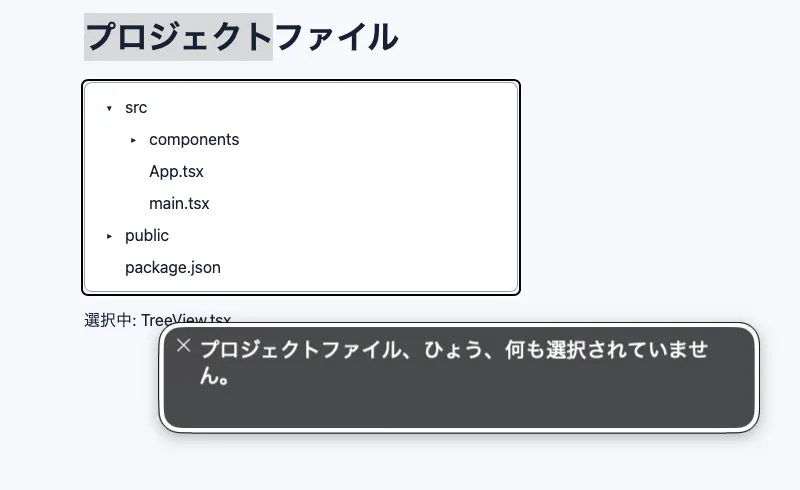
Now try operating the TreeView component with VoiceOver on macOS. When you move to the TreeView, VoiceOver announces プロジェクトファイル、ひょう、何も選択されていません (“Project files, table, nothing selected”), including the accessible name from aria-label and the role. VoiceOver appears to announce the Tree View hierarchy as ひょう (“table”) in Japanese.
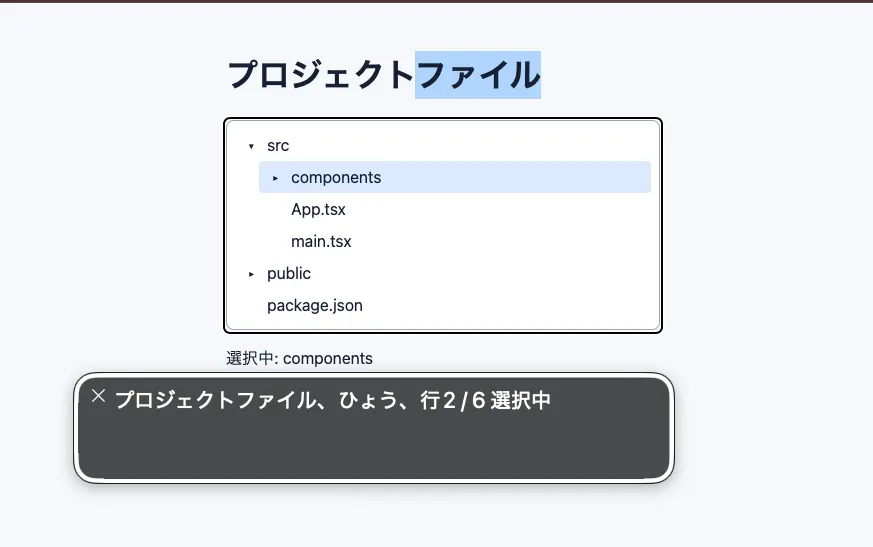
When an item is selected, VoiceOver also announces its position and selection state, such as 行 2 / 5、選択中 (“row 2 of 5, selected”).
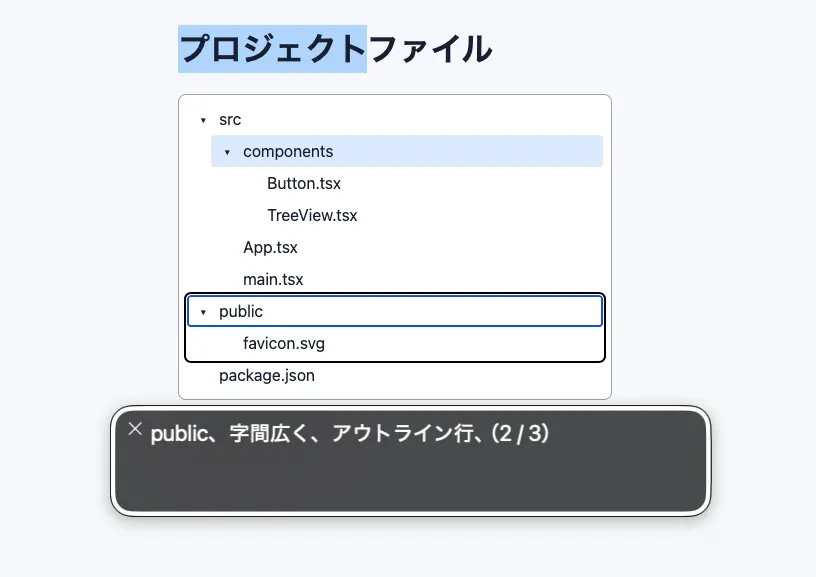
When you select a parent node with children, VoiceOver announces its expansion state and hierarchy, for example, public、字間広く、アウトライン行(2 / 3). In this environment, VoiceOver announces aria-expanded=true as 字間広く and aria-expanded=false as 下位項目が折りたたまれました.
If you pause on the tree, VoiceOver also announces instructions for operating it. This is one reason implementing the expected keyboard behavior matters.
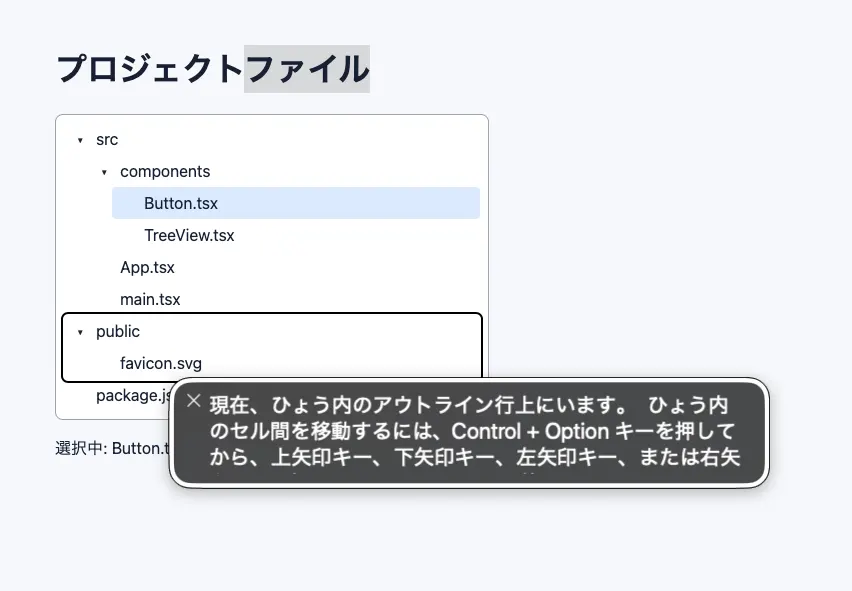
Try the keyboard controls as well. Up and Down Arrow move focus, while Left and Right Arrow collapse, expand, and move between parent and child nodes. Enter or Space changes the selection. Try type-ahead too: press p to move focus to “package.json,” or a to move to “App.tsx.”
Use a component library instead of building your own
We built the Tree View from scratch to understand its interaction model, but as you can see, keyboard behavior and focus management based on the APG Tree View pattern are complex. If maintaining a custom implementation is impractical, consider using an accessibility-focused component library.
For example, React Aria provides unstyled React components and Hooks. Because it does not impose a fixed visual design, you can style it freely to match your application's design system. React Aria is also highly regarded for accessibility.
React Aria's Tree supports keyboard navigation and selection, static and dynamic collections, and controlled or uncontrolled expansion and selection state. A
TreeItem's textValue is also used for type-ahead. The official documentation provides Tree and TreeItem implementations built on react-aria-components, with CSS and Tailwind CSS examples that you can copy into a project and customize.
If you can adopt Adobe's design system and finished styling, React Spectrum's TreeView is another option.
Summary
- A Tree View is not merely a visual hierarchy; it is a composite widget with an interaction model that includes keyboard behavior and focus management
- Design the Tree View's structure and state, and apply
aria-expandedonly to parent nodes - When exposing hierarchy and position explicitly, maintain accurate
aria-level,aria-posinset, andaria-setsizevalues - Focus and selection are different states and should be visually distinct in CSS
- Manage focus with roving
tabindex - For keyboard interaction, use Up and Down Arrow to move focus, Left and Right Arrow to expand, collapse, and move between parents and children, and Enter or Space to select. Navigate only among visible nodes
- If maintaining a custom component is difficult, consider an accessibility-focused component library such as React Aria
References
Tree View Pattern | APG | WAI | W3C
Tree | React Aria
TreeView | React Spectrum