
Simplifying Mock Setup with the MSW v3 Vite Plugin
An official Vite plugin has been added in MSW v3. It eliminates the need to copy or update worker files, allowing you to configure mocks from virtual:msw. In this article, we will try integrating the plugin into a small Vite and TypeScript application.
Mock Service Worker (MSW) is a library that intercepts network requests and returns mocked responses. It is used to develop the frontend before the backend API is ready, or to reproduce specific responses in tests.
In the traditional browser setup, you place mockServiceWorker.js in the public directory with the msw init command, and then configure the worker from your application with setupWorker(). Because this file is tied to a specific MSW version, you need to keep it in sync whenever you update the library.
MSW v3.0.0 adds an official Vite plugin. The plugin serves the worker script from your installed MSW package, so you no longer need to copy the file. You can also use a preconfigured
network from the virtual:msw module.
In this article, I'll try adding the plugin to a small Vite and TypeScript application.
Differences between the traditional setup and the Vite plugin
The browser version of MSW intercepts requests using a Service Worker. A Service Worker is a script that runs separately from the page and can respond to requests before the browser sends them to the network. In the traditional setup, you place the worker script
mockServiceWorker.js in the public directory and call setupWorker() in your application to configure it.
Since mockServiceWorker.js has to be updated every time the MSW version changes, you had to run msw init and copy it again each time. With the Vite plugin, you no longer need to copy or update the worker script. The plugin serves it from the dev server, so there is no need to run msw init or manage public/mockServiceWorker.js.
Adding the Vite plugin
Let's try out the MSW Vite plugin. Create a Vite project and install MSW.
npm install msw --save-devRegister msw() from msw/vite as a plugin in vite.config.ts.
import { defineConfig } from "vite";
import { msw } from "msw/vite";

export default defineConfig({
  plugins: [msw()],
});
With this, the dev server serves /mockServiceWorker.js. You don't need to create public/mockServiceWorker.js or run msw init. If you are adding it to an existing Vite project, add it alongside your framework plugin.
Next, configure TypeScript. MSW v3 adds a virtual module called virtual:msw, which provides network. Add the type declarations for this virtual module, msw/vite/client.
/// <reference types="vite/client" />
/// <reference types="msw/vite/client" />
Enabling mocks with virtual:msw
First, create a handler that returns user information for GET /api/user.
import { http, HttpResponse } from "msw/http";

export const handlers = [
  http.get("/api/user", () => {
    return HttpResponse.json({ id: "1", name: "azukiazusa" });
  }),
];
http.get() specifies the target HTTP method and URL, and HttpResponse.json() returns a JSON response.
Next, prepare the mocks before the application starts.
if (import.meta.env.DEV) {
  const { network } = await import("virtual:msw");
  const { handlers } = await import("./mocks/handlers");

  network.configure({ handlers });
  await network.enable();
}

await import("./app");
network is an object the plugin creates based on defineNetwork(), which was added in MSW v3. The plugin switches what network uses depending on the Vite environment. In browser environments it uses a Service Worker, and in server environments such as SSR it uses the same interceptors as msw/node. This means you can set up mocks from the same virtual:msw without worrying about whether to import msw/browser or msw/node.
network.configure() registers the handlers, and network.enable() starts intercepting requests. Since enable() returns a Promise, the application is loaded only after it resolves. If you start the application without waiting, the first request may be sent before the mocks are ready.
import.meta.env.DEV is a flag provided by Vite that indicates the development environment. By placing the dynamic imports of virtual:msw and the handlers inside this condition as well, the branch is removed in a regular production build, keeping the mock code out of it.
Calling the API and displaying the result
Let's try code that actually calls the API with fetch() and displays the retrieved user name on the page. This API doesn't exist, but since the mock handler responds to it, we should be able to get the user name.
const output = document.querySelector<HTMLParagraphElement>("#user")!;

try {
  const response = await fetch("/api/user");
  if (!response.ok) {
    throw new Error(`HTTP ${response.status}`);
  }
  const user: { id: string; name: string } = await response.json();
  output.textContent = user.name;
} catch (error) {
  output.textContent = "ユーザーを取得できませんでした";
  console.error(error);
}

export {};
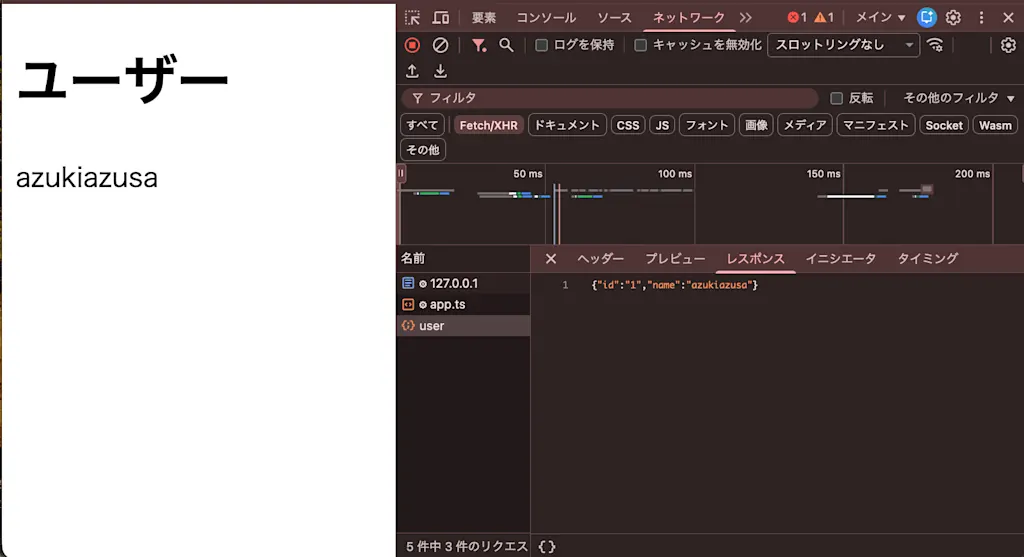
azukiazusa is displayed on the page, and I confirmed in the Network tab of DevTools that the /api/user request was answered with the mocked response.
Using an existing setupWorker with worker-only
If you want to keep using your existing setupWorker(), pass mode: "worker-only" to the Vite plugin's msw(). In this mode, the plugin takes care of serving the worker script, while you configure and start the worker yourself. virtual:msw is not available.
To use worker-only mode, change vite.config.ts as follows.
import { defineConfig } from "vite";
import { msw } from "msw/vite";

export default defineConfig(({ command }) => ({
  plugins: command === "serve" ? [msw({ mode: "worker-only" })] : [],
}));
Here, the plugin is registered only when the dev server starts. This is because in MSW 3.0.0, worker-only mode emits the worker script when it is also registered for builds.
For the worker configuration, we use the same handlers as before. Unlike the virtual:msw approach, you need to create the worker by calling setupWorker() from msw/browser.
import { setupWorker } from "msw/browser";
import { handlers } from "./handlers";

export const worker = setupWorker(...handlers);
Also replace src/main.ts, switching from the virtual:msw setup to starting the worker created with setupWorker().
if (import.meta.env.DEV) {
  const { worker } = await import("./mocks/browser");
  await worker.start();
}

await import("./app");
With this setup as well, I confirmed that the first /api/user request received the mocked response and the user name was displayed.
Summary
- The MSW v3 Vite plugin serves the worker script from your installed MSW package, so you no longer need to copy or update it manually
- In the default
automode, you register handlers onnetworkfromvirtual:mswto start mocking - To reliably mock the first request, start the application only after
network.enable()has resolved - In
worker-onlymode, you can keep your existingsetupWorker()while letting the plugin serve the worker script