
Build a Task Management App with IndexedDB, React, and Dexie.js
IndexedDB is an asynchronous, transactional database for storing structured data in the browser. Learn its fundamentals through the native API, then build a task management app with React and Dexie.js.
When you want to keep data entered in a web application in the browser, localStorage is a common choice. However, storing only simple strings becomes cumbersome when you need to persist large amounts of structured data. IndexedDB is an API for storing this kind of data in the browser. It supports key-based lookups, indexes, and transactions, and lets you read and write JavaScript objects asynchronously.
That said, not all browser-side data belongs in IndexedDB. For a few kilobytes of key-value data, such as a theme preference, whether a sidebar is open, or the most recently selected tab, localStorage is simpler. Because localStorage is a synchronous API, the code also stays straightforward. IndexedDB, on the other hand, is asynchronous and crosses the event loop several times between opening a database and retrieving a value.
For many client-server applications, localStorage is sufficient. If you need to store large amounts of structured data, using a server-side database is usually simpler and more reliable. IndexedDB becomes useful for note-taking apps, task management apps, chat apps, and other applications that need to work offline. For example, you can save offline edits to IndexedDB and send them to the server once the network connection returns.
The following web applications also use IndexedDB. Their use cases range from performance and offline editing to protecting unsent data and synchronizing with a server.
- Linear: Stores workspace data and unsent changes locally, decoupling rendering and optimistic updates from network responses. A
third-party technical analysis describes an architecture that restores in-memory data from IndexedDB.
- Figma: Stores offline edits as incremental changes rather than complete files, allowing recovery after a tab closes and transmission after reconnecting.
Figma's engineering article explains that changes are split and stored by file and node.
- Slack: Persists a copy of its in-memory Redux store so it can restore state quickly on the next launch and make previously read conversations available offline.
Slack's engineering article describes an implementation that combines this approach with Service Worker caching.
- Notion: Queues user actions as transactions and retains them until the server persists or rejects them.
Notion's engineering article explains that it uses IndexedDB or SQLite depending on the platform.
This article first explores the fundamentals of IndexedDB. Then, using Dexie.js, we will build a React application that can add, update, delete, and filter tasks.
What Is IndexedDB?
IndexedDB is an object-oriented database built into the browser. The Indexed Database API 3.0 specification defines it as an API for storing records containing simple values and hierarchical objects. In addition to strings, it can store numbers, dates, arrays, and
Blob values such as images—anything that can be copied by the structured clone algorithm.
Unlike a relational database table, IndexedDB does not require every property name and type to be defined as a column. It is a schemaless database in which records in the same object store can have different properties. Records in an object store are saved as JavaScript objects.
The basic operations resemble those of a relational database: create object stores; add, update, and delete records; and search by keys or indexes. For example, imagine storing tasks as the following objects:
interface Task {
  id: string;
  title: string;
  status: "todo" | "done";
  createdAt: number;
}
If tasks are stored in the tasks object store with id as the key, you can retrieve a task with a specific ID using the object store's get() method.
const transaction = database.transaction("tasks", "readonly");
const store = transaction.objectStore("tasks");
const request = store.get(taskId);
By contrast, if status is not the primary key and has no index, you cannot directly retrieve only records where status === "todo". A straightforward approach is to retrieve every record with getAll() and filter them in JavaScript.
const transaction = database.transaction("tasks", "readonly");
const store = transaction.objectStore("tasks");
const request = store.getAll();

// The success event fires when the records are retrieved successfully.
request.addEventListener("success", () => {
  const todoTasks = request.result.filter(
    (task: Task) => task.status === "todo",
  );
});
With openCursor(), you can inspect records one at a time without loading them all into memory as an array. However, you still need to scan every record to find those that match the condition.
If you create an index on status in advance, you can pass "todo" to the index and retrieve only the matching records.
const transaction = database.transaction("tasks", "readonly");
const store = transaction.objectStore("tasks");
const statusIndex = store.index("status");
const request = statusIndex.getAll("todo");
IndexedDB operations are asynchronous by default. Its API is event-driven, delivering results through success and error events.
let task: Task | undefined;
const request = store.get(taskId);
request.addEventListener("success", () => {
  task = request.result;
});
Storing Tasks with the IndexedDB API
Before working with the IndexedDB API, you first need to open a database. The first argument to indexedDB.open() is the database name, and the second is its version. This version is used when changing the database schema. Because the structure of object stores and indexes can vary between versions, increasing the version number signals that the schema needs to change.
const DATABASE_NAME = "native-indexeddb-task-app";
const STORE_NAME = "tasks";

// indexedDB is an event-driven API, which makes it somewhat awkward to use directly.
// Wrap requests so they can be handled as Promises.
function requestToPromise<T>(request: IDBRequest<T>): Promise<T> {
  return new Promise((resolve, reject) => {
    request.addEventListener("success", () => resolve(request.result));
    request.addEventListener("error", () => reject(request.error));
  });
}

async function openTaskDatabase(): Promise<IDBDatabase> {
  // Open the database with its name and version.
  const request = indexedDB.open(DATABASE_NAME, 1);

  // upgradeneeded fires when the database is first created or its version increases.
  request.addEventListener("upgradeneeded", () => {
    const database = request.result;
    // Object stores and indexes can be created only during upgradeneeded.
    const store = database.createObjectStore(STORE_NAME, {
      // The property specified by keyPath becomes the primary key.
      keyPath: "id",
    });
    // Create an index on the status property.
    store.createIndex("status", "status");
  });

  return requestToPromise(request);
}
The upgradeneeded event fires when a database is opened for the first time or when the version passed to open() exceeds its existing version. Object stores and indexes can be created or deleted only within the versionchange transaction that is automatically created at this point.
Because this example specifies keyPath: "id", the stored object's id property becomes its primary key. The createIndex method creates an index. In createIndex("status", "status"), the first argument is the index name, and the second identifies the record property used for lookups.
To add a task, create a readwrite transaction and call add(). All reads and changes to data in the database must occur within a transaction.
function transactionDone(transaction: IDBTransaction): Promise<void> {
  return new Promise((resolve, reject) => {
    transaction.addEventListener("complete", () => resolve());
    transaction.addEventListener("abort", () => reject(transaction.error));
    transaction.addEventListener("error", () => reject(transaction.error));
  });
}

async function addTask(task: Task): Promise<void> {
  const database = await openTaskDatabase();
  // Specify the target object store and transaction mode.
  const transaction = database.transaction(STORE_NAME, "readwrite");

  // Retrieve the object store and call add().
  transaction.objectStore(STORE_NAME).add(task);

  // Wait for the transaction's `complete` event.
  await transactionDone(transaction);
  database.close();
}
After calling add(), wait for the transaction's complete event. Because the entire transaction can fail even after an individual request succeeds, waiting for the transaction to finish confirms that the changes were committed.
If a user closes the tab or browser while a transaction is in progress, unfinished writes may not be saved. As a precaution, consider adding a beforeunload event to warn the user when a transaction has not completed before the page unloads.
To read every task, call getAll() within a readonly transaction.
import type { Task } from "./db";

async function getTasks(): Promise<Task[]> {
  const database = await openTaskDatabase();
  const transaction = database.transaction(STORE_NAME, "readonly");
  const request = transaction.objectStore(STORE_NAME).getAll();

  const tasks = await requestToPromise(request);
  await transactionDone(transaction);
  database.close();
  return tasks;
}A readwrite transaction can also read data, but you should not routinely use one for read-only operations. Transactions targeting the same object store may have to wait when their execution overlaps with a readwrite transaction. By contrast, readonly transactions can start concurrently even when they target the same stores. To avoid unnecessary waits and unintended writes, use readonly when retrieving data and readwrite when adding, updating, or deleting it.
Upgrading the Schema
As an application evolves, you may need to add an index later. For example, suppose you want to store each task's last update time as updatedAt and sort tasks by that value.
As discussed earlier, indexes can be created only within a versionchange transaction. Therefore, increase the version number passed to open() to trigger upgradeneeded. Versions must be integers greater than or equal to 1, and they cannot be downgraded. Calling open() with a version lower than the current one produces a VersionError.
The important detail is that the required work depends on the version from which the database is being upgraded. A user already on v1 needs only the changes between v1 and v2, while a first-time visitor also needs the object store to be created. The event's oldVersion property provides the previous version, allowing you to branch accordingly.
const DATABASE_VERSION = 2;

async function openTaskDatabase(): Promise<IDBDatabase> {
  // Increase the version and call open().
  const request = indexedDB.open(DATABASE_NAME, DATABASE_VERSION);

  request.addEventListener("upgradeneeded", (event) => {
    const database = request.result;
    // During upgradeneeded, request.transaction provides the versionchange transaction.
    const transaction = request.transaction!;

    // oldVersion is 0 when the database did not previously exist.
    // For a first-time visitor, create the object store.
    if (event.oldVersion < 1) {
      const store = database.createObjectStore(STORE_NAME, { keyPath: "id" });
      store.createIndex("status", "status");
    }

    // Both upgrades from v1 and newly created databases pass through this block.
    if (event.oldVersion < 2) {
      const store = transaction.objectStore(STORE_NAME);
      // Create a new index on the updatedAt property.
      store.createIndex("updatedAt", "updatedAt");

      // Populate updatedAt for existing records.
      const cursorRequest = store.openCursor();
      cursorRequest.addEventListener("success", () => {
        const cursor = cursorRequest.result;
        if (!cursor) return;

        cursor.update({ ...cursor.value, updatedAt: cursor.value.createdAt });
        cursor.continue();
      });
    }
  });

  return requestToPromise(request);
}
By listing conditions such as oldVersion < 1 and oldVersion < 2, an existing v1 user executes only the second block, while a new user executes both. The same pattern also supports a user returning after a long absence and upgrading directly from v1 to v3.
Data migrations also happen within the same versionchange transaction. In this example, a cursor reads existing records one at a time, adds updatedAt, and writes each record back with update(). The transaction is not committed when execution leaves the upgradeneeded listener; it commits only after all requests, including the cursor traversal, finish.
An index includes only records whose indexed property contains a valid key. Because undefined and null are not valid keys, records without updatedAt cannot be retrieved through the updatedAt index. This is why existing records must be populated with a value.
Finally, consider what happens when the application is open in multiple tabs. If one tab keeps a v1 connection open while another calls open() with v2, upgradeneeded does not fire; a blocked event fires instead. The upgrade cannot begin until the older connection closes.
const request = indexedDB.open(DATABASE_NAME, DATABASE_VERSION);

request.addEventListener("blocked", () => {
  // A connection to an older version is still open.
  // Ask the user to close the other tabs.
});
To avoid this, handle the versionchange event on the existing connection and close it.
database.addEventListener("versionchange", () => {
  // Another tab is attempting to upgrade the database.
  database.close();
  // This tab can no longer access the database, so prompt the user to reload.
});
Calling close() allows the waiting open() operation to continue and perform the upgrade. Without handling these two events, the application can remain unable to update for as long as a user keeps an older tab open.
Avoid Waiting for Other Asynchronous Operations During a Transaction
IndexedDB transactions are intended to finish quickly. Under the specification, a transaction automatically proceeds toward committing when it has no new requests and control returns to the event loop.
Consequently, code like the following, which waits for fetch() during a transaction, is unsafe.
const transaction = database.transaction("tasks", "readwrite");
const store = transaction.objectStore("tasks");
const task = await requestToPromise(store.get(taskId));

const response = await fetch(`/api/tasks/${taskId}`);
const changes = await response.json();

// The transaction may have ended while waiting for fetch().
store.put({ ...task, ...changes });
Here, put() may throw a TransactionInactiveError. Retrieve the required data from the network before starting the transaction, or execute only consecutive IndexedDB requests within the transaction.
Libraries for Working with IndexedDB
IndexedDB wrappers range from small libraries that simply add Promise support to database libraries that provide reactive queries and synchronization. This section introduces idb and Dexie.js.
idb: Promise Support While Preserving IndexedDB's Structure
idb is a small wrapper that converts IDBRequest objects into Promises while preserving most of the IndexedDB API. You define the schema in the upgrade callback of openDB() and can await the results of methods such as get() and put().
import { openDB } from "idb";

const database = await openDB("task-app", 1, {
  upgrade(database) {
    const store = database.createObjectStore("tasks", { keyPath: "id" });
    store.createIndex("status", "status");
  },
});

await database.add("tasks", task);
const tasks = await database.getAll("tasks");
IndexedDB concepts such as object stores, transactions, and indexes remain unchanged. This library is useful when gradually migrating existing IndexedDB code to Promises or maintaining an abstraction level close to the browser API.
Dexie.js: Queries and Reactive Updates
Dexie.js is also an IndexedDB-specific wrapper, but it provides higher-level APIs for schema definitions, queries, error handling, and transactions. The
useLiveQuery() hook from dexie-react-hooks can rerender React components whenever a committed change affects a query's results.
The next section demonstrates how to use it.
Building a Task Management App with React and Dexie.js
We will now build a task management app with React and Dexie.js. Create a project, then install dexie and dexie-react-hooks.
npm create vite@8 indexeddb-task-app -- --template react-ts
cd indexeddb-task-app
npm install
npm install [email protected] [email protected]
npm run dev
Defining the Database and Indexes
Create a src/db.ts file and define the task type and database.
import Dexie, { type Table } from "dexie";

export type TaskStatus = "todo" | "done";

export interface Task {
  id: string;
  title: string;
  status: TaskStatus;
  createdAt: number;
}

export const db = new Dexie("indexeddb-react-task-app") as Dexie & {
  // Use Task as the record type and string as the primary-key type.
  tasks: Table<Task, string>;
};

db.version(1).stores({
  tasks: "id, status, createdAt",
});
new Dexie("indexeddb-react-task-app") creates the database. The as Dexie & { tasks: Table<Task, string> } portion adds TypeScript types. Explicitly declaring that db.tasks has the type Table<Task, string> allows TypeScript to check values passed to db.tasks.add(), the return value of db.tasks.get(), and the primary-key type. However, this typing exists only at compile time; Dexie.js does not validate these types at runtime.
version(1) corresponds to the IndexedDB version. stores() specifies each object store's key and indexes. In tasks: "id, status, createdAt", id is the primary key, while status and createdAt are indexes.
You do not need to list every property in a Dexie.js schema—only the primary key and properties used for lookups. title is stored as part of each record, but because it has no index, it cannot be queried using where("title").
Displaying Tasks with useLiveQuery()
To retrieve tasks, use useLiveQuery() from dexie-react-hooks. Beyond fetching the initial data, useLiveQuery() watches the IndexedDB data read inside its callback. If an addition, update, or deletion made through Dexie.js might affect the query results, the hook reruns the query and rerenders the React component.
In this example, the all filter retrieves every task, while the other filters narrow the results using the status index.
import { type FormEvent, useState } from "react";
import { useLiveQuery } from "dexie-react-hooks";
import { db, type TaskStatus } from "./db";

type Filter = "all" | TaskStatus;

export function App() {
  const [filter, setFilter] = useState<Filter>("all");
  const tasks = useLiveQuery(
    () =>
      filter === "all"
        ? db.tasks.orderBy("createdAt").reverse().toArray()
        : db.tasks
            .where("status")
            .equals(filter)
            .reverse()
            .sortBy("createdAt"),
    [filter],
    [],
  );

  // Add the form and task list later.
}
The first argument to useLiveQuery() is a function that executes a Dexie.js query. The second is a dependency array, similar to the one used by React's useEffect(); when filter changes, the query runs again with the new condition. The query is assembled as follows:
where("status").equals(filter)filters records using thestatusindex.reverse()switches to descending order.sortBy("createdAt")sorts by thecreatedAtvalue. BecausesortBy()preserves thereverse()setting, the results are ordered bycreatedAtin descending order.
The third argument, [], is the value returned for tasks before the initial IndexedDB query finishes. If this argument is omitted, tasks is undefined during the first render.
Live queries also reflect changes made through Dexie.js in other same-origin tabs or Web Workers, not just changes in the current tab.
Adding Tasks
When the form is submitted, add a task with db.tasks.add().
const addTask = async (event: FormEvent<HTMLFormElement>) => {
  event.preventDefault();
  const formElement = event.currentTarget;
  const formData = new FormData(formElement);
  const title = String(formData.get("title") ?? "").trim();

  if (!title) return;

  await db.tasks.add({
    id: crypto.randomUUID(),
    title,
    status: "todo",
    createdAt: Date.now(),
  });
  formElement.reset();
};
Once add() completes, useLiveQuery() detects the change, so you do not need to add the retrieved task to React state manually. Because the table was created with explicit types, TypeScript warns you if an object passed to add() is missing required properties.
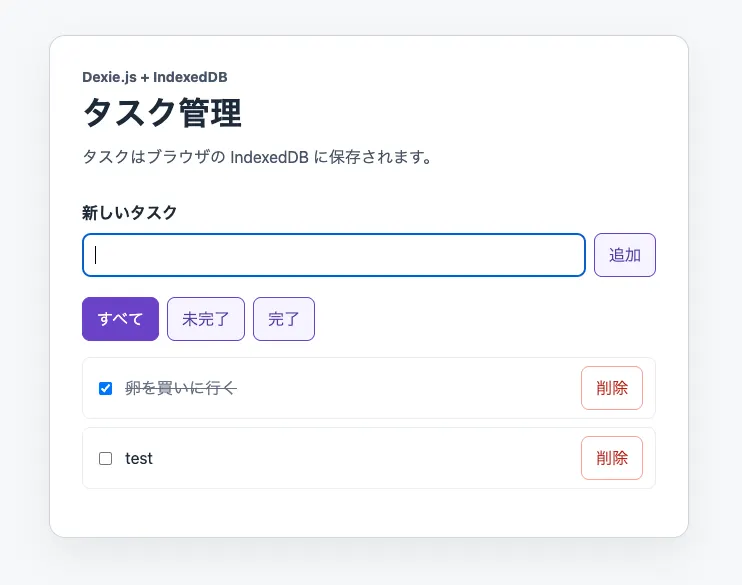
The form looks like this:
<form onSubmit={addTask}>
  <label htmlFor="task-title">新しいタスク</label>
  <input id="task-title" name="title" autoComplete="off" required />
  <button type="submit">追加</button>
</form>
Updating and Deleting Tasks
When a checkbox changes, toggle status with db.tasks.update(). When the delete button is clicked, remove the task with db.tasks.delete(). Passing the primary key as the first argument identifies the record to update or delete.
<ul>
  {tasks.map((task) => (
    <li key={task.id}>
      <label>
        <input
          type="checkbox"
          checked={task.status === "done"}
          onChange={async () => {
            // Update the task.
            await db.tasks.update(task.id, {
              status: task.status === "done" ? "todo" : "done",
            });
          }}
        />
        <span>{task.title}</span>
      </label>
      <button
        type="button"
        // Delete the task.
        onClick={() => db.tasks.delete(task.id)}
      >
        削除
      </button>
    </li>
  ))}
</ul>
Finally, add buttons for switching between filters.
<div>
  {(["all", "todo", "done"] as const).map((value) => (
    <button
      type="button"
      key={value}
      onClick={() => setFilter(value)}
    >
      {{ all: "すべて", todo: "未完了", done: "完了" }[value]}
    </button>
  ))}
</div>
Testing the app confirms that it supports task CRUD operations, as shown below. Even after reloading the page, tasks stored in IndexedDB remain visible.
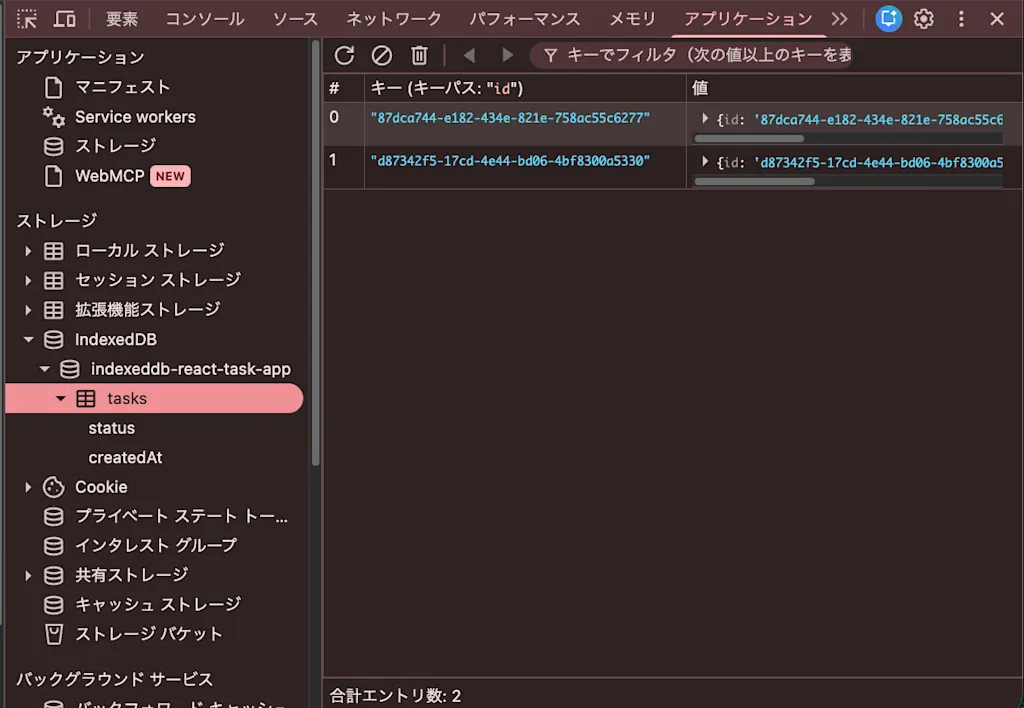
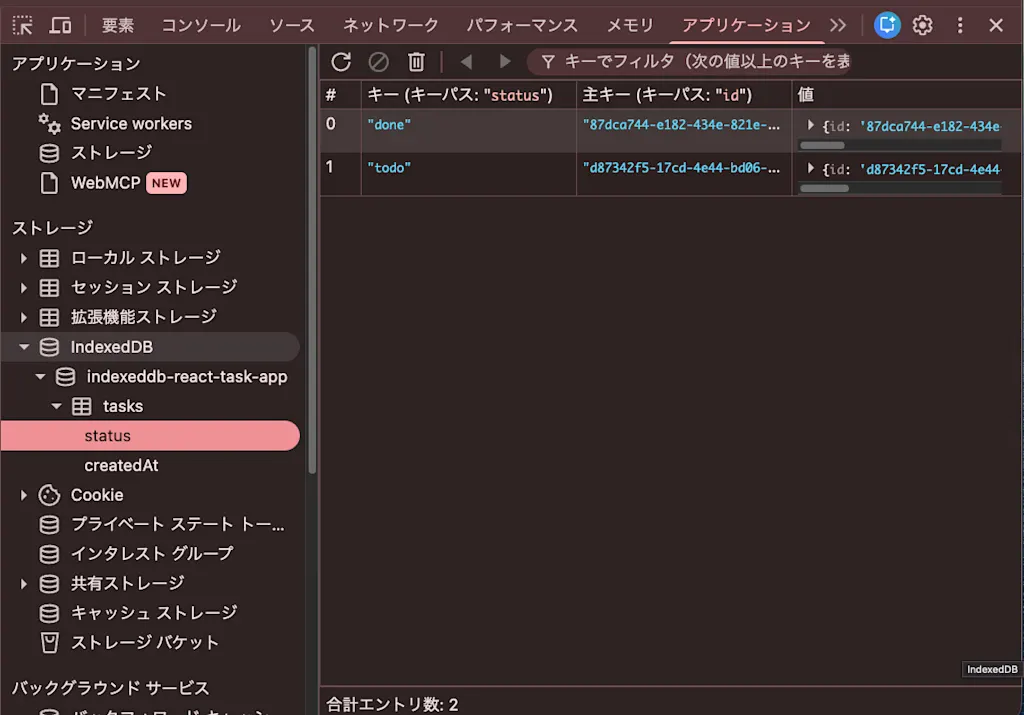
In Chrome DevTools, open the Application panel, then select indexeddb-react-task-app followed by tasks under Storage > IndexedDB to see the stored keys and values. You can inspect the status and createdAt indexes in the same way.
Adding an Index Later
Dexie.js also requires a version upgrade when adding an index. The upgradeneeded branching used with the IndexedDB API can be replaced with a sequence of version() declarations. As before, let's add an updatedAt index.
export interface Task {
  id: string;
  title: string;
  status: TaskStatus;
  createdAt: number;
  updatedAt?: number;
}

db.version(1).stores({
  tasks: "id, status, createdAt",
});

db.version(2)
  .stores({
    // Redeclare every index for the object store being modified.
    tasks: "id, status, createdAt, updatedAt",
  })
  .upgrade((transaction) =>
    transaction
      .table<Task>("tasks")
      .toCollection()
      .modify((task) => {
        task.updatedAt = task.createdAt;
      }),
  );
Only changed object stores need to be passed to stores(), but each changed store must list its primary key and every index. You also need to retain the version(1) definition because users who still have a v1 database need to migrate from v1 to v2.
The function passed to upgrade() runs within the same kind of versionchange transaction as upgradeneeded. Values changed with modify() are saved automatically. Dexie.js executes only the required upgrade() callbacks in sequence according to oldVersion, so you do not need to write the branching logic yourself.
Summary
- IndexedDB is a standard browser API that stores structured JavaScript values in object stores and reads or writes them asynchronously using keys, indexes, and transactions.
localStorageis sufficient when storing only a few kilobytes of key-value data. Consider IndexedDB when requirements include growing numbers of records, conditional filtering, orBlobstorage.- The IndexedDB API requires attention to individual request completion, transaction completion, schema upgrades, and short transaction lifetimes.
- Adding indexes requires a version upgrade and consideration of
oldVersionbranching, migration of existing records, and handlingblockedandversionchange. Dexie.js can express this declaratively withversion(2).stores().upgrade(). idbis a Promise-based wrapper that stays close to IndexedDB, while Dexie.js provides schemas, queries, and live queries for React.- The task management app built with React and Dexie.js supports CRUD operations, filtering through the
statusindex, and reactive updates withuseLiveQuery().