Understanding Codex Sandbox and Agent Approvals
Choosing how much command auto-approval to allow in coding agents is a key design tradeoff between usability and security. This article explains how Codex sandboxing works and how approvals are handled for commands run outside the sandbox.
One of the key design questions when using coding agents is how much command auto-approval should be allowed. Letting the agent act autonomously without asking for approval for every command can improve workflow efficiency, but it also introduces risks such as running incorrect commands or executing malicious code. There have even been reports of coding agents mistakenly running dangerous commands such as rm -rf ~/.
On the other hand, requiring user approval before every single command does not automatically make things safer. If approval prompts appear too frequently, users may gradually begin approving them casually, creating the risk of approving actions reflexively without checking what will actually be run. This is often called "authorization fatigue," and from a security perspective it can create a more dangerous situation. It is important to define flexible approval rules based on command type and risk level, such as auto-approving lower-risk commands like ls and cat while requiring approval for commands like rm and mv that affect the filesystem.
Expanding the range of commands that can be auto-approved and increasing agent autonomy can also improve the user experience and workflow efficiency. Many coding agents use the concept of a "sandbox" as a way to let agents perform more tasks autonomously while still maintaining security. A sandbox is a mechanism that provides a virtual environment where the commands an agent can run and the resources it can access are restricted. As a result, even if the agent mistakenly runs a dangerous command, the impact can be minimized.
In Codex sandboxing, reading and writing files inside the workspace, as well as running commands within that scope such as ls and find, are allowed by default. Destructive commands and commands that require network access are not allowed inside the sandbox, and user approval is required when the agent needs to run commands outside the sandbox.
This article explains how the Codex sandbox works and how the approval process works when running commands outside the sandbox.
Getting started with the Codex sandbox
The Codex sandbox uses each operating system's native sandboxing features. As a prerequisite, you need to satisfy the following OS-specific requirements.
- macOS: built-in Seatbelt
- Windows: Windows Sandbox when running in PowerShell, or Linux sandboxing features when running in WSL
- Linux or WSL:
bubblewrap must be installed in advance
Codex enables sandboxing by default. Codex balances agent autonomy and security by combining "sandbox modes," which control what can be done inside the sandbox, and "approval policies," which control how command approvals are handled.
There are three sandbox modes, and the default is workspace-write. If the workspace is not version-controlled, the default becomes read-only.
workspace-write: A mode that allows reading and writing files inside the workspace, such as the directory where Codex was launched and directories liketmp/, as well as routine commands likelsandfindread-only: A mode that only allows reading files in the workspace. Files cannot be edited or created without approvaldanger-full-access: A mode that completely removes sandbox restrictions. The agent can access all files on the system and use network access as well.
Even in workspace-write mode, the following paths are protected as read-only.
<writable-root>/.git<writable-root>/.agents<writable-root>/.codex
There are also three approval policies available. The default is on-request.
untrusted: Ask for user approval before running commands that are not part of the trusted command seton-request: Ask for user approval before running commands outside the sandboxnever: Never stop for the approval process
You can specify sandbox modes and approval policies using launch options when starting Codex. For example, to use read-only mode with the untrusted approval policy, run the following command:
codex --sandbox read-only --ask-for-approval untrustedYou can also write the same settings in ~/.codex/config.toml for user settings or .codex/config.toml placed in the project root for project settings. Project settings take precedence over user settings.
sandbox_mode = "read-only"
approval_policy = "untrusted"
You can also save access control settings as profiles. The profiles you save here can be invoked with codex --profile <profile-name>.
[profiles.full-access]
sandbox_mode = "danger-full-access"
ask_for_approval = "never"

[profiles.read-only]
sandbox_mode = "read-only"
ask_for_approval = "never"
In the Codex App, you can also switch sandbox modes and approval policies from Settings -> Configuration in the UI. Changes made there are saved to config.toml.
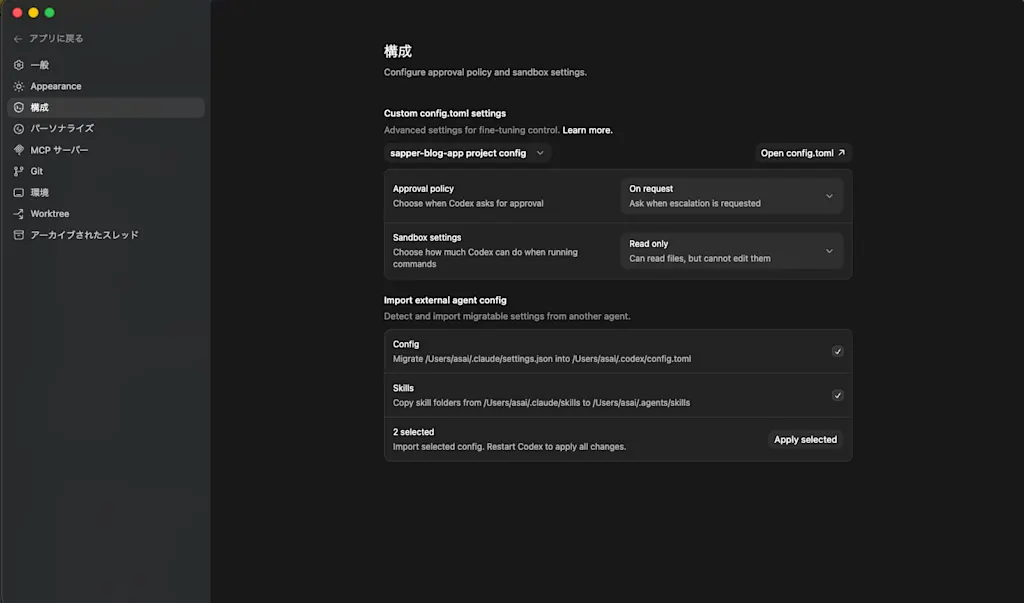
To see what happens when a command runs inside the Codex sandbox, you can use the codex sandbox command. Its argument specifies which sandbox environment to run the command in.
# macOS
codex sandbox macos [command]
# Linux
codex sandbox linux [command]
For example, let's try running ls inside the sandbox. This command runs without any problem.
$ codex sandbox macos ls
README.md app/ ...
On the other hand, an operation like git add . fails. That is because the <writable-root>/.git directory is protected as read-only.
$ codex sandbox macos git add .
fatal: Unable to create '/sapper-blog-app/.git/index.lock': Operation not permitted
Commands such as curl that require network access also fail inside the sandbox.
$ codex sandbox macos curl https://www.google.com
curl: (6) Could not resolve host: www.google.com
Network access
By default, Codex does not allow network access inside the sandbox. Enabling internet access for the agent introduces security risks such as the following.
- Prompt injection attacks through untrusted web content
- Leakage of code or sensitive information
- Downloading malware or vulnerable libraries
- Incorporating content with license violations
There have been reported cases of prompt injection attacks that embed invisible text in a website and feed malicious instructions only to the agent. As a countermeasure, it is important not to allow access to untrusted websites in the first place.
https://www.keysight.com/blogs/en/tech/nwvs/2025/05/16/invisible-prompt-injection-attack
You can allow network access inside the sandbox by setting sandbox_workspace_write.network_access to true in config.toml, but this is not recommended from a security perspective.
[sandbox_workspace_write]
network_access = true
Instead of enabling network access, a safer choice is to have the agent use the built-in Web Search Tool. Codex uses cached search results by default. The cache is managed by OpenAI, but it still cannot completely eliminate the risk of prompt injection, so web search results should still be treated as untrusted.
If you want to use real-time search results, specify live with the --search option or in the web_search section of config.toml. If you specify disable, you can disable the Web Search Tool entirely.
web_search = "cached" # default

# web_search = "live" # use real-time search results
# web_search = "disable"
Controlling commands that run outside the sandbox
You can use Rules to control commands that run outside the sandbox. For example, npm install requires network access and therefore must run outside the sandbox, but in some cases you may already know it is safe and not want to ask the user for approval every time before it runs.
Rules are defined in ~/.codex/rules/ or .codex/rules/ in the project root. Let's create a default.rules file. This file is written in Starlark and defines the rules. The following is an example rule that automatically allows npm install outside the sandbox.
prefix_rule(
    pattern = ["npm", "install"],
    decision = "allow",
    justification = "Allow normal npm install runs",
    match = ["npm install", "npm install react", "npm install --save-dev vitest"],
)
pattern is a required field that specifies the command prefix to match. decision specifies what to do when the rule matches, and it can be one of the following three values.
allow: Run the command without showing an approval promptprompt: Ask the user for approval before running the commandforbidden: Block the command without showing a prompt
justification is a field that describes the rule and is shown in the approval prompt. match contains examples used to validate the rule when it is loaded. It helps catch mistakes before the rule is applied.
You can validate rule definitions with the codex execpolicy check command.
$ codex execpolicy check --pretty \
 --rules ~/.codex/rules/default.rules \
 -- npm install react

{
  "matchedRules": [
    {
      "prefixRuleMatch": {
        "matchedPrefix": [
          "npm",
          "install"
        ],
        "decision": "allow",
        "justification": "通常の npm install 実行"
      }
    }
  ],
  "decision": "allow"
}
Rules can be configured manually by the user, but they can also be saved automatically to ~/.codex/rules/ when the user selects "2. Yes, don't ask again for commands starting with <command>" when prompted for approval by the agent.
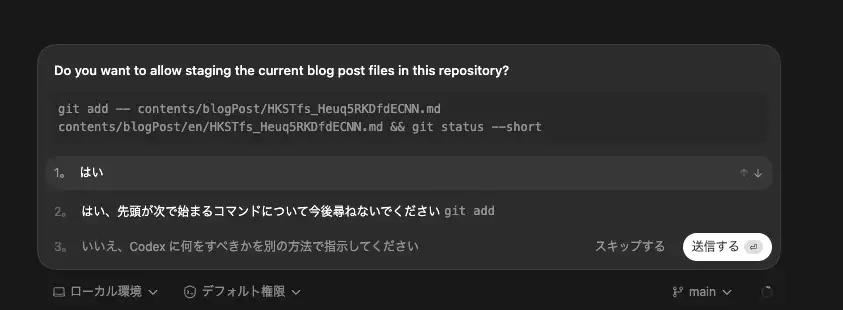
In the example shown in the screenshot above, you can see that a rule allowing the git add command has been saved automatically.
prefix_rule(pattern=["git", "add"], decision="allow")Delegating approvals to a sub-agent with guardian_approval
Codex also provides a feature called guardian_approval that lets you delegate approval decisions for commands run outside the sandbox to a sub-agent. When this is enabled, a sub-agent can make the approval decision instead of asking the user every time approval is needed. This reduces how often the user has to approve actions and helps mitigate approval fatigue.
To enable guardian_approval, set features.guardian_approval to true in config.toml.
[features]
guardian_approval = true
You can also enable it after launching codex by using the /experimental command.
/experimental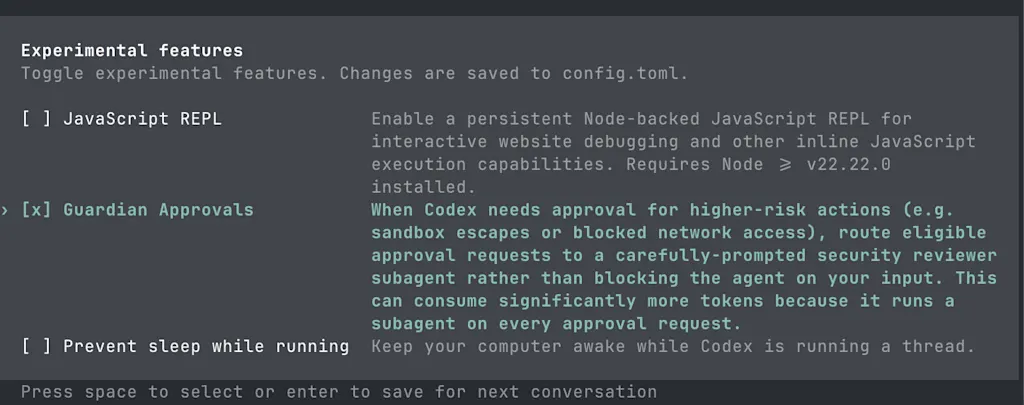
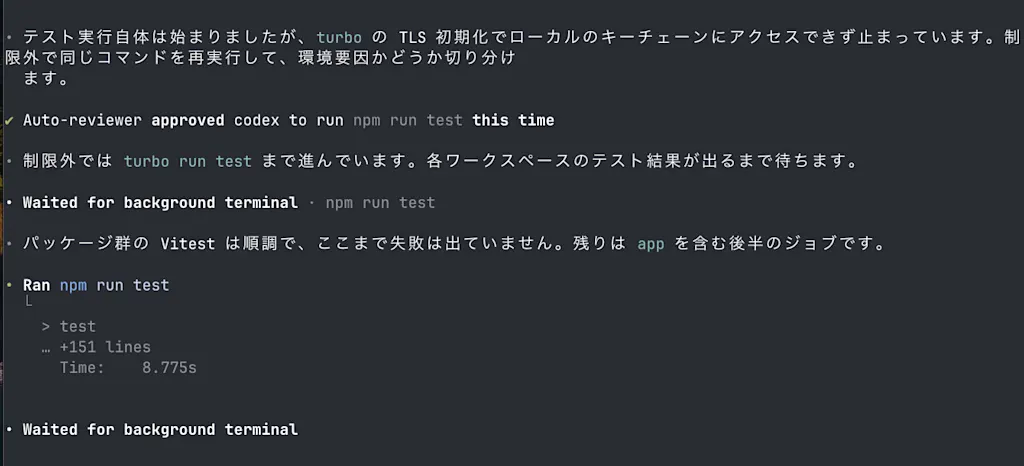
Let's ask the agent to run tests with guardian_approval enabled. This project uses turborepo. When the agent tries to run
npm run test inside the sandbox, it fails because the network access required for TLS initialization is restricted.
After seeing that npm run test failed during TLS initialization, the Codex agent determined that it needed to run the command outside the sandbox. At that point, no approval prompt was shown to the user, and instead the approval request was sent to a sub-agent. In the end, the log showed "✔ Auto-reviewer approved codex to run npm run test this time", indicating that npm run test was executed outside the sandbox without waiting for user approval.
Summary
- How far to allow command auto-approval is an important design question for balancing agent autonomy and security
- A sandbox is a mechanism that provides a virtual environment limiting what commands an agent can run and what resources it can access, and it is an effective way to improve agent autonomy while maintaining security
- Codex balances agent autonomy and security through the combination of sandbox modes and approval policies
- Inside the Codex sandbox, the default is
workspace-writemode with theon-requestapproval policy. This allows reading and writing files inside the workspace and running routine commands, while still requiring user approval before commands are run outside the sandbox - Codex does not allow network access inside the sandbox by default. When you need capabilities that would otherwise require network access in the sandbox, using the Web Search Tool is a safer option. Because the Web Search Tool uses cached search results, it can reduce the risk of prompt injection
- Rules can be used to control commands that run outside the sandbox
- Codex also provides
guardian_approval, which delegates approval decisions for commands run outside the sandbox to a sub-agent. This can reduce how often the user has to approve actions and mitigate approval fatigue