Displaying Capability Elements as Icons Only with `displaymode="icon-only"`
Chrome has implemented a `displaymode="icon-only"` attribute that renders `<camera>`, `<microphone>`, and `<geolocation>` as icon buttons without text. This article explains how to use `displaymode="icon-only"`.
As of November 6, 2026, displaymode="icon-only" is an experimental feature in Chrome. To try it, you need to launch Chrome with --enable-blink-features=CapabilityElementIconOnlyMode. It is not yet part of any specification, and the attribute name may change.
HTML elements such as <camera>, <microphone>, and <geolocation>, which request permissions through a button rendered by the browser, are called Capability Elements. Because the browser controls the button's appearance and label, they let you request permissions more safely than calling getUserMedia() from JavaScript. And even if a user accidentally blocks a permission they actually need, they can simply press the button again to re-request it.
However, these elements are rendered as wide buttons with an icon next to localized text, and the text cannot be removed. A "my location" button in the corner of a map, or the camera and microphone toggles lined up at the bottom of a video conferencing screen, are usually shown as icons only. Because Capability Elements require text, they don't fit into such tight spaces.
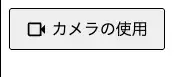
To address this, Chrome has implemented the displaymode="icon-only" attribute, which renders these elements as icons only. This article explains how to use displaymode="icon-only".
A Quick Recap of Capability Elements
Capability Elements let a page request permissions when the user clicks an element embedded in the page, instead of calling getUserMedia() or navigator.geolocation.getCurrentPosition() from JavaScript. The following elements are available in Chrome.
| Element | What it provides |
|---|---|
<geolocation> |
Location (GeolocationPosition) |
<usermedia> |
A camera and microphone MediaStream |
<camera> |
A camera MediaStreamTrack |
<microphone> |
A microphone MediaStreamTrack |
To keep them trustworthy as browser-controlled buttons, Capability Elements come with styling constraints, such as the contrast ratio between text and background colors, font size, ranges for width and height, and opacity. The fact that calling click() from a script does not trigger a permission request, and what happens when the constraints are violated, are covered in Declaratively Requesting Camera and Microphone Permissions with the
<usermedia> Element.
The button label is decided by the browser and cannot be changed by the page. For example, in Chrome with English settings, <camera> reads "Use camera" and <geolocation> reads "Use location". The PEPC Explainer explains that the browser sets the label because, if pages could choose it, they could use misleading text like "Click here to proceed".
Using displaymode="icon-only"
To display an element as an icon, add the displaymode="icon-only" attribute to it.
<camera displaymode="icon-only"></camera>
<microphone displaymode="icon-only"></microphone>
<geolocation displaymode="icon-only"></geolocation>
Here is how it looked in Chrome Canary 159 with Japanese settings.
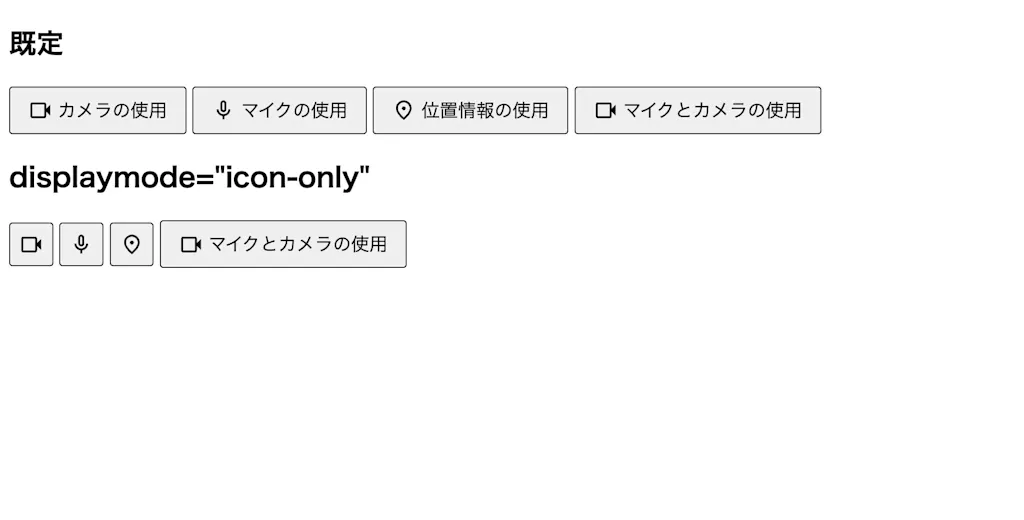
The text disappeared from <camera>, <microphone>, and <geolocation>, and they became square, icon-only buttons. However, <usermedia> kept its text and was not rendered as an icon.
Even when you switch to icon-only display with displaymode="icon-only", the accessible name stays the same as the original label.
As of November 2026, Chrome has no DOM property corresponding to the displaymode attribute, so use setAttribute() to switch it from JavaScript.
const geolocation = document.querySelector("geolocation");
geolocation.setAttribute("displaymode", "icon-only");
Summary
- By default, Capability Elements are rendered as buttons with an icon and browser-defined text, and the text cannot be removed, which made them hard to place in tight spaces such as map controls or video conferencing toolbars
- Chrome has implemented the
displaymode="icon-only"attribute, which renders<camera>,<microphone>, and<geolocation>as icon-only buttons