
Flue is a TypeScript framework for building AI agents. Flue adopts the harness-driven architecture used by coding agents such as Claude Code, and it can use a wide range of AI models as agents. As the foundation for this harness architecture, Flue uses
Pi, which is also used by
OpenCrew. Pi is described as a "minimal terminal coding harness": a harness that provides the minimum set of features needed to run coding agents in a terminal. Flue builds on Pi and makes it possible to build and manage more advanced agents.
Flue provides a comprehensive set of features needed to build agents.
- Agents: AI models that keep context across a session and execute tasks autonomously
- Workflows: structured processes that agents use to execute tasks
- instructions: directions and rules that tell agents how to execute tasks
- Tools: external functions or services that agents can use to execute tasks
- Skills: specialized knowledge for specific tasks, loaded only when needed
- Subagents: agents delegated by the main agent to handle specialized work
- MCP servers: open MCP (Model Context Protocol) servers that provide interfaces for agents to communicate with external services and tools
- Sandboxes: isolated environments where agents can run code safely
- Observability: features for monitoring agent behavior and collecting logs and metrics
- Channels: interfaces for communicating with external services such as Slack, Discord, and Teams through HTTP requests
Durable execution is also important when building AI agents. Agent runs can take a long time, so even if an error occurs in the middle, the system should be able to rerun or recover the task. Flue can resume agent execution from the middle by storing session history and context. For example, when running Flue on Cloudflare Workers, session history and context are stored in Durable Objects.
This article introduces how to build AI agents with Flue.
Create a Flue Project
Let's create a Flue project and build the most basic agent first. Make sure Node.js 22.19.0 or later is installed. You also need to obtain an API key for the AI provider you want to use. Here, we assume you are using an OpenAI API key. You can get one from https://platform.openai.com/api-keys.
Flue is an AI-first framework designed to be used together with coding agents. For that reason, the recommended way to set up a Flue project is to give the setup guidelines as context to a coding agent such as Claude Code or Codex and let the agent do the setup. In this article, however, we will set up the Flue project manually for learning purposes.
Create a Node.js project in a new directory, install @flue/runtime and @flue/cli, and then run flue init to initialize the Flue project.
mkdir flue-agent-example
cd flue-agent-example
npm init -y
npm install @flue/runtime@latest
npm install @flue/cli@latest --save-dev
npx flue init --target node # or cloudflare
Running npx flue init creates a flue.config.ts file.
import { defineConfig } from '@flue/cli/config';

export default defineConfig({
	target: 'node',
});
Set your OpenAI API key in the OPENAI_API_KEY environment variable. Adjust this part as needed for the AI provider you use. Create a .env file and write the following:
OPENAI_API_KEY=your_openai_api_keyNow create your first agent. Flue detects entry points from the source code of the project, and several components must be placed according to conventions. Agents must be placed in the src/agents directory. Create the src/agents directory and then create a my-first-agent.ts file. The filename is used as the agent name.
import { defineAgent, type AgentRouteHandler } from '@flue/runtime';

export const description = "最初のエージェントです。ユーザーの質問に博多弁で答えます。";

export const route: AgentRouteHandler = async (_c, next) => next();

export default defineAgent(() => ({
	model: "openai/gpt-5.4-nano",
	instructions: "あなたは優秀なアシスタントです。博多弁でユーザーの質問に答えてください。",
}))
The description variable describes the agent. By exporting it as a named export, Flue automatically collects it. route is the agent route handler. By exporting it as a named export, the agent is exposed over HTTP. You can call the agent with POST /agents/my-first-agent/:id and receive event streaming with GET /agents/my-first-agent/:id. Routing uses Hono, and you can use Hono middleware in
route. Here, we call next() to delegate processing to the next middleware.
Agents must be defined with the defineAgent function and exported as the default export. model specifies the AI model to use. Here, we specify openai/gpt-5.4-nano as the OpenAI provider model. See https://pi.dev/models for the available models.
instructions specifies the directions and rules the agent follows when executing tasks. Here, it instructs the agent to answer user questions in Hakata dialect.
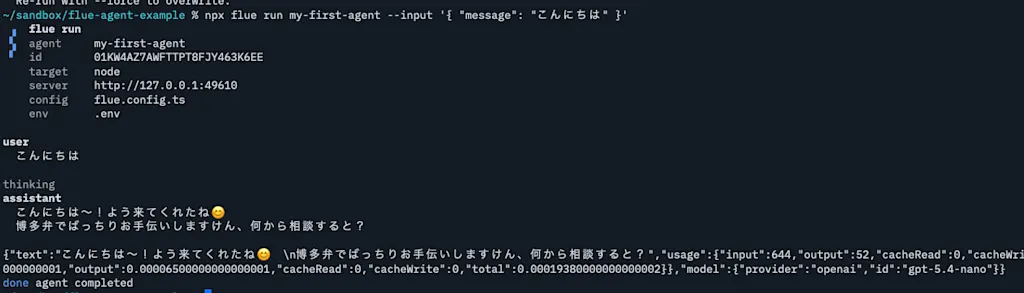
Run the my-first-agent agent with the following command:
npx flue run my-first-agent --input '{ "message": "こんにちは" }'The terminal displays the agent output and information such as token usage in JSON format. As specified in instructions, the agent answers the user's question in Hakata dialect.
Build an SRE Agent
From here, let's explore Flue's features by building a more practical AI agent. In this example, we will build an SRE (Site Reliability Engineering) agent. An SRE agent is an agent that can autonomously support system monitoring, incident response, and recovery work. It can monitor system state and execute countermeasures when anomalies are detected. We will build features such as using tools to retrieve system status and logs, and referencing Runbooks as skills to follow specific response procedures.
First, define the system prompt (instructions) that describes how the SRE agent should behave. The SRE agent can monitor system state and execute countermeasures when anomalies are detected. Define instructions as follows. In my-first-agent, we passed instructions directly as a string. For a serious agent, however, instructions often becomes a long text, and you may also want to manage its change history separately. In that case, it is better to manage instructions as an independent Markdown file. Here, we define instructions in src/agents/sre-agent.md.
# Sentinel — SRE オンコール支援エージェント

あなたは SRE チームのオンコール業務を支援するアシスタント「Sentinel」です。
障害発生時に、状況を素早く調査し、原因の仮説を立て、復旧アクションを提案します。

## 行動原則

1. **調査(読み取り)は積極的に行う。** ログ・メトリクス・デプロイ履歴の確認など、
   システムの状態を「見るだけ」の操作は、確認を取らずに自分から実行してよい。
2. **変更(書き込み)は必ず人に確認する。** デプロイ・ロールバック・スケールなど、
   本番に影響する操作は、勝手に実行せず必ずオンコール担当の承認を得る。
3. **推測で動かない。** 原因が確定していないのに変更操作を提案しない。
   まず根拠(ログ・メトリクス・差分)を集め、仮説とその確度を明示する。
4. **簡潔に報告する。** 「何が起きているか」「考えられる原因」「次の一手」を
   この順で短くまとめる。確証が持てない点は正直に「不明」と伝える。

## 調査の進め方(専門エージェントへの委譲)

障害対応の現場では、原因が特定できるまで複数のコンポーネントにまたがって、
ログ・メトリクスなどのシグナルを横断的に調査する。あなたはこれを専門エージェントに委譲する。

- **ログの調査** → `log-analyst` に委譲する。
- **メトリクス(ヘルス/エラー率/レイテンシ/アラート)の調査** → `metrics-analyst` に委譲する。
- 各専門エージェントは担当シグナルの**要約だけ**を返す。原因の断定はしない。

委譲する理由は、生ログや大量の指標であなた自身のコンテキストを汚さず、
**要約だけを受け取る**ため。各エージェントへの依頼メッセージには、対象サービス名など必要な文脈を必ず含める。

そのうえで **最終判断はあなたが行う**。返ってきた要約を、デプロイ履歴(`get-deploy-history`)など
他の事実と突き合わせ、原因の仮説と確度を組み立て、復旧アクションを提案する。

## 応答フォーマット

障害調査の報告は、原則として次の3点で構成する。

- **現状**: いま観測されている事実(アラート・症状)
- **原因の仮説**: 確度(高/中/低)とその根拠
- **推奨アクション**: 次にやるべきこと(変更操作なら承認が必要な旨も添える)
Here, we define the SRE agent's operating principles, investigation process, and response format. In src/agents/sre-agent.ts, use with { type: 'markdown' } to import the .md file. This syntax is called an import attribute. Specifying
type: 'markdown' tells the runtime to load it as a Markdown file.
import { defineAgent, type AgentRouteHandler } from '@flue/runtime';
import instructions from './sre-agent.md' with { type: 'markdown' };

export const description = "SRE エージェントです。システムの監視や障害対応、システムの復旧作業を自律的に行います。";

export const route: AgentRouteHandler = async (_c, next) => next();

export default defineAgent(() => ({
  model: "openai/gpt-5.4-nano",
  instructions,
}))
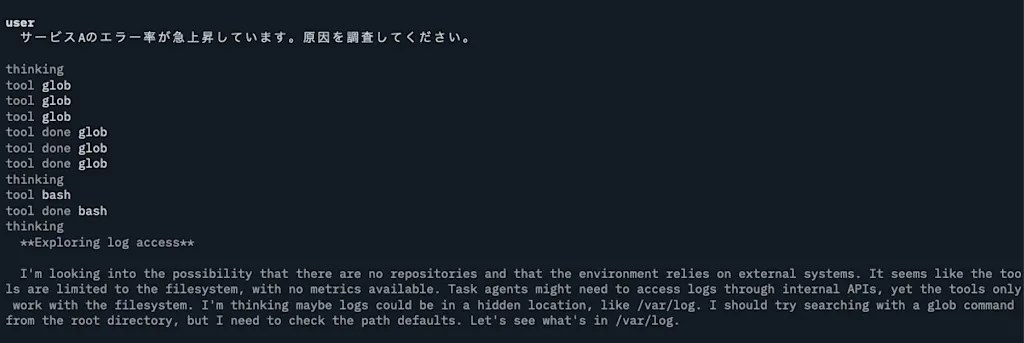
Try running the sre-agent agent and confirm that it behaves according to the specified instructions.
npx flue run sre-agent --input '{ "message": "サービスAのエラー率が急上昇しています。原因を調査してください。" }'It fails because we have not defined any tools yet, but you can see that it tries to investigate logs and metrics as instructed.
Define Tools for Investigating Logs and Metrics
Define tools that allow the SRE agent to investigate logs and metrics. Tools are external functions or services that agents can use to execute tasks. In a real application, these would call external service APIs to retrieve logs and metrics. Here, we define mock tools so we can confirm that the SRE agent can use them.
Tools themselves can be placed wherever you like. Create a src/tools directory and create get-deploy-history.ts, get-logs.ts, and get-service-status.ts. get-logs.ts is the tool for investigating logs. Here, it returns fixed mock logs.
import { defineTool, type JsonValue } from "@flue/runtime";
import * as v from "valibot";

import { listServices, queryLogs } from "../lib/mock-data.ts";

export const getLogsTool = defineTool({
  name: "get-logs",
  description:
    "指定したサービスの直近のログを取得する。level で error/warn/info に絞り込める。読み取り専用で副作用はない。",
  input: v.object({
    service: v.pipe(v.string(), v.description("サービス名。例: payments-api")),
    level: v.optional(v.picklist(["error", "warn", "info"])),
    limit: v.optional(v.pipe(v.number(), v.description("取得する最大件数"))),
  }),
  async run({ input, signal }): Promise<JsonValue> {
    const { service, level, limit = 20 } = input;
    const entries = queryLogs(service, level, limit);
    if (!entries) {
      return {
        error: `unknown service: ${service}`,
        knownServices: listServices(),
      };
    }
    return { service, count: entries.length, entries };
  },
});
The following tools are implemented on the assumption that they refer to the mock data below. They do not connect to a real system. Instead, they return the incident scenario embedded here in advance.
src/lib/mock-data.ts
export type ServiceName = "payments-api" | "auth-api" | "checkout-web";

export type ServiceStatus = {
  service: ServiceName;
  health: "healthy" | "degraded" | "down";
  errorRatePct: number;
  p95LatencyMs: number;
  activeAlerts: string[];
};

const services: Record<ServiceName, ServiceStatus> = {
  "payments-api": {
    service: "payments-api",
    health: "degraded",
    errorRatePct: 18.4,
    p95LatencyMs: 2400,
    activeAlerts: [
      "HighErrorRate: payments-api 5xx > 15% (5m)",
      "DBConnectionPoolNearLimit: payments-api 20/20",
    ],
  },
  "auth-api": {
    service: "auth-api",
    health: "healthy",
    errorRatePct: 0.2,
    p95LatencyMs: 120,
    activeAlerts: [],
  },
  "checkout-web": {
    service: "checkout-web",
    health: "healthy",
    errorRatePct: 0.4,
    p95LatencyMs: 310,
    activeAlerts: [],
  },
};

export type Deploy = {
  id: string;
  service: ServiceName;
  ref: string;
  message: string;
  deployedBy: string;
  deployedAt: string; // Relative display (fixed because this is a mock)
  status: "succeeded" | "failed";
};

const deploys: Record<ServiceName, Deploy[]> = {
  "payments-api": [
    {
      id: "dpl_8842",
      service: "payments-api",
      ref: "a1b2c3d",
      message: "perf: DB コネクションプールを遅延初期化に変更",
      deployedBy: "mio",
      deployedAt: "12分前",
      status: "succeeded",
    },
    {
      id: "dpl_8830",
      service: "payments-api",
      ref: "f9e8d7c",
      message: "chore: 依存ライブラリを更新",
      deployedBy: "ken",
      deployedAt: "3時間前",
      status: "succeeded",
    },
  ],
  "auth-api": [
    {
      id: "dpl_8801",
      service: "auth-api",
      ref: "c4d5e6f",
      message: "fix: トークン有効期限の計算を修正",
      deployedBy: "ken",
      deployedAt: "昨日",
      status: "succeeded",
    },
  ],
  "checkout-web": [],
};

export type LogEntry = {
  ts: string;
  level: "error" | "warn" | "info";
  service: ServiceName;
  message: string;
};

const logs: Record<ServiceName, LogEntry[]> = {
  "payments-api": [
    {
      ts: "12:03:11",
      level: "error",
      service: "payments-api",
      message: "timeout acquiring connection from pool after 5000ms",
    },
    {
      ts: "12:03:09",
      level: "error",
      service: "payments-api",
      message:
        "FATAL: remaining connection slots are reserved; pool exhausted (active=20/20)",
    },
    {
      ts: "12:02:55",
      level: "warn",
      service: "payments-api",
      message: "DB pool usage high: 19/20 connections in use",
    },
    {
      ts: "11:51:30",
      level: "info",
      service: "payments-api",
      message: "deploy a1b2c3d applied: lazy pool init enabled",
    },
    {
      ts: "11:50:02",
      level: "info",
      service: "payments-api",
      message: "healthcheck ok",
    },
  ],
  "auth-api": [
    {
      ts: "12:03:00",
      level: "info",
      service: "auth-api",
      message: "healthcheck ok",
    },
  ],
  "checkout-web": [
    {
      ts: "12:03:00",
      level: "info",
      service: "checkout-web",
      message: "healthcheck ok",
    },
  ],
};

export function listServices(): ServiceName[] {
  return Object.keys(services) as ServiceName[];
}

function isKnownService(service: string): service is ServiceName {
  return service in services;
}

export function getServiceStatus(service: string): ServiceStatus | null {
  return isKnownService(service) ? services[service] : null;
}

export function getDeployHistory(service: string): Deploy[] | null {
  return isKnownService(service) ? deploys[service] : null;
}

export function queryLogs(
  service: string,
  level?: LogEntry["level"],
  limit = 20,
): LogEntry[] | null {
  if (!isKnownService(service)) return null;
  const entries = level
    ? logs[service].filter((l) => l.level === level)
    : logs[service];
  return entries.slice(0, limit);
}
Tools are defined with the defineTool function. name is a required property and is the name the AI uses when calling the tool. description is important because the AI uses it to decide whether to call the tool. input is the schema for the arguments accepted by the tool, and here it is defined with valibot. The
run function executes when the tool is called. input can be used type-safely based on the valibot schema. signal is the signal from AbortController, used to interrupt processing.
Pass the defined tools to the tools property of the object passed to defineAgent() to make them available to the agent.
import { defineAgent, type AgentRouteHandler } from "@flue/runtime";
import instructions from "./sre-agent.md" with { type: "markdown" };
import { getLogsTool } from "../tools/get-logs.ts";
import { getServiceStatusTool } from "../tools/get-service-status.ts";

export const description =
  "SRE エージェントです。システムの監視や障害対応、システムの復旧作業を自律的に行います。";

export const route: AgentRouteHandler = async (_c, next) => next();

export default defineAgent(() => ({
  model: "openai/gpt-5.4-nano",
  instructions,
  tools: [getLogsTool, getServiceStatusTool],
}));
Let's confirm that the tools are actually called from the agent. Send a message such as "payments-api has a 5xx alert. Investigate it."
npx flue run sre-agent --input '{ "message": "payments-api で 5xx アラートが出ている。調べて" }'You can confirm that the get-logs and get-service-status tools are called, and that the SRE agent forms a hypothesis about the cause and proposes a recommended action based on the tool results.
Define a Runbook as a Skill
Production systems often have procedure documents called Runbooks for each type of incident. Runbooks make it possible to respond to repeated incidents using the same steps. By loading these Runbooks as context for the agent, we can expect it to propose appropriate responses for each type of incident.
One way to pass context to the agent is to write the Runbook content directly in instructions. However, there are often multiple Runbooks for different types of incidents, and the steps themselves tend to be long, so this can consume a lot of context. If a Runbook for a web frontend incident is included in the context while investigating a database incident, the agent may refer to irrelevant information. These problems come from the fact that instructions is always loaded as the system prompt.
For context like Runbooks, where multiple documents exist for different incident types, defining them as skills is effective. Skills follow the Agent Skills specification and are loaded into context only when the agent decides they are needed. At the beginning of a session, only the skill description is loaded into the agent context. The full skill is loaded only when the agent determines that it needs to use the skill. Loading context only when necessary is called progressive disclosure.
Skills themselves can be placed anywhere. In the Agent Skills specification, the skill content is written in a Markdown file named SKILL.md, and related files such as scripts are placed in the same directory. Here, we create a skill named payments-runbook at src/skills/payments-runbook/SKILL.md.
---
name: payments-runbook
description: payments-api で 5xx 急増・レイテンシ悪化・DB コネクションプール枯渇(pool exhausted / connection slots reserved)が起きたときの調査と復旧の手順(runbook)。
---

# Runbook: payments-api コネクションプール枯渇

payments-api で 5xx の急増や `pool exhausted` 系のログが観測されたときに従う手順。

## 1. 切り分け(読み取りのみ)

次を確認し、事実を集める。

1. メトリクスは `metrics-analyst` に委譲し、health・エラー率・レイテンシ・発火中アラートの要約を得る。
2. ログは `log-analyst` に委譲し、エラーログの要約を得る。要約に
   `pool exhausted` / `connection slots are reserved` / `timeout acquiring connection`
   が含まれていればコネクションプール枯渇を疑う。
3. `get-deploy-history("payments-api")` で直近デプロイを確認(これはあなた自身が行う)。
   **症状の発生時刻と直近デプロイの時刻が近ければ、そのデプロイを第一容疑とする。**

## 2. 原因の判定

- 直近デプロイがプール設定・DB アクセス周りを変更しており、かつ症状がデプロイ直後に始まっている
  → **そのデプロイによるリグレッションの可能性が高い(確度:高)**。
- デプロイと無関係にトラフィック増だけでプールが枯渇している場合は、スケールやプールサイズ調整を検討(本 runbook の範囲外。エスカレーションする)。

## 3. 復旧アクション(変更=要承認)

第一容疑が直近デプロイの場合、**最優先はロールバック**。

- `rollback-service` で、その1つ前の正常なリビジョンへ戻す。
  デプロイ履歴で「直近の1つ前の `succeeded` なリビジョン」を `toRef` に指定する。
- これは変更操作なので、必ずオンコール担当の承認を得てから実行する(自動では実行しない)。

ロールバックで回復しない、または原因がデプロイでないと判断した場合は、人間にエスカレーションする。

## 4. 報告

復旧操作の後は、現状・実施したアクション・残課題を簡潔に共有する。
Load the created skill into the agent by passing it to the skills property of the object passed to defineAgent. A skill is not just a Markdown file, so you need to specify the import attribute type: 'skill'.
import { defineAgent, type AgentRouteHandler } from "@flue/runtime";
import instructions from "./sre-agent.md" with { type: "markdown" };
import { getLogsTool } from "../tools/get-logs.ts";
import { getServiceStatusTool } from "../tools/get-service-status.ts";
import paymentsRunbook from "../skills/payments-runbook/SKILL.md" with { type: "skill" };

export const description =
  "SRE エージェントです。システムの監視や障害対応、システムの復旧作業を自律的に行います。";

export const route: AgentRouteHandler = async (_c, next) => next();

export default defineAgent(() => ({
  model: "openai/gpt-5.4-nano",
  instructions,
  tools: [getLogsTool, getServiceStatusTool],
  skills: [paymentsRunbook],
}));
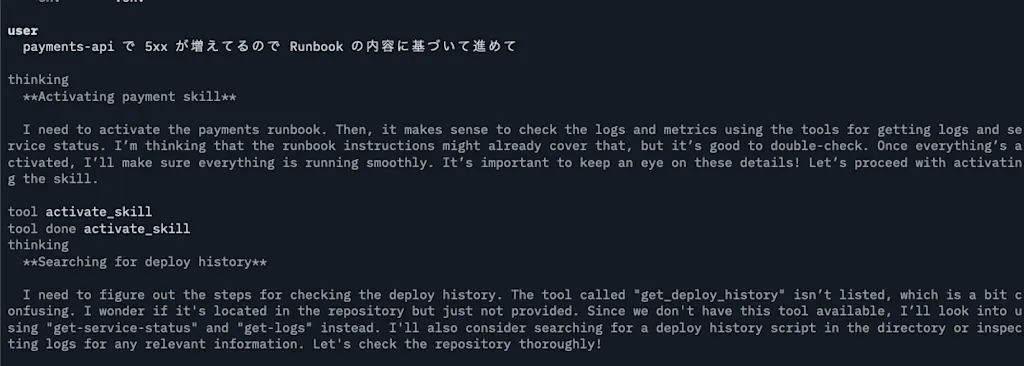
If you send a message such as "payments-api has increasing 5xx responses, so proceed based on the Runbook", the SRE agent can load the payments-runbook skill and propose investigation and recovery actions based on the Runbook.
npx flue run sre-agent --input '{ "message": "payments-api で 5xx が増えてるので Runbook の内容に基づいて進めて" }'You can see that the agent uses the activate_skill tool to load the payments-runbook skill.
Delegate Tasks to Subagents for Efficient Incident Investigation
In real incident response, investigations often span multiple components and telemetry sources until the cause is identified. For example, when 5xx errors increase in payments-api, you need to determine whether the issue is in payments-api itself, in the database, or in the interaction between the two. You also often need to combine multiple telemetry sources such as metrics, logs, and traces.
When an investigation spans multiple areas like this, it is useful to define subagents and split agents by investigation area. If one agent handles the entire investigation, it might mix up information when investigating API server logs and database metrics at the same time. Logs alone can also contain many lines and consume a large amount of context. By defining a subagent and assigning log investigation to a log-focused agent, only that log-focused agent needs to load log information into context. The log-focused agent analyzes logs specifically and returns only the conclusion to the main agent, which prevents raw logs from polluting the main agent's context.
For simple work that does not require complex judgment, you can also use a cheaper, smaller model for a subagent. Running subagents in parallel can also help speed up investigation.
Define subagents with the defineAgentProfile function. Like the main agent, a subagent can define a model, instructions, and tools. Let's define log-analyst, a subagent that investigates logs. Create src/subagents/log-analyst.ts and define it as follows. The description is important because the parent agent uses it to decide whether to call the subagent, so it should describe the subagent's role concisely.
import { defineAgentProfile } from "@flue/runtime";
import { getLogsTool } from "../tools/get-logs.ts";

export const logAnalyst = defineAgentProfile({
  name: "log-analyst",
  description: "ログ専門の調査サブエージェントです。`get-logs` を使って指定サービスのログを読み、異常の要点だけを簡潔に要約して返します。",
  model: "openai/gpt-5.4-nano",
  instructions:
    "あなたはログ専門の調査サブエージェントです。`get-logs` を使って指定サービスのログを読み、異常の要点だけを簡潔に要約して返します。",
  tools: [getLogsTool],
});
Add the logAnalyst subagent to the main SRE agent. By passing the subagent to the subagents property of defineAgent in src/agents/sre-agent.ts, the main SRE agent can call the subagent. Remove the getLogsTool that was originally passed to the SRE agent from the tools array. The SRE agent delegates log investigation to the subagent, so the SRE agent itself no longer needs to investigate logs directly.
import { defineAgent, type AgentRouteHandler } from "@flue/runtime";
import instructions from "./sre-agent.md" with { type: "markdown" };
import { getServiceStatusTool } from "../tools/get-service-status.ts";
import paymentsRunbook from "../skills/payments-runbook/SKILL.md" with { type: "skill" };
import { logAnalyst } from "../subagents/log-analyst.ts";

export const description =
  "SRE エージェントです。システムの監視や障害対応、システムの復旧作業を自律的に行います。";

export const route: AgentRouteHandler = async (_c, next) => next();

export default defineAgent(({ id }) => ({
  model: "openai/gpt-5.4-nano",
  instructions,
  tools: [getServiceStatusTool],
  skills: [paymentsRunbook],
  subagents: [logAnalyst],
}));
Send the message "payments-api has increasing 5xx responses, so proceed based on the Runbook" again, and you can confirm that the SRE agent calls the log-analyst subagent. Agents with subagents use the task tool to start subagent sessions.
npx flue run sre-agent --input '{ "message": "payments-api で 5xx が増えてるので Runbook の内容に基づいて進めて" }'Use Workflows for Structured Processing
A workflow is structured processing that decomposes one task into multiple steps and performs processing for each step. Finite, inspectable tasks such as document conversion, review, and CI processing can be structured as workflows. On the other hand, tasks that require multiple conversational steps, such as real-time incident response, are better handled sequentially within an agent conversation rather than defined as workflows.
As an example, let's define a workflow that creates a postmortem from an incident. This workflow consists of the following three steps:
- Write the incident information and related logs from the input to a file
- Start a session, use tools to investigate additional context, and generate
postmortem.md - Read back the generated Markdown and return a structured result
The artifact is output as a Markdown file named postmortem.md, so this is inspectable processing. Workflows must be placed in the src/workflows/ directory by convention. The filename also becomes the workflow name, so create a file named postmortem.ts. Define workflows with the defineWorkflow function.
import { defineAgent, defineWorkflow } from "@flue/runtime";
import { local } from "@flue/runtime/node";
import * as v from "valibot";

import { getLogsTool } from "../tools/get-logs.ts";
import { getServiceStatusTool } from "../tools/get-service-status.ts";
import { getDeployHistoryTool } from "../tools/get-deploy-history.ts";

export default defineWorkflow({
  agent: defineAgent(() => ({
    model: "openai/gpt-5.4-nano",
    // Write to real files on the host instead of the default virtual sandbox (in memory).
    // incident.md / postmortem.md are created under cwd.
    sandbox: local(),
    cwd: "postmortems",
    tools: [getServiceStatusTool, getLogsTool, getDeployHistoryTool],
  })),

  // Input: which service had what kind of incident.
  input: v.object({
    service: v.pipe(
      v.string(),
      v.description("対象サービス名。例: payments-api"),
    ),
    incident: v.pipe(
      v.string(),
      v.description("インシデントの概要。発生時刻・症状など分かっている範囲で"),
    ),
  }),

  // Output: the generated postmortem body and the extracted structured summary.
  output: v.object({
    markdown: v.pipe(
      v.string(),
      v.description("生成されたポストモーテム本文(Markdown)"),
    ),
    rootCause: v.pipe(v.string(), v.description("推定された根本原因")),
    actionItems: v.array(v.string()),
  }),

  async run({ harness, input }) {
    // 1. Write the input to a file.
    //    Because an intermediate file remains, the execution history can be inspected later.
    await harness.fs.writeFile(
      "incident.md",
      `# Incident: ${input.service}\n\n${input.incident}\n`,
    );

    // 2. Start a session, investigate the situation with tools, and generate a postmortem.
    const session = await harness.session();
    await session.prompt(
      [
        "incident.md を読んでください。",
        `その上で ${input.service} の現在のステータス・直近のエラーログ・デプロイ履歴を`,
        "ツールで調査し、以下の構成で postmortem.md を書いてください:",
        "## 概要 / ## 影響 / ## タイムライン / ## 根本原因 / ## 再発防止策",
      ].join("\n"),
    );

    // 3. Read back the artifact and extract a structured summary.
    const markdown = await harness.fs.readFile("postmortem.md");
    const summary = await session.prompt(
      "いま書いた postmortem.md の内容から、根本原因と再発防止のアクション項目を抽出してください。",
      {
        result: v.object({
          rootCause: v.string(),
          actionItems: v.array(v.string()),
        }),
      },
    );

    return {
      markdown,
      rootCause: summary.data.rootCause,
      actionItems: summary.data.actionItems,
    };
  },
});
A workflow first defines an input schema and an output schema. The input schema describes the information needed to call the workflow, and the output schema describes the workflow's result. Both are defined with valibot. The workflow's processing is defined in the run function. harness is an object representing the workflow execution environment and provides features such as the filesystem and sessions.
Before starting a session by calling the agent, harness.fs.writeFile writes the input incident information to a file named incident.md. This file is later read by the agent. Next, harness.session() starts a session, and session.prompt sends a prompt to the agent. Here, the prompt tells the agent to read the incident information, investigate the situation using tools, and generate a postmortem. Finally, harness.fs.readFile reads the generated postmortem.md, and session.prompt is used again to extract a structured summary.
The default sandbox setting for agents uses just-bash, but with that setting, the generated postmortem.md cannot be read back in this example. Here, we change the sandbox setting to local() so that files are written to the host filesystem. By specifying the workflow working directory with the cwd property, postmortems/incident.md and postmortems/postmortem.md are created.
The local() sandbox can access the host filesystem, so it has security risks. When running workflows, use only trusted agents.
Now run the workflow. Use the npx flue run postmortem command and pass the target service and incident summary as input.
npx flue run postmortem \
  --input '{"service":"payments-api","incident":"02:14 に 5xx が急増し、決済が断続的に失敗。直後にアラートが発火。"}'
You can confirm that postmortems/incident.md and postmortems/postmortem.md are created, and that a structured summary is returned as the workflow result.
$ tree postmortems

postmortems
├── incident.md
└── postmortem.md

1 directory, 2 files
Call the SRE Agent from Slack
If an AI agent can only be run from a local terminal, its convenience is limited. To use an AI agent in real operations, it is essential to call it from a chat interface. You might build your own chat interface and sell it as a service, or integrate the agent with existing chat services such as Slack or Discord. Flue provides channels for integrating with chat services. Channels are interfaces for communicating with external services such as Slack, Discord, and Teams through HTTP requests.
Here, we will use the Slack channel to call the SRE agent from Slack. To use the Slack channel, you first need to create a Slack app and obtain a Bot Token. See the Slack API documentation for how to create a Slack app and obtain a Bot Token.
Flue provides a CLI command that lets a coding agent add a Slack channel for you. By running flue add channel slack with the --print option, the setup instructions for the Slack channel are printed to standard output. You can pass the printed content to a coding agent and have it configure the Slack channel.
npx flue add channel slack --print | codexIn this article, we will configure the Slack channel manually for learning purposes. First, obtain the Slack app Bot Token and Signing Secret, and set them as environment variables.
SLACK_BOT_TOKEN=xoxb-your-slack-bot-token
SLACK_SIGNING_SECRET=your-slack-signing-secret
Install @flue/slack for creating the Slack channel and @slack/web-api, the official Slack SDK.
npm install @flue/slack @slack/web-apiCreate src/channels/slack.ts and define the Slack channel. Channels must be placed in the src/channels directory. This automatically creates endpoints such as /channels/slack/events, /channels/slack/interactions, and /channels/slack/commands.
import { dispatch } from '@flue/runtime';
import { createSlackChannel } from '@flue/slack';
import sreAgent from '../agents/sre-agent.ts';

export const channel = createSlackChannel({
  signingSecret: process.env.SLACK_SIGNING_SECRET!,
  async events({ payload }) {
    if (payload.type !== 'event_callback') return;
    if (payload.event.type !== 'app_mention') return;

    const event = payload.event;
    await dispatch(sreAgent, {
      id: channel.conversationKey({
        teamId: payload.team_id,
        channelId: event.channel,
        threadTs: event.thread_ts ?? event.ts,
      }),
      input: {
        type: 'slack.app_mention',
        eventId: payload.event_id,
        text: event.text,
      },
    });
  },
});
This example responds only when the app is mentioned in Slack, that is, when an app_mention event is received. It uses the dispatch function to send the event to the SRE agent. The conversationKey function combines the Slack team ID, channel ID, and thread timestamp to generate a unique conversation key. The mention text is passed in the text property of the input object.
At this point, the app can receive Slack messages, but the SRE agent cannot yet reply to Slack with the result of its processing. To reply to Slack, define a tool for posting a Slack reply. Create src/tools/reply-in-threads.ts and define the replyInThread tool for replying in a thread.
import { defineTool } from "@flue/runtime";
import { WebClient } from "@slack/web-api";
import * as v from "valibot";

const client = new WebClient(process.env.SLACK_BOT_TOKEN);

export function replyInThread(ref: { channelId: string; threadTs: string }) {
  return defineTool({
    name: "reply-in-slack-thread",
    description: "このエージェントに紐づく Slack スレッドに返信する。",
    input: v.object({ text: v.pipe(v.string(), v.minLength(1)) }),
    async run({ input }) {
      const result = await client.chat.postMessage({
        channel: ref.channelId,
        thread_ts: ref.threadTs,
        text: input.text,
      });
      return {
        ...(result.channel === undefined ? {} : { channel: result.channel }),
        ...(result.ts === undefined ? {} : { ts: result.ts }),
      };
    },
  });
}
Load the created tool into the sre-agent agent. At this point, use channel.parseConversationKey(id) to restore the Slack channel ID and thread timestamp, and pass them to the replyInThread tool.
import { defineAgent, type AgentRouteHandler } from "@flue/runtime";
import instructions from "./sre-agent.md" with { type: "markdown" };
import { getLogsTool } from "../tools/get-logs.ts";
import { getServiceStatusTool } from "../tools/get-service-status.ts";
import { replyInThread } from "../tools/reply-in-threads.ts";
import paymentsRunbook from "../skills/payments-runbook/SKILL.md" with { type: "skill" };
import { channel } from "../channels/slack.ts";

export const description =
  "SRE エージェントです。システムの監視や障害対応、システムの復旧作業を自律的に行います。";

export const route: AgentRouteHandler = async (_c, next) => next();

export default defineAgent(({ id }) => ({
  model: "openai/gpt-5.4-nano",
  instructions,
  tools: [
    getLogsTool,
    getServiceStatusTool,
    replyInThread(channel.parseConversationKey(id)),
  ],
  skills: [paymentsRunbook],
}));
After defining the channel, start the Flue project.
npx flue devThe development server starts at http://localhost:3583, and the output shows that
sre-agent is registered as an agent and Slack is registered as a channel. To use the Slack channel with a local development server, you need to expose the local server to the internet with a tool such as ngrok. Use ngrok to expose the local server, and set https://<your-ngrok-subdomain>.ngrok.io/channels/slack/events as the Request URL for Event Subscriptions in the Slack app. Use the URL shown in the ngrok command output as the ngrok subdomain.
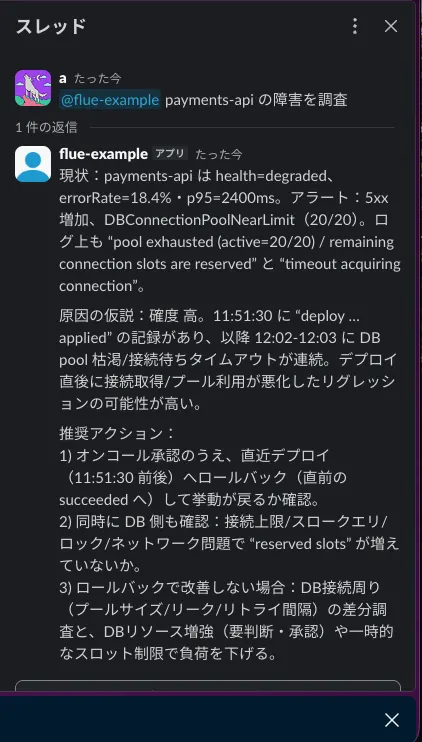
ngrok http 3583Then add the app_mention event under "Subscribe to bot events" and install the Slack app in your workspace. You can now call the SRE agent from Slack. If you send a message such as "@sre-agent payments-api has increasing 5xx responses, so proceed based on the Runbook", the SRE agent investigates and proposes recovery actions based on the Runbook, then replies in the thread with the result.
Summary
- Flue is a TypeScript AI agent framework that adopts a harness-driven architecture. It comprehensively provides building blocks such as agents, workflows, instructions, tools, skills, subagents, MCP servers, sandboxes, observability, and channels.
- It enables durable execution by storing session history and context in storage. On Cloudflare Workers, it stores state in Durable Objects.
- Agents are defined with
defineAgent. By following conventions such as filenames and placement directories, Flue automatically collects them. Becauseinstructionscan become long, it is often better to manage them as an independent Markdown file. - Tools are defined with
defineTooland made available to agents by passing them to thetoolsproperty. - Contexts that may exist in multiple versions, such as Runbooks for different incident types, can be defined as skills so they are loaded only when needed through progressive disclosure. Skills are created with
SKILL.mdand imported with the import attributewith { type: "skill" }. - For investigations spanning multiple areas, delegating tasks to subagents prevents the main agent context from being polluted and makes investigation more efficient. Subagents are defined with
defineAgentProfile. - Finite, inspectable processing can be structured as workflows. Define workflows with
defineWorkflow, including input and output schemas and the processing logic. - Channels allow agents to be called from existing chat services such as Slack.